
As Amazon Associates, we earn from qualifying purchases. This means we may receive a small commission at no extra cost to you if you click through and make a purchase.
The Microsoft Surface Duo 2 is an ambitious mobile device that challenges the conventional single-glass smartphone layout by placing two distinct screens on a folding hinge. Built around the idea that real work requires more visual space, it combines a dedicated multi-window interface with modern mobile hardware including 5G connectivity and a dynamic triple-lens rear camera array. Our verdict is straightforward: it delivers an unmatched dual-display workflow for organizing notes, spreadsheets, and communications side by side, making it a compelling tool for mobile power users who are willing to navigate the wider physical footprint of a foldable chassis.
This dual-panel device suits business professionals, frequent note-takers, and multitaskers who routinely juggle email, calendar entries, and document drafts while away from their desks. If you spend your day referencing spreadsheets while on video conferences or drafting messages while researching in a browser, the physical split creates an organized digital workspace that single-screen phones struggle to replicate. Conversely, anyone seeking a lightweight, one-handed handset for quick casual messaging or those who demand a built-in headphone jack should look toward traditional single-screen alternatives instead.
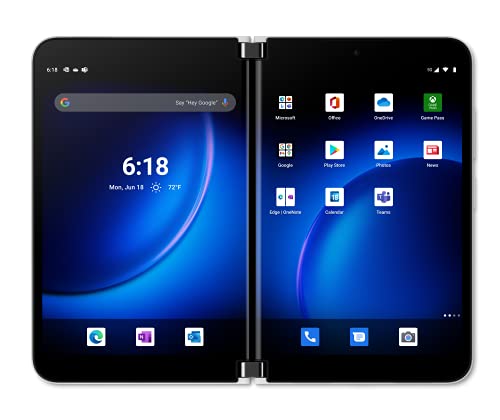


Microsoft Surface Duo 2 at a Glance

| Feature | Specification |
|---|---|
| Form Factor | Foldable Dual Screen |
| Processor | Snapdragon Series |
| Installed Memory and Storage | 256 GB with 8 GB capacity |
| Rear Camera Setup | Dynamic Triple-Lens Camera with LED Flash |
| Front Camera Resolution | 5 MP |
| Cellular Connectivity | 5G Unlocked |
| SIM Configuration | Dual SIM (Nano-SIM format) |
| Biometric Authentication | Fingerprint Recognition |
| Wired Interface | USB Type-C |
| Water Resistance | Water Resistant |
| Headphone Jack | No Headphone Jack |
| Exterior Finish | Glacier |
Dual-Screen Multitasking and Productivity Features
The primary reason to evaluate this device lies in its approach to running applications simultaneously. While standard mobile devices rely on split-screen modes that squeeze software into narrow aspect ratios, the Surface Duo 2 dual screen design gives each active application its own dedicated full-sized display. This separation prevents user interfaces from feeling compressed and allows toolbars, menus, and text fields to render properly. When managing daily operations, having your schedule visible on one panel while writing emails on the other eliminates the constant app-switching that slows down mobile work.
Software customization plays a major role in how effectively this hardware operates. With Surface Duo 2 app groups, you can link two companion programs together and launch them simultaneously with a single tap on the home screen. A project manager might pair Microsoft Teams with OneNote, while a financial analyst might group an email client with a spreadsheet viewer. Furthermore, cross-screen drag-and-drop functionality lets you select images, highlighted text passages, or documents from one panel and pull them directly into a message or document draft on the opposite side. For workers who often pair their mobile routine with hardware like a microsoft surface laptop, these integrated Microsoft 365 experiences feel intuitive and familiar.
Input flexibility extends to digital inking as well. Pairing the device with an optional Surface Slim Pen 2 enables precise handwriting, document annotation, and sketching across supported office applications on either panel. Writing notes on one panel while reading reference materials on the other mirrors the natural behavior of working with a physical notebook alongside a book, reinforcing the value of the Surface Duo 2 for productivity across meetings and remote work environments.
Hardware Design, Foldable Ergonomics, and Daily Carry
Evaluating the Surface Duo 2 everyday use requires understanding how its mechanical hinge and wide proportions influence daily handling. Unlike flexible folding screens that bend a continuous plastic layer, Microsoft utilizes two discrete glass displays joined by an engineered hinge. This construction provides solid tactile feedback and allows the device to stay propped open at various angles, resting flat like an open book, tented on a desk for video playback, or folded fully backward for single-panel use. The Glacier finish presents a clean, minimalist look, though the broad width means operating the phone with one hand requires deliberate adjustment.
Carrying the device in pockets is noticeably different from carrying a standard narrow phone. When closed, the dual screens fold inward, shielding the primary display glass against keys or coins. However, its overall width requires larger pockets or a dedicated bag compartment. The integration of a fingerprint recognition sensor ensures secure and swift unlocking without needing to enter passcodes every time you unfold the chassis. Much like the design philosophy seen in creative workstations like the surface pro studio, Microsoft prioritizes intentional desk and two-handed interaction over pocket-sized minimalism.
Physical ports and connectivity options are focused on current digital standards. The chassis features a single USB Type-C port for data transfer and recharging, while biometric security is handled smoothly by the embedded fingerprint sensor. Audio output relies entirely on digital connections or wireless streaming, as the listing confirms there is no headphone jack built into the frame. Durability is bolstered by basic water resistance, giving protection against incidental splashes during unpredictable commutes.
Camera Performance and Media Handling
Mobile photography on a dual-screen device presents distinct ergonomic advantages and trade-offs. The Surface Duo 2 camera performance is anchored by a dynamic triple-lens rear camera array supported by an integrated LED flash. This multi-lens module allows you to frame shots on one display while immediately reviewing full-sized previews or editing galleries on the adjacent screen. Having immediate visual access to your previous shot without leaving the camera viewfinder accelerates the process of capturing and organizing media for personal or professional use.
On the front side, the device features a 5 MP sensor intended primarily for video meetings and quick self-portraits. While adequate for business calls via Microsoft Teams or similar video conferencing platforms, the resolution is modest compared to the high-resolution front cameras found on many traditional flagship phones. For streaming and leisure, optimized audio modes adapt output based on whether the device is folded flat, opened like a book, or placed in a viewing posture on a flat surface.
Beyond capturing pictures, media consumption benefits from the dual-panel layout when running gaming and entertainment apps from the Google Play store. Users can stream video on the top panel while managing playback controls, group chats, or social feeds below. For mobile gamers, specific Xbox titles can map touch controls onto the lower screen while displaying the uninterrupted gameplay feed on the upper screen, effectively turning the phone into a dedicated dual-screen controller console.
Processing Hardware, 5G Connectivity, and Specifications
Under the hood, the Surface Duo 2 specs are centered around a high-performance Snapdragon processor series coupled with 5G network support. Having fast mobile data is crucial for downloading cloud attachments, syncing large Microsoft 365 documents, and participating in high-definition video calls while traveling. The unlocked status provides flexibility to choose network providers, while the Dual SIM configuration using Nano-SIM cards allows frequent travelers or business professionals to manage two separate cellular lines on a single device.
System memory and storage capacity are configured to handle concurrent tasks without aggressive background app closing. The hardware listing notes 256 GB of installed capacity alongside an 8 GB memory specification, giving ample headroom for locally stored files, presentation decks, downloaded media, and demanding multitasking sessions. When handling modern workplace data flows or collaborating across cloud platforms akin to recent silicon advances such as the surface laptop 7 snapdragon x elite, the Snapdragon processor inside this phone maintains smooth responsive transitions between panels.
Software versatility is supported through access to the broad Android ecosystem via the Google Play store. While the listing notes the operating system details as TBC, it confirms broad compatibility with everyday mobile software, productivity suites, and streaming tools. Touch input remains fluid across both panels, allowing rapid gesture navigation, window snapping, and unified workspace management.
Microsoft Surface Duo 2 Pros and Cons
Pros
- Dual screens for true side-by-side app multitasking
- App Groups launch paired software with one tap
- Supports Surface Slim Pen 2 for digital inking
- Dynamic triple-lens rear camera with LED flash
- Fast 5G connectivity and Dual Nano-SIM support
- Water-resistant chassis with fingerprint recognition
Cons
- No built-in 3.5mm headphone jack
- Modest 5 MP front-facing camera resolution
- Wider foldable form factor hinders one-handed use
Check Microsoft Surface Duo 2 on Amazon
Who Should Buy the Microsoft Surface Duo 2
Buy It If
- You regularly cross-reference documents, calendars, and emails side by side and need distinct physical displays for multitasking.
- You heavily utilize Microsoft 365 cloud software and want features like cross-app drag-and-drop and custom app group shortcuts.
- You take digital handwritten notes or sketch using a stylus such as the compatible Surface Slim Pen 2.
- You want a foldable device that protects its internal screens when fully closed inside a bag or pocket.
Skip It If
- You prefer a slim, narrow smartphone designed for comfortable one-handed texting and operation.
- You rely on legacy wired audio accessories and require an integrated 3.5mm headphone jack.
- You prioritize a high-resolution selfie camera for social media creation over an enterprise-focused front sensor.
Microsoft Surface Duo 2 Alternatives Worth a Look
If you are exploring the mobile market but remain unsure whether a dual-screen foldable matches your daily workflow, several other Android devices offer differing strengths across form factor, camera hardware, and battery design.
Privacy Display

The Privacy Display smartphone is a high-tier single-screen device featuring a Samsung Galaxy S26 Ultra configuration with 512GB of storage, Galaxy AI capabilities, an AI camera, and Super Fast Charging 3.0. Shoppers who want a traditional monolithic display with massive internal storage and automated AI photo enhancements rather than a dual-screen folding layout will find this a powerful alternative.
Unlocked Cell Phones Smartphone Android

For buyers interested in integrated stylus input on a conventional large display, the Unlocked Cell Phones Smartphone Android handset offers a 6.8-inch HD screen, Android 13, and a built-in pen. It pairs an extensive 6800 mAh battery with a 108MP plus 48MP camera setup and dual SIM support, making it appealing for users wanting extensive battery capacity and stylus writing without a split-screen hinge.
Prepaid Smartphone- 6.6″ 120Hz Display

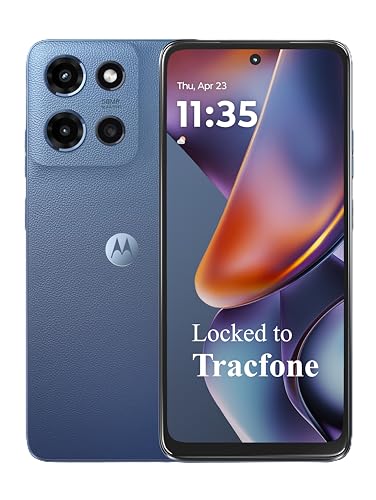
The Prepaid Smartphone- 6.6″ 120Hz Display represents an accessible entry point featuring a Motorola Moto G 2025 platform locked to Tracfone. It delivers 5G connectivity, a fast 120Hz refresh rate on a 6.6-inch panel, a 50MP Quad Pixel camera, and 64GB of storage, catering to budget-conscious users who need dependable everyday communication on a standard single display.
Final Verdict
Our comprehensive Microsoft Surface Duo 2 review reveals a device purpose-built for productivity enthusiasts who find ordinary mobile screens restrictive. By focusing on true dual-window execution rather than synthetic splits, it transforms tasks like cross-referencing information, managing email while viewing attachments, and taking handwritten meeting notes into seamless experiences. The dynamic triple-lens rear camera, 5G networking, and responsive Snapdragon architecture supply the performance needed to drive both panels effectively throughout a busy workday.
When asking is Surface Duo 2 worth it, the answer depends entirely on your daily computing priorities. If your phone functions primarily as a pocket office for managing communications, reviewing documents, and running concurrent tools, the dual-screen form factor provides practical advantages that standard handsets cannot match. However, if your daily routine centers around single-handed casual use, compact pocketability, or wired headphones, a traditional smartphone remains the more practical choice.
FAQ
Does the Microsoft Surface Duo 2 have a headphone jack?
No, the listing confirms that the device does not feature a 3.5mm headphone jack. Users must connect their audio gear via the USB Type-C port or utilize wireless Bluetooth headphones for audio listening.
Can you use a stylus on the Microsoft Surface Duo 2?
Yes, you can pair the Surface Slim Pen 2 with the device to take handwritten notes, sketch ideas, and mark up documents across supported Microsoft 365 applications on either display.
What SIM card format does the device require?
The phone features Dual SIM functionality and uses a Nano-SIM card size, allowing users to configure cellular network access on compatible unlocked 5G carriers.
What cameras are included on the Microsoft Surface Duo 2?
The device includes a dynamic triple-lens rear camera system paired with an LED flash for capturing photos and videos, along with a 5 MP front-facing sensor designed for video calls and conferencing.
How do App Groups work on this device?
App Groups let you pair any two applications together and save them to your home screen. Tapping that shortcut automatically launches both programs side by side across the dual displays simultaneously.


