
As Amazon Associates, we earn from qualifying purchases. This means we may receive a small commission at no extra cost to you if you click through and make a purchase.
The Lenovo IdeaPad 3 14 is an everyday mobile computer equipped with an AMD Ryzen 5 5500U processor, 8GB of DDR4 memory, and a 14-inch Full HD display. Configured in an Abyss Blue chassis with integrated AMD Radeon 7 graphics, this notebook targets home office workers, distance learners, and general users seeking reliable multi-core processing power without extraneous bulk. In short, it functions as a dependable, no-nonsense daily laptop that easily tackles document editing, media consumption, and continuous web research.
This notebook suits students taking notes across multiple lecture classes, remote employees collaborating through video calls, and households in need of an efficient personal machine. The six-core processing architecture ensures responsive performance when juggling dozens of browser tabs alongside office software suites. However, consumers demanding dedicated graphical power for contemporary triple-A gaming or intensive 3D modeling will find the integrated platform insufficient. If your routine calls for a larger visual workspace or a dedicated numeric keypad, considering a sister model like the lenovo – ideapad 3 15 laptop might make sense, whereas this 14-inch edition emphasizes compact portability.
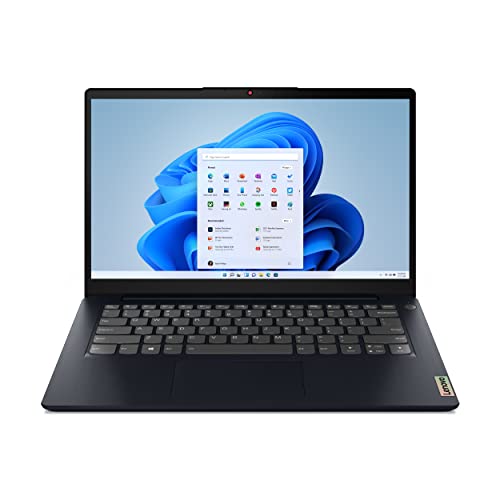



Lenovo IdeaPad 3 14 at a Glance

| Feature | Specification |
|---|---|
| Processor | AMD Ryzen 5 5500U Mobile Processor |
| Graphics | AMD Radeon 7 Graphics (Integrated) |
| Memory | 8GB DDR4 RAM |
| Storage | 256GB Solid State Drive (SSD) |
| Display | 14.0-inch FHD (1920 x 1080) IPS, Anti-Glare |
| Operating System | Windows 11 Home |
| Wireless Connectivity | Wi-Fi 6 (2×2 802.11ax), Bluetooth 5.0 |
| Ports | USB, USB-C, HDMI |
| Audio & Webcam | 720p Camera with Privacy Shutter, Dual Mic Array, Dolby Audio Speakers (2x 1.5W) |
| Weight & Color | 4.4 pounds, Abyss Blue |
Processing Power and Multitasking Performance
At the center of the hardware array sits the AMD Ryzen 5 5500U mobile processor, a silicon component featuring six physical cores and twelve execution threads. For general productivity, this chip delivers an immediate advantage over entry-level dual-core and quad-core platforms. Routine computing tasks—such as updating massive data spreadsheets, managing extensive research decks, and hosting simultaneous streaming sessions—execute smoothly without stuttering or sudden system pauses. Examining the lenovo ideapad 3 ryzen 5 performance reveals that modern multi-threaded software benefits considerably from this architectural headroom, allowing applications to distribute workloads cleanly across all available cores.
Complementing the central processor is 8GB of DDR4 system memory paired with a 256GB solid-state drive. The solid-state storage interfaces via quick internal pathways to accelerate operating system startups, application loading sequences, and local file access. While the 256GB capacity provides plenty of space for standard operating files, office suites, and educational assignments, users maintaining large local collections of raw video files or immense offline media libraries may eventually require supplementary external drives. In daily multitasking, the 8GB memory quota effortlessly manages routine productivity runs, though running high-overhead specialized software alongside multiple active browser sessions can consume a sizable portion of the available RAM.
To sustain steady operation during demanding task cycles, the system incorporates intelligent thermals governed by Lenovo’s Q-Control feature. Users can cycle between three distinct operational modes to match their immediate computing environment: a quiet mode designed to minimize fan noise during relaxed study sessions, an intelligent balance mode for standard workloads, and a full performance mode that pushes thermal dissipation to prevent thermal throttling under heavy multi-threaded loads. This active cooling infrastructure ensures the processor sustains its clock frequencies without generating uncomfortable surface heat across the keyboard deck.
Display Quality and Visual Comfort
The visual interface centers on a 14.0-inch Full HD display featuring a native resolution of 1920 by 1080 pixels. Because this panel utilizes IPS technology rather than traditional twisted nematic designs, users benefit from wider horizontal and vertical viewing angles, preventing the color wash-out and contrast shifts commonly observed when tilting budget laptop screens. The lenovo ideapad 3 14 inch fhd configuration ensures crisp text rendering for extended reading sessions, clear image reproduction for media streams, and ample screen canvas to position two application windows side by side without causing severe text distortion.
Lenovo packages the display inside four-sided narrow bezels, maximizing active screen area while maintaining a compact physical footprint. By minimizing the border plastic around the top, bottom, and lateral borders, the design creates an open, uncluttered viewing field that facilitates focused work. Additionally, the screen features an anti-glare matte coating. This treatment effectively diffuses overhead indoor lighting, classroom fluorescents, and ambient daylight from nearby windows, significantly reducing distracting surface reflections and minimizing eye strain during long working stretches.
The integrated AMD Radeon 7 graphics hardware powers the visual output, driving external high-resolution panels when connected via the built-in HDMI port alongside the primary 14-inch screen. While this graphics processing unit handles full-resolution streaming video, digital illustration apps, and basic casual photo manipulation with ease, it is not engineered to power modern graphically demanding titles at aggressive visual presets. Its primary function is providing clean hardware acceleration for Windows 11 animations, web page rendering, and video playback decoding.
Connectivity, Audio, and Physical Hardware
Physical and wireless connectivity options on the machine reflect the demands of contemporary remote work. The laptop integrates Wi-Fi 6 (2×2 802.11ax) network hardware, ensuring fast and stable local network speeds when paired with compatible modern routers, along with Bluetooth 5.0 for establishing low-latency connections to wireless peripherals, headsets, and mobile accessories. On the physical chassis, users find a balanced port arrangement consisting of USB, USB-C, and HDMI ports, enabling direct connections to external storage devices, desktop peripherals, mice, keyboards, and secondary presentation screens without requiring a separate adapter hub.
For communication, the top bezel houses a 720p webcam supported by an integrated dual-microphone array. The microphones use directional beamforming to capture spoken audio clearly while mitigating ambient domestic noise during conference calls and remote classes. Recognizing privacy concerns in home and educational environments, the webcam features a built-in mechanical privacy shutter. Moving this physical slider securely obscures the optical sensor, giving users definite peace of mind against accidental camera activations or potential software compromises without resorting to makeshift stickers.
Audio playback is handled by two downward-firing 1.5-watt stereo speakers fine-tuned with Dolby Audio processing. The system also integrates native support for Amazon Alexa on PC, enabling voice commands to manage daily calendar schedules, create to-do lists, stream music, check local news, or answer quick inquiries directly from the operating system. Weighing 4.4 pounds and finished in an Abyss Blue coating, the notebook provides a solid, understated aesthetic. If your priorities lean toward ultra-lightweight all-metal enclosures or higher-tier specifications, step-up alternatives like the lenovo ideapad 5 ryzen 7 offer an interesting benchmark for comparing standard builds against premium alternatives.
Battery Expectations and Thermal Control
When assessing portable computing gear, battery autonomy ranks among the most critical practical considerations. The product listing does not specify the exact battery life hours or total watt-hour capacity for this specific IdeaPad 3 configuration. Real-world longevity naturally fluctuates based on operational settings, such as display brightness levels, background network traffic, and whether active tasks engage heavy multi-core CPU cycles. Evaluating lenovo ideapad 3 battery life requires understanding how the energy-efficient 15-watt nominal draw of the AMD Ryzen 5000 U-series architecture regulates power usage across diverse workflows.
The aforementioned Q-Control system directly impacts operational power consumption. By engaging the quiet mode preset, the system curtails peak processor frequencies and lowers fan curves, effectively reducing power draw during modest tasks such as reviewing PDF documents, drafting text, or conducting offline reading. Conversely, engaging the performance mode unlocks full thermal headroom to complete compute-heavy processes faster, inevitably consuming internal energy reserves at a significantly accelerated rate.
For everyday users, carrying the factory charging adapter remains standard practice when planning full days away from home or office desks. The hardware platform balances energy efficiency with performance responsiveness, but without an official runtime claim from the manufacturer, establishing realistic expectations around moderate daily tasks rather than sustained heavy computing represents the safest approach to daily mobile use.
Lenovo IdeaPad 3 14 Pros and Cons
Pros
- Six-core AMD Ryzen 5 5500U processor
- Sharp 14-inch Full HD IPS anti-glare display
- Fast Wi-Fi 6 and Bluetooth 5.0 wireless
- Built-in physical webcam privacy shutter
- Intelligent thermals with 3-mode Q-Control
Cons
- Modest 256GB internal storage capacity
- Chassis carries noticeable weight at 4.4 pounds
- Listing does not specify battery run time
Check Lenovo IdeaPad 3 14 on Amazon
Who Should Buy the Lenovo IdeaPad 3 14
The combination of a six-core AMD processor, solid-state storage, and an anti-glare IPS display makes this machine an attractive proposition for specific computing profiles, while other users may find its physical attributes or hardware ceilings limiting.
Buy It If
- You need a dependable machine for school or college work: The lenovo ideapad 3 ryzen 5 for students delivers ample computing power for multitasking between academic portals, collaborative documents, and research databases.
- You conduct routine home office work: The combination of Wi-Fi 6, dual microphones, a 720p webcam with a physical shutter, and HDMI connectivity makes managing daily remote responsibilities smooth and organized.
- You want a clear, glare-free visual interface: The 14.0-inch 1080p IPS panel with its matte anti-glare coating provides comfortable viewing under varying ambient lighting conditions.
- You value straightforward thermal management: Lenovo’s three-stage Q-Control allows you to manually quiet down cooling fans or ramp up processing throughput based on your immediate task.
Skip It If
- You require a dedicated gaming or heavy 3D rendering machine: The integrated AMD Radeon 7 graphics hardware is not designed to execute demanding triple-A titles or complex visual simulations.
- You store massive offline video and gaming libraries: The 256GB solid-state drive can fill up rapidly once the operating system, productivity suites, and large media files are installed.
- You require an ultra-lightweight featherweight notebook: At 4.4 pounds, this notebook carries more heft than many ultraportable alternatives; shoppers wanting basic functionality at minimal physical footprint might consider exploring entry units like the lenovo ideapad 1 instead.
Lenovo IdeaPad 3 14 Alternatives Worth a Look
If you are exploring other portable computing options in this performance tier, several alternate configurations from comparable retail categories offer distinct hardware balances.
2026-2027 edition

The 2026-2027 edition HP 14 Laptop Computer utilizes an Intel N150 processor, 4GB of DDR5 RAM, 128GB of SSD storage, and includes 1TB of cloud storage along with Windows 11 and Microsoft 365. This alternative serves shoppers who prioritize cloud integration and lower local storage demands over the multi-core processing power and 8GB RAM found in the IdeaPad 3.
Supports 1TB TF Card Expansion

The Supports 1TB TF Card Expansion portable notebook features a larger 15.6-inch FHD LCD display, an Intel N4020 processor, 4GB of DDR4 memory, and 128GB of eMMC storage running Windows 11. Users seeking a broader screen canvas and simple memory card expansion for fundamental office tasks may consider this model, though its dual-core N4020 platform trails significantly behind the six-core Ryzen 5 in processing capability.
Copilot AI

The Copilot AI HP 2026 Essential Laptop incorporates an Intel processor, 128GB of storage, 1TB of cloud storage, Office 365, and a dedicated Copilot AI key on Windows 11 in a natural silver lightweight form factor. It targets individuals who favor integrated AI assistant features and cloud software bundles rather than the heavier local processing muscle of the AMD 5000 series chip.
Final Verdict
Evaluating the lenovo ideapad 3 ryzen 5 specs indicates that this machine provides an exceptionally practical baseline for general-purpose computing. Pairing the capable six-core AMD Ryzen 5 5500U processor with 8GB of DDR4 RAM and a rapid 256GB SSD resolves the common lag and freezing issues often encountered on low-power entry notebooks. Everyday workflows—ranging from drafting lengthy reports and streaming high-definition media to organizing virtual meetings—run fluidly thanks to the balanced underlying silicon. The inclusion of Wi-Fi 6, physical privacy shutter controls, and an anti-glare IPS display further refines its practical utility for home and school environments.
So, is lenovo ideapad 3 ryzen 5 worth it for everyday use? If your computing expectations center on productivity, web navigation, academic research, and standard office management, this laptop delivers consistent real-world value and reliable daily operation. Its trade-offs—such as an unstated official battery runtime, 4.4-pound overall carry weight, and a modest 256GB internal drive—are standard concessions for this category. In this lenovo ideapad 3 ryzen 5 5500u review, the hardware proves itself as a competent, work-ready machine that handles daily digital tasks with steady confidence.
FAQ
Does the Lenovo IdeaPad 3 14 have a physical webcam cover?
Yes, the integrated 720p webcam includes a built-in mechanical privacy shutter. Users can slide the cover manually across the lens to block visual capture when not participating in active calls.
What display panel type is used on this 14-inch laptop?
The laptop features a 14.0-inch Full HD (1920 x 1080) IPS display with an anti-glare coating and four-side narrow bezels, delivering broad viewing angles and reduced surface reflection.
Can the Lenovo IdeaPad 3 14 handle modern 3D gaming?
The laptop utilizes integrated AMD Radeon 7 graphics rather than a dedicated graphics card. While it manages casual titles and basic media tasks well, it is not built for running modern graphically intensive triple-A games at high visual settings.
What ports are available on the physical chassis?
The machine includes standard USB ports, a USB-C port, and an HDMI port for connecting external monitors, peripheral mice, keyboards, storage drives, and other compatible accessories.
Does this model come with voice assistant capabilities?
Yes, the notebook supports Amazon Alexa on PC, allowing users to ask questions, manage their calendars, set task reminders, and control media playback using voice interactions directly from Windows 11.


