
As Amazon Associates, we earn from qualifying purchases. This means we may receive a small commission at no extra cost to you if you click through and make a purchase.
The Acer Swift Go 16 enters a competitive market as a lightweight, large-screen notebook tailored for users who want modern processing power without lugging around a hefty workstation. Operating on Windows 11 Pro and running an Intel Core Ultra 7 355 processor with integrated graphics, it combines an expansive 16-inch OLED touchscreen with a slim chassis that weighs only 3 pounds. Our one-line verdict: this laptop delivers a stunning visual workspace and smooth everyday responsiveness, making it one of the most practical large-format productivity companions available.
This notebook suits mobile professionals, hybrid office workers, students handling massive documents, and anyone who values rich screen contrast and color fidelity for daily computing. However, those who require dedicated discrete graphics for heavy video rendering or high-end 3D gaming will need to look elsewhere. If you find yourself comparing different form factors within this family, our hands-on look at the Acer Swift Go lineup provides additional context on how the smaller variants stack up for pure travel convenience.




Acer Swift Go 16 at a Glance
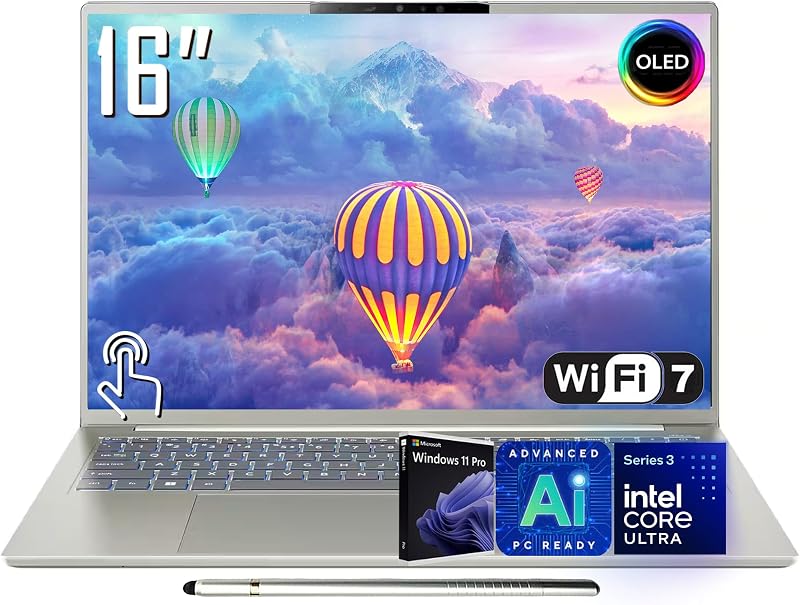
| Attribute | Specification Details |
|---|---|
| Display | 16-inch WUXGA (1920 x 1200) OLED Multi-Touch, 16:10, 100% DCI-P3, 0.2ms response time, 250 nits |
| Processor | Intel Core Ultra 7 355 (8 cores, 8 threads, 4P + 4E, 2.3 GHz base, up to 4.7 GHz turbo) |
| Neural Processing Unit | Intel AI Boost NPU (Up to 49 TOPS) |
| Graphics | Intel Integrated Graphics |
| Memory | 32GB LPDDR5X RAM |
| Storage | 1TB PCIe 4.0 Solid State Drive |
| Chassis Dimensions | 13.97″ W x 9.66″ L x 0.62″ Th; 3.00 lbs; Vapor Silver finish |
| Networking | Wi-Fi 7 (802.11be), Bluetooth 5.4 |
| Input & Extras | Backlit keyboard, Precision Corning Gorilla Glass touchpad, stylus included |
| Operating System | Windows 11 Pro |
Display Quality and Visual Immersion
The centerpiece of this machine is unquestionably the display panel. Choosing an ROG Swift OLED or similar high-end desktop monitor has long spoiled creative professionals, and having OLED technology inside a lightweight notebook brings that same visual depth to a mobile workstation. The Acer Swift Go 16 OLED panel features a WUXGA resolution of 1920 x 1200, which adheres to a tall 16:10 aspect ratio. That extra vertical space reduces scrolling while reading long web pages, editing coding scripts, or reviewing complex financial models. The listing notes a brightness level of 250 nits, which is standard for balanced indoor environments, though working in direct, unfiltered sunlight may require finding a shaded spot.
Color presentation is where this panel shines brightest. By covering 100% of the DCI-P3 cinema color gamut, it provides vivid, lifelike shades that standard office laptop screens cannot match. Whether you are reviewing brand photography, streaming high-definition video, or tweaking presentation decks, the contrast ratio inherent to OLED means true, pitch-black levels instead of washed-out gray backlights. Furthermore, the ultra-fast 0.2ms response time virtually eliminates ghosting during fast animations, making window dragging and video playback look remarkably fluid.
In addition to raw visual quality, the Acer Swift 16 OLED touch display incorporates multi-touch capability and includes a dedicated stylus in the box. Having stylus input on a 16-inch screen turns the laptop into a massive digital drafting board for signing documents, sketching wireframes, or annotating PDFs during team calls. The multi-touch sensor responds smoothly to multi-finger gestures, giving you alternate navigation methods beyond the traditional trackpad.
Processor Performance and Multitasking Capability
Under the hood, this configuration relies on an upgraded Intel Core Ultra 7 355 processor, making it a modern Intel Core Ultra 7 laptop engineered to tackle mixed daily workloads. This chip features an 8-core, 8-thread architecture consisting of 4 Performance cores and 4 Efficient cores. It runs at a base clock of 2.3 GHz and can boost up to 4.7 GHz when demanding tasks call for sudden bursts of speed. The processor package is supported by 16MB of L2 cache and 12MB of Intel Smart Cache (L3), helping the system manage active system threads without noticeable stutter.
Artificial intelligence acceleration is integrated straight into the silicon via the Intel AI Boost NPU, rated for up to 49 TOPS. This specialized engine offloads automated background tasks, such as camera framing, audio cleanup, and Windows 11 Copilot features, without draining resources from the primary computing cores. Paired with a massive 32GB of high-speed LPDDR5X memory, multitasking remains seamless even when you keep dozens of browser tabs open alongside office suites, communication apps, and local data projects. The 1TB PCIe 4.0 SSD delivers rapid boot times and quick application loading, ensuring that large file transfers complete without bottlenecking your flow.
It is important to note the graphical limits of this hardware setup. Because it relies on Intel integrated graphics rather than a power-hungry discrete graphics card, graphical workloads are limited to everyday editing, video streaming, and casual games. Those exploring the broader Acer Swift Go 16 specs will appreciate that this unified hardware footprint keeps heat generation and power consumption manageable, maintaining a smooth desktop experience throughout typical work routines.
Portability, Build Quality, and Everyday Mobility
A standard 16-inch notebook often feels bulky, requiring a specialized backpack and adding substantial strain during a commute. Acer breaks that mold here by engineering an ultra-thin profile measuring just 0.62 inches thick and maintaining a total weight of exactly 3 pounds. Moving between conference rooms, home desks, and coffee shops feels effortless. If you are accustomed to carrying smaller ultrabooks like the Acer Swift 14, stepping up to a 16-inch panel with this minimal weight penalty gives you screen real estate without the traditional bulk.
The chassis comes in an understated Vapor Silver finish that fits comfortably in corporate environments without drawing unwanted attention. The exterior lines are clean, and the hinges hold the expansive screen firmly in place while allowing smooth opening angles. Acer has paired this shell with a Precision Corning Gorilla Glass touchpad, providing a smooth gliding surface that resists surface scratches and registers multi-touch swipes with high accuracy.
Power management is a major consideration for anyone who spends long stretches away from an AC outlet. The listing promises all-day battery life to help users power through standard workdays, although the listing does not specify the exact watt-hour capacity or manufacturer run-time estimates under standardized benchmarks. Just as readers frequently examine Acer Swift Edge 16 battery life when shopping for large, lightweight machines, real-world longevity here will naturally fluctuate based on your OLED brightness level and the intensity of your multitasking sessions.
Keyboard, Connectivity, and Work Features
Deploying a notebook like the Acer Swift Edge 16 for work environments demands versatile input methods and modern connectivity ports. The built-in keyboard features full backlighting, which lets you maintain your typing speed in dimmed lecture halls or during late-night work sprints. Key travel provides a comfortable tactile response, and the layout leaves ample room for your wrists on either side of the glass touchpad.
Peripheral connectivity is comprehensive, eliminating the need to pack separate dongles for basic peripherals. You get:
- Two Thunderbolt ports (Thunderbolt 4 support for high-speed docking, data, and video output)
- Two USB-A 3.2 ports for existing flash drives, mice, and external accessories
- One HDMI 2.1 video output port for direct connection to external monitors and conference projectors
- One dedicated 3.5mm headset jack for wired audio
Wireless performance is future-proofed thanks to the inclusion of Wi-Fi 7 (802.11be) and Bluetooth 5.4. When paired with compatible networking hardware, Wi-Fi 7 delivers lower latency and wider channel throughput, making large cloud backups and high-bitrate video calls stable. For remote collaboration, the laptop features a 5MP webcam equipped with facial recognition for swift Windows Hello logins, alongside a physical privacy shutter to ensure peace of mind when meetings wrap up. Audio is driven by DTS:X Ultra Audio processing, which produces clear voice reproduction for voice calls and balanced output for casual media viewing.
Acer Swift Go 16 Pros and Cons
Pros
- Vibrant 16-inch OLED touchscreen with 100% DCI-P3
- Extremely lightweight at only 3 pounds
- Generous 32GB LPDDR5X RAM for seamless multitasking
- Fast Intel Core Ultra 7 with dedicated NPU
- Stylus included directly in the box
- Modern Wi-Fi 7 and dual Thunderbolt ports
Cons
- Integrated graphics unsuitable for heavy 3D gaming
- Screen brightness rated at 250 nits
- Factory box opened and resealed for configuration upgrades
Check Acer Swift Go 16 on Amazon
Who Should Buy the Acer Swift Go 16
Buy It If
- You want a spacious 16-inch OLED touch display with deep blacks and rich 100% DCI-P3 colors inside a 3-pound chassis.
- You juggle multiple demanding applications at once and need the headroom of 32GB LPDDR5X RAM and a fast 1TB SSD.
- You rely on modern connectivity standards, including Thunderbolt 4, HDMI 2.1, and cutting-edge Wi-Fi 7.
- You appreciate having an included digital stylus for sketching, signing documents, and precise touch control.
Skip It If
- Your primary workload involves intense 3D gaming or heavyweight GPU-accelerated 3D rendering that requires dedicated graphics.
- You frequently work outdoors in direct sunlight where 250 nits of display brightness may struggle against bright reflections.
- You prefer factory-sealed, un-upgraded hardware, as the seller notes the original box is opened and resealed to install the advertised configuration.
Acer Swift Go 16 Alternatives Worth a Look
If your daily workflow or hardware requirements differ from what this lightweight OLED machine provides, several other laptops offer different feature balances worth considering.
2026-2027 Edition

The 2026-2027 edition HP 14 laptop features an Intel N150 processor, 4GB of DDR5 RAM, 128GB SSD storage, and 1TB of cloud storage bundled with Microsoft 365. It suits budget-focused students or basic web browsers who prioritize a compact 14-inch footprint and simple document editing over high-end OLED visuals and heavy multitasking performance.
Supports 1TB TF Card Expansion

The Supports 1TB TF Card Expansion notebook is a gray 15.6-inch laptop built for students and home offices. It carries an Intel N4020 processor, 4GB of DDR4 RAM, and 128GB of eMMC storage, accompanied by an FHD LCD screen. This unit fits shoppers who only need fundamental offline utility and flexible micro-SD expansion for light office chores.
Copilot AI

The Copilot AI HP 2026 Essential laptop comes in Natural Silver with an Intel processor, 128GB of storage, an LED display, and 1TB of cloud storage with Office 365 on Windows 11. It provides an accessible entry point for everyday shoppers seeking basic integrated Copilot capabilities for straightforward writing and web tasks.
Final Verdict
This Acer Swift Go 16 review highlights a laptop that hits a rare sweet spot in the portable computing landscape. By uniting an expansive 16-inch OLED touchscreen with an ultra-slim 0.62-inch chassis that tips the scales at just 3 pounds, it completely dismantles the notion that a large-screen machine has to be cumbersome to travel with. The combination of an Intel Core Ultra 7 processor, 32GB of RAM, and a swift 1TB SSD guarantees that everyday multitasking remains responsive, fluid, and whisper-quiet.
When buyers evaluate whether this machine matches their needs, or ask is Acer Swift Edge 16 worth it compared to traditional thick desktop replacements, the balance of display clarity and featherweight construction makes a very persuasive case. If you do not require a dedicated gaming graphics card and want an expansive, color-accurate screen for daily productivity, this configuration stands out as a thoroughly modern, capable daily driver.
FAQ
Does the Acer Swift Go 16 come with a stylus?
Yes, the listing specifies that a stylus is included in the package, allowing you to take immediate advantage of the 16-inch multi-touch OLED screen for digital signing, handwritten notes, and drawing.
What display resolution and panel type does this laptop use?
The laptop features a 16-inch WUXGA OLED display with a resolution of 1920 x 1200. It offers a 16:10 aspect ratio, 100% DCI-P3 color gamut coverage, an ultra-fast 0.2ms response time, and 250 nits of brightness.
Why does the listing mention that the box was opened and resealed?
The seller notes that the original factory box is opened and resealed to install hardware upgrades, such as the 32GB RAM and 1TB SSD configuration, and to conduct professional inspection and testing prior to shipment.
Can this laptop handle modern video games?
The laptop utilizes Intel integrated graphics rather than a dedicated discrete graphics processor. While it can run casual games, web-based titles, and lighter older games, it is not built for high-end, graphically demanding 3D gaming titles.
What physical ports are available on the chassis?
The chassis includes two Thunderbolt ports, two USB-A 3.2 ports, an HDMI 2.1 video output port, and a 3.5mm headset jack, giving you broad compatibility with external displays, storage drives, and docking stations without extra adapters.


