
As Amazon Associates, we earn from qualifying purchases. This means we may receive a small commission at no extra cost to you if you click through and make a purchase.
The ASUS Vivobook 14 is an everyday 14-inch clamshell notebook equipped with a 12th Generation Intel Core i5 processor, snappy solid-state storage, and functional privacy hardware designed to simplify daily computing. It offers dependable responsiveness for office software, school coursework, web navigation, and media playback without encumbering users with unnecessary bloat or unneeded features.
This compact machine is particularly well-suited for hybrid workers and remote learners who value solid typing ergonomics, functional port connectivity, and dependable construction for common digital chores. Those needing a serious gaming rig or a heavy-duty workstation for complex 3D rendering should look elsewhere, as the integrated Intel graphics and modest memory allocation are tailored strictly for general-purpose workloads.


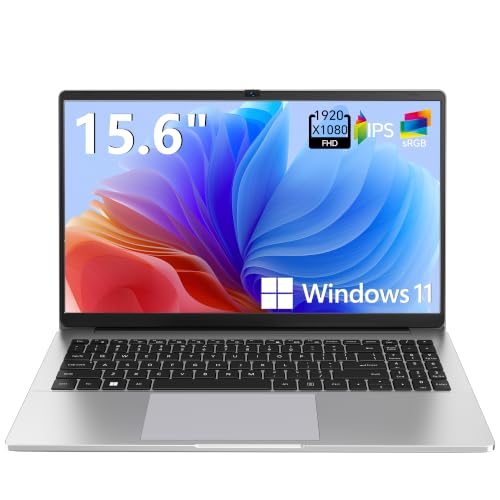

ASUS Vivobook 14 at a Glance

| Feature | Specification |
|---|---|
| Processor | Intel Core i5-1235U |
| Graphics | Intel Iris Xᵉ Graphics (Integrated) |
| Memory | 8GB DDR4 RAM |
| Storage | 256GB PCIe SSD |
| Display | 14-inch FHD (1920 x 1080) NanoEdge Display |
| Operating System | Windows 11 Home |
| Wireless Connectivity | Wi-Fi 6E and Bluetooth 5 |
| Weight | 2.16 kg |
| Chassis Color | Quiet Blue |
| Hinge Design | 180° Lay-Flat Hinge |
Everyday Processing and Multitasking Performance
At the center of the hardware package is the Intel Core i5-1235U, a power-efficient mobile chip designed to balance battery consumption with multi-core throughput. When evaluating the asus vivobook 14 i5 1235u configuration, daily responsiveness is consistently smooth across routine tasks such as navigating multi-tab browser sessions, managing spreadsheet formulas, and drafting extensive text files. Integrated Intel Iris Xᵉ Graphics handles high-definition video feeds and basic visual processing with ease, keeping animations fluid across the desktop interface.
Memory and storage directly influence how this machine handles concurrent duties. Outfitted with 8GB of system memory and a 256GB PCIe solid-state drive, the laptop boots Windows 11 Home quickly and retrieves local files without perceptible lag. For everyday computing, 8GB remains functional for standard multitasking, though users who keep dozens of browser tabs active alongside communication tools may need to practice active tab management. Shoppers considering alternative form factors or memory configurations within this family might also consider the asus vivobook go 15.6” fhd slim laptop, amd ryzen 3 7320u quad core processor, 8gb ddr5 ram, 256gb s for comparable everyday execution.
Thermal stability plays a major role in sustained processing output. ASUS integrates IceCool thermal technology to expel warm air away from internal components during intensive data handling. This cooling architecture keeps the chassis comfortable against the palms and prevents the processor from throttling down to sluggish speeds during extended video calls or large file transfers.
Display Quality and Visual Comfort
The visual experience centers on a 14-inch Full HD display featuring a native resolution of 1920 by 1080 pixels. This screen resolution delivers sharp text for long reading sessions and crisp definition when streaming lectures or web video. Slim NanoEdge bezels border the panel, expanding the active viewing area relative to the laptop footprint so users can focus on their work without wide, distracting plastic margins.
A notable mechanical asset is the 180-degree lay-flat hinge. This hinge enables the display lid to open completely level with the keyboard deck, simplifying screen sharing across a study table or collaborative desk without forcing users to turn the whole computer around. For users who prefer alternative chassis styles or touch-driven screens, reviewing the convertible asus vivobook 16 flip offers perspective on how flexible hinges expand collaborative workflow options.
While the 1080p panel provides dependable visual fidelity for productivity documents and web streaming, it remains a standard business-class display rather than a wide-gamut media canvas. Those seeking deep contrast, cinematic dynamic range, or higher refresh rates would naturally find dedicated panels like the asus vivobook s 15.6 inch 3k oled 120hz windows laptop intel core ultra 7-155h intel evo edition ai better aligned with specialized multimedia editing.
Keyboard Layout, Typing Comfort, and Daily Usability
Productivity relies heavily on tactile input, and the asus vivobook 14 ergosense keyboard is designed precisely to minimize typing fatigue. Key spacing and dish-shaped keycaps match natural finger mechanics, allowing students and remote employees to draft essays, reports, and emails comfortably across extended sessions. The built-in backlighting provides clear key visibility when typing in dim meeting spaces, libraries, or low-light home offices.
Hygiene and user wellness receive thoughtful attention through ASUS Antimicrobial Guard Plus. Frequently touched surfaces across the keyboard deck and palm rests receive a specialized coating designed to inhibit the growth of harmful bacteria, helping maintain a cleaner workspace over years of shared or mobile use.
Communication hardware is similarly tuned for remote collaboration. The integrated webcam includes a physical privacy shield that slides smoothly over the lens to block unwanted video access instantly. Paired with onboard AI Noise-Canceling Technology, the internal microphones isolate human speech from ambient room commotion like typing chatter or distant fans, ensuring clean audio during team meetings and online classes.
Durability, Cooling, and Build Quality
Mobile computers inevitably encounter minor bumps, vibrations, and shifts inside commuter backpacks. The asus vivobook 14 military grade durability credentials mean the chassis is tested against stringent US military-grade standards for resilience and longevity. This rigorous design standard provides reassurance that the chassis hinges, ports, and internal brackets can withstand typical daily transport between home, class, and the office.
Weighing in at 2.16 kilograms, the notebook carries a sturdy, substantial feel. The Quiet Blue finish lends a subdued, professional aesthetic appropriate for conference rooms, client presentations, and university lecture halls alike. While slightly heavier than ultra-minimalist subnotebooks, the added mass contributes to chassis rigidity and minimizes deck flex when typing vigorously.
Long-term reliability is further reinforced by the limited warranty and compatibility across a broad peripheral ecosystem. Users can easily connect external displays, standard mice, desktop keyboards, external storage drives, and office printers without requiring proprietary driver packages or specialized expansion docks.
Battery Charging and Peripheral Connectivity
Power availability is essential when working away from a permanent desk. While the listing does not specify total runtime hours for the asus vivobook 14 battery life, it highlights built-in fast-charging capabilities that restore up to 50 percent of battery capacity in just 30 minutes using the supplied 19-volt power supply. This rapid charge rate allows users to top off their reserves quickly during brief lunch breaks or between lectures.
Physical connectivity is comprehensive, eliminating the need for constant adapter dongles. The laptop features dedicated USB Type-A ports, a versatile USB Type-C port, and a full-size HDMI video output to connect external monitors or classroom projectors. This assortment simplifies moving between mobile setups and multi-screen desk workstations.
Wireless networking keeps pace with contemporary data networks through integrated Wi-Fi 6E and Bluetooth 5. Wi-Fi 6E unlocks broader spectrum bands for reduced interference and lower latency on modern office routers, while Bluetooth 5 ensures stable connections to wireless mice, keyboards, and audio headsets.
ASUS Vivobook 14 Pros and Cons
Pros
- Intel Core i5-1235U delivers responsive multi-core processing
- Fast charging reaches 50 percent capacity in 30 minutes
- ErgoSense backlit keyboard provides comfortable typing ergonomics
- Chassis tested to US military-grade durability standards
- Physical webcam shield and AI noise-canceling audio
Cons
- Modest 256GB solid-state storage capacity
- Weight of 2.16 kilograms limits featherlight portability
- Listing does not specify total battery runtime hours
Check ASUS Vivobook 14 on Amazon
Who Should Buy the ASUS Vivobook 14
Buy It If
- You need a dependable machine for coursework: the asus vivobook 14 for students provides a comfortable keyboard, physical webcam shield, and reliable Wi-Fi 6E for everyday study.
- You value rapid battery recovery and want fast-charge technology that replenishes 50 percent capacity within a short half-hour window.
- You desire physical privacy hardware, including a manual sliding webcam cover and clear AI background noise isolation for calls.
- You prefer a durable laptop chassis tested against US military-grade environmental standards for daily commuting peace of mind.
Skip It If
- You require massive onboard local storage for large video libraries, as the included 256GB SSD fills quickly without external drives or cloud backups.
- You want an ultra-lightweight travel notebook under 1.5 kilograms for featherlight backpack carry.
- You plan to run demanding modern 3D video games or complex 4K timeline edits that require a dedicated graphics processor.
ASUS Vivobook 14 Alternatives Worth a Look
Shoppers browsing the everyday laptop category will find several alternative configurations that trade processing power, memory sizes, or cloud services depending on unique user requirements.
2026-2027 edition

The 2026-2027 edition HP 14 Laptop Computer runs an Intel N150 processor alongside 4GB of DDR5 RAM and a 128GB SSD. It comes bundled with Windows 11, Microsoft 365, and 1TB of cloud storage. Shoppers who prioritize integrated cloud productivity licenses over the Core i5 performance of the Vivobook may consider this alternative for very basic text document workflows.
Supports 1TB TF Card Expansion
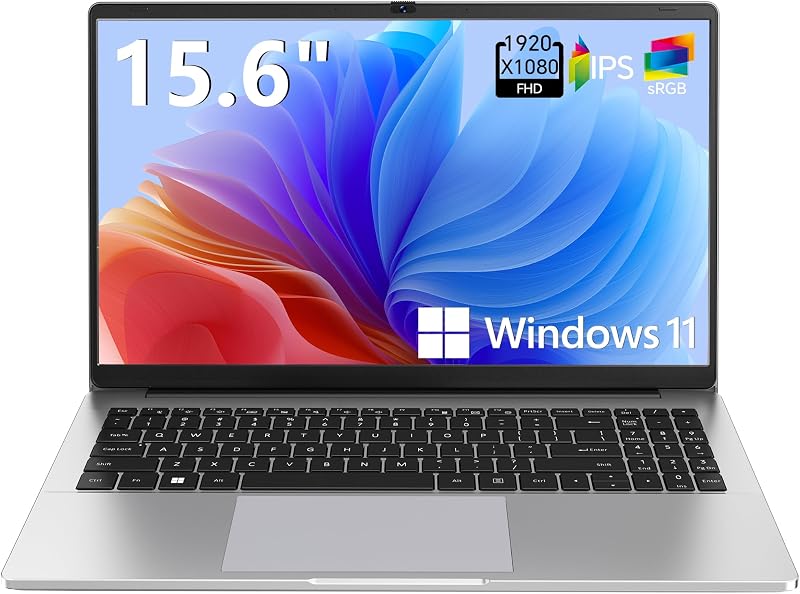
The Supports 1TB TF Card Expansion notebook offers a larger 15.6-inch Full HD LCD display, an Intel N4020 processor, 4GB of DDR4 RAM, and 128GB of eMMC storage running Windows 11. It features expandable storage via a 1TB TF card slot, appealing primarily to home office users who prioritize a wider screen and secondary memory card expansion over multi-core computing power.
Copilot AI

The Copilot AI HP 2026 Essential Laptop features a Natural Silver finish, an Intel processor, 128GB of internal storage, and an LED display. Bundled with Office 365, 1TB of cloud storage, and integrated Copilot AI assistance features, it serves buyers looking for lightweight, software-bundled cloud computing for everyday personal use.
Final Verdict
When asking whether the asus vivobook 14 is worth it, the answer depends entirely on your daily computing requirements. For users seeking a practical, responsive daily driver, this notebook checks nearly all the essential functional boxes. The 10-core Intel Core i5-1235U processor delivers dependable multitasking, the backlit ErgoSense keyboard ensures typing comfort, and the inclusion of Wi-Fi 6E and fast charging keeps mobile work seamless.
The primary compromises involve its modest 256GB storage drive and 2.16-kilogram weight profile, which prioritize desktop-grade durability and essential components over featherweight portability. For students, remote professionals, and household administrators who want a straightforward, no-nonsense Windows 11 computer with robust build standards, the ASUS Vivobook 14 remains an exceptionally capable choice for daily productivity.
FAQ
Does the ASUS Vivobook 14 have a backlit keyboard?
Yes, the ASUS Vivobook 14 features a backlit ErgoSense keyboard that illuminates the key legends, allowing you to type accurately in low-light settings such as lecture halls or evening work environments.
How fast does the ASUS Vivobook 14 battery recharge?
Using ASUS fast-charge technology, the laptop can recharge its battery up to 50 percent capacity in approximately 30 minutes, allowing users to restore power quickly during short work breaks.
What ports are available on the ASUS Vivobook 14?
The laptop includes USB Type-A ports, a modern USB Type-C port, and a full-size HDMI output for external displays, alongside modern wireless connections via Wi-Fi 6E and Bluetooth 5.
Can the ASUS Vivobook 14 lay completely flat?
Yes, the laptop features a 180-degree lay-flat hinge that lets the screen recline completely flat on a table, making it easy to share notes, spreadsheets, or visual content with collaborators across a desk.
Does the ASUS Vivobook 14 include a webcam privacy cover?
Yes, the notebook includes a physical webcam privacy shield that slides directly over the camera lens to block visual capture whenever the webcam is not in active use.


