As Amazon Associates, we earn from qualifying purchases. This means we may receive a small commission at no extra cost to you if you click through and make a purchase.
The Microsoft Surface Laptop 7 represents a pivotal transition for Microsoft’s premier business clamshell notebook, shifting to Qualcomm’s Snapdragon X Elite processor. Designed from the ground up to support modern AI-assisted productivity, this ultraportable laptop integrates high-speed memory, an advanced neural processing unit, and an exceptionally bright touchscreen display into a lightweight chassis. In our assessment based on the manufacturer’s technical specifications and published capabilities, this configuration delivers a responsive, dependable environment for office tasks, intensive document review, and multi-app business workflows.
This notebook is tailored specifically for traveling consultants, remote professionals, and enterprise users who prioritize responsive computing, modern wireless standards, and extended mobile stamina during demanding workdays. Conversely, buyers who rely heavily on legacy x86 software requiring proprietary kernel-level drivers or professionals requiring a high-powered discrete graphics chip may want to look toward other hardware platforms. If you are comparing different form factors within this generation of hardware, you can also explore our analysis of the microsoft surface laptop series to understand how this clamshell model compares to other traditional builds.



Microsoft Surface Laptop 7 at a Glance

| Feature | Specification Detail |
|---|---|
| Processor | Qualcomm Snapdragon X Elite with Qualcomm Adreno Graphics |
| AI Acceleration | Integrated 45 TOPS Neural Processing Unit (NPU) |
| Memory | 16GB DDR5 (8448MHz) |
| Storage | 512GB Solid State Drive (SSD) |
| Display | 13.8-inch 2K+ (2304 x 1536) 120Hz Touchscreen, 600 nits |
| Operating System | Windows 11 Pro |
| Ports | 2 x USB-C (USB4), 1 x USB-A, Surface Connect port, 3.5mm combo jack |
| Wireless | Wi-Fi 7 and Bluetooth 5.4 |
| Camera & Audio | 1080p FHD front camera with Windows Hello, HD Audio |
| Dimensions & Weight | 11.85″ x 8.67″ x 0.69″; 3.00 lbs |
Processing Performance and Multitasking Efficiency
At the center of the computing experience is the Qualcomm Snapdragon X Elite processor, backed by shared Qualcomm Adreno Graphics. The core hardware architecture has been engineered to optimize system responsiveness while keeping power consumption low during everyday professional demands. When evaluating the surface laptop 7 snapdragon x elite specs, the inclusion of 16GB of DDR5 system memory operating at a rapid 8448MHz frequency stands out. This high-bandwidth memory configuration ensures that complex spreadsheets, numerous web browser tabs, and collaborative business tools run in parallel without the micro-stutter often experienced on slower memory setups.
The system comes preinstalled with Windows 11 Pro, offering enterprise-grade management tools, advanced encryption, and native support for modern ARM-based processing. For users curious about surface laptop 7 arm compatibility, native Windows applications compile and execute directly on the Snapdragon processor, resulting in swift launch speeds and smooth transitions between open windows. General business suites, productivity software, and standard web tools operate natively, unlocking the full potential of the silicon. Everyday office multitasking benefits directly from this integration, as the processor handles active background tasks without bogging down the active foreground window.
In terms of overall microsoft surface laptop 7 performance, the clamshell design maintains quiet operation even during prolonged business usage. Storage is handled by a 512GB SSD that facilitates rapid boot sequences and near-instantaneous application loading. It is important to note the product listing disclosure: this brand-new unit has been professionally resealed to upgrade the internal SSD, providing a three-year warranty on the upgraded storage drive through Issaquah Highlands Tech, alongside Microsoft’s standard one-year warranty on the rest of the components. For standard office duties and cloud-connected workflows, the balance of processing speed and memory bandwidth offers a remarkably fluid experience.
Copilot+ PC Architecture and AI-Powered Productivity
A defining characteristic of this laptop is its designation as a surface laptop 7 copilot plus pc, which centers on an integrated 45 TOPS neural processing unit. This dedicated NPU is designed to process artificial intelligence tasks locally on the machine rather than sending every query to cloud servers. By executing machine learning models directly on the hardware, the system maintains user privacy and decreases latency during automated business workflows. A dedicated Copilot key on the backlit keyboard grants instant access to Windows 11 Pro AI tools, helping you draft emails, summarize documents, and organize daily project schedules efficiently.
The on-device NPU powers several practical features designed to enhance daily corporate communications. Windows Studio Effects utilizes the 45 TOPS processing capability to improve camera lighting, suppress background distractions, and blur surroundings during high-stakes video conferences. The laptop also supports Live Captions, providing automatic real-time translation from 44 languages into English for video calls, recorded presentations, or streaming media. These features execute locally on the NPU, leaving the primary CPU and Adreno graphics cores free to handle spreadsheet calculations, presentations, and active web research simultaneously.
Creative and managerial tasks also benefit from on-device acceleration. The product documentation highlights enhanced tools within Adobe Lightroom, where AI-powered editing utilities allow users to eliminate background distractions, apply custom blur effects, and enhance professional imagery in a single tap. Furthermore, the explorable timeline feature known as Recall is slated to provide quick document, email, and web page retrieval by tracking system activities. For teams seeking a dependable surface laptop 7 snapdragon x elite for business, these integrated tools reduce repetitive administrative overhead and streamline daily communication.
Display Quality and Visual Experience
The visual centerpiece is a 13.8-inch 2K+ touchscreen display sporting an expansive 2304 x 1536 resolution. With a peak brightness rating of 600 nits, the screen remains crisp, legible, and easy to view whether working beneath harsh office fluorescent lights or near bright conference room windows. The 120Hz refresh rate ensures that scrolling through lengthy legal briefs, editing dense project timelines, and navigating touch interactions feel seamless and immediate. The panel’s 3:2 aspect ratio is also fundamentally practical for office work, offering more vertical space for reading documents and writing code compared to conventional widescreen displays.
Touch responsiveness allows users to sign digital documents, navigate interfaces, and collaborate with colleagues naturally. The screen’s high-resolution clarity makes tiny spreadsheet numbers and detailed charts sharp, reducing eye strain over prolonged work sessions. Users interested in different screen form factors or specialized display technologies within the Surface ecosystem can read our microsoft surface pro oled review to understand how panel types and tablet designs differ from this traditional clamshell setup.
The surface laptop 7 snapdragon display also provides ample versatility when connecting to external workstations. Thanks to the integrated USB4 controllers, the system can drive two external 4K monitors running at 60Hz simultaneously without requiring a proprietary docking hub. This makes transitioning from a mobile environment to a multi-monitor desk setup effortless, giving power users the visual canvas required to monitor real-time data feeds, communications, and primary tasks side by side.
Ports, Connectivity, and Hardware Build
Despite measuring a slim 0.69 inches thick and weighing exactly 3.0 pounds, the laptop provides a practical and versatile port layout. Users receive two USB-C ports with full USB4 capabilities, one traditional USB-A port for legacy thumb drives or presentation clickers, a 3.5mm audio combo jack, and the signature Surface Connect port. Retaining a standard USB-A port eliminates the need to carry awkward dongles for standard office accessories, while the high-speed USB-C connections handle high-speed data transfer, power delivery, and external video output effortlessly.
Wireless networking is equally modern, integrating Wi-Fi 7 and Bluetooth 5.4 standards. Wi-Fi 7 compatibility ensures high-throughput, low-latency connectivity when paired with compatible enterprise access points, making large cloud backups and high-definition video calls dependable in congested network spaces. Bluetooth 5.4 maintains stable connections with wireless mice, keyboards, and modern headsets without dropping signal during critical presentations.
The exterior chassis features an elegant Sapphire finish in a traditional clamshell form factor, providing structural rigidity while maintaining a professional aesthetic for boardroom meetings. The front-facing 1080p FHD camera works in tandem with Windows Hello infrared sensors for instantaneous biometric facial logins, ensuring strong data security without typing passwords in public spaces. The integrated HD audio speakers and comfortable backlit keyboard round out a cohesive physical design built for long typing sessions in dim environments. Those who prefer a larger screen format might also consider reviewing the microsoft surface laptop 15 to weigh size against portability.
Battery Efficiency and Daily Business Mobility
One of the primary benefits of transitioning to an ARM-based architecture is power management. The surface laptop 7 snapdragon x elite battery life benefits significantly from the processor’s ability to balance low-power efficiency cores with high-performance cores. Rather than consuming excessive energy and generating unnecessary heat during basic tasks like document processing or video streaming, the system scales its energy draw precisely according to workload demands. This allows mobile professionals to work through off-site client meetings, airport layovers, and full-day seminars without constantly hunting for an available wall outlet.
Because the Snapdragon platform runs cool under everyday office loads, thermal throttling is kept to a minimum, preserving responsive performance whether the machine is operating on battery power or plugged into a desk charger. For traveling consultants and remote workers, this reliability transforms daily mobile computing from an exercise in battery anxiety into an uninterrupted workday. When weighing whether the surface laptop 7 snapdragon x elite is worth it, this balance of quiet thermal operation, sustained unplugged performance, and rapid wake-from-sleep capabilities represents one of the strongest arguments for choosing this modern iteration.
Microsoft Surface Laptop 7 Pros and Cons
Pros
- Fast Qualcomm Snapdragon X Elite processor
- Vibrant 13.8-inch 120Hz 600-nit touchscreen
- High-speed 16GB DDR5 8448MHz memory
- Dual USB4 ports supporting dual 4K monitors
- Modern Wi-Fi 7 and Bluetooth 5.4 wireless
- Dedicated 45 TOPS NPU for on-device AI
Cons
- Resealed chassis for third-party SSD upgrade
- Split warranty coverage between vendors
- Shared graphics memory rather than dedicated GPU
Check Microsoft Surface Laptop 7 on Amazon
Who Should Buy the Microsoft Surface Laptop 7
Buy It If
- You need a dependable business clamshell with a bright 600-nit, 120Hz touchscreen that excels at daily multitasking.
- You want on-device AI tools like Live Captions, Windows Studio Effects, and a dedicated 45 TOPS NPU to accelerate your video meetings and communication.
- You require modern connectivity, including dual USB4 ports capable of driving two 4K external monitors, Wi-Fi 7, and a legacy USB-A port.
- You travel frequently and demand long-lasting mobile efficiency backed by Windows 11 Pro security tools.
Skip It If
- Your daily work relies strictly on legacy software, custom drivers, or specialized enterprise plug-ins that have not yet been optimized for ARM architecture.
- You need a dedicated high-performance gaming GPU or workstation-tier graphics hardware for intensive 3D rendering.
- You are uncomfortable with a resealed chassis that divides warranty coverage between the original manufacturer and a third-party SSD upgrade vendor.
Microsoft Surface Laptop 7 Alternatives Worth a Look
If your daily workflow, screen preference, or storage requirements do not align with this particular configuration, several other laptops on the market serve different computing needs.
2026-2027 edition

The 2026-2027 edition HP 14 laptop features an Intel N150 processor, 4GB of DDR5 RAM, 128GB of SSD storage, and 1TB of cloud storage via Microsoft 365 on Windows 11. This model suits students or casual users who need a very basic web-browsing machine with bundled cloud productivity apps rather than an AI-accelerated business workstation.
Supports 1TB TF Card Expansion
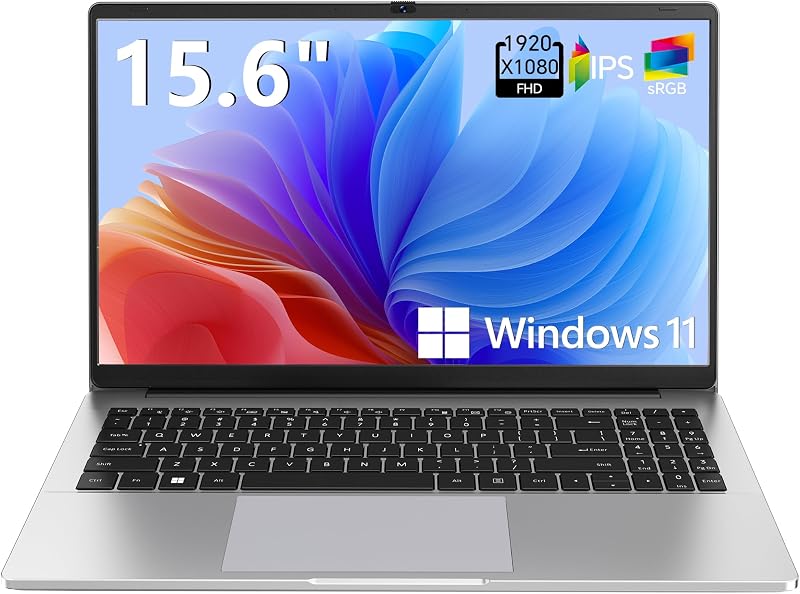
The Supports 1TB TF Card Expansion gray 15.6-inch laptop is equipped with an Intel N4020 processor, 4GB of DDR4 RAM, 128GB of eMMC storage, an FHD LCD display, and Windows 11. It provides an option for home office users or budget-minded shoppers who want a larger 15.6-inch visual workspace and expandable card storage for basic media viewing and simple document typing.
Copilot AI

The Copilot AI HP 2026 Essential laptop offers an Intel processor, 128GB of storage, an LED display, 1TB of cloud storage with Office 365, and a lightweight natural silver chassis running Windows 11. It is a sensible consideration for users who want lightweight basic computing with integrated Microsoft Office services without requiring the premium build, 120Hz touchscreen, or high-speed DDR5 memory of the flagship Surface line.
Final Verdict
The Microsoft Surface Laptop 7 successfully ushers the Surface family into the next era of personal computing. By marrying the efficient Qualcomm Snapdragon X Elite architecture with 16GB of rapid 8448MHz DDR5 memory, Windows 11 Pro, and a dedicated 45 TOPS NPU, this machine provides an exceptionally polished, quiet, and responsive platform for day-to-day business operations. The 13.8-inch 120Hz touchscreen stands out as one of the brightest and most legible displays in its class, while modern Wi-Fi 7 and dual USB4 ports guarantee excellent docking and wireless flexibility.
While prospective buyers should ensure their specialized business applications run smoothly on ARM and remain mindful of the split warranty on this upgraded 512GB SSD model, the overall package is undeniably compelling for modern enterprise users, hybrid workers, and frequent travelers. If you want a sleek, premium clamshell notebook that handles intensive office multitasking while unlocking cutting-edge on-device AI features, this Surface laptop delivers the performance and refinement required for serious work.
FAQ
Can the Microsoft Surface Laptop 7 run standard business software on ARM?
Yes, standard business suites, modern web browsers, and popular productivity tools run natively or via emulation on Windows 11 Pro. However, proprietary business utilities that rely on custom x86 kernel-level drivers should be verified for ARM compatibility prior to deployment.
Does this model support multiple external monitors?
Yes, the two USB-C (USB4) ports support up to two external 4K monitors running at 60Hz simultaneously without requiring a dedicated docking station, alongside standard Surface Connect dock options.
What does the resealed SSD upgrade mean for the warranty?
The laptop was opened and resealed by Issaquah Highlands Tech to install the upgraded 512GB SSD. As detailed in the listing, the upgraded SSD is backed by a three-year warranty from Issaquah Highlands Tech, while Microsoft provides a one-year warranty on the remaining factory components.
What are the benefits of the 45 TOPS NPU?
The 45 TOPS NPU handles AI workloads directly on the device rather than offloading them to remote servers. This hardware accelerates features like Windows Studio Effects for video calls, automatic Live Captions translation across 44 languages, and AI-assisted photo editing in Adobe Lightroom without draining the CPU.
How bright is the 13.8-inch touchscreen display?
The 13.8-inch 2K+ touchscreen panel achieves up to 600 nits of brightness, making it easy to read in brightly lit office spaces or near windows, and it features a smooth 120Hz refresh rate.