As Amazon Associates, we earn from qualifying purchases. This means we may receive a small commission at no extra cost to you if you click through and make a purchase.
The Dell Precision 5540 is a premium mobile workstation built to bridge the gap between heavy computational capability and sleek, portable hardware. Sold as an Amazon Renewed machine, this clamshell laptop packages a six-core Intel Core i7-9850H processor, an enterprise-grade NVIDIA Quadro T1000 graphics coprocessor, and a massive 32GB allotment of DDR4 system memory into an aluminum-and-carbon chassis measuring under half an inch thick. For creative professionals, technical students, and corporate users looking for certified workstation hardware capable of tackling heavy design suites without spending flagship sums on brand-new machinery, this renewed configuration provides a potent balance of speed, physical expansion, and premium design.
This portable workstation suits engineers running CAD modeling suites, video editors assembling multi-track timelines, data analysts parsing memory-intensive datasets, and advanced students who require enterprise operating system tools and abundant memory. However, shoppers looking for a featherweight travel notebook with multiple days of battery standby, modern AAA gaming enthusiasts seeking consumer GeForce RTX graphical features, or casual web browsers who only need basic cloud applications will find this powerhouse over-engineered for their day-to-day requirements.



Dell Precision 5540 at a Glance

| Feature | Specification |
|---|---|
| Processor | 9th Gen Intel Hexa-Core i7-9850H (2.6 GHz base, up to 4.6 GHz turbo) |
| Graphics Coprocessor | NVIDIA Quadro T1000 (DDR4 SDRAM) |
| System Memory | 32GB DDR4 RAM |
| Internal Storage | 512GB Solid State Drive (listing title also notes 1TB SSD) |
| Display Panel | 15.6-inch Touchscreen (FHD 1920 x 1080 in specs; 4K UHD in description) |
| Operating System | Windows 11 Pro / Windows 10 Pro 64-bit |
| Chassis Dimensions | 13.9 inches long by 9.25 inches wide by 0.43 inches thick |
| Screen Bezel | 1.1 centimeters |
| Port Selection | 1x Thunderbolt 3/USB-C, 2x USB 3.2 Gen 1 Type-A, HDMI, SD Card Reader, Audio Combo |
| Input Hardware | Backlit keyboard, multi-touch capacitive display surface |
Processing Power and Quadro Graphics Performance
At the center of the Dell Precision 5540 specs is the 9th Generation Intel Core i7-9850H processor. Built with six physical cores and twelve processing threads, this chip runs at a dependable 2.6 GHz base clock frequency and can boost up to 4.6 GHz when short-burst computational speed is required. Unlike standard ultrabook processors that throttle back under heavy multithreaded loads to conserve thermal headroom, this H-series Intel silicon is tuned to sustain elevated throughput across demanding mathematical simulations, 3D rendering jobs, and complex code compilations. For everyday business operations, the processor handles hundreds of spreadsheet formulas, background database services, and heavy local server environments without hesitation.
Graphical tasks are managed by the dedicated NVIDIA Quadro T1000 graphics coprocessor, supported by dedicated DDR4 video memory alongside integrated Intel graphics for low-power display output. While consumer-grade graphics chips focus on raw polygon pushing in commercial video games, Quadro GPUs feature software drivers specifically engineered and certified for stability inside professional creative and CAD applications such as Autodesk AutoCAD, SolidWorks, Revit, and Adobe Creative Cloud. Using the Dell Precision 5540 for video editing yields smooth timeline scrubbing, responsive hardware-accelerated color grading, and reliable video encoding across formats like 4K H.264 and ProRes.
This balanced pairing of the Dell Precision 5540 i7 9850h and Dell Precision 5540 Quadro T1000 ensures that technical workflows remain stable when deadlines approach. By relying on enterprise graphics drivers, the machine minimizes software crashes during lengthy render queues or high-precision spatial modeling sessions. While it will run casual games at standard settings, its engineering priority remains absolute visual fidelity, computational precision, and verified driver compatibility in professional productivity environments.
Memory Headroom and Storage Architecture
Multitasking capabilities on this mobile workstation are significantly elevated by the included 32GB of high-speed DDR4 RAM. Having 32GB of memory pre-installed provides comfortable overhead for modern production pipelines. Users can run virtual machines, keep multiple Adobe applications active in memory simultaneously, and load extensive datasets directly into system memory without suffering from disk caching slowdowns. For power users who refuse to close web browser tabs while compiling software or rendering high-resolution artwork, this memory allocation ensures system responsiveness never degrades.
For storage, the system is outfitted with a high-speed Solid State Drive. The product specification table lists a 512GB SSD, while the listing title also references 1TB SSD capacity. Regardless of the specific drive variance supplied by the seller, the solid-state architecture delivers near-instantaneous operating system boot times, rapid loading of heavy application libraries, and responsive data transfers when manipulating large media files. The swift read and write speeds make opening gigabyte-sized design files feel effortless, keeping your daily workflow fluid.
Users who handle intensive digital content creation often expand their storage or workspace by connecting dedicated external drives and peripheral displays. When managing complex visual projects on an expansive desktop surface like the dell 27 plus qhd monitor – s2725dsm, the combination of 32GB system memory and rapid solid-state storage allows you to preview high-resolution graphics on an external screen while your primary local disk handles real-time scratch disk caching without noticeable lag.
Display Quality and Touchscreen Usability
The visual centerpiece of this machine is its 15.6-inch display, framed by a narrow 1.1-centimeter bezel that maximizes screen estate within a compact footprint. Within the listing information, the display resolution is described with slight variance: the primary bullet points specify a 15.6-inch Full HD panel running at 1920 x 1080 resolution, while the technical specification section mentions a 4K UHD display option. Both panel variants deliver vibrant color reproduction, wide viewing angles, and sharp text clarity for reading documents, inspecting technical schematics, and color-correcting digital media.
The Dell Precision 5540 touchscreen integration adds an intuitive dimension to standard laptop interaction. The capacitive touch digitizer allows users to interact directly with software interfaces, making it simple to tap buttons, pinch-to-zoom on fine architectural drawings, or annotate documents during collaborative meetings. While a traditional precision trackpad and backlit keyboard remain the primary inputs for typing and detailed cursor control, touch input offers an agile secondary method for navigating expansive web pages and presentation decks.
The combination of a 15.6-inch diagonal workspace and narrow bezels gives users ample room to organize multi-window application layouts. For professionals who frequently present concepts directly to clients across a conference table, the touchscreen functionality allows smooth navigation through slide decks and blueprints without requiring an external mouse or awkward keyboard reaches.
Workspace Connectivity and Port Layout
Unlike many modern thin laptops that eliminate standard legacy connectivity in favor of minimalist designs, the Dell Precision 5540 workstation retains an extensive array of physical ports suitable for production studios and technical offices. The chassis houses two standard USB 3.2 Gen 1 Type-A ports, which support existing flash drives, external mouse receivers, and hardware security keys without needing aftermarket dongles or adapter cables.
For high-speed modern peripherals, the notebook includes a versatile USB Type-C port supporting Thunderbolt 3 technology. This high-bandwidth interface facilitates single-cable docking solutions, external GPU enclosures, and ultra-fast external SSD arrays. Video output is exceptionally versatile, offering both a dedicated full-sized HDMI port and video pass-through via Thunderbolt. Creators who require an expansive studio setup can connect directly to high-resolution professional screens like the dell 32 plus 4k monitor – s3225qs via HDMI, giving them an expansive digital workspace for multi-track video editing, coding IDEs, and intricate graphic layouts.
Rounding out the physical I/O is a built-in full-sized SD card reader and a standard 3.5mm headphone/microphone audio combo jack. For photographers and video creators, having a built-in SD card reader eliminates the frustration of carrying external card adapters on location shoots. High-speed Wi-Fi and Bluetooth wireless protocols ensure reliable connections to wireless local area networks, wireless mice, and external audio gear.
Chassis Design, Thermal Management, and Battery Life
The physical construction of the Dell Precision 5540 emphasizes durable portability. Measuring 13.9 inches in length, 9.25 inches in width, and an impressively slender 0.43 inches in thickness, it packs enterprise workstation internals into a chassis comparable in thickness to standard consumer ultrabooks. The backlit keyboard provides tactile key travel and clear illumination, allowing users to type comfortably in dimly lit conference rooms, lecture halls, or evening office environments.
Packing a 45-watt Intel Core i7 processor and dedicated Quadro graphics into a chassis under half an inch thick places significant demands on thermal engineering. Under heavy processing loads, such as sustained 3D exports or batch RAW photo conversions, the internal dual-fan cooling system spins up to expel heat through rear exhaust vents. Users working on resource-intensive tasks should place the laptop on a firm, flat surface to ensure uninhibited airflow through the intake vents located beneath the clamshell base.
When evaluating Dell Precision 5540 battery life, buyers should note that the Amazon listing does not specify the exact battery watt-hour capacity or manufacturer-rated runtime. Because this machine utilizes high-voltage processing silicon and dedicated graphics rather than ultra-low-power mobile chips, operational battery life depends heavily on workload intensity, screen brightness, and power management settings. Mobile workstation users transitioning from thicker, bulkier desktop-replacement machines like the dell precision 7560 will appreciate this machine’s thinner, lighter profile, but should plan to carry the included AC adapter for intensive full-day design and rendering sessions.
Dell Precision 5540 Pros and Cons
Pros
- Generous 32GB DDR4 memory for heavy multitasking
- Dedicated NVIDIA Quadro T1000 graphics acceleration
- Six-core Intel Core i7-9850H processor
- Slim clamshell profile at 0.43 inches thick
- Versatile Thunderbolt 3 and HDMI connectivity
Cons
- Listing does not specify battery life capacity
- Conflicting storage and display specs in listing
- Demands active cooling under sustained processing loads
Check Dell Precision 5540 on Amazon
Who Should Buy the Dell Precision 5540
Buy It If
- You need 32GB of pre-installed RAM for intensive multitasking, virtualization, and heavy creative software suites.
- You rely on specialized CAD, engineering, or 3D modeling programs that benefit directly from certified NVIDIA Quadro drivers.
- You want a sleek clamshell laptop with a 15.6-inch touchscreen display that retains legacy USB-A, HDMI, and an SD card reader.
- You are shopping for enterprise-grade hardware capabilities through a dependable renewed program rather than paying top-tier launch prices.
Skip It If
- Your primary workload consists of lightweight document processing and web browsing where a basic, low-power laptop is sufficient.
- You demand all-day battery life away from an electrical outlet without carrying a dedicated power brick.
- You prioritize modern high-refresh-rate gaming displays and consumer GeForce RTX graphics features.
Dell Precision 5540 Alternatives Worth a Look
If you are exploring the mobile laptop marketplace, several alternative models cater to different computing priorities, ranging from entry-level portable notebooks to cloud-focused daily machines.
2026-2027 edition

The 2026-2027 edition HP 14 laptop computer is an entry-level machine featuring an Intel N150 processor, 4GB of DDR5 RAM, a 128GB SSD, Windows 11, and integrated Microsoft 365 cloud storage. This compact alternative is best suited for students and casual users who prioritize light document drafting, online coursework, and cloud-based file management over local workstation performance and heavy multitasking memory.
Supports 1TB TF Card Expansion
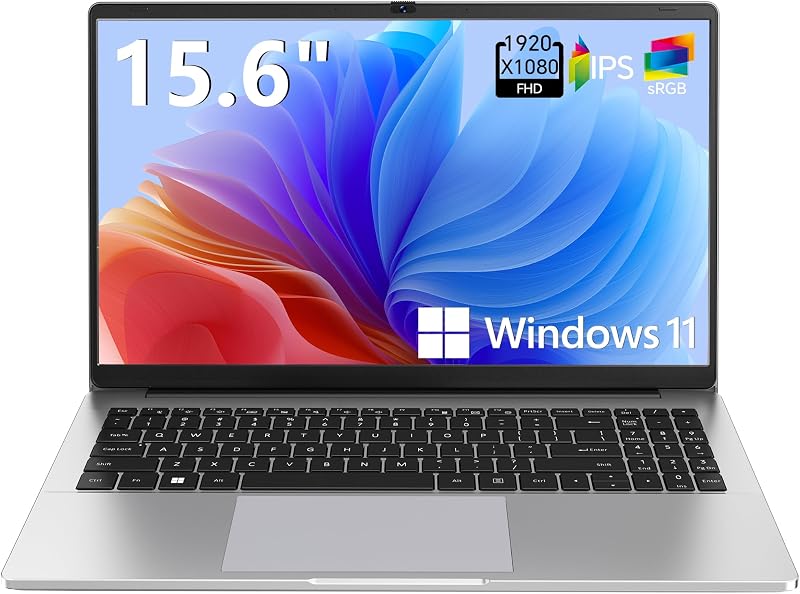
The Supports 1TB TF Card Expansion notebook is a gray 15.6-inch portable laptop powered by an Intel Celeron N4020 processor, 4GB of DDR4 memory, 128GB eMMC storage, and Windows 11. Shoppers looking strictly for basic home office computing, web navigation, and media playback who do not require professional GPU acceleration or high RAM capacity will find this model a simple alternative.
Copilot AI

The Copilot AI HP 2026 Essential laptop offers an Intel processor, 128GB of internal storage, Windows 11, and built-in Microsoft 365 integration. It targets buyers who want a lightweight, everyday portable computer tailored around artificial intelligence productivity tools and standard office software rather than professional-tier hardware rendering.
Final Verdict
Evaluating whether the Dell Precision 5540 is worth it comes down to matching your software requirements with this machine’s distinctive hardware profile. By pairing an Intel Core i7-9850H processor with 32GB of DDR4 memory and an NVIDIA Quadro T1000 GPU, this laptop provides genuine enterprise-grade rendering, modeling, and multitasking throughput. Its robust port selection—featuring Thunderbolt 3, standard USB-A, HDMI, and an integrated SD card reader—delivers connectivity that modern consumer ultra-thin laptops frequently abandon.
As a Dell Precision 5540 renewed offering, it represents a highly functional, utilitarian workstation for engineers, creative editors, and technical students who need reliable driver certifications and expansive RAM on a realistic budget. As long as you account for the power demands of high-performance components by keeping your AC adapter accessible during heavy work sessions, this mobile workstation serves as a dependable, highly capable digital workbench.
FAQ
Can the Dell Precision 5540 handle 4K video editing?
Yes. The combination of the six-core Intel Core i7-9850H processor, dedicated NVIDIA Quadro T1000 graphics, and 32GB of DDR4 RAM provides the computing power and memory bandwidth required to edit, scrub, and export high-resolution 4K video projects smoothly inside modern editing suites.
Does the Dell Precision 5540 have a touchscreen?
Yes, the Dell Precision 5540 includes a 15.6-inch capacitive multi-touch display, allowing users to navigate interface elements, zoom in on design schematics, and interact directly with creative applications on the screen.
What operating system comes installed on the Dell Precision 5540?
The listing mentions both Windows 11 Pro and Windows 10 Pro 64-bit across different specification sections. Both operating systems include enterprise-grade security tools, BitLocker encryption, and remote desktop management features suitable for professional and business use.
What ports are available on the Dell Precision 5540?
The workstation features one USB Type-C port with Thunderbolt 3 support, two USB 3.2 Gen 1 Type-A ports, one full-sized HDMI video port, a full-sized SD card reader, and a 3.5mm headphone/microphone audio combo jack.
How long does the battery last on the Dell Precision 5540?
The Amazon listing does not specify the exact battery life rating or watt-hour capacity for this renewed machine. Because it runs a high-performance 45W Intel H-series processor and dedicated Quadro graphics, battery longevity varies based on workload intensity, and keeping the included AC adapter nearby during intensive tasks is recommended.