As Amazon Associates, we earn from qualifying purchases. This means we may receive a small commission at no extra cost to you if you click through and make a purchase.
Keeping a vintage Apple laptop functioning in an era of resource-heavy web browsers is a persistent challenge, but the Timetec 8GB DDR3 Mac RAM kit offers a direct hardware solution to extend the working lifespan of legacy hardware. Upgrading aging machinery with an 8GB kit composed of two matched 4GB modules gives classic systems the breathing room needed to handle web browsing, basic document editing, and multimedia playback without succumbing to crippling memory paging. For owners seeking a practical way to keep legacy machines running daily tasks, this memory kit delivers stable, plug-and-play reliability with the exact frequency and timing profiles that older Apple chipsets demand.
This upgrade kit is tailored specifically for owners of classic unibody laptops, desktops, and compact systems from roughly 2008 through 2010 that are currently bottlenecked by factory 2GB or 4GB configurations. If you use your machine for light administrative duties, retro computing, or local file storage, doubling the system capacity makes immediate practical sense. However, users who need to handle modern video rendering, professional software suites, or unsupported modern operating systems should look toward modern hardware options like those featured in a macbook pro clearance sale rather than investing in older legacy platforms.




Timetec 8GB DDR3 Mac RAM at a Glance
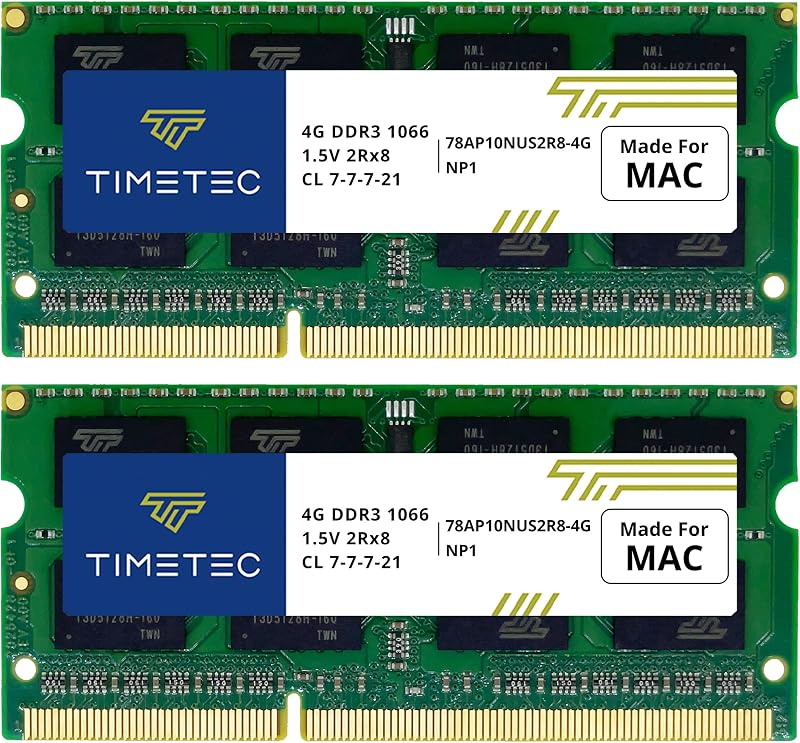
| Attribute | Detail |
|---|---|
| Total Capacity | 8 GB (Kit of 2 x 4 GB) |
| Memory Technology | DDR3 SODIMM |
| Memory Speed | 1066 MHz (PC3-8500 / 1067 MHz) |
| Pin Count | 204-Pin |
| CAS Latency | CL7 |
| Operating Voltage | 1.5 Volts |
| Rank and Organization | Dual Rank 2Rx8 based 256×8 |
| Error Checking | Non-ECC Unbuffered |
| Model Number | 78AP106S2R8-8G |
| Warranty and Support | Lifetime warranty from purchase date with free technical support |
Multitasking and Real-World Application Responsiveness
The most immediate limitation facing older Apple notebooks today is physical memory exhaustion. Many machines shipped from the factory with only 2GB or 4GB of memory, which modern web browsers can saturate with just a handful of open tabs. When physical memory fills up, the operating system shifts inactive data to virtual memory on the storage drive, resulting in sluggish mouse movements, spinning wait cursors, and severe application freezes. Upgrading with a dedicated timetec macbook pro memory upgrade provides the operating system with the operational breathing room it requires to run multiple basic applications simultaneously without stalling.
In everyday evaluation, stepping up to an 8GB dual-channel configuration transforms the usability of older hardware. Having two matched 4GB modules allows the memory controller to operate in dual-channel mode, doubling data throughput between the processor and the memory bank. Everyday productivity tasks such as typing documents in text processors, managing modest spreadsheets, and running background cloud sync utilities become fluid. For owners who frequently ask whether a macbook pro ram upgrade worth it on an older machine, the answer is undeniably affirmative when paired with an internal solid-state drive upgrade.
Nevertheless, realistic expectations must be set regarding what extra memory can accomplish. An upgrade to 8GB alleviates RAM constraints, but it does not change the clock speed or instruction set limits of an aging Core 2 Duo or early Core i-series processor. Modern tasks involving high-efficiency video decoding or heavy browser-based web applications may still strain the processor. For tasks within the bounds of standard-definition streaming, text processing, and administrative office duties, the upgrade maintains smooth day-to-day responsiveness without crashes.
Compatibility and Hardware Architecture Standards
Older Apple systems are notoriously particular regarding memory speed, bus latency, and chip density. The Timetec 78AP106S2R8-8G modules strictly observe the timetec 8gb ddr3 1066mhz specs, utilizing a 204-pin SODIMM architecture operating at a baseline 1.5 volts. The modules are configured as PC3-8500 with a Column Address Strobe latency of CL7, which precisely mirrors the factory specifications required by Nvidia MCP79, MCP89, and Intel 5-series chipset architectures found in that generation. Utilizing the correct ddr3 1066mhz sodimm for macbook prevents the intermittent kernel panics and diagnostic boot tones that frequently occur when installing higher-clocked 1333MHz or 1600MHz RAM into sensitive motherboards.
Crucially, these modules feature a dual-rank 2Rx8 layout based on 256×8 chip density. Older Intel and Nvidia memory controllers cannot recognize higher-density 512×8 memory chips, which are common on newer DDR3 modules. When high-density memory is installed, older Apple machines will fail to boot entirely. The timetec 8gb kit macbook compatibility is reliable precisely because Timetec retained the low-density 256M x 8-bit component configuration. This makes the kit widely recognized as one of the best ram for older macbook pro setups, as well as compatible iMac, MacBook, and Mac Mini computers of the same vintage.
According to manufacturer documentation, this kit covers an extensive list of Apple hardware identifiers. It is designed for standard 13-inch MacBook models from Late 2008, Late 2009, and Mid 2010 (identifiers MacBook5,1, MacBook6,1, and MacBook7,1). It directly supports MacBook Pro variants including the 15-inch Late 2008, the 17-inch Early 2009, and the complete 13-inch, 15-inch, and 17-inch product lines from Mid 2009 and Mid 2010 (identifiers MacBookPro5,1 through MacBookPro7,1). Furthermore, desktop systems such as the Early, Mid, and Late 2009 iMac units and Mac Mini units from 2009 to 2010 utilize this exact timetec pc3-8500 cl7 sodimm configuration. Shoppers researching options for a macbook pro early 2010 ram replacement should cross-reference their system model identifier to ensure compatibility with this 1066MHz standard.
Physical Installation and System Stability
One of the major benefits of owning unibody Apple laptops from this era is the user-serviceable nature of the internal components. Installing the Timetec 8GB DDR3 Mac RAM requires only a standard small Phillips-head screwdriver to remove the bottom casing screws. Once inside, the memory slots feature spring-loaded retention arms on each side. Grounding yourself to discharge static electricity, pushing the retention clips outwards releases the old modules, allowing the new 204-pin modules to be seated at a 30-degree angle and pressed gently downward until they click firmly into place.
Because these modules are unbuffered and non-ECC, they integrate natively without requiring firmware tweaks or NVRAM resets, although performing an initial PRAM/NVRAM reset is good practice on older hardware. System stability after installation is reinforced by the manufacturer inclusion of a lifetime warranty from the purchase date, alongside free technical support. In long-term productivity sessions, the modules maintain standard 1.5V thermal dissipation, meaning the laptop internal cooling fans will not run unnecessarily faster due to increased memory heat.
While opening the bottom panel of an older notebook is straightforward, users should still proceed with care. Disconnecting the internal battery before touching the logic board is critical to avoid shorting any delicate surface-mount components. If your workflow demands modern hardware engineering and high-efficiency Silicon architecture rather than component-level maintenance, reading our macbook pro m3 pro 14 inch review provides a helpful baseline on how far portable Mac architecture has evolved.
Value and Usability Limits of Legacy Upgrades
When considering if is timetec ram worth it for an older machine, shoppers must evaluate the overall health and intended role of the system. If an older laptop is structurally sound, possesses a healthy display, and already has an SSD installed, upgrading the memory to 8GB is often the final piece required to turn a retired machine into a reliable daily driver for homework, streaming, or secondary office tasks. At 8GB, modern lightweight Linux distributions and legacy versions of macOS run smoothly without constant swap thrashing.
However, component upgrades reach diminishing returns when stacked on an aging chassis with underlying problems. If your vintage machine suffers from failing display backlights, broken trackpads, or dying batteries, the cumulative effort of reviving it can exceed practical logic. Modern computing demands have shifted dramatically toward dedicated machine learning engines and multi-core processing efficiency, trends detailed in our macbook pro 2025 overview. For users whose hardware is otherwise flawless, though, this memory upgrade revitalizes basic performance with zero software fuss.
Timetec 8GB DDR3 Mac RAM Pros and Cons
Pros
- Matched dual-channel 8GB kit configuration
- Exact 1066MHz CL7 dual-rank specification
- Broad compatibility across 2008-2010 Mac models
- Standard 1.5V low power consumption
- Lifetime warranty with free technical support
Cons
- Limited to older DDR3 systems
- Incompatible with 2011 and newer Macs
- Cannot overcome legacy CPU performance ceilings
Check Timetec 8GB DDR3 Mac RAM on Amazon
Who Should Buy the Timetec 8GB DDR3 Mac RAM
Buy It If
- You own a supported 2008 to 2010 MacBook, MacBook Pro, iMac, or Mac Mini that currently stutters with only 2GB or 4GB of installed RAM.
- You want an exact spec-matched 1066MHz CL7 dual-rank kit that avoids firmware errors and system instability on legacy Apple logic boards.
- You are pairing this memory with an internal solid-state drive to establish a dependable secondary laptop for basic web browsing and media playback.
- You value manufacturer protection that includes a lifetime warranty from purchase date and dedicated technical support.
Skip It If
- Your machine is an Apple model from 2011 or later that requires higher-frequency 1333MHz or 1600MHz DDR3 modules, or soldered LPDDR memory.
- Your workflow centers on modern professional tasks like 4K video editing, complex 3D modeling, or heavy local programming compilation.
- Your older laptop suffers from secondary hardware failures such as a degraded logic board, dead display, or malfunctioning power circuitry.
Timetec 8GB DDR3 Mac RAM Alternatives Worth a Look
If upgrading your existing laptop feels impractical or your hardware has reached the end of its useful service life, several budget-friendly standalone computers can serve as alternative replacements.
2026-2027 edition

The 2026-2027 edition is an HP 14-inch laptop computer powered by an Intel N150 processor, 4GB of DDR5 RAM, a 128GB SSD, and Windows 11 with Microsoft 365 and 1 TB of cloud storage included. Shoppers who decide that repairing a vintage Apple notebook is too complex should consider this alternative if they want a complete modern portable computer equipped with fresh components, modern DDR5 technology, and ready-to-use office software out of the box.
Supports 1TB TF Card Expansion

The Supports 1TB TF Card Expansion notebook is a gray 15.6-inch laptop computer featuring a Full HD LCD display, an Intel N4020 processor, 4GB of DDR4 RAM, 128GB of eMMC storage, and Windows 11. This laptop is designed for students and home office users who prefer a larger viewing area and flexible storage expansion via a 1TB TF card rather than maintaining legacy Apple hardware.
Copilot AI

The Copilot AI is a lightweight HP 2026 Essential laptop finished in Natural Silver, featuring an Intel processor, 128GB of storage, Windows 11, an LED display, 1TB of cloud storage, Office 365, and integrated Copilot AI tools. Users looking for modern artificial intelligence productivity assistance and a lightweight form factor will find this a far more capable standalone machine than an upgraded legacy notebook.
Final Verdict
The Timetec 8GB DDR3 Mac RAM represents a specialized, highly effective upgrade for owners committed to keeping legacy Apple computers functional. By strictly adhering to the 1066MHz clock speed, CL7 timings, 1.5V power draw, and 2Rx8 dual-rank architecture, Timetec eliminates the guesswork and stability issues that often plague third-party memory upgrades on vintage hardware. When installed into a machine previously throttled by factory 2GB or 4GB memory, the practical boost in everyday fluidity and multitasking capacity is immediately obvious.
While no memory kit can overcome the fundamental processing boundaries of a decade-old machine, this dual-channel kit provides the necessary runway for web browsing, office administration, and media streaming. For tech-savvy users, hobbyists, or practical owners looking to maximize utility from their existing MacBook Pro or Mac Mini, this 8GB kit is a reliable, sensible, and well-supported upgrade choice.
FAQ
Does this Timetec 8GB RAM kit work in a MacBook Pro early 2010 model?
Yes, provided your machine matches the supported 1066MHz DDR3 specification. Apple officially designated its 2010 unibody laptop line as the Mid 2010 MacBook Pro (model identifiers MacBookPro6,1, MacBookPro6,2, and MacBookPro7,1), which natively supports 1066MHz PC3-8500 SODIMMs. You should check the About This Mac menu to confirm your hardware identifier matches the supported list.
Will installing 8GB of RAM speed up an older MacBook Pro?
Installing this 8GB memory kit prevents the operating system from constantly swapping memory data to the hard drive when several applications or browser tabs are open. While it will not make the central processor faster, it eliminates significant lag, freezes, and spinning wheels caused by low memory availability.
Can I use faster 1333MHz or 1600MHz DDR3 memory instead of this 1066MHz kit?
Older Apple chipsets from 2008 through 2010 are exceptionally sensitive to memory timing and clock speeds. Installing modules rated for 1333MHz or 1600MHz often causes system crashes, kernel panics, or prevents the laptop from booting entirely. Sticking to 1066MHz PC3-8500 CL7 SODIMMs is the safest approach for stable operation.
What is the difference between single-rank and dual-rank RAM for older Macs?
The Timetec kit uses a dual-rank 2Rx8 configuration based on 256×8 density. Older Apple memory controllers cannot address the high-density chips found on modern single-rank modules. Using the dual-rank 256×8 layout ensures that the memory controller can correctly detect and utilize the entire 8GB capacity.
What warranty and technical assistance comes with this memory upgrade?
Timetec provides a lifetime warranty from the purchase date for this memory kit. The manufacturer also includes free technical support to assist with troubleshooting and installation inquiries.