
As Amazon Associates, we earn from qualifying purchases. This means we may receive a small commission at no extra cost to you if you click through and make a purchase.
The Acer Chromebook 314 is a practical, entry-level 14-inch laptop built around Google’s streamlined Chrome OS ecosystem. Combining an Intel Celeron N4500 dual-core processor, 4GB of LPDDR4X system memory, and a sharp Full HD display, this clamshell portable is designed to handle common cloud-centered workflows without unnecessary hardware bloat. For everyday users seeking an uncomplicated computer for composing documents, browsing modern websites, and streaming entertainment, it stands out as a dependable, budget-conscious workstation that gets core jobs done.
This laptop is particularly well suited for students needing a focused study portal, household users who handle personal administrative tasks online, and remote workers who operate entirely inside web browsers. The lightweight design and snappy startup experience make it easy to carry and deploy across different rooms or classrooms. However, individuals requiring heavy multimedia editing software, specialized Windows applications, or advanced local hardware power will quickly feel limited by the entry-level components and should evaluate options like the acer chromebook plus 514 instead.


Acer Chromebook 314 at a Glance

| Attribute | Detail |
|---|---|
| Processor | Intel Celeron N4500 Dual-Core (Up to 2.8GHz) |
| Graphics | Intel UHD Graphics (Integrated / Shared) |
| Display | 14-inch Full HD (1920 x 1080) ComfyView Anti-Glare |
| Memory | 4GB LPDDR4X On-Board RAM |
| Internal Storage | 64GB eMMC |
| Battery Life | Up to 10.5 hours |
| Operating System | Chrome OS with Titan C2 Security |
| Wireless Connectivity | Wi-Fi 5 (802.11ac, 2×2 MU-MIMO) and Bluetooth 5.0 |
| Weight and Dimensions | 3.3 lbs; 12.85″ L x 9″ W x 0.74″ H |
| Physical Ports | 1 USB-C (DisplayPort and Charging), 1 USB 3.2 Gen 1, 3.5mm combo jack, Memory Card Slot |
Display Clarity and Visual Comfort
The standout physical feature of this laptop is the acer chromebook 314 full hd display. Measuring 14 inches diagonally with a native resolution of 1920 x 1080 pixels, the panel delivers crisp text rendering and balanced visuals that make reading lengthy digital textbooks, news articles, and multi-column spreadsheets comfortable. Budget laptops in this segment frequently cut corners by utilizing lower-resolution 768p panels, which can leave text looking jagged and limit usable screen real estate. By offering a true 1080p canvas, this model ensures that split-screen multitasking and media viewing remain sharp and detailed.
Acer incorporates its ComfyView widescreen technology into this panel, which adds an anti-glare finish across the surface. This matte coating is invaluable for anyone who frequently studies or types near sunlit windows, beneath harsh fluorescent overhead lights in school libraries, or in shared living areas. By actively diffusing reflections, the anti-glare coating reduces eye strain during prolonged research sessions. While the listing does not specify extreme outdoor brightness metrics, the panel performs reliably across typical indoor office, classroom, and bedroom environments.
Color rendition and black levels are standard for an entry-level computing device driven by integrated Intel UHD Graphics. While it is not intended for professional print grading or color-critical photography work, it delivers pleasing visual clarity for streaming movies on YouTube, video chatting with classmates, and browsing media-heavy websites. The widescreen 16:9 aspect ratio provides an expansive layout for watching widescreen video content without massive black bars cutting into your viewing area.
Processing Speed and Everyday Performance Limits
Under the hood, the laptop relies on a dual-core Intel Celeron N4500 processor capable of burst frequencies up to 2.8GHz. When assessing acer chromebook 314 celeron n4500 performance, realistic expectations are essential. This processor is engineered explicitly for low thermal output and high energy efficiency rather than raw computing muscle. Within its intended operational lane, the processor manages fundamental tasks smoothly, opening browser tabs briskly and navigating standard productivity web applications without frustrating lag.
For standard acer chromebook 314 everyday use, this hardware configuration provides steady responsiveness. You can comfortably draft papers in Google Docs, manage your inbox in Gmail, stream music in a background tab, and research topics across half a dozen open pages simultaneously. The system boots in under ten seconds, getting you straight to your digital workspace almost immediately after opening the lid. However, because the processor features only two execution cores, running complex web scripts or attempting to juggle multiple heavy multimedia applications at once will reveal its performance ceiling.
Shoppers wanting a more flexible computing form factor for digital sketching, touch navigation, or frequent tablet-style reading may want to consider a 2-in-1 device like the acer spin 314. On this clamshell model, high-demand workloads like compiling large codebases, editing multi-track video timelines, or running graphics-heavy mobile games will result in dropped frames and slower processing times. For basic day-to-day web tasks, however, the dual-core chip operates reliably and maintains system stability without generating excessive heat.
Memory, Storage, and Physical Connectivity
Understanding the balance of acer chromebook 314 storage and ram is vital before making a purchasing choice. The machine comes outfitted with 4GB of LPDDR4X on-board memory and 64GB of eMMC solid-state flash storage. Because the 4GB of RAM is soldered to the board, you cannot upgrade the memory down the road. This capacity is perfectly sufficient for running Chrome OS and a modest number of simultaneous browser tabs, but users who keep dozens of resource-intensive pages open concurrently will eventually encounter tab reloads as the operating system manages memory usage.
The 64GB of eMMC storage is intentionally tailored to a cloud-first computing workflow. Chrome OS saves documents, photos, and backups directly to Google Drive, minimizing the need for massive internal hard drives. Local storage is primarily reserved for offline document caching, operating system updates, and downloaded mobile applications from the Google Play Store. For users who need to store large offline collections of PDFs, audio tracks, or personal media files, the inclusion of a built-in memory card slot provides an easy path to expand your local storage capacity using an external card.
Physical and wireless connections cover all standard modern necessities. The laptop features a versatile USB Type-C port supporting USB 3.2 Gen 1 data transfer speeds up to 5 Gbps, USB power delivery for charging the device, and DisplayPort functionality for running an external monitor. You also get a traditional USB 3.2 Gen 1 Type-A port for legacy flash drives or wired mice, alongside a standard 3.5mm headphone and microphone combo jack. Wireless connections are handled by dual-band 802.11ac Wi-Fi 5 featuring 2×2 MU-MIMO technology, ensuring a stable connection on both 2.4GHz and 5GHz router networks, supported by Bluetooth 5.0 for pairing wireless peripherals.
Battery Longevity and Everyday Portability
One of the primary benefits of pairing an ultra-efficient Intel Celeron processor with Chrome OS is excellent energy management. The manufacturer rates the acer chromebook 314 battery life at up to 10.5 hours on a full charge. In practical everyday routines involving document editing, web reading, and modest video streaming, this extended endurance allows students and mobile workers to leave the power adapter at home during a typical school day or work shift without constantly scanning the room for wall outlets.
Portability is further enhanced by the lightweight clamshell chassis. Weighing in at 3.3 pounds and measuring 0.74 inches thick, this laptop slides effortlessly into commuter backpacks, messenger bags, and standard student book bags. Its physical dimensions of 12.85 inches long by 9 inches wide strike a practical sweet spot, offering enough surface area for a spacious typing deck and a wide 14-inch screen without feeling unwieldy on small lecture hall desks or shared kitchen tables.
For shoppers prioritizing maximum compactness above all else, an ultra-compact machine like the acer chromebook spin 311 presents a smaller alternative, but the 14-inch form factor of this unit provides a far more comfortable desktop typing posture. Furthermore, the inclusion of USB-C charging ensures that you can use a single modern charger across multiple personal gadgets, simplifying your travel setup and keeping cable clutter to an absolute minimum.
Operating System, Built-In Security, and Google AI
The software experience centers on the streamlined advantages of Google’s cloud platform, highlighting key acer chromebook 314 chrome os features. Because Chrome OS executes most processes inside a secure browser sandboxing environment, it operates with exceptional fluidity on modest hardware components. Automatic updates run quietly in the background without forcing disruptive system reboots, keeping your operating environment optimized and safe from software vulnerabilities.
Security is a major selling point for families and students. The laptop includes Google’s Titan C2 security chip, which works at the hardware level to verify system integrity and shield sensitive credentials from unauthorized access. Operating under a verified boot protocol, the device routinely inspects its software baseline upon startup. If any tampering or corruption is discovered, it automatically restores itself to an untainted state, eliminating the chronic virus and malware headaches commonly encountered on legacy desktop platforms.
Productivity is further augmented by deep integration with Google’s artificial intelligence tools. Users can chat with Gemini directly from the home screen to assist with writing outlines, summarizing complex articles, and planning study schedules. The product package also includes a trial offering three months of Google AI Pro at no cost, granting expanded access to creative tools such as Gemini in Docs and Gmail, alongside 5TB of cloud storage. In addition, the integrated Google Play Store provides access to popular mobile applications, including Microsoft 365, Minecraft, and Adobe Express, expanding the machine’s functional reach beyond basic browser tabs.
Acer Chromebook 314 Pros and Cons
Pros
- Sharp 1080p Full HD anti-glare display
- Up to 10.5 hours of battery life
- Lightweight 3.3-pound clamshell chassis
- Hardware security with Titan C2 chip
- Versatile USB-C port with DisplayPort output
Cons
- Modest dual-core Intel Celeron N4500 performance
- Non-upgradable 4GB RAM limits heavy multitasking
- Modest 64GB internal eMMC storage
Check Acer Chromebook 314 on Amazon
Who Should Buy the Acer Chromebook 314
Selecting the right computer requires balancing your performance expectations against what you actually do every day. The Acer Chromebook 314 is tailored to a distinct segment of users who prize affordability, simplicity, and screen readability over raw processing muscle.
Buy It If
- You need a dedicated study laptop with a sharp 1080p Full HD screen for reading digital textbooks and typing coursework.
- Your daily computer usage happens entirely inside web browsers, Google Workspace apps, and popular Android streaming tools.
- You want dependable battery life that lasts up to 10.5 hours to get through classes or work shifts without hunting for an outlet.
- You want a lightweight 3.3-pound machine with hardware-backed Titan C2 security that eliminates malware worries.
Skip It If
- You rely on resource-heavy legacy desktop software like professional desktop video editors or CAD applications.
- You regularly work with 30 or more active browser tabs and require 8GB or 16GB of system RAM to avoid tab reloading.
- You need a flexible 360-degree convertible hinge or an active stylus touchscreen for digital illustration.
Acer Chromebook 314 Alternatives Worth a Look
If you are exploring the wider 14-inch and 15-inch budget laptop landscape, several close alternatives offer different trade-offs in screen quality, processor architecture, and storage configurations.
HP 14″ HD Chromebook Laptop

Shoppers who prioritize extended runtime over display sharpness may want to look at the HP 14″ HD Chromebook Laptop. This model steps down to a standard HD resolution panel but claims up to 14 hours of battery life alongside an Intel Quad-Core N4120 processor. It is an appealing option for students who spend long hours away from wall outlets and do not mind a lower-resolution screen in exchange for longer battery endurance.
14″ FHD IPS 300 nits

For buyers who want an upgraded display panel and expanded bundled hardware, the 14″ FHD IPS 300 nits ASUS CX14 Chromebook provides a compelling choice. This system features an Intel Celeron N50 CPU, faster Wi-Fi 6 connectivity, an IPS screen with 300 nits of brightness, and 576GB of total storage via a 64GB SSD paired with a 512GB PLUSERA docking set. Choose this option if you need brighter screen viewing and significantly more external storage capacity straight out of the package.
64GB eMMC
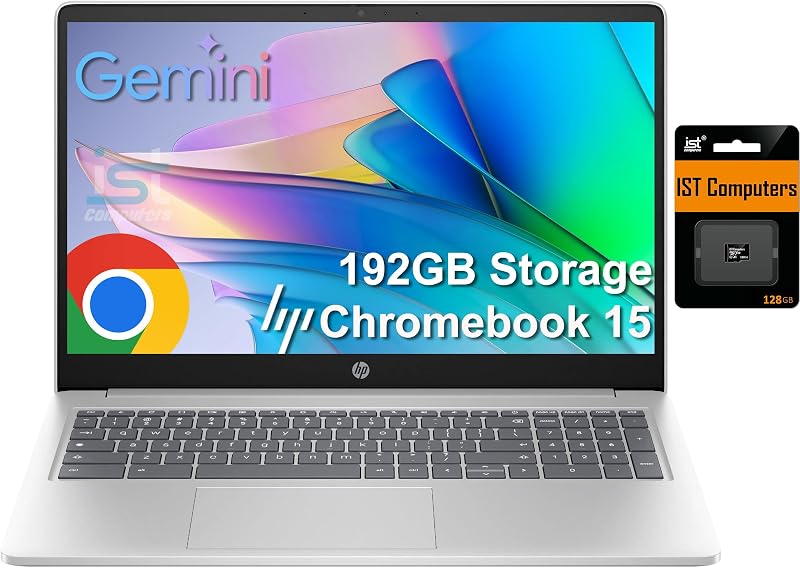
If you prefer a larger workspace with dedicated numerical input, consider the 64GB eMMC HP Chromebook 15.6-inch laptop. Powered by an Intel N200 processor with 8GB of modern DDR5 RAM, a numeric keyboard, and a combined 192GB storage setup (64GB eMMC plus a 128GB SD card), it is better suited for users who handle frequent number crunching and desire a roomier physical typing deck.
Final Verdict
When weighing whether the machine meets everyday needs, answering is the acer chromebook 314 worth it comes down to matching its hardware to your workflow. This laptop does not pretend to be a powerhouse workstation; instead, it focuses on delivering the core necessities of modern computing. By providing a sharp 14-inch Full HD anti-glare display, responsive Wi-Fi 5, up to 10.5 hours of battery endurance, and robust hardware security, it provides tremendous everyday utility for general research, communication, and digital entertainment.
The modest dual-core Celeron N4500 processor and 4GB of RAM represent real boundaries that heavy multitaskers will eventually touch. If your work involves intensive media processing or running numerous demanding background tools, investing in a performance-focused machine like the acer chromebook plus 516 is the wiser route. But for students, home users, and cloud-first workers wanting an uncomplicated, lightweight laptop that handles essential tasks reliably, the Acer Chromebook 314 delivers solid day-in, day-out functionality.
FAQ
Does the Acer Chromebook 314 have a touchscreen display?
No, this model features a traditional non-touch 14-inch Full HD ComfyView widescreen display housed in a standard clamshell form factor. Navigation is handled through the integrated keyboard and multi-touch trackpad.
Can I run Microsoft Office applications on this Chromebook?
While you cannot install traditional legacy Windows desktop software, you can easily access web versions of Microsoft 365 through the Chrome browser or download supported Microsoft productivity apps directly via the Google Play Store.
Can I upgrade the internal memory or storage later?
The 4GB LPDDR4X memory is soldered directly onto the motherboard and cannot be expanded. While the 64GB eMMC internal storage is also fixed, the laptop includes a built-in memory card slot that lets you expand local storage capacity using an external card.
How is the built-in webcam for video calls and remote classes?
The laptop comes equipped with an HD webcam supporting 1280 x 720 resolution and 720p audio and video recording, paired with two built-in stereo speakers and a 3.5mm combo jack, providing clear audio and video for school meetings and virtual conferences.
Can you connect an external monitor to this laptop?
Yes, the versatile USB Type-C port on the side of the chassis supports DisplayPort functionality over USB-C, allowing you to connect an external monitor or projector using a compatible cable or adapter.


