As Amazon Associates, we earn from qualifying purchases. This means we may receive a small commission at no extra cost to you if you click through and make a purchase.
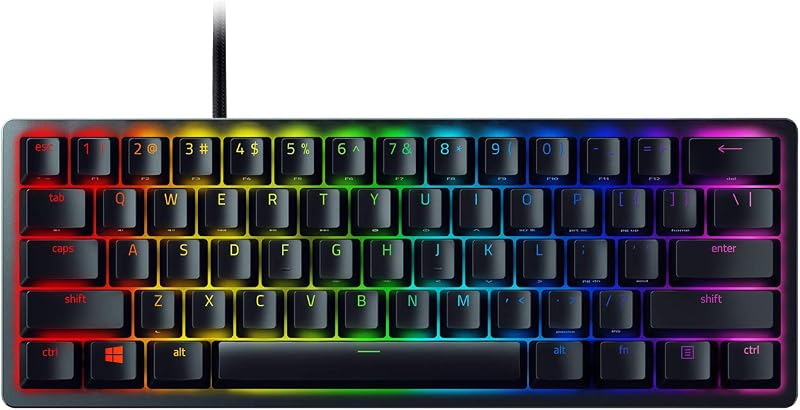
The Razer Huntsman Mini is a streamlined 60 percent gaming keyboard engineered to eliminate desktop clutter while providing near-instantaneous key registration through optical switch technology. By dispensing with the standard numeric keypad, navigation cluster, and dedicated function row, the board concentrates entirely on the primary 61-key block essential for core typing and gaming inputs. It combines that condensed footprint with proprietary linear optical switches that trigger inputs using infrared light beams rather than physical metal contacts. The definitive verdict on this unit is that it offers exceptional speed, rock-solid physical stability, and expansive mouse clearance for competitive players, though general computer users will face an adjustment period due to the necessity of secondary function combinations.
This keyboard is purpose-built for competitive first-person shooter enthusiasts who use low mouse sensitivity and need vast mousepad territory for rapid horizontal aiming sweeps. It is equally suitable for tournament travelers and minimalists who value durable hardware that slides effortlessly into a gear bag. In contrast, professionals who spend their workdays navigating large spreadsheets, programmers who constantly utilize physical arrow keys, and gamers who rely on dedicated macro keys should look elsewhere. Everyday users who prefer a plug-and-play layout without learning secondary key combinations will likely find the condensed format frustrating for standard office workflows.



Razer Huntsman Mini at a Glance
| Feature | Specification |
|---|---|
| Form Factor | 60 percent compact design |
| Switch Type | Razer Linear Optical switch |
| Actuation Distance | 1.0 mm optical light-beam actuation |
| Key Count | 61 keys |
| Keycap Material | Oil-resistant doubleshot PBT |
| Top Plate Construction | Matte aluminum top frame |
| Lighting Ecosystem | Individually backlit Razer Chroma RGB with 16.8 million colors |
| Firmware Enhancements | Razer Snap Tap input prioritization and Razer Hypershift remapping |
| Wired Connection | Detachable corded connection (Micro USB and USB-C noted in listing specifications) |
| Water Resistance | Not water resistant |
Razer Huntsman Mini Linear Optical Switches and Actuation Speed
The defining technical feature of this keyboard is its switch mechanism. Traditional mechanical switches rely on moving metal contact leaves that physically collide to complete an electrical circuit. Over time, physical metal leaves bounce and create electrical noise, necessitating a built-in debounce delay to ensure a single press does not register multiple times. The razer huntsman mini linear optical switches bypass that physical bottleneck by utilizing light-based actuation. When you press a key, the switch stem interrupts an internal infrared light beam, which instantly transmits the keypress signal to your computer at the speed of light.
Beyond the raw physics of optical detection, Razer tuned these linear switches with a shallow 1.0 mm actuation distance. The listing points out that this is 15 to 30 percent shorter than standard linear switches found on competing boards. A travel distance of 1.0 mm means you do not have to bottom out the key to trigger an in-game action; the slightest deliberate downward press registers immediately. In fast-paced games where movement transitions, strafing, and ability activations dictate the outcome of a duel, that millisecond advantage translates directly into sharper physical execution. The keypress feel remains smooth and consistent from the top of the travel down to the bottom housing because there is no tactile bump or mechanical leaf creating resistance.
Because the switch components actuate without physical electrical contacts degrading under repeated friction, optical switches are inherently built for sustained endurance. Gamers who hammer their movement keys during intense play will appreciate that optical switches avoid the debounce degradation that can eventually cause phantom double-clicks on aging mechanical keyboards. For competitive players who prioritize absolute input speed above all else, the optical design fulfills its engineering promise by delivering crisp, instantaneous response on every keystroke.
The 60 Percent Form Factor and Desk Ergonomics
The razer huntsman mini 60 percent layout represents a drastic departure from conventional full-sized and tenkeyless peripherals. By housing only 61 keys, the keyboard discards the number pad, the entire navigation cluster containing Insert, Delete, Home, End, Page Up, and Page Down, the dedicated arrow keys, and the physical F1 through F12 function row. What remains is the core alphanumeric typing block. This radical reduction frees up substantial physical desk real estate, allowing you to position your keyboard and mouse pad closer together to achieve a natural, shoulder-width posture during long sessions.
For tactical shooter players who rely on low mouse sensitivity, this form factor provides a distinct competitive edge. Low-DPI aiming demands wide, sweeping forearm motions across large desk pads. On a full-sized board, wide mouse flicks frequently result in the mouse slamming against the right edge of the keyboard chassis. The compact frame of the Razer Huntsman Mini allows you to position the board straight or angled sharply without intruding on your primary aiming zone. Those setting up high-performance compact battlestations with hardware like an asus rog nuc will find that this keyboard complements a clutter-free, small-footprint gaming desk exceptionally well.
The natural compromise of a 60 percent layout is that discarded functions must be accessed via secondary layers. To use arrow keys, adjust volume, or press F5 to refresh a browser, you must hold down the dedicated Function key while tapping the corresponding alphanumeric key. Razer eases this learning curve by printing the secondary functions clearly along the front-facing side of each keycap. While muscle memory develops quickly for common shortcuts, anyone who frequently edits code or types numbers into financial software will experience a noticeable drop in speed compared to working on a board with dedicated navigation keys.
Build Quality and Doubleshot PBT Keycaps
Portability and compact dimensions mean very little if a keyboard flexes under pressure. The Razer Huntsman Mini addresses rigidity by anchoring its internal switch plate inside a structural matte aluminum top frame. This metal faceplate prevents the body from flexing when pressed forcefully and lends the keyboard a dense, anchored feel on the desk surface despite its light footprint. The classic black matte finish resists visible fingerprint smudges and integrates cleanly with other dark gaming gear, such as desktop speaker systems like the razer nommo v2.
The keycaps represent another significant physical upgrade over standard peripherals. Many keyboards ship with smooth ABS plastic keycaps that wear down within months of heavy use, developing slick, shiny spots from natural skin oils. The razer huntsman mini pbt keycaps utilize high-grade, oil-resistant polybutylene terephthalate molded through a doubleshot process. Doubleshot construction uses two separate layers of plastic fused together: one for the outer shell and another for the translucent legends. This manufacturing technique ensures the lettering can never physically wear off, rub away, or fade over time.
In addition to resisting surface shine and long-term grime buildup, the PBT material features a finely textured, matte surface that provides a tactile grip during play. Even if your fingertips sweat during high-pressure competitive rounds, the subtle grain of the PBT keycaps maintains steady finger positioning without slipping. Underneath the keycaps, the board houses its corded electric connection port, featuring a detachable cable design that makes packing the keyboard into a backpack straightforward and prevents cable bending damage during transport.
Software Customization and Razer Snap Tap Input Handling
Advanced functionality for the Razer Huntsman Mini is unlocked through Razer Synapse 4, which manages macro creation, key assignments, and RGB profiles. A standout addition to the software suite is razer huntsman mini snap tap, a firmware-level input optimization feature designed specifically to sharpen player movement in tactical games. When enabled, Snap Tap evaluates two assigned directional keys—typically A and D used for lateral strafing—and automatically prioritizes the latest key pressed without requiring the user to fully release the prior key. This eliminates the brief dead-zone overlap that occurs during human finger transitions, enabling immediate counter-strafing and instantaneous stopping for perfectly accurate shots.
Razer ships the Snap Tap feature toggled off by default inside Razer Synapse, allowing players to choose whether they wish to activate it based on personal preference and competitive guidelines. Beyond input prioritization, the software provides Razer Hypershift, a powerful macro utility that allows users to assign an auxiliary set of functions to any key. By holding down a chosen Hypershift modifier key, the user effectively doubles the board’s command count, executing complex input sequences, opening applications, or firing custom shortcuts without leaving the main typing cluster.
Visual customization is powered by the Razer Chroma RGB lighting ecosystem. Each of the 61 keys features independent backlighting capable of displaying up to 16.8 million colors. Through Synapse, users can program static backlights, dynamic spectrum cycles, or reactive lighting patterns that pulse on keypress. The Chroma platform also integrates directly with popular video games, Philips Hue home lighting, and hardware from over 30 partners to mirror in-game alerts, health levels, and environmental lighting across your entire gaming space.
Razer Huntsman Mini Pros and Cons
Pros
- Instant 1.0 mm linear optical actuation
- Durable oil-resistant doubleshot PBT keycaps
- Rigid matte aluminum top frame
- Compact 60 percent space-saving layout
- Customizable Snap Tap and Hypershift support
Cons
- No dedicated arrow keys or function row
- Not water resistant against spills
- Wired only with no wireless connectivity
Check Razer Huntsman Mini on Amazon
Who Should Buy the Razer Huntsman Mini
Buy It If
- You play competitive first-person shooters and need maximum desktop space for wide, low-sensitivity mouse sweeps.
- You want lightning-fast linear optical switches with a shallow 1.0 mm actuation distance that registers keypresses at the speed of light.
- You desire long-term durability from oil-resistant doubleshot PBT keycaps that will not develop slick spots or fading lettering over time.
- You travel frequently to tournaments or LAN events and need an ultra-compact keyboard with a detachable cable that fits easily into a travel bag.
Skip It If
- You frequently use dedicated arrow keys, navigation blocks, or numeric keypads for day-to-day work tasks, coding, or data entry alongside an everyday workstation like an intel nuc i7-1260p.
- You need a completely wireless setup for living room gaming, as this peripheral relies on a corded electric connection.
- You work in a spill-prone environment where liquid hazards exist, as this keyboard is explicitly rated as not water resistant.
Razer Huntsman Mini Alternatives Worth a Look
If you are exploring other form factors, alternative switch styles, or wireless layouts before committing to a 60 percent optical board, several notable alternatives address different desk requirements.
15-Zone RGB Illumination

The 15-Zone RGB Illumination keyboard offers a full-sized layout equipped with a metal panel design, whisper-quiet keys, and 25-key anti-ghosting. Unlike the Huntsman Mini, this unit features IP32 water resistance to protect against minor liquid spills. Shoppers who need a quiet, spill-resistant board with dedicated arrow keys and a number pad for everyday office work will find this a practical alternative over an ultra-compact 61-key frame.
AULA F75 Pro Wireless Mechanical

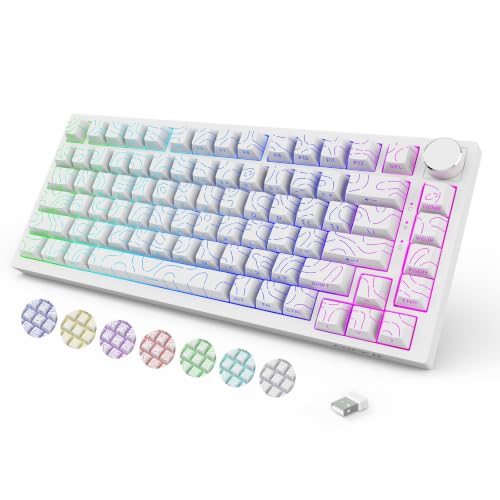
The AULA F75 Pro Wireless Mechanical keyboard is a 75 percent wireless board featuring pre-lubed Reaper mechanical switches, side-printed PBT keycaps, and a dedicated control knob. It supports triple-mode connectivity across 2.4GHz wireless, Bluetooth 5.0, and USB-C wired modes. Readers who want hot-swappable custom mechanical switches, wireless capability, and dedicated arrow keys without jumping all the way to a full-sized footprint should consider this model over the wired-only Huntsman Mini.
75% Compact,RGB Led Light,Bluetooth,2.4GHz&USB-C,Rechargeable,Tactile Switches,Clicky

The 75% Compact,RGB Led Light,Bluetooth,2.4GHz&USB-C,Rechargeable,Tactile Switches,Clicky keyboard is a multi-device wireless mechanical keyboard featuring tactile, clicky sound switches and a rotary knob. It offers hot-swappable switch sockets and rechargeable operation via Bluetooth, 2.4GHz wireless, or USB-C. Shoppers who prefer physical tactile click feedback and multi-device wireless pairing over pure optical linear speed will find this 75 percent model more versatile for cross-platform computing.
Final Verdict
Taking a comprehensive look at the razer huntsman mini specs reveals a peripheral built with a single objective in mind: delivering uncompromising gaming speed in the smallest practical footprint. The combination of linear optical switches with a 1.0 mm actuation point, textured doubleshot PBT keycaps, and a rigid aluminum top plate produces an exceptionally responsive, durable package. When paired with input utilities like Razer Snap Tap and full Chroma RGB integration, it stands as an elite option for competitive players who treat their keyboard strictly as an instrument of speed.
Deciding whether the board fits your desk comes down to how you balance gaming performance against general usability. Anyone asking is razer huntsman mini worth it must consider their tolerance for secondary key layers. If your daily computer routine involves intensive typing, spreadsheet management, or constant arrow key usage, the missing physical keys will introduce friction into your workflow. However, if your primary goal is maximizing mouse mobility and securing instantaneous switch response for competitive gaming, the Razer Huntsman Mini delivers uncompromising performance that justifies its condensed form factor.
FAQ
How does Razer Snap Tap work on the Razer Huntsman Mini?
Razer Snap Tap is an input prioritization feature managed inside Razer Synapse 4. When assigned to two opposing directional keys, such as A and D, Snap Tap ensures that the keyboard immediately registers the most recent key pressed without waiting for the previous key to be completely released. This enables rapid counter-strafing in first-person shooters by cutting out human transition delays. The feature is set to off by default and can be enabled or disabled at any time through the software.
How do you access arrow keys on the Razer Huntsman Mini?
Because the 60 percent layout eliminates dedicated arrow keys, directional navigation is handled through a secondary function layer. By pressing and holding the Fn key located on the lower right side of the keyboard, the I, J, K, and L keys function as Up, Left, Down, and Right arrows. Razer prints these secondary functions on the front side of each keycap to help users navigate without needing to guess.
What makes the linear optical switches different from traditional mechanical switches?
Standard mechanical switches use metal leaves that touch together to complete an electrical circuit, which requires a debounce delay to prevent false signals. Razer linear optical switches use an infrared light beam inside each switch housing. Pressing the key allows the light beam to pass through the switch stem, registering the keypress instantaneously at the speed of light with zero debounce delay and a short 1.0 mm actuation distance.
Can the Razer Huntsman Mini be used without the Razer Synapse software?
Yes, the Razer Huntsman Mini functions as a standard plug-and-play keyboard across compatible operating systems without software running. Basic typing, default RGB backlighting cycles, and factory secondary function layers printed on the keycaps work immediately. However, configuring custom Chroma RGB effects, remapping keys with Razer Hypershift, and toggling the Razer Snap Tap feature require Razer Synapse 4.
Is the Razer Huntsman Mini water resistant?
No, the Razer Huntsman Mini is explicitly classified as not water resistant. The chassis features an open-plate aluminum design that allows liquid to seep directly into the internal switch assemblies and circuit board if a drink is spilled. Users should keep liquids away from the keyboard surface to avoid hardware damage.