
As Amazon Associates, we earn from qualifying purchases. This means we may receive a small commission at no extra cost to you if you click through and make a purchase.
The Dell Latitude 3550 is a 16-inch business notebook engineered for professionals, students, and home-office coordinators who require dependable everyday computing. Configured with a 10-core Intel Core i5-120U processor, 16GB of DDR5 memory, a 512GB solid-state drive, and Windows 11 Pro, this laptop is designed to tackle demanding multitasking schedules without slowing down. In short, it delivers a balanced combination of modern processing power, generous memory, and extensive physical connectivity, making it a reliable workhorse for routine business tasks.
This machine suits knowledge workers, educators, remote specialists, and small business operators who juggle extensive browser tabs, spreadsheets, and video conferences simultaneously. However, shoppers who need high-performance 3D rendering capabilities or a dedicated gaming graphics processor will find the integrated Intel graphics insufficient and should look toward dedicated graphics workstations instead.
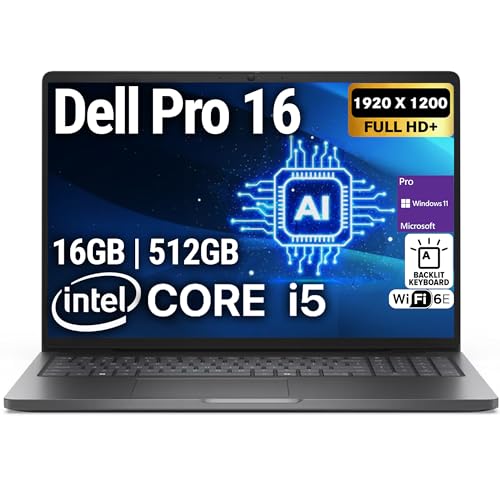



Dell Latitude 3550 at a Glance

| Feature | Specification |
|---|---|
| Processor | Intel Core i5-120U (10 Cores, Up to 5.0 GHz, 12MB Cache) |
| Memory | 16GB DDR5 RAM |
| Storage | 512GB NVMe Solid State Drive |
| Display | 16-inch FHD+ (1920 x 1200) Screen |
| Graphics | Integrated Intel Iris Xe Graphics |
| Operating System | Windows 11 Pro |
| Wireless | Wi-Fi 6E and Bluetooth |
| Webcam and Audio | HD Webcam, Stereo Speakers, Dual-Array Microphone |
| Weight and Color | 4.0 lbs, Black Finish |
| Warranty | 1-Year Manufacturer / 1-Year OEMGenuine Limited Warranty |
Processing and Multitasking Performance
At the core of this system sits the Intel Core i5-120U processor, featuring a hybrid 10-core layout capable of reaching clock speeds up to 5.0 GHz backed by 12MB of cache. This architecture divides workloads across dedicated performance cores and energy-efficient cores, allowing users to run active software in the foreground while background tasks process smoothly. For everyday workplace activities such as formatting massive data sheets, assembling slide decks, and running concurrent communications tools, the Latitude 3550 Core i5 processor delivers steady, responsive performance that keeps pace with fast-paced work routines.
Multitasking relies heavily on available memory, and this configuration provides 16GB of DDR5 RAM. Modern web browsers, enterprise client portals, and productivity suites consume significant memory resources, which quickly bogs down laptops limited to basic memory pools. The 16GB DDR5 memory in this machine allows users to bounce between dozens of open tabs and business software suites without stutter or system freezing. Shoppers curious about Latitude 3550 upgrade RAM possibilities should note that this specific configuration comes pre-upgraded by OEMGenuine, giving buyers ample memory capacity out of the box similar to enterprise models like the dell pro 16 plus.
Internal storage is handled by a 512GB NVMe solid-state drive that ensures rapid operating system boot sequences, quick wake times, and snappy application loading. Moving away from traditional mechanical hard drives to a high-speed SSD eliminates common read and write bottlenecks when accessing local databases or saving complex multi-page files. While 512GB provides generous capacity for standard software installations, business documents, and photo libraries, power users maintaining large uncompressed video archives will want to pair the machine with network storage or external drives for long-term archiving.
Display Quality and Workspace Comfort
The display on this Latitude 3550 laptop features a 16-inch diagonal view with a FHD+ resolution of 1920 by 1200 pixels. The 16:10 aspect ratio provides noticeable vertical space over traditional 16:9 widescreen formats, which is a major benefit when reviewing legal documents, manipulating spreadsheets, or writing lines of code. The extra vertical room reduces the need for continuous scrolling, allowing professionals to view entire document pages and data rows in a single glance.
Evaluating the Dell Latitude 3550 display quality shows that the panel is built with increased brightness and expanded contrast to ensure visual clarity across varied work environments. Under standard overhead office fluorescent lighting or next to home-office windows, text remains crisp and readable, helping prevent eye fatigue during marathon computer sessions. Visual output is driven by integrated Intel Iris Xe Graphics, which easily handles multiple productivity windows, high-definition streaming media, and external video output.
It is important to understand the intended scope of this screen. The display is calibrated for business readability, text sharpness, and general multimedia rather than specialized wide-gamut digital color grading or professional print production. For remote office tasks, school projects, web development, and daily media streaming, the 16-inch panel provides an immersive, uncluttered viewing area that makes working without an external desktop monitor comfortable and productive.
Ports, Docking, and Peripheral Connectivity
A common frustration with modern portable computers is the loss of standard ports, but the Latitude 3550 ports offer a comprehensive layout that supports diverse office accessories. The inclusion of a dedicated RJ-45 Gigabit Ethernet port provides a direct, wired networking option for enterprise desks where wireless congestion interferes with data security or video call quality. Having an Ethernet port built directly into the chassis eliminates the hassle of carrying around fragile USB adapters.
For external display connectivity, the laptop supports both HDMI and DisplayPort protocols, allowing users to hook up external monitors, conference room televisions, or classroom projectors without difficulty. The system also includes standard USB ports for thumb drives, external mouse receivers, and desktop printers, alongside a built-in microSD card reader for importing images or moving data between mobile devices. Users moving from older compact corporate machines like the dell latitude 3410 will appreciate that this larger chassis keeps physical legacy connectivity alive.
Wireless networking is handled by an integrated Wi-Fi 6E module alongside Bluetooth support. Wi-Fi 6E extends wireless communication into the 6 GHz frequency band when paired with a compatible router, resulting in lower network congestion and cleaner latency during critical team calls. Built-in Bluetooth enables quick pairing with wireless accessories such as wireless keyboards, noise-canceling headphones, and wireless presentation remotes.
Keyboard, Audio, and Daily Usability
Data entry and typing comfort are crucial for professional workflows, and this machine features a backlit keyboard that supports accurate typing in dim conference halls, evening workspaces, or darkened home offices. The key switches offer responsive travel and tactile feedback, helping maintain typing speed while reducing fingertip strain during long drafting sessions. The clean black chassis provides a solid, steady typing deck that resists excessive keyboard flex under brisk keystrokes.
Remote collaboration features are well covered by an integrated front-facing HD webcam, stereo speakers, and a dual-array microphone. The dual-microphone array works to capture clean spoken audio while minimizing ambient background chatter, making voices sound distinct during Zoom conferences and Microsoft Teams sessions. The stereo speakers provide clean, intelligible vocal playback for meetings and training videos, matching the practical standards seen on established corporate workhorses like the dell latitude 5420 renewed.
When considering power portability, the listing does not specify exact manufacturer runtime estimates for the Latitude 3550 battery life or the specific watt-hour rating of the internal battery, although it specifies an operating voltage of 15 volts. Because the Intel Core i5-120U utilizes an energy-efficient U-series design, it aims to conserve battery during document processing, but regular travelers should still carry their charging brick for full workdays away from wall outlets. Weighing in at 4.0 pounds, the laptop balances its generous 16-inch display footprint with practical mobility for carrying between meeting rooms or commuting.
Operating System, Security, and Business Longevity
Configured directly with Windows 11 Pro, the Latitude 3550 for business provides immediate access to essential enterprise-level operating tools. Windows 11 Pro includes BitLocker drive encryption to safeguard confidential corporate data, remote desktop access for off-site troubleshooting, and advanced group policy controls necessary for managing company networks. These features make deploying this notebook into established business environments straightforward, ensuring security policies are enforced without needing expensive operating system upgrades.
Reviewing the Dell Latitude 3550 specs shows that the hardware balance is designed for lasting multi-year productivity. The pairing of a modern 10-core Intel Core i5 processor with 16GB of DDR5 RAM ensures the system will comfortably handle upcoming software releases, expanded browser resource requirements, and evolving business platforms. Unlike gaming-oriented notebooks such as the laptop acer nitro, this laptop avoids loud cooling fans and high power consumption, focusing instead on whisper-quiet operation and steady business reliability.
Warranty coverage includes a 1-year manufacturer warranty alongside a 1-year OEMGenuine limited warranty, covering the upgraded memory and storage components. This gives business purchasers peace of mind, knowing that both the core chassis and the pre-installed hardware upgrades carry warranty protection against defects during the initial year of deployment.
Dell Latitude 3550 Pros and Cons
Pros
- Fast 10-core Intel Core i5-120U processor
- Generous 16GB DDR5 RAM for smooth multitasking
- Spacious 16-inch FHD+ 16:10 workspace display
- Built-in RJ-45 Ethernet and display ports
- Pre-installed with Windows 11 Pro
Cons
- Integrated graphics unsuited for heavy 3D rendering
- Listing does not specify battery run time
- Weighs 4.0 pounds which limits ultra-light mobility
Check Dell Latitude 3550 on Amazon
Who Should Buy the Dell Latitude 3550
Buy It If
- You want an expansive 16-inch FHD+ 16:10 workspace that minimizes vertical scrolling when working with documents.
- You need 16GB of DDR5 memory and a 10-core Intel Core i5 processor for smooth multitasking across office applications.
- You rely on integrated physical ports like RJ-45 Ethernet, HDMI, and USB without wanting to carry external dongles.
- You require Windows 11 Pro for BitLocker drive encryption and corporate network management out of the box.
Skip It If
- You need a dedicated graphics processing unit for intense 3D modeling, modern gaming, or professional video rendering.
- You require an ultra-lightweight laptop weighing under 3 pounds for constant one-handed mobile travel.
- You prefer an entirely factory-original configuration without third-party vendor memory or storage upgrades.
Dell Latitude 3550 Alternatives Worth a Look
Buyers exploring portable computing options across different sizes, configurations, and intended uses can consider several alternatives on Amazon depending on their specific budget and workflow priorities.
2026-2027 edition

The 2026-2027 edition is an HP 14 laptop computer powered by an Intel N150 processor with 4GB of DDR5 RAM, 128GB SSD storage, Windows 11 with Microsoft 365, and 1 TB of cloud storage. This compact machine is suited for students or basic document writers who want a lighter 14-inch form factor and rely mostly on cloud tools rather than heavy local multitasking.
Supports 1TB TF Card Expansion

The Supports 1TB TF Card Expansion notebook is a gray 15.6-inch laptop featuring an Intel N4020 processor, 4GB of DDR4 RAM, 128GB of eMMC storage, a FHD LCD display, and Windows 11. It provides an option for home office users with very light computing needs who prioritize memory card expansion and basic web browsing over multi-core performance.
Copilot AI

The Copilot AI laptop is a natural silver HP 2026 Essential notebook featuring a lightweight portable design, an LED display, an Intel processor, 128GB of storage, Windows 11, Office 365, and 1TB of cloud storage. Shoppers seeking a portable everyday computer focused on cloud-assisted applications and lightweight office software will find it a simpler alternative to the Dell.
Final Verdict
In this Dell Latitude 3550 review, the laptop establishes itself as a capable, no-nonsense desktop replacement for everyday business and productivity work. By integrating an efficient 10-core Intel Core i5-120U processor with 16GB of responsive DDR5 memory and a 512GB NVMe SSD, it sidesteps the performance slowdowns that often plague lower-spec office machines. The inclusion of a 16-inch FHD+ 16:10 display, a backlit keyboard, and legacy ports like RJ-45 Ethernet makes it a reliable daily companion for corporate and home-office desks.
When asking whether the Latitude 3550 is worth it, the answer is clear for professionals, remote workers, and students who value stable multitasking, Windows 11 Pro security, and dependable connectivity over flashy multimedia extras. While creative professionals and gamers needing dedicated GPU muscle should look elsewhere, this Dell Latitude configuration delivers a practical, well-rounded business package that handles everyday computing with confidence.
FAQ
Does the Dell Latitude 3550 come with Windows 11 Pro?
Yes, this configuration of the Dell Latitude 3550 comes pre-installed with Windows 11 Pro, offering business management tools like BitLocker encryption and domain connectivity.
What processor is included in this Dell Latitude 3550 configuration?
This laptop is powered by an Intel Core i5-120U processor featuring 10 cores, up to 5.0 GHz maximum frequency, and 12MB of cache.
How much memory and storage does the laptop have?
The machine features 16GB of high-speed DDR5 RAM and a 512GB NVMe solid-state drive, pre-upgraded by OEMGenuine.
Can I connect an external monitor to the Dell Latitude 3550?
Yes, the notebook supports external displays directly through built-in HDMI and DisplayPort compatibility without needing external dongles.
What is the battery life of the Dell Latitude 3550?
The listing does not specify exact battery life hours or capacity, though it notes a 15-volt operating level and utilizes a power-efficient Intel Core i5 U-series processor.


