
As Amazon Associates, we earn from qualifying purchases. This means we may receive a small commission at no extra cost to you if you click through and make a purchase.
The Dell Latitude 3410 is a 14-inch business notebook powered by an Intel Core i5-10210U processor, 8GB of DDR4 memory, and a 256GB solid-state drive running Windows 10 Pro. In this dell latitude 3410 review, our assessment shows that it serves as a dependable, no-frills workstation designed to handle administrative routines, web-based tools, and remote communication without unnecessary complications.
This laptop suits office workers, remote employees, and students who need dependable performance for spreadsheets, text documents, and browser tabs during their daily routine. Conversely, creative professionals who need high color accuracy and power users who handle complex 3D rendering should look elsewhere due to the modest 1366 x 768 resolution and integrated graphics. Shoppers exploring Dell’s business lineup can also check our latitude 3550 laptop evaluation to see how newer generations compare.



Dell Latitude 3410 at a Glance

| Feature | Specification |
|---|---|
| Screen Size and Resolution | 14 inches, HD (1366 x 768) |
| Processor | Intel Core i5-10210U 10th Gen (1.6 GHz quad-core) |
| System Memory | 8GB DDR4 SDRAM |
| Internal Storage | 256GB SSD (Serial ATA) |
| Graphics Coprocessor | Integrated Intel UHD Graphics |
| Operating System | Windows 10 Pro (English/French/Spanish) |
| Dimensions | 13 inches long x 9.7 inches wide x 1 inch thick |
| Weight | 3.5 pounds |
| Connectivity & Peripherals | Wi-Fi, Bluetooth, Ethernet, HDMI, Webcam, HD Audio |
| Chassis Color | Black |
Core Processing and Office Performance
At the center of this machine is an Intel Core i5-10210U processor from the 10th generation family. Operating with four physical cores and a base clock speed of 1.6 GHz, this processor handles daily administrative demands smoothly. When evaluating the dell latitude 3410 performance across web research, online management portals, and everyday documents, the quad-core architecture maintains steady operation without frustrating delays or thermal throttling under typical workloads.
Relying on the dell latitude 3410 i5 10th gen configuration ensures that daily office software boots up rapidly and responds cleanly to typical commands. The system comes pre-configured with Windows 10 Pro, which includes dedicated automatic backup software and business management features suitable for workplace networks. Because it uses integrated Intel UHD Graphics, graphical tasks share memory with the system rather than utilizing a discrete GPU. This setup keeps the laptop quiet and power-efficient, even though it is not built for 3D modeling or modern gaming.
For users asking if the dell latitude 3410 for office work meets standard professional expectations, the processor provides ample computing headroom. Composing reports, balancing ledgers, hosting voice calls, and managing extensive email archives happen seamlessly. Power users managing complex local simulations will want higher tier silicon, but for standard documentation and multitasking, the processing package remains entirely capable.
Display Clarity and Visual Workspace
The screen represents the most noticeable hardware compromise on this notebook. Measuring 14 inches diagonally, the display outputs an entry-level HD resolution of 1366 x 768 pixels. Examining the dell latitude 3410 display quality reveals that while it is adequate for reading text, entering data, and navigating web forms, it lacks the crispness of Full HD panels. Individual pixels are visible upon closer inspection, and text edges appear softer than on screens with higher pixel densities.
The 768p resolution also restricts your total on-screen workspace. While single-window writing and full-screen browsing present no operational problems, side-by-side window multitasking feels somewhat constrained. Comparing two spreadsheets side by side or keeping a web reference open next to a text document requires frequent horizontal scrolling or window minimizing.
Fortunately, the built-in HDMI port allows you to bypass the built-in panel when working at a stationary desk. Connecting an external display such as the dell u3225qe ultrasharp 32in 4k monitor gives you expansive desktop real estate for complex multitasking while letting the laptop function as a quiet computing hub. Utilizing an external monitor effectively solves the spatial limits of the internal 768p screen.
Memory Configuration and Storage Capacity
System responsiveness depends heavily on memory bandwidth and storage speed. This model includes 8GB of DDR4 SDRAM, providing sufficient breathing room for modern desktop workflows. With 8GB installed, you can keep multiple browser tabs active, run communication apps in the background, and edit documents without immediate memory pressure or severe system slowdowns.
Internal storage is provided by a 256GB solid-state drive with a Serial ATA interface. The SSD delivers significant speed advantages over traditional spinning drives, enabling fast boot times into Windows 10 Pro and rapid file access. While 256GB offers plenty of space for the operating system, corporate tools, and standard documents, it can fill up if you store extensive offline video libraries. Regarding dell latitude 3410 upgrade options, the listing does not specify additional internal drive bays or maximum RAM capacity, so buyers should plan their workflow around the factory 8GB RAM and 256GB SSD configuration.
Reviewing the dell latitude 3410 specs confirms that combining 8GB of DDR4 memory with a solid-state drive creates a dependable everyday workstation. For users working within cloud environments like Microsoft 365 or Google Workspace, the local 256GB capacity is more than adequate for cached files and routine project archives.
Chassis Form Factor and Connectivity
The laptop sports a functional black chassis built for durability rather than luxury. Measuring 13 inches long, 9.7 inches wide, and 1 inch thick, the casing feels sturdy in hand. Weighing 3.5 pounds, it remains portable enough to carry in a backpack or shoulder bag between meetings, home, and the office without causing significant fatigue.
Peripheral connectivity is one of the machine’s primary advantages. It supports external displays via HDMI, as well as mice, keyboards, storage drives, and printers via Wi-Fi, Bluetooth, and a dedicated Ethernet jack. Having a physical Ethernet port is especially valuable in corporate environments where wireless networks are crowded or unstable. A built-in webcam and HD audio hardware ensure you can participate in online conferences without needing external peripherals.
Buyers frequently inquire about dell latitude 3410 battery life during mobile work sessions; however, the listing does not specify battery capacity in watt-hours or provide estimated run times. Actual battery longevity will vary depending on display brightness, network usage, and background workloads. Shoppers interested in comparing different business configurations can explore our review of the dell latitude 5420 renewed to evaluate alternative Latitude models.
Dell Latitude 3410 Pros and Cons
Pros
- Quad-core 10th Gen Intel Core i5 processor
- Pre-installed Windows 10 Pro with backup software
- Responsive 8GB DDR4 system memory
- Fast 256GB solid-state drive storage
- Versatile connectivity including HDMI, Ethernet, and Wi-Fi
Cons
- Entry-level 1366 x 768 HD resolution screen
- Listing does not specify battery capacity or runtime
- Relatively thick one-inch chassis profile
Check Dell Latitude 3410 on Amazon
Who Should Buy the Dell Latitude 3410
Selecting the right laptop requires matching hardware capabilities to your daily workflow. The Dell Latitude 3410 focuses strictly on core productivity rather than high-end multimedia features.
Buy It If
- You need a dependable work computer for document creation, web portals, and office administration.
- You want a proven quad-core Intel Core i5 processor paired with 8GB of RAM and a fast 256GB solid-state drive.
- You rely on Windows 10 Pro features, multilingual interface options, and included backup software.
- You frequently dock at a desk using external monitors, Ethernet networking, and standard desktop peripherals.
Skip It If
- You need a Full HD or 4K screen for photo editing, graphic arts, or high-density multitasking.
- You require heavy 3D rendering power or dedicated graphics, where a high-performance system like the dell pro 16 plus is much more suitable.
- You want a slim ultrabook profile rather than a standard one-inch thick business chassis.
Dell Latitude 3410 Alternatives Worth a Look
Evaluating the dell latitude 3410 vs alternatives provides helpful perspective on how different hardware balances memory, storage, and display quality.
2026-2027 edition

The 2026-2027 edition is an HP 14 laptop computer powered by an Intel N150 processor, 4GB of DDR5 RAM, and a 128GB SSD, running Windows 11 with Microsoft 365 and 1 TB of cloud storage included. While it features newer DDR5 memory and bundled cloud storage, it includes only 4GB of RAM and half the local storage space of the Latitude 3410. Shoppers who prioritize bundled Microsoft 365 services over local multitasking capacity may find this HP alternative appealing.
Supports 1TB TF Card Expansion
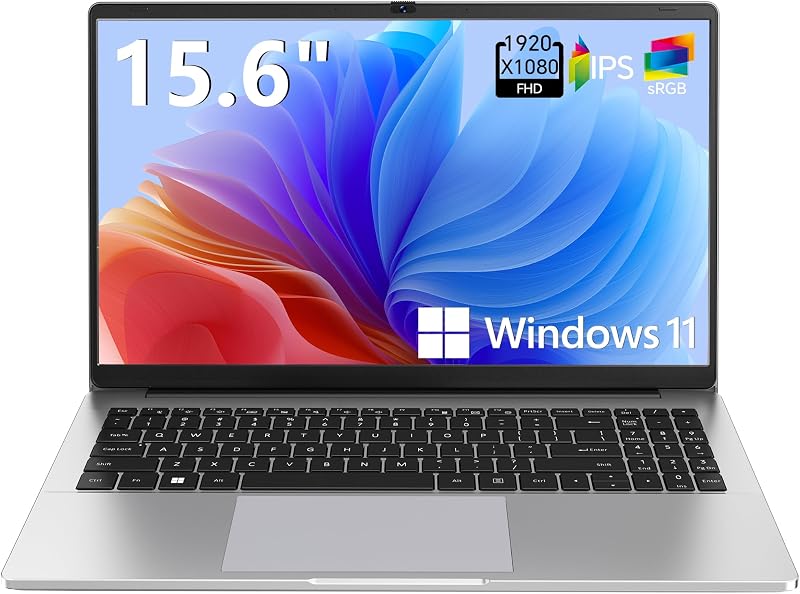
The Supports 1TB TF Card Expansion notebook is a gray 15.6-inch laptop equipped with an Intel N4020 processor, 4GB of DDR4 RAM, 128GB of eMMC storage, and Windows 11. Its primary advantage over the Latitude 3410 is its larger Full HD display and expandable TF card storage option up to 1TB. Users who insist on a 1080p screen for viewing media and documents, and who do not mind an entry-level N4020 chip, should consider this model.
Copilot AI

The Copilot AI laptop is a natural silver HP 2026 Essential laptop featuring an Intel processor, 128GB of storage, an LED display, Windows 11, Office 365, and 1TB of cloud storage in a lightweight build. It caters to users who want modern AI integration and pre-bundled cloud office software. Those who value bundled cloud tools in a portable package might prefer it, while users who need 8GB of RAM and a 256GB local SSD will prefer the Latitude.
Final Verdict
Deciding if the dell latitude 3410 is worth it depends directly on your daily computing priorities. As an office productivity tool, it succeeds by pairing an Intel Core i5 quad-core processor with 8GB of DDR4 memory and a 256GB solid-state drive under Windows 10 Pro. It handles everyday office tasks, document processing, and virtual meetings reliably while maintaining dependable network connectivity via Wi-Fi and physical Ethernet.
The clear trade-off is the 1366 x 768 HD display, which lacks the sharpness and workspace of higher-resolution alternatives. However, when paired with an external monitor via HDMI or used strictly for document creation and web portals, the laptop performs its duties reliably. For buyers seeking a practical, business-ready workhorse for administrative tasks, the Dell Latitude 3410 remains a solid, dependable option.
FAQ
What operating system comes on the Dell Latitude 3410?
The laptop comes pre-installed with Windows 10 Pro supporting English, French, and Spanish languages, and it includes integrated automatic backup software.
What is the screen resolution on the Dell Latitude 3410?
The 14-inch display has an HD resolution of 1366 x 768 pixels, which is sufficient for basic web browsing and office documents.
Can the Dell Latitude 3410 connect to an external monitor?
Yes, the notebook features an HDMI output that allows you to connect an external monitor, projector, or TV for an expanded workspace.
What is the battery life of the Dell Latitude 3410?
The listing does not specify the battery capacity or runtime hours. Battery life will vary depending on display brightness and active workloads.
Does the Dell Latitude 3410 include a webcam for video meetings?
Yes, the computer includes a built-in webcam and HD audio hardware suitable for video conferences and online calls.
Is the Dell Latitude 3410 suitable for modern 3D gaming?
No, the system utilizes integrated Intel UHD Graphics rather than a dedicated graphics card, making it suitable for office software rather than demanding 3D gaming.


