As Amazon Associates, we earn from qualifying purchases. This means we may receive a small commission at no extra cost to you if you click through and make a purchase.
The Dockteck 7-in-1 USB-C Hub is a compact aluminum connectivity adapter designed to turn a single modern Type-C port into a full desktop workstation connection. Featuring 4K video output at a smooth 60Hz refresh rate, 100W Power Delivery pass-through, a 1Gbps RJ45 Ethernet port, dual SD and microSD card slots, and two USB 3.0 data ports, this dongle addresses the port limitations found on slim ultrabooks and tablets. For remote professionals and creative multitaskers seeking dependable desktop docking without unnecessary bulk, this multiport adapter delivers stable day-to-day utility across all vital workstation categories.
This dockteck 7 in 1 multiport adapter suits office workers, remote employees, students, and casual creators who need to connect external monitors, wired internet, flash drives, and camera memory cards through one lightweight piece of hardware. It integrates smoothly with modern hardware setups, whether you are running a workstation laptop or pairing accessories with portable tablets like the 2026 ipad air 13 inch. However, users who require dual external display support, multi-gigabit networking, or downstream USB-C data ports for high-speed portable solid-state drives should look elsewhere, as those specific features are not supported on this hub.
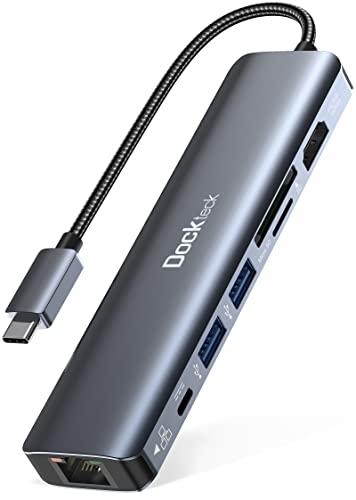



Dockteck 7-in-1 USB-C Hub at a Glance

| Feature | Specification |
|---|---|
| Hardware Interface | USB Type-C |
| HDMI Video Output | Up to 4K at 60Hz |
| USB Power Delivery | 100W input (delivers up to 92W pass-through charging) |
| Ethernet Connectivity | 1x RJ45 Gigabit Ethernet port (up to 1Gbps) with LED lights |
| USB Data Ports | 2x USB-A 3.0 (up to 5Gbps, 5V 1.6A) |
| Card Reader Interface | 1x SD card slot, 1x TF / Micro SD card slot (UHS-I 104 MB/s, simultaneous reading) |
| Enclosure Material | Aluminum |
| Dimensions and Weight | 5.36 x 1.34 x 0.55 inches; 92 grams |
| Operating System Support | Windows 11, 10, 8, 7, Vista, XP; macOS 10.6 or later; iPadOS; Linux 2.6.14 |
| Warranty and Service | 24-month warranty with 24/7 customer service |
HDMI Video Output and Display Performance
The standout feature of this dockteck usb c adapter 4k 60hz configuration is its HDMI port capability. Many compact USB-C adapters limit 4K video resolution to a sluggish 30Hz refresh rate, which introduces noticeable cursor lag and stuttering during standard window management. This adapter outputs up to 3840×2160 resolution at 60Hz, providing the fluid visual experience expected from modern desktop monitors, 4K televisions, and productivity displays.
Achieving 60Hz at 4K resolution requires that the host device supports DisplayPort 1.4 Alternate Mode over its USB-C port. When connected to compatible machines, text appears exceptionally sharp, media playback remains stutter-free, and navigating complex spreadsheets or timeline editors feels smooth. The listing notes that picture sharpness and sound reproduction transfer directly over the HDMI link, making it a viable single-cable screen expansion solution for presentations and home office desks alike.
Shoppers searching for the best usb c hub with 4k 60hz support should keep in mind that this unit features exactly one HDMI output. It does not include a DisplayPort connection or a secondary video port. Users who need to power two or more independent external displays will need a larger multi-display docking station or a device with multiple video-capable outputs.
Power Delivery and Pass-Through Charging
Managing battery levels while keeping multiple accessories active is a core challenge for single-port computers. The dockteck hub 100w power delivery port accepts standard USB-C chargers up to 100W. The adapter routes up to 92W of continuous charging directly to the host laptop or tablet, while retaining approximately 8W to power its internal controller board, LED indicators, and connected peripherals.
This 92W throughput is particularly effective when using the dockteck usb c hub for macbook pro setups, Dell XPS machines, and other power-hungry laptops. Instead of watching your battery drain during demanding video rendering or continuous video conferencing, the hub keeps your system replenished when attached to a reliable high-output charger, such as an official macbook charger apple brand power brick or a comparable USB-C supply.
A crucial technical detail to understand is that the USB-C port on this hub functions exclusively for power input. According to the product specifications, this port does not support data transfer or video transmission. You cannot plug a USB-C flash drive, external Type-C SSD, or secondary Type-C monitor into this port. All data interactions must occur through the USB-A ports or card slots.
Wired Networking and Gigabit Ethernet Stability
Wireless networks are convenient, but they remain prone to signal dropouts, latency spikes, and interference from household walls or competing appliances. The integrated RJ45 port on this hub delivers a dockteck usb c hub ethernet speed of up to 1Gbps (1000 Mbps). This wired pipeline ensures responsive video meetings, smooth cloud backups, and stable online gaming sessions where wireless connections might falter.
The Ethernet jack includes integrated LED status lights that provide immediate visual feedback regarding connection validity and active data traffic. This small hardware detail eliminates guesswork when troubleshooting office local area networks or home routers, as you can verify active link status with a quick glance at the side of the dongle.
The networking controller is designed for plug-and-play operation across major platforms, including modern Windows installations, macOS, iPadOS, and older legacy operating systems dating back to Windows XP and Linux 2.6.14. No separate software setup or disc installation is needed to establish an instant hardwired network connection.
Data Transfer Speeds and Dual Card Reading
Peripheral connectivity is handled by two USB-A 3.0 ports alongside an integrated dockteck hub dual card reader. The two USB-A ports transfer data at rates up to 5Gbps (5000 megabits per second), allowing quick transfers of documents, audio files, and photo libraries between legacy thumb drives, external mechanical hard drives, and your host computer.
These USB 3.0 ports share a maximum electrical output of 5V at 1.6A. While this provides ample juice to run standard computer peripherals such as optical mice, wireless dongles, external keyboards, and self-powered drives, it is not built to charge external smartphones or run multiple unpowered, high-draw portable hard drives at the same time.
For mobile creators and photographers, the dockteck 7 in 1 specs include dedicated slots for full-sized SD cards and TF (microSD) cards. Both slots operate on the UHS-I bus standard with read speeds reaching up to 104 MB/s. Crucially, the hub supports simultaneous reading and writing across both slots at the same time. While dedicated single-purpose devices like the apple usb-c to sd card reader require swapping cards individually, this hub lets you offload drone footage and camera photos together without disconnecting hardware.
Dockteck 7-in-1 USB-C Hub Pros and Cons
Pros
- Smooth 4K video output at 60Hz
- Up to 92W pass-through laptop charging
- Gigabit Ethernet with connection indicator LEDs
- Simultaneous SD and microSD card reading
- Durable aluminum casing weighing 92 grams
Cons
- No downstream USB-C data ports
- Limited to a single external display
- Card readers capped at UHS-I speeds
Check Dockteck 7-in-1 USB-C Hub on Amazon
Who Should Buy the Dockteck 7-in-1 USB-C Hub
Buy It If
- You need a stable single-monitor setup with crisp 4K visual output running at a full 60Hz.
- Your home or office workflow requires an uninterrupted 1Gbps wired Ethernet connection for calls and uploads.
- You manage media across both SD and microSD formats and want to read both cards simultaneously.
- You want a durable aluminum hub that supports up to 92W laptop charging pass-through in a lightweight 92-gram body.
Skip It If
- You rely on modern USB-C flash drives or portable SSDs, since the hub features no downstream USB-C data ports.
- Your desk requires dual or triple external monitor outputs from a single hub connection.
- You require professional high-bandwidth UHS-II card transfer speeds exceeding 104 MB/s.
Dockteck 7-in-1 USB-C Hub Alternatives Worth a Look
While the Dockteck adapter hits a practical middle ground for typical single-screen remote workstations, shoppers with specific port priorities or lighter travel needs may prefer an alternative configuration.
85W Max PD Anker 7-in-1 Hub

The 85W Max PD Anker hub provides 4K@60Hz HDMI video, two USB 3.0 ports, SD/TF card slots, and up to 85W Power Delivery pass-through, but swaps out the RJ45 Ethernet port in favor of a dedicated USB-C data port. For comparison with expanded multi-port options, our look at the anker 555 8-in-1 covers similar hardware designs.
Shoppers who rely exclusively on reliable Wi-Fi networks and own newer USB-C storage drives will appreciate the added Type-C data connection on this Anker alternative, though laptop charging pass-through is capped slightly lower at 85W.
Aluminum FORIDA USB Hub 3.0

The Aluminum FORIDA USB Hub 3.0 is a 7-port fast laptop multiport splitter focused strictly on USB connectivity. Unlike the Dockteck unit, it does not provide HDMI video output, memory card readers, or high-wattage power pass-through charging.
This alternative is intended specifically for users who already have display output sorted out and simply need to connect an array of traditional USB accessories, such as multiple keyboards, flight sticks, printers, and flash drives, to a single Type-C port.
Acer 5-in-1 USBC Splitter Docking Station

The USBC Splitter Docking Station from Acer is a compact 5-in-1 adapter featuring 4K@60Hz HDMI 2.0, 100W Power Delivery, a USB-C data port, alongside USB-A 3.0 and USB-A 2.0 connections. It omits both Ethernet connectivity and memory card slots to keep its footprint minimal.
Users who travel frequently with an iPad Pro or thin laptop and only require a single monitor hookup, standard power delivery, and mixed USB-A and USB-C peripheral ports will find this streamlined adapter a good match.
Final Verdict
When asking if the dockteck 7 in 1 worth it question holds up for everyday users, the hardware makes a strong case. By prioritizing 4K resolution at 60Hz instead of cutting corners with 30Hz video, Dockteck ensures that your external display looks sharp and responds fluidly. Paired with reliable 1Gbps wired internet, simultaneous dual card reading, and up to 92W of clean pass-through charging, it satisfies the everyday connectivity demands of most modern remote workers.
The main trade-offs are the total absence of downstream USB-C data ports and the restriction to a single display output. If your desk relies on modern Type-C flash drives or dual monitors, you will quickly encounter its limits. But for anyone looking to build a clean, reliable, single-screen workstation powered through an aluminum dongle backed by a 24-month warranty, the Dockteck 7-in-1 USB-C Hub is a practical, dependable pick.
FAQ
Does the Dockteck 7-in-1 USB-C Hub support 4K resolution at 60Hz?
Yes, the HDMI port supports resolutions up to 4K (3840×2160) at a 60Hz refresh rate. To achieve this speed, your host laptop, tablet, or PC must support DisplayPort 1.4 Alternate Mode over its USB-C port.
Can I use the 100W USB-C port to transfer files from a hard drive?
No, the USB-C port on this hub is strictly designated for Power Delivery input. It does not support data transfer or video transmission. All data devices must connect to the two USB-A 3.0 ports or the memory card slots.
Can the SD and microSD card slots be used at the same time?
Yes, the Dockteck hub explicitly supports simultaneous reading and writing across both the SD and TF (microSD) slots. You can access files on both memory cards concurrently without needing to eject one to use the other.
How much charging power reaches my laptop when using a 100W charger?
When connected to a 100W USB Power Delivery wall charger, the hub delivers up to 92W of continuous charging power to the host computer. The remaining power is reserved to run the hub’s internal chips, network port, and connected USB devices.
Does the Gigabit Ethernet port require manual driver installation?
The listing states that the hub is plug and play across supported operating systems, including Windows, macOS, iPadOS, and Linux. Most modern systems will detect the 1Gbps network connection automatically without requiring manual driver downloads.