As Amazon Associates, we earn from qualifying purchases. This means we may receive a small commission at no extra cost to you if you click through and make a purchase.
The UGREEN MaxiDok Thunderbolt 5 is a flagship desktop expansion hub engineered around Intel’s next-generation connectivity standard, bringing unprecedented data transfer throughput and high-density port selection to demanding computing environments. Serving as an all-in-one powerhouse, the dock provides up to 120Gbps of bi-directional or boosted bandwidth, integrated internal solid-state drive expansion, and extensive video routing capabilities to modernize professional workstations. For creative professionals, software engineers, and power users who routinely shuffle terabytes of media or run multiple high-refresh displays, this unit delivers an extraordinary single-cable solution that easily eliminates desktop cable clutter and peripheral bottlenecks.
This hub is tailor-made for owners of cutting-edge hardware, including modern Apple silicon laptops and top-tier Windows machines equipped with Thunderbolt 4 or Thunderbolt 5 controllers. However, everyday office workers who only need to plug in a standard wireless mouse, keyboard, and an ordinary 1080p display will find this level of engineering far beyond their daily requirements. If your workflow does not actively leverage multi-gigabit data pipelines, high-resolution multi-monitor configurations, or internal storage pooling, more modest USB-C hubs will comfortably manage your routine tasks without the dedicated cooling and power overhead demanded by this hardware.




UGREEN MaxiDok Thunderbolt 5 at a Glance
| Attribute | Detail |
|---|---|
| Host Connection Bandwidth | Intel-certified Thunderbolt 5 up to 120Gbps |
| Total Port Selection | 17 ports across front and rear panels |
| Internal Storage Expansion | M.2 NVMe PCIe Gen4x4 slot (2230 to 2280, up to 8TB) |
| External Display Output | Dual or single 8K at 60Hz, triple independent displays on Windows |
| System Power Capacity | 240W total system power |
| Host Laptop Charging | Up to 140W dedicated charging power |
| Wired Networking | 2.5GbE RJ45 Ethernet port |
| Card Reader Interfaces | SD 4.0 and TF 4.0 high-speed card slots |
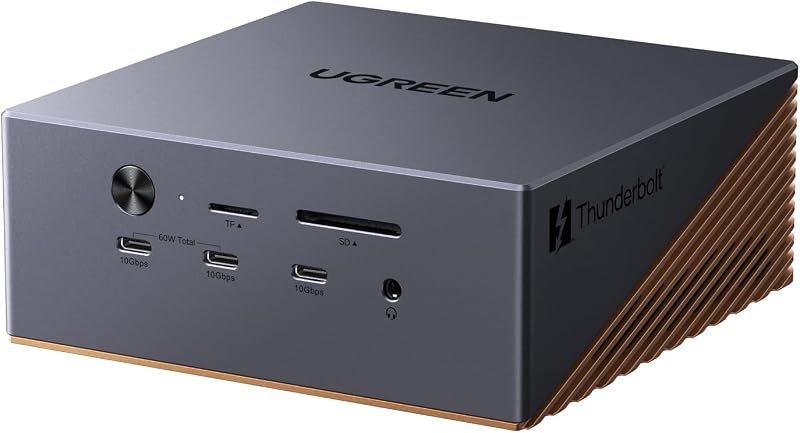
| Chassis and Cooling | Bronze aluminum unibody with 60mm ultra-thin AI smart fan |
| Operating System Requirements | Windows 10 or later; macOS 15 or later for Mac platforms |
Bandwidth and Data Throughput Capabilities
The defining hallmark of the ugreen maxidok thunderbolt 5 docking station is its integration of Intel-certified Thunderbolt 5 technology, which delivers a staggering baseline performance ceiling reaching up to 120Gbps. Compared to previous-generation Thunderbolt 4 hubs that maxed out at 40Gbps, this standard triples the available communication pipe between your host machine and external hardware. The practical benefit of this massive bandwidth pipe is the complete removal of data congestion when concurrently driving multiple high-resolution screens, transferring uncompressed video footage, and reading high-speed external storage drives.
To complement the host connection, the rear panel includes two downstream Thunderbolt 5 ports capable of daisy-chaining additional next-generation peripherals or running dedicated high-throughput accessories. Alongside these high-tier connections, the hub integrates six dedicated 10Gbps USB interfaces split evenly between three USB-A ports and three USB-C ports. This layout ensures thumb drives, audio interfaces, and external drive enclosures operate at their maximum rated USB 3.2 Gen 2 speeds without cannibalizing bandwidth required by your primary display monitors.
For content creators working with camera media, the front plate features integrated SD 4.0 and TF 4.0 card slots. These slots provide substantial speed uplinks for photographers and videographers ingesting heavy media straight from modern camera cards. While earlier docks forced compromises between display refresh rates and fast data bus access, the ugreen maxidock thunderbolt 5 specs demonstrate how a single upstream link can comfortably handle heavy concurrent pipelines without stuttering or dropped frames.
Internal M.2 NVMe Storage Integration
A standout capability that separates this device from generic hubs is its internal storage expansion bay, establishing it as a premier thunderbolt 5 docking station with nvme support. Underneath the chassis lies a dedicated PCIe Gen4x4 M.2 interface capable of housing drives from compact 2230 cards up to full-length 2280 format sticks, supporting storage volumes up to 8TB. Having a fast drive enclosure housed inside the desktop dock removes the need for loose external drive enclosures dangling from cables around your workspace. Users who appreciate clean storage integrations might also remember the ugreen mac mini 11-in-1 docking station with ssd expansion, but this new dock elevates the storage interface to Gen4x4 speeds over a 120Gbps bus.
Physical drive installation accommodates M.2 NVMe SSDs equipped with heatsinks, provided the heatsink dimensions do not exceed a height of 12 millimeters and a width of 24 millimeters. This clearance allows users to install performance drives that require passive cooling without worrying about clearance jams inside the compartment. The manufacturer notes that certain drive configurations are incompatible, though the listing does not specify every excluded drive model beyond confirming that heatsinks must adhere to strict size ceilings. When populated with a high-grade drive, the ugreen maxidock thunderbolt 5 ssd slot functions as an exceptionally fast scratch disk for video rendering, local file processing, or vast project archives.
Having your primary backup volume or high-speed active project library hardwired into your desk hub fundamentally streamlines mobile computing. When you disconnect your laptop to attend a meeting or commute, you undock a single cable rather than unmounting multiple external drives. Upon returning, plugging back in immediately mounts your massive 8TB storage array alongside your monitors, wired network, and desktop accessories in one seamless step.
Multi-Monitor Video Output and Visual Resolution
Visual output is an area where the ugreen thunderbolt 5 dock 8k truly shows its architectural muscle, particularly for setups requiring extreme pixel density and ultra-sharp fidelity. On compatible Windows workstations, the dock supports up to triple independent displays simultaneously by combining its dual downstream Thunderbolt 5 ports with the dedicated DisplayPort connection. Users can drive a single 8K monitor at 60Hz or power dual 8K screens at 60Hz, providing expansive digital real estate for complex video editing timelines, CAD designs, and multi-window analytical dashboards.
For Apple hardware environments, the display behavior operates according to platform capabilities. When evaluating the ugreen maxidock thunderbolt 5 for mac, the dock supports dual external displays, natively accommodating MacBook models driven by M4, M4 Pro, M4 Max, as well as M1, M2, and M3 Pro and Max chips, alongside the Mac mini M4 Pro. Apple users must note that macOS 15 or later is required to utilize this dock properly. The hardware handles high-resolution dual-screen output smoothly across supported Mac configurations, making it a compelling centerpiece for Mac studio suites.
Display planning requires careful attention to the specific port configurations provided on the chassis. The integrated DisplayPort connector does not support DP++ (DisplayPort Dual-Mode), which means passive DisplayPort-to-HDMI cables will not function if you plan to connect an HDMI monitor. To route video to an HDMI screen through that port, you must utilize an active adapter. Understanding these port characteristics prevents configuration snags and ensures your multi-panel display array fires up without resolution downgrades.
Power Delivery, Networking, and Thermal Architecture
Managing high-speed data, internal storage, and dual 8K video output produces substantial electrical demands and heat, which UGREEN addresses with a comprehensive 240W total system power supply. Out of this substantial capacity pool, the dock allocates up to 140W of dedicated laptop charging power to the upstream host connection. This robust ugreen maxidock power delivery guarantees that even high-draw mobile workstations and performance gaming laptops maintain full battery replenishment under sustained computational loads. In addition, two of the front USB-C ports share up to 60W of fast-charging output to quickly juice phones, tablets, or portable accessories while your computer runs.
Wired data networking is anchored by a built-in 2.5GbE Ethernet port, providing a substantial leap over standard 1Gbps network jacks found on basic office hubs. This 2.5 Gigabit connection provides lower latency, faster local network file transfers, and highly stable network connectivity when accessing local network-attached storage (NAS) devices or working within enterprise servers. To pair with other high-power charging bricks in an organized setup, users often inspect standalone multi-port units like the ugreen nexode pro or smaller travel adapters such as the ugreen nexode 45w, but the MaxiDok completely unifies high-wattage device power into its own centralized desktop brick.
To sustain these demanding operations without thermal throttling, the MaxiDok is housed in an aluminum unibody enclosure finished in a matte bronze tone that actively draws heat away from internal components. Active thermal dissipation is handled by an internal AI smart cooling mechanism driven by an ultra-thin 60mm fan. The manufacturer explicitly notes that it is completely normal for the cooling fan to operate and produce audible sound during operation. This fan ensures that high-speed PCIe Gen4 NVMe data transfers and intensive multi-stream video processing remain stable without risking thermal shutdowns during long work days.
Workstation Integration and 17-in-1 Port Layout
The physical layout of the ugreen maxidock 17 in 1 is carefully balanced between quick-access front interfaces and permanent rear cable runs. The front panel gives rapid access to SD and micro SD 4.0 card slots, multi-gigabit USB-C and USB-A ports for thumb drives, and a 3.5mm audio port for headphones or headsets. The rear panel organizes the heavy infrastructure: the main upstream Thunderbolt 5 cable, downstream Thunderbolt ports, the DisplayPort socket, the 2.5GbE LAN interface, additional audio jacks, and dedicated peripheral USB ports. This split design keeps long monitor and network lines hidden behind your desk while keeping temporary hookups right at your fingertips.
Audio routing is unusually versatile, providing a total of three 3.5mm audio ports across the body. This setup allows users to keep dedicated desktop speakers plugged into the rear while retaining quick access to a headset or microphone on the front without constantly swapping plugs. The bronze aluminum exterior not only adds structural durability and scratch resistance but also features a built-in security lock slot, allowing the hardware to be tethered securely in shared office spaces or open production studios.
Evaluating whether is ugreen maxidock thunderbolt 5 worth it comes down to how fully your daily workflow utilizes its consolidated footprint. By bringing 17 individual connection points together into one chassis, the dock replaces an entire nest of individual dongles, card readers, external drive enclosures, and network adapters. It converts your mobile laptop into a permanent workstation with a single physical connection, saving valuable time and wear-and-tear on your computer’s built-in ports.
UGREEN MaxiDok Thunderbolt 5 Pros and Cons
Pros
- Blazing 120Gbps Thunderbolt 5 transfer bandwidth
- Built-in 8TB M.2 PCIe Gen4x4 SSD slot
- Comprehensive 17-in-1 desktop connectivity layout
- High-capacity 140W laptop charging power delivery
- Dual 8K display support at 60Hz
Cons
- Active 60mm cooling fan generates audible noise
- DisplayPort lacks DP++ and requires active HDMI adapters
- Requires macOS 15 or newer on Mac systems
Check UGREEN MaxiDok Thunderbolt 5 on Amazon
Who Should Buy the UGREEN MaxiDok Thunderbolt 5
Buy It If
- You own a modern Thunderbolt 4 or Thunderbolt 5 laptop and demand maximum transfer speeds up to 120Gbps for intensive media creation.
- You want a unified workstation with internal M.2 NVMe storage up to 8TB to eliminate loose external drive enclosures from your desk.
- You manage multi-monitor workspaces requiring dual or triple high-resolution displays, including single or dual 8K at 60Hz.
- You need high-wattage 140W host power delivery alongside 2.5GbE wired networking for heavy local file movement.
Skip It If
- You only use standard 1080p or 4K office monitors and simple USB accessories that do not require multi-gigabit transfer speeds.
- You require silent, completely passive cooling, as this dock utilizes an active 60mm internal fan that runs under workload.
- You work on legacy operating systems, as this hardware requires at least Windows 10 or macOS 15.
UGREEN MaxiDok Thunderbolt 5 Alternatives Worth a Look
If the extreme bandwidth, active fan cooling, or multi-display capabilities of this flagship dock exceed your workstation needs, several alternative docking hubs cater to different workflows.
Dual HDMI USB C Dock

The Dual HDMI USB C Dock is an 8-in-1 portable hub designed for standard USB-C laptops, offering dual HDMI monitor connectivity at 4K resolution alongside 1Gbps Ethernet, SD/TF card slots, and up to 85W maximum Power Delivery passthrough. Shoppers who only need dual HDMI screens and everyday connectivity without high-speed NVMe storage bays or 120Gbps bandwidth will appreciate this compact, charger-free alternative.
Universal Dock

The Universal Dock provides business-oriented desktop expansion with 100W Power Delivery charging, quad display output support, and standard DisplayPort and HDMI video interfaces. This plug-and-play office hub suits corporate environments running multi-display commercial monitors where high-speed Thunderbolt 5 pipelines and internal SSD storage are unnecessary.
for Windows and Mac

The for Windows and Mac docking station connects via USB 3.0 or USB-C to provide dual HDMI monitor outputs, Gigabit Ethernet, dedicated audio jacks, and six USB ports. Users running older laptops or cross-platform workstations that lack Thunderbolt ports should look here for basic desktop display and peripheral routing.
Final Verdict
The UGREEN MaxiDok Thunderbolt 5 represents the pinnacle of desktop docking technology, combining the immense 120Gbps bandwidth of Intel-certified Thunderbolt 5 with an internal Gen4x4 M.2 NVMe SSD enclosure. By integrating 17 well-placed ports, 140W host charging, 2.5GbE networking, and dual 8K display output into a bronze aluminum enclosure, UGREEN has produced a remarkably complete powerhouse for creative professionals, engineers, and digital artists who refuse to compromise on data speeds.
While the active cooling fan and high-tier hardware specifications make it excessive for casual spreadsheet editing and simple office chores, power users will find its single-cable convenience transformative. If you own compatible Thunderbolt hardware and need uncompromised data throughput paired with massive integrated desktop storage, this dock stands out as an elite, future-proof centerpiece for your creative workspace.
FAQ
Does the dock come with an internal M.2 SSD installed?
No, the dock features a built-in PCIe Gen4x4 M.2 slot supporting 2230 through 2280 drive sizes up to 8TB, but the solid-state drive itself must be purchased separately and installed by the user.
Can I connect an HDMI monitor to the DisplayPort socket?
Yes, but you must use an active DisplayPort-to-HDMI adapter because the DisplayPort connection on the dock does not support DP++ (DisplayPort Dual-Mode).
Is the internal cooling fan supposed to run constantly?
The dock features an AI smart cooling system with a 60mm ultra-thin fan, and the manufacturer states that it is normal for the cooling fan to operate and produce audible sound during operation to maintain thermal stability.
What operating systems are supported by this dock?
The dock requires Windows 10 or later for Windows PCs, and macOS 15 or later for Apple Mac computers including supported M-series MacBooks and the Mac mini M4 Pro.
How much power does the dock provide to my connected laptop?
Backed by a 240W total system power supply, the dock delivers up to 140W of dedicated high-speed charging power directly to the host laptop over the primary upstream connection.