
As Amazon Associates, we earn from qualifying purchases. This means we may receive a small commission at no extra cost to you if you click through and make a purchase.
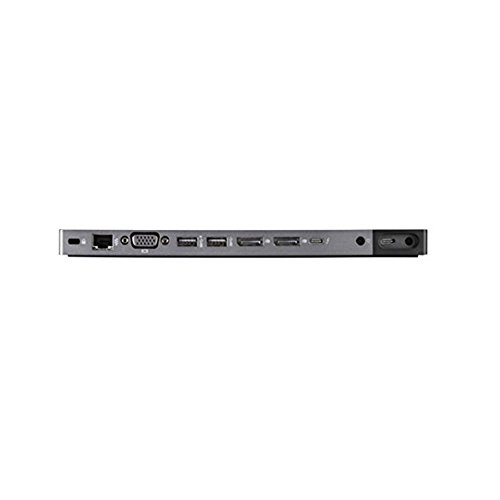
The HP ZBook 200W Thunderbolt 3 Dock is an enterprise-grade desktop expansion hub engineered specifically to supply substantial electricity and extensive port selection to select high-performance mobile workstations. Delivering a full 200 watts of system power through a combined tether, this specialized accessory aims to transform a portable computer into a fully fleshed-out desktop replacement with zero cable clutter. Our verdict: this dock is an indispensable, rock-solid desktop hub for owners of supported third-generation ZBook machines who require authentic high-wattage charging alongside multi-monitor productivity, though its strict hardware compatibility makes it unsuitable for mainstream laptops.
This workstation accessory is tailored directly for CAD designers, video editors, and technical professionals who rely on older corporate machines such as the HP ZBook 15 G3, HP ZBook 17 G3, or HP ZBook Studio G3. If your daily workflow demands multiple external monitors, permanent wired networking, and a fleet of connected USB peripherals running off a single plug, it delivers unmatched utility. However, if you have recently migrated to a modern ultraportable machine such as the hp elitebook 860 g11 or standard commercial notebooks that recharge over universal USB-C Power Delivery, this dock will be excessively bulky, largely incompatible, and fundamentally mismatched with your equipment.

![[2-Pack] 40W USB C Charger Cube Fast Charging Block Multiport Wall Plug](https://m.media-amazon.com/images/I/31Erlrm1PaL._SL500_.jpg "[2-Pack] 40W USB C Charger Cube Fast Charging Block Multiport Wall Plug")

HP ZBook 200W Thunderbolt 3 Dock at a Glance

| Attribute | Detail |
|---|---|
| Model Number | P5Q61UT |
| Total Wattage | 200 Watts (AC Adapter Included) |
| Host Connection | Thunderbolt 3 power cable |
| Video Outputs | 2x DisplayPort 1.2, 1x VGA |
| USB Ports | 3x USB 3.0, 1x Powered USB 3.0 (4 total) |
| Thunderbolt Ports | 1x Thunderbolt 3 (supports DisplayPort 1.2 and USB 3.1 Gen 2) |
| Audio and Networking | 1x RJ-45 Ethernet, 1x combo audio jack |
| Total Port Count | 14 ports |
| Product Dimensions | 9.06 x 9.06 x 0.69 inches |
| Item Weight | 8 ounces |
| Official Compatibility | HP ZBook 17 G3, HP ZBook 15 G3, HP ZBook Studio G3 |
Dedicated 200-Watt Workstation Power Delivery
The standout feature distinguishing this docking station from consumer-grade desktop docks is its substantial 200-watt power handling capability. Heavy computational laptops equipped with discrete workstation graphics and multi-core processors pull significantly more current than lightweight office notebooks. Standard USB-C docks top out between 60 and 100 watts, which routinely causes battery draining even when plugged in under intense rendering workloads. This dedicated hp zbook thunderbolt 3 dock 200w bypasses those thermal and electrical limitations by routing high-wattage power alongside data signals directly into the mobile workstation.
By shipping with its own 200-watt AC adapter in the box, the unit provides a true single-cable docking experience without compromising charging speeds. Rather than unpack and plug in your portable AC charger every morning, the dock maintains permanent high-current power at your desk. The integrated Thunderbolt 3 power cable passes electricity straight to your workstation, allowing the battery to replenish rapidly even while running demanding modeling or rendering simulations. As an authentic hp 200w power delivery dock, it ensures that your workstation hardware runs at peak thermal and computational performance profiles instead of throttling into a low-power mode.
This robust power delivery architecture also supplies electricity out to connected accessories without starving the host machine. The dock incorporates a powered USB 3.0 port designed specifically to recharge mobile phones, external audio gear, or wireless peripherals even when your workstation is shut down or disconnected. Having dedicated electrical headroom means you can plug in spinning external hard drives and multiple video adapters simultaneously without experiencing the random peripheral disconnects typical of underpowered third-party hubs.
Video Connectivity and Multi-Monitor Productivity
Expanding your visual workspace is an absolute necessity for CAD operators, animators, and software developers, and the video layout on this unit is built around enterprise productivity. The rear panel provides two full-sized DisplayPort 1.2 connectors alongside a legacy analog VGA output. In addition to these dedicated display interfaces, the onboard Thunderbolt 3 port supports DisplayPort 1.2 protocols natively, which dramatically increases your routing flexibility when establishing dual-screen or multi-display desktop setups.
Having two independent DisplayPort sockets makes running high-resolution monitors straightforward without requiring active external splitters. Users can anchor two high-resolution desktop panels to review technical blueprints, code editors, and timeline sequences with crisp digital accuracy. Because DisplayPort 1.2 carries high-bandwidth video, you can drive high-density displays smoothly alongside your primary laptop display. While newer generations of docks have moved on toward DisplayPort 1.4, this dock’s video output matches the exact native display engine found inside third-generation ZBook systems.
The inclusion of a traditional VGA port offers a practical nod toward legacy corporate conference rooms and older office display inventory. If your desk incorporates a secondary reference monitor or an older projector that relies on an analog signal, you can connect directly without digging for dongles. Furthermore, because the listing notes you can link up to 10 devices at once across its various connections, users running complex visual setups can route digital displays and legacy hardware alongside their external peripherals seamlessly.
Comprehensive Port Selection and Workspace Organization
Peripheral expansion is where the hp p5q61ut dock truly shines as a permanent command station. In total, the hardware features 14 ports arranged around its perimeter, creating a central hub for daily input devices, storage drives, and corporate accessories. With four total USB 3.0 ports available, you have ample room to attach external mechanical keyboards, precision mice, drawing tablets, and external storage drives simultaneously without swapping cables constantly throughout your shift.
Networking stability is another vital pillar of this dock’s connectivity suite. The inclusion of an RJ-45 Ethernet port ensures that workstation users have an uncompromised, gigabit-speed wired network connection. In large engineering firms or corporate media offices where gigabyte-sized files and source code repositories are transferred over local servers, a stable wired LAN connection is vastly superior to crowded office Wi-Fi networks. The integrated combo audio jack further simplifies desk cable routing, providing a direct connection point for wired office headsets, conferencing earbuds, or desktop speakers.
While newer compact equipment like the hp thunderbolt dock 120w g2 was developed for later generations with lower power envelopes, this 200W model emphasizes full-throttle workstation utility. Its dedicated Thunderbolt 3 port also doubles as a high-speed data interface that supports USB 3.1 Gen 2 speeds. This allows users to attach external solid-state drive arrays and RAID backup enclosures, executing huge file transfers without saturating the channels reserved for display outputs or input peripherals.
Hardware Design, Footprint, and Compatibility Restrictions
Measuring 9.06 inches long, 9.06 inches wide, and just 0.69 inches tall, the dock adopts a wide, square, low-profile footprint. Weighing approximately 8 ounces, the chassis is finished in clean black or gray tones that match the aesthetic of commercial workstation gear. While its wide footprint occupies slightly more physical desk real estate than modern vertical desktop towers, the flat, thin design allows it to sit unobtrusively underneath monitor stands or alongside laptop risers. The listing also highlights that the unit is compact enough to slip into a briefcase if you need to transport your primary desktop hub between office and home workstations.
It is vital, however, to examine the strict boundaries around hp zbook 200w compatibility before making a purchasing decision. According to the manufacturer listing, this dock is explicitly compatible with three specific models: the HP ZBook 17 G3, the HP ZBook 15 G3, and the HP ZBook Studio G3. The proprietary combined Thunderbolt and barrel-style power cable assembly was engineered specifically to interface with the side ports of these particular chassis. This is not a universal USB-C docking station that you can hand off to any brand of laptop.
Because of this tight mechanical pairing, buying the hp zbook 200w for zbook g3 workstations is a tailor-made match, but attempting to force it into non-supported systems will lead to frustration. If you do not possess one of these exact third-generation mobile workstations, the physical power connection will simply not seat properly. For owners of those specific G3 platforms, however, the bespoke fit guarantees that both heavy high-amperage power delivery and high-speed data streams communicate without firmware incompatibilities.
HP ZBook 200W Thunderbolt 3 Dock Pros and Cons
Pros
- Supplies full 200W power to heavy workstations
- Dual DisplayPort 1.2 plus legacy VGA outputs
- Four USB 3.0 ports with dedicated charging
- Gigabit RJ-45 Ethernet for wired stability
- Thunderbolt 3 power cable included
Cons
- Strictly limited to select ZBook G3 models
- Wide 9-inch square footprint takes desk space
- Lacks native HDMI video outputs
Check HP ZBook 200W Thunderbolt 3 Dock on Amazon
Who Should Buy the HP ZBook 200W Thunderbolt 3 Dock
Buy It If
- You own an HP ZBook 17 G3, 15 G3, or Studio G3 and need an authentic 200-watt desktop docking solution.
- You want a true single-cable setup that supplies full system power while routing dual DisplayPort monitors and wired LAN.
- Your desk setup uses up to 10 simultaneous connected devices, including USB peripherals and legacy VGA hardware.
- You need to leave your original laptop charging brick packed in your travel bag for mobile field use.
Skip It If
- You own a modern Thunderbolt 4 or standard USB-C business laptop from another brand or generation.
- You require integrated HDMI ports without using external DisplayPort adapter cables.
- You have limited desktop real estate and prefer a compact vertical dock with a minimal footprint.
HP ZBook 200W Thunderbolt 3 Dock Alternatives Worth a Look
Shoppers searching for high-power docks and charging equipment on Amazon frequently encounter compact multi-port wall adapters alongside enterprise workstation hubs. If your computing needs center on mobile phone charging or compact device travel power rather than a dedicated 14-port workstation docking base, these alternate power options might match your daily routine better.
2 Pack USB C Charger

The 2 Pack USB C Charger is a dual-port Type C wall charger power adapter block designed for smartphones and tablets like iPhones and Samsung devices. Unlike the 200-watt workstation dock, this product is solely a wall plug for mobile accessories and carries no display or peripheral data ports. It is an ideal pick for users who merely need dual-device fast charging at the wall rather than a massive desktop docking station.
4-Port PD+QC Power Adapter Compact

The 4-Port PD+QC Power Adapter Compact offers a 40W multi-port USB-C fast charging cube layout in a 2-pack configuration intended for travel. It provides four charging slots for smartphones, iPads, and lightweight gadgets. Readers looking to juice up multiple personal mobile devices from a single wall outlet during business trips will prefer this compact brick over a 14-port workstation dock.
PD 20W Europe Plug Adapter

The PD 20W Europe Plug Adapter is a 4-port European travel plug adapter featuring a 20W USB-C charging block for Android and iOS devices. This unit is built strictly for international wall socket compatibility across European destinations. If you are traveling abroad and need to charge handheld devices without carrying heavy workstation power gear, this adapter is the appropriate tool.
Final Verdict
When evaluating whether the hp zbook 200w workstation dock fits your daily workflow, your laptop model is the ultimate deciding factor. For engineers, CAD professionals, and enterprise users running an HP ZBook 17 G3, 15 G3, or Studio G3, this hub remains one of the few pieces of hardware capable of routing 200 watts of raw operational power alongside dual digital displays and gigabit networking through a single cable. It effectively resolves cable clutter, preserves your portable charger for travel, and keeps legacy workstation platforms operating at their highest performance tiers.
Ultimately, if you are wondering is hp zbook 200w worth it for an existing G3 mobile workstation, the answer is an unqualified yes. The hp zbook 200w specs provide exactly the mix of legacy and modern ports needed to keep these high-end mobile workstations productive in an office or home environment. As long as you respect its strict compatibility boundaries and avoid pairing it with standard consumer notebooks, the HP ZBook 200W Thunderbolt 3 Dock delivers outstanding stability, immense power delivery, and effortless multi-device management.
FAQ
Which laptops are officially compatible with the HP ZBook 200W dock?
The official listing explicitly specifies compatibility with three machines: the HP ZBook 17 G3, HP ZBook 15 G3, and HP ZBook Studio G3. It is engineered specifically around the port layout and 200-watt power requirements of these third-generation workstations.
Does the dock come with its own AC power adapter?
Yes, the dock listing confirms that an AC adapter is included in the package. It supplies the full 200-watt capacity required to drive the dock, power your connected USB accessories, and charge the connected ZBook workstation simultaneously.
Can I run multiple external monitors using this dock?
Yes, the dock features two DisplayPort 1.2 outputs, one legacy VGA port, and a Thunderbolt 3 port that also supports DisplayPort 1.2 video. This setup provides ample display outputs to run dual external monitors for professional design, coding, or multitasking workflows.
How many USB ports are built into the docking station?
The dock provides four USB 3.0 ports in total. One of these ports is a dedicated powered USB port, which allows you to recharge mobile phones and external accessories even when the laptop is not actively in use.
Does the HP ZBook 200W dock include a wired network port?
Yes, the dock includes a dedicated RJ-45 Ethernet port. This allows workstation users to connect directly to corporate or home local area networks via an Ethernet cable for fast, reliable data transfers without relying on wireless networking.
While this dedicated dock anchors a heavy-duty workstation setup at your primary desk, mobile creators often require flexible display connectivity on the go. Integrating a compact Portable Monitor Hub allows you to maintain a multi-screen workflow in the field without carrying bulky proprietary hardware. Matching your connectivity gear to both your physical workspace and laptop power demands ensures maximum productivity wherever you work.


