As Amazon Associates, we earn from qualifying purchases. This means we may receive a small commission at no extra cost to you if you click through and make a purchase.
The Sabrent 7-Port USB-C Hub (HB-3A4C) is a dedicated desktop expansion hub built to solve persistent peripheral clutter and port scarcity on modern workstations. Equipped with seven total 5Gbps connections, an included 48W external power brick, and individual hardware toggle switches for every port, this unit acts as a physical command center for desktop gear. If you need a stable, self-powered accessory station that lets you turn individual devices on and off without constantly pulling cables, this hub delivers outstanding utility and reliable execution.
This powered hub suits power users, streamers, audio editors, and handheld gaming enthusiasts who balance a mix of modern Type-C and legacy Type-A gear. However, shoppers searching for an all-in-one docking station capable of transmitting monitor video over HDMI or providing high-wattage charging pass-through to a host laptop should look at alternative hardware instead.


Sabrent 7-Port USB-C Hub at a Glance

| Attribute | Detail |
|---|---|
| Model Number | HB-3A4C |
| Total USB Ports | 7 |
| Port Configuration | 3 USB-A and 4 USB-C |
| Data Transfer Rate | 5Gbps (USB 3.2 Gen 1×1 / 625 MB/s) |
| External Power Adapter | 48W included power brick |
| High-Power Port Output | 1 USB-C port supporting up to 20W Power Delivery |
| Standard Port Output | 3 USB-C ports delivering 5V/900mA |
| Individual Controls | Dedicated on/off toggle switches with white LED indicators |
| Enclosure Material | Aluminum alloy |
| Item Dimensions | 5.5 x 1.96 x 0.69 inches |
| Item Weight | 10.6 ounces |
| Host Compatibility | Windows, macOS, Linux, Steam Deck, ROG Ally |
Port Configuration and 5Gbps Data Throughput
Finding a desktop expander with a sensible balance of modern and legacy ports can be frustrating, as many compact hubs still reserve Type-C connections solely for power delivery. The Sabrent 7-Port USB-C Hub addresses this by providing three USB-A ports alongside four fully functional USB-C data ports. This setup lets you maintain permanent connections for everyday legacy peripherals like keyboards, mice, and flash drives, while leaving ample room for modern Type-C external drives, audio DACs, and card readers.
Every port on the hub conforms to USB 3.2 Gen 1×1 specifications, delivering a maximum throughput rate of 5Gbps (equivalent to 625 megabytes per second). For standard office workflows, photo backups, and general peripheral management, this bandwidth provides smooth, lag-free performance across connected devices. However, users frequently moving massive video archives to ultra-fast NVMe enclosures will find 5Gbps slower than the 10Gbps or 40Gbps speeds offered by higher-tier Thunderbolt docks. As covered in our look at multi-function options like the anker 555 8-in-1, selecting the right expansion hub requires balancing raw throughput and peripheral diversity against your specific workspace needs.
Under continuous operation, the hub handles concurrent read and write operations across multiple attached drives without dropping connections. The inclusion of three Type-A ports prevents the need for clunky female-to-male adapters, ensuring your older thumb drives and input accessories remain immediately accessible alongside newer Type-C hardware.
Power Architecture and the Dedicated 20W PD Port
Bus-powered hubs draw all their operating current directly from your host computer, which often leads to brownouts, dropped connections, and drive unmounting when multiple high-draw devices run simultaneously. The Sabrent 7-port usb-c 48w powered hub eliminates this problem by incorporating a standalone 48W external power adapter. This dedicated power delivery architecture ensures that mechanical external drives, RGB lighting controllers, and audio interfaces receive steady, uninterrupted current regardless of what your computer host port can supply.
Power distribution across the four Type-C ports is divided into two distinct roles. Three of the USB-C ports supply standard 5V/900mA power, which matches standard USB data specifications and easily powers typical accessories without excess heat. The fourth USB-C connection is a dedicated fast-charging port supporting up to 20W Power Delivery. This sabrent 20w pd usb-c hub configuration allows you to quickly charge a smartphone, power bank, wireless mouse, or set of wireless earbuds right from your desk surface.
While the 20W PD port is a welcome tool for mobile devices, it is essential to understand that this hub is not designed to power a heavy-duty workstation or gaming laptop. Users accustomed to charging their systems using a high-output wall unit like a macbook charger apple brand will still need to plug their primary laptop charger directly into their machine, as the Sabrent hub directs its 48W power envelope toward connected accessories rather than the host computer.
Independent Power Switches and Workflow Control
The standout feature of this sabrent powered usb-c hub individual switches layout is the physical button sitting above every single connection. Each of the seven ports features an independent mechanical switch paired with a crisp white LED status light. Pressing a button cuts electrical power and data communication to that specific port instantly, giving you granular physical control over your connected hardware without unplugging a single cable.
This switching capability provides significant practical advantages for desktop organization, hardware longevity, and privacy. You can leave external hard drives plugged into the hub full-time and toggle them on only during scheduled system backups, preventing unnecessary drive wear, spindle noise, and background energy consumption. Content creators and home office workers can also use the switches as physical kill-switches for USB webcams and microphones, ensuring absolute privacy when video meetings and streaming sessions conclude.
The switches also make troubleshooting simple. If an external audio DAC, game controller, or microcontroller hangs, you can reboot the peripheral with a quick double-press of its toggle rather than reaching around the back of your computer to yank and reinsert the connector. The white LED indicators provide immediate visual confirmation of which ports are active at any glance.
Build Quality, Thermals, and System Compatibility
Sabrent built this hub inside a rigid aluminum alloy housing that measures 5.5 inches long, 1.96 inches wide, and 0.69 inches tall, weighing in at 10.6 ounces. The metallic chassis gives the hub a reassuring, weighted feel on the desk surface, helping it resist being dragged off your workspace by stiff, heavy-gauge peripheral cables. More importantly, the aluminum body acts as a passive heatsink, drawing operating heat away from internal controllers and dissipating it into the room during sustained multi-port transfers.
System compatibility is fully plug-and-play across major operating environments, including Windows, macOS, and Linux, with the specifications noting Windows 11 compatibility out of the box. No proprietary drivers or background utility software are required; host operating systems detect the hub and route device traffic automatically. Gamers looking to expand input hardware will also appreciate using the sabrent 7-port usb-c hub for steam deck and ROG Ally handheld setups, as it allows docking controllers, storage drives, and wired keyboards through a single host connection.
It is worth noting that this unit is strictly a data and peripheral power hub, completely omitting video display output standards like HDMI or DisplayPort. If your primary goal is driving external displays or integrating high-refresh-rate monitors into your desk, you will want to look at a dedicated display dock such as the hm lab z-neo 8k usb hub rather than a pure USB peripheral hub like this Sabrent model.
Sabrent 7-Port USB-C Hub Pros and Cons
Pros
- Individual on/off power switches for each port
- Dedicated 48W external power adapter included
- Generous mix of four USB-C and three USB-A ports
- One USB-C port supports 20W Power Delivery
- Durable heat-dissipating aluminum alloy housing
Cons
- Transfer speeds capped at 5Gbps across all ports
- No video display outputs or memory card readers
- Cannot provide charging power to the host computer
Check Sabrent 7-Port USB-C Hub on Amazon
Who Should Buy the Sabrent 7-Port USB-C Hub
Buy It If
- You manage a wide array of desktop accessories and need a powered usb-c hub 5gbps with individual switches to control them easily.
- You want a dependable desktop hub backed by an external 48W power adapter to prevent external hard drive brownouts and connection drops.
- You need a modern port layout featuring four USB-C and three USB-A ports to support both current-generation and legacy hardware on a shared setup.
- You value hardware privacy and peripheral longevity, using physical push-button toggles to isolate webcams, audio gear, and storage drives.
Skip It If
- You need an all-in-one docking hub that routes video to external monitors through HDMI or DisplayPort connections.
- You regularly work with massive media files that require 10Gbps, 20Gbps, or Thunderbolt-tier transfer speeds.
- You want a single-cable docking station that supplies 65W to 100W of charging power to recharge your host laptop battery.
Sabrent 7-Port USB-C Hub Alternatives Worth a Look
While the Sabrent hub excels as an independently switched desktop command center, different workspace configurations may demand greater portability, monitor video output, or a strictly legacy port selection.
5Gbps Data Transfer for Mouse

The 5Gbps Data Transfer for Mouse hub from UGREEN is an ultra-slim, bus-powered four-port USB-A splitter designed for mobile use. Unlike the Sabrent unit, this compact expander has a short 0.5-foot cable, lacks an external power supply, and carries no Type-C ports or power switches. It is built strictly for laptop users who need to connect basic input accessories like mice, keyboards, and flash drives on the go.
USB 3.0 Hub with 3.3ft
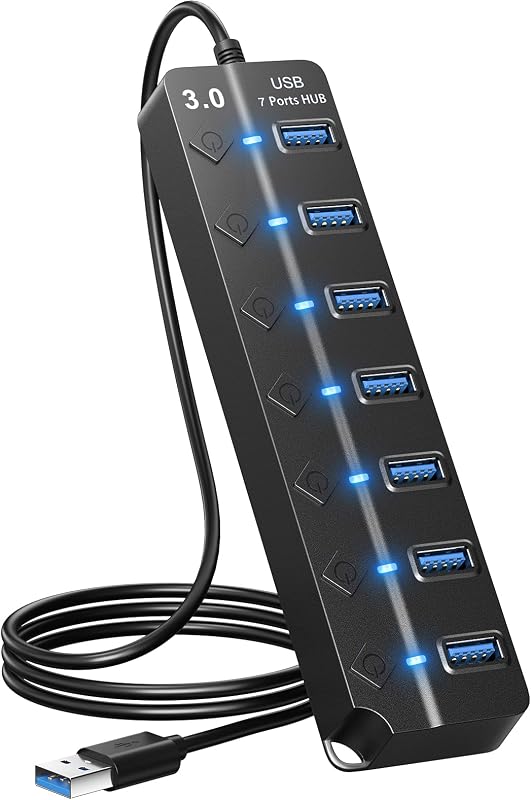
The USB 3.0 Hub with 3.3ft cable is an extended desktop splitter featuring seven USB ports equipped with individual on/off switches and indicator lights. While it shares the Sabrent model’s physical switching design and desktop utility, it relies entirely on older USB-A connectors. Workstations populated exclusively by legacy Type-A cables that do not require modern USB-C ports may find this an appealing, simple alternative.
85W Max PD

The 85W Max PD Anker 7-in-1 Multi-Port USB Adapter is built for users who need display connectivity alongside data ports. It features 4K at 60Hz HDMI video output, dual USB 3.0 ports, a USB-C data port, integrated SD/TF card slots, and support for up to 85W pass-through charging. It lacks the independent toggle switches and dedicated external power brick of the Sabrent hub, but it works well as a versatile travel dock for laptop users needing monitor support.
Final Verdict
The Sabrent 7-Port USB-C Hub (HB-3A4C) fills a distinct niche in desktop peripheral management by combining seven high-utility ports with dedicated physical switches and independent external power. Its aluminum alloy construction withstands daily workspace demands, while the inclusion of four modern USB-C data ports alongside three standard USB-A connections ensures your desk setup remains functional across varying device generations. The 48W power supply keeps connected drives and demanding accessories stable, eliminating the brownouts typical of bus-powered splitters.
For shoppers wondering is sabrent 7-port usb-c hub worth it, the answer depends entirely on your port requirements. If you already have dedicated monitor connections and simply need a dependable peripheral switcher that prevents port wear and keeps storage accessories controlled, this hub is an outstanding addition to your desk setup. Those requiring integrated display outputs or host laptop charging should opt for a multi-function travel dock instead.
FAQ
Can the Sabrent 7-Port USB-C Hub charge my host laptop?
No, the hub does not supply charging power back to your host laptop. Its included 48W external power brick is dedicated entirely to powering the hub’s internal controllers and the seven connected accessories, including up to 20W via its single fast-charging USB-C port.
Does this Sabrent hub support video output over HDMI or DisplayPort?
No, this model is exclusively designed for USB data transfer and peripheral power delivery. None of the four USB-C ports support DisplayPort Alternate Mode, and there are no HDMI or DisplayPort video outputs on the device.
Can I use the Sabrent 7-Port USB-C Hub on a Steam Deck or ROG Ally?
Yes, the listing confirms compatibility with both the Steam Deck and ROG Ally handheld systems. You can connect the hub to the console’s USB-C port to link keyboards, mice, flash drives, and external controllers for a desktop-style gaming setup.
Do the individual toggle switches remember their state when powered off?
The individual switches are mechanical push buttons. Because they physically stay in their depressed or raised position, each port retains its active or inactive state even if you unplug the main power brick or disconnect the hub from your computer.
Does the hub require special driver software to work on Mac or PC?
No, the Sabrent hub operates via plug-and-play functionality across Windows, macOS, and Linux. Your operating system detects the hub immediately upon connection without requiring manual driver downloads or proprietary management software.