
As Amazon Associates, we earn from qualifying purchases. This means we may receive a small commission at no extra cost to you if you click through and make a purchase.
The CIDOO QK61 V2 is a compact 60-percent mechanical keyboard that brings custom-keyboard acoustic design and open-source remapping tools into an accessible, pre-assembled package. Built with a flexible gasket-mounted polycarbonate plate and a dense five-layer sound dampening stack, this board achieves a distinctively deep, poppy typing signature that normally requires extensive aftermarket modifications. For everyday typists and minimalists looking to streamline their desk without sacrificing tactile satisfaction, it represents an impressive all-in-one peripheral.
This keyboard best suits enthusiasts, touch typists, and gamers who prioritize desk space and typing acoustics over dedicated navigation clusters. However, users who spend their workdays navigating dense spreadsheets, data entry personnel who require a numerical pad, or casual computer users intimidated by layered key combinations should look toward larger standard layouts instead. In this comprehensive cidoo qk61 v2 review, we examine whether its tailored acoustic design and firmware flexibility outweigh the inherent compromises of a 61-key footprint.


CIDOO QK61 V2 at a Glance

| Attribute | Detail |
|---|---|
| Form Factor | 60% Compact Layout (61 Keys) |
| Mounting Style | Gasket Mounted |
| Plate Material | Polycarbonate (PC) |
| Internal Damping | 5 Layers: Sandwich Foam, PET Film, IXPE Pad, Bottom Foam, Silicone Pad |
| Switch Configuration | Linear Mechanical Switches |
| Hot-Swap Compatibility | 3-Pin and 5-Pin MX Mechanical Switches |
| Keycaps | Double-Shot PBT (Cherry Profile) plus 2 Transparent PC Accent Caps |
| Connectivity Modes | 2.4GHz Wireless, Bluetooth 5.0, USB-C Wired |
| Battery Capacity | 3000mAh Rechargeable |
| Lighting | South-Facing RGB LEDs |
Typing Feel and Acoustic Gasket Architecture
The standout feature of the CIDOO QK61 V2 is its interior build, which directly addresses the hollow, clack-heavy acoustics typical of generic mechanical keyboards. At its core, the keyboard relies on a gasket-mounted assembly paired with a polycarbonate (PC) plate. Unlike rigid aluminum, brass, or steel plates, polycarbonate yields slightly under downward finger pressure. This inherent flexibility softens the bottom-out impact during rapid keystrokes, reducing finger fatigue over long writing sessions while shifting the acoustic pitch downward.
MechLands engineered an elaborate sound-dampening profile using five distinct internal layers. The keyboard incorporates sandwich foam between the plate and PCB, an IXPE switch pad to sharpen initial actuation pops, a PET sound-improving film to focus resonance, case bottom foam to absorb stray vibrations, and a molded bottom silicone pad that eliminates empty internal air cavities. The result is an authentic, deep cidoo qk61 v2 typing sound that enthusiast communities describe as thocky and poppy, delivering a satisfying, cushioned feel straight from the factory floor without requiring tedious tape mods or hand-lubing.
Complementing this internal stack are the pre-installed linear switches. The factory linears provide a smooth, consistent downward keystroke free from the tactile bump or clicky reset mechanisms that can sound abrasive in quiet office or bedroom environments. Because the gasket tabs and damping layers isolate the typing vibrations from the exterior shell, key presses feel uniform across alpha keys and modifiers alike, creating a stable, refined keystroke rhythm across the entire board.
Layout Constraints and VIA Firmware Programming
Transitioning to a 60-percent layout is the most significant operational hurdle prospective buyers face. The keyboard measures just 61 keys in a single unified section, which means there are no physical arrow keys, no navigation island (Home, End, Page Up, Page Down), no numeric keypad, and no standalone function row (F1 through F12). Everyday functions such as directional navigation, system shortcuts, and delete commands are relocated to secondary function layers accessed by holding down key modifiers.
To mitigate the disruption caused by missing hardware keys, the keyboard features native VIA firmware support. Through cidoo qk61 v2 via programming, users can connect the board to the web-based or desktop VIA utility to reconfigure any key on any layer. You can create custom macro sequences, set tap-dance functions where tapping a key sends one stroke while holding it sends another, and reposition arrow clusters to positions that feel natural to your personal muscle memory. The changes are saved directly onto the board’s onboard memory, meaning your custom keymaps persist when hopping between different machines.
Despite the power of VIA, mastering a 60-percent board still requires an adjustment period. If your daily workflow involves continuous spreadsheet entry, financial calculation, or frequent code debugging with function shortcuts, relying on layer switches can slow down your typing speed initially. However, for prose writers, terminal command users, and minimalists who keep their hands anchored strictly to the home row, the elimination of outer keys drastically cuts down on wrist travel and overall arm strain.
Tri-Mode Wireless Setup and Battery Endurance
Flexibility across multiple computing environments is central to the design of the CIDOO QK61 V2. The keyboard offers tri-mode connectivity, allowing users to cycle between low-latency 2.4GHz wireless via an included USB dongle, Bluetooth 5.0 pairing for multiple mobile devices, and a detachable wired USB-C connection. Managing your cidoo qk61 v2 wireless setup is simplified by a dedicated physical toggle switch placed directly adjacent to the USB-C port, letting you transition between wired and wireless modes without having to memorize complex onboard keystroke combinations.
The integrated Bluetooth 5.0 receiver allows easy pairing across laptops, smartphones, tablets, and desktop workstations running Windows or macOS. If you frequently swap your workstation between a desktop gaming rig and an ultraportable productivity laptop such as a thinkpad t16 32gb ram setup, the wireless flexibility enables clean transitions without re-plugging cables. The listing also notes device compatibility spanning gaming consoles and handheld devices, broadening its utility beyond traditional PC desks.
To sustain untethered use, the chassis houses a 3000mAh rechargeable battery. While the listing does not specify exact operating hours per charge, a 3000mAh cell provides ample longevity for typical wireless mechanical keyboards when lighting is managed carefully. Users who run dynamic backlighting at maximum brightness will naturally need to recharge more frequently through the USB-C port, while turning off the RGB LEDs will significantly stretch the cidoo qk61 v2 battery life across consecutive work weeks.
Hot-Swappable PCB, Keycaps, and Hardware Customization
Durability and personalization are built directly into the keyboard hardware. The CIDOO QK61 V2 comes equipped with a hot-swappable printed circuit board that features universal sockets compatible with both 3-pin and 5-pin mechanical switches. Users looking to experiment with cidoo qk61 v2 hot swappable switches can easily extract the factory linears and install switches from brands such as Cherry, Gateron, Outemu, Kailh, or various custom MX clones using the bundled keycap and switch puller, entirely bypassing the need for soldering equipment.
The keycaps supplied on the board are crafted from double-shot PBT molded into a standard Cherry profile. PBT plastic provides substantial structural resistance against finger oils, meaning the keys will not develop the shiny, slick surface wear commonly seen on cheaper ABS keycaps after months of heavy typing. The legends are formed through a two-stage plastic injection process, guaranteeing they will never fade or wear off under aggressive keystrokes. In addition to the standard black keycaps, MechLands includes two transparent polycarbonate keycaps, giving the keyboard an eye-catching accent right out of the box.
Backlighting is handled by vibrant south-facing RGB LEDs installed flush against the PCB. South-facing orientation is a critical detail for keyboard enthusiasts because it eliminates physical interference between the switch housing and the lower edge of Cherry-profile keycaps during downward travel. While south-facing lights do not illuminate translucent top legends as aggressively as north-facing LEDs, they cast a rich, uniform glow between the key rows that enhances the keyboard’s aesthetic without causing harsh glare.
Everyday Usability and Gaming Performance
Evaluating the cidoo qk61 v2 for gaming reveals obvious physical advantages alongside a few functional considerations. The 60-percent footprint leaves an enormous amount of clear desk real estate to the right of the keyboard. For competitive first-person shooter players who use low mouse sensitivity, having unrestricted clearance across a spacious gaming pad like the steelseries qck heavy ensures the mouse never collides with the edge of the keyboard frame during sweeping tracking maneuvers.
The linear switches supply immediate actuation without tactile hitches, making rapid double-taps and fast directional counter-strafing feel crisp and responsive. Using the 2.4GHz wireless connection provides low-latency input that matches wired performance for everyday gaming sessions. Furthermore, the ability to remap keys and bind multi-step gaming macros via VIA allows players to reposition crucial actions within easy reach of the left hand, compensating for the lack of dedicated macro or function keys.
For modern workstation setups, such as pairing the board with a high-end laptop like an apple macbook pro m5 max 128gb ram workstation, the keyboard’s compact footprint slips effortlessly into a travel bag alongside your computer. When you weigh the complete package—the five layers of sound dampening, the flexible PC plate, robust PBT caps, and comprehensive tri-mode wireless flexibility against its compact compromises—is cidoo qk61 v2 worth it? For users committed to a minimalist desk setup who value sound and touch above all else, the overall cidoo qk61 v2 specs deliver remarkable hardware refinement that punches well above conventional entry-level keyboards.
CIDOO QK61 V2 Pros and Cons
Pros
- Five-layer acoustic damping stack
- Gasket mount with flexible PC plate
- Full VIA firmware remapping support
- Versatile tri-mode wireless connectivity
- Hot-swappable 3-pin and 5-pin PCB
- Durable double-shot Cherry profile PBT keycaps
Cons
- No dedicated physical arrow keys
- Layer navigation requires learning curve
- Lacks function row and numeric pad
Who Should Buy the CIDOO QK61 V2
Buy It If
- You want a deeply cushioned, thocky typing sound profile straight out of the box without opening the case to install custom foam or tape mods.
- Desk real estate is at a premium, and you need maximum clearance for wide mouse swings during gaming or a tidy, clutter-free workspace.
- You appreciate the freedom of open-source VIA software to create custom layer layouts and persistent macros stored on the hardware.
- You switch frequently between multiple devices using Bluetooth, 2.4GHz wireless, and wired USB-C connections.
Skip It If
- Your daily work relies heavily on dedicated physical arrow keys, a number pad, or frequent function-row shortcut commands.
- You prefer a plug-and-play full-sized peripheral without the learning curve required to navigate secondary software layers.
- You want shine-through backlit legends for typing in total darkness, as double-shot PBT keycaps block legend passthrough.
CIDOO QK61 V2 Alternatives Worth a Look
If the 60-percent form factor or specific features of the CIDOO QK61 V2 do not align with your computing needs, several alternative options cater to different desktop requirements.
Amazon Basics Wired QWERTY Keyboard
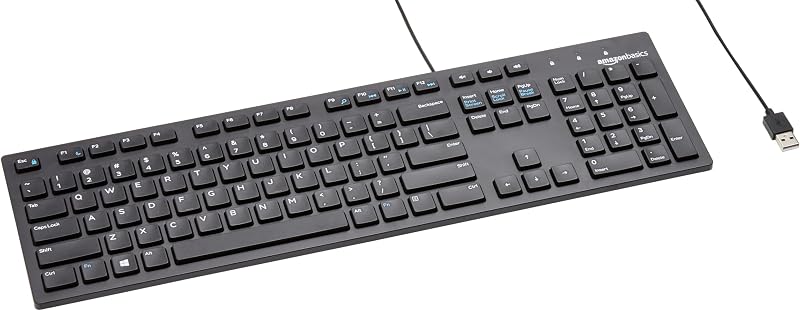
The Amazon Basics Wired QWERTY Keyboard is a full-sized, standard wired keyboard designed for Windows users who want an easy, plug-and-play typing solution. It includes a complete number pad, dedicated navigation clusters, and media control keys. Choose this keyboard if you work extensively with spreadsheets or basic office applications and want a straightforward peripheral without layered key combinations, wireless pairing, or mechanical switch maintenance.
Full size keyboard with spill-resistant
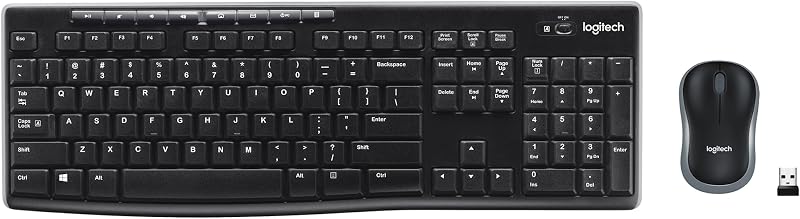
The Logitech MK270 combo features a full-size wireless keyboard with a spill-resistant design and an included compact ambidextrous mouse that connect together via a single USB-A nano receiver. This option is ideal for users seeking a complete, budget-conscious wireless desktop set that maintains traditional full-size layout conveniences, spill protection, and simple plug-and-play operation for standard office environments.
Creamy Computer Keyboard for PC

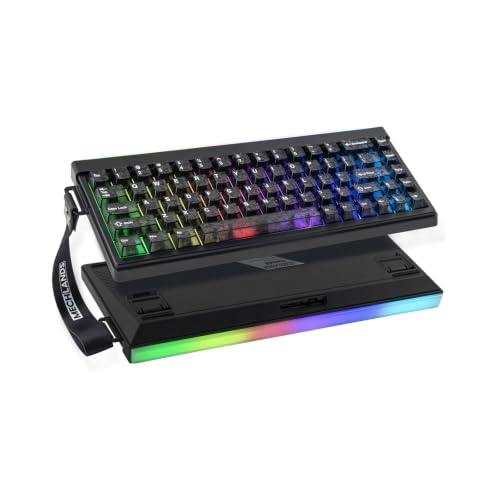
The MechLands Halo68 is a 68-key silent wireless keyboard featuring a membrane structure, a built-in 2000mAh battery, RGB backlighting with a decorative light box, and carbon fiber keycaps. Typists who want a compact footprint but still require dedicated physical arrow keys—or who prefer the ultra-quiet operation of a membrane keyboard over mechanical switches—should consider this 68-key alternative.
Final Verdict
The CIDOO QK61 V2 sets a high bar for pre-assembled compact keyboards by integrating features once reserved exclusively for high-end custom mechanical keyboard kits. Its combination of a gasket-mounted polycarbonate plate, five specialized internal damping layers, and factory-smooth linear switches produces a rich, satisfying sound signature that stands out immediately. Coupled with robust double-shot PBT keycaps, south-facing RGB illumination, and hot-swappable PCB sockets, the physical build provides everything needed for a premium desktop experience.
The trade-off rests entirely on whether your daily routine can accommodate a 61-key layout. If you are willing to embrace VIA remapping to manage arrows and navigation shortcuts via secondary layers, the board rewards you with a tiny desktop footprint, exceptional acoustics, and seamless tri-mode connectivity. For writers, gamers, and minimalist workstation creators, the CIDOO QK61 V2 represents a thoughtfully engineered peripheral that balances enthusiast features with daily wireless convenience.
FAQ
Does the CIDOO QK61 V2 come with dedicated arrow keys?
No, the keyboard features a compact 60-percent layout with 61 keys and omits dedicated arrow keys. Arrow directional commands are accessed via secondary function layers or remapped to alternative keys using VIA software.
How do I reprogram keys on the CIDOO QK61 V2?
The keyboard supports VIA firmware programming. You can open a compatible VIA browser interface or desktop application while the keyboard is plugged in, allowing you to remap any key, create custom macros, and configure lighting layers that save directly onto the onboard memory.
What types of switches can I use in the hot-swappable PCB?
The PCB features universal hot-swap sockets compatible with standard 3-pin and 5-pin MX-style mechanical switches, including options from Cherry, Gateron, Kailh, Outemu, and equivalent mechanical clones.
How do I switch between Bluetooth, 2.4GHz, and wired connections?
The keyboard includes a physical slider switch located next to the USB-C port on the rear of the board, allowing you to quickly select between wired mode, 2.4GHz wireless dongle mode, and Bluetooth pairing.
What accessories are included in the box?
According to the product listing, the box contains the CIDOO QK61 V2 keyboard, a keycap puller, and extra keycaps, including two transparent polycarbonate accent caps.


