As Amazon Associates, we earn from qualifying purchases. This means we may receive a small commission at no extra cost to you if you click through and make a purchase.
The Anker Prime TB5 Dock represents a significant generational leap in desktop connectivity, bringing next-generation Thunderbolt 5 architecture to modern power users, digital media editors, and workstation setups. Designed to overcome the bandwidth bottlenecks of older standards, this anker prime charging docking station delivers unprecedented throughput up to 120Gbps alongside robust 140W Power Delivery 3.1 host charging. If your daily workflow centers on moving gargantuan creative assets or driving high-resolution multi-monitor configurations, this hub establishes an uncompromising foundation for productivity, serving as an authoritative single-cable desktop bridge.
This dock is built specifically for creators and enterprise users working with cutting-edge hardware, including Apple Silicon systems running macOS 15 Sequoia or modern Thunderbolt 5 and Thunderbolt 4 Windows workstations. Everyday office workers browsing documents or streaming lightweight media will find these extreme transfer speeds and multi-display outputs far beyond what standard tasks require. Those with simpler peripheral requirements may prefer a more modest setup such as the anker nano docking station, but users demanding maximum bandwidth will appreciate the massive headroom engineered into this unit.




Anker Prime TB5 Dock at a Glance
| Attribute | Detail |
|---|---|
| Brand & Model | Anker Prime TB5 Dock (Model A83B5) |
| Hardware Interface | Thunderbolt 5 (backward compatible with Thunderbolt 4) |
| Total Port Count | 14 ports (including 8 total USB ports) |
| Maximum Data Transfer | Up to 120Gbps |
| Host Laptop Charging | Up to 140W Max (Power Delivery 3.1) |
| Video Output Capabilities | Up to 8K@60Hz single; Dual 8K@60Hz for Thunderbolt 5 Windows |
| Video Port Types | 1x HDMI 2.1 or DisplayPort 2.1, 2x Thunderbolt 5 downstream |
| Networking | 1x 2.5Gbps RJ45 Ethernet |
| Minimum OS Requirement | macOS 15 Sequoia (for Mac computers) |
| Dimensions & Weight | 4.56 x 4.56 x 2.95 inches; 2.4 pounds |
Next-Gen Thunderbolt 5 Bandwidth and Data Transfer
The primary draw of this anker prime thunderbolt 5 dock review centers on its immense speed advantage over previous desktop hubs. Operating over the Thunderbolt 5 specification, this docking station boasts maximum data transfer capabilities reaching up to 120Gbps. This enormous bandwidth pipe allows users to manage uncompressed high-bitrate video footage, massive 3D asset libraries, and high-speed external NVMe storage arrays simultaneously without encountering protocol saturation. In practical figures supplied by the manufacturer, this performance allows you to transfer a 150GB file in as little as 25 seconds through the Thunderbolt 5 connection.
In addition to raw speed, the anker prime 14-in-1 dock performance relies on how efficiently the device routes data between multiple demanding peripherals. With dual downstream Thunderbolt 5 ports operating alongside the dedicated upstream host connection, you can daisy-chain downstream storage devices or high-speed accelerators without degrading performance across secondary USB ports. For creative professionals who regularly back up large video projects or transfer multi-gigabyte production archives, the jump from older standards to Thunderbolt 5 removes the annoying idle time spent waiting for progress bars to finish.
Power Delivery 3.1 and High-Wattage Laptop Charging
Managing desktop power demands is another area where the anker 140w thunderbolt 5 docking station separates itself from ordinary hubs. The upstream connection provides up to 140W of power using the modern Power Delivery 3.1 protocol. This high ceiling ensures that power-hungry laptops receive their maximum supported intake through a single cable, eliminating the need to connect a secondary manufacturer power brick even during processor-intensive rendering jobs or heavy multi-tasking sessions.
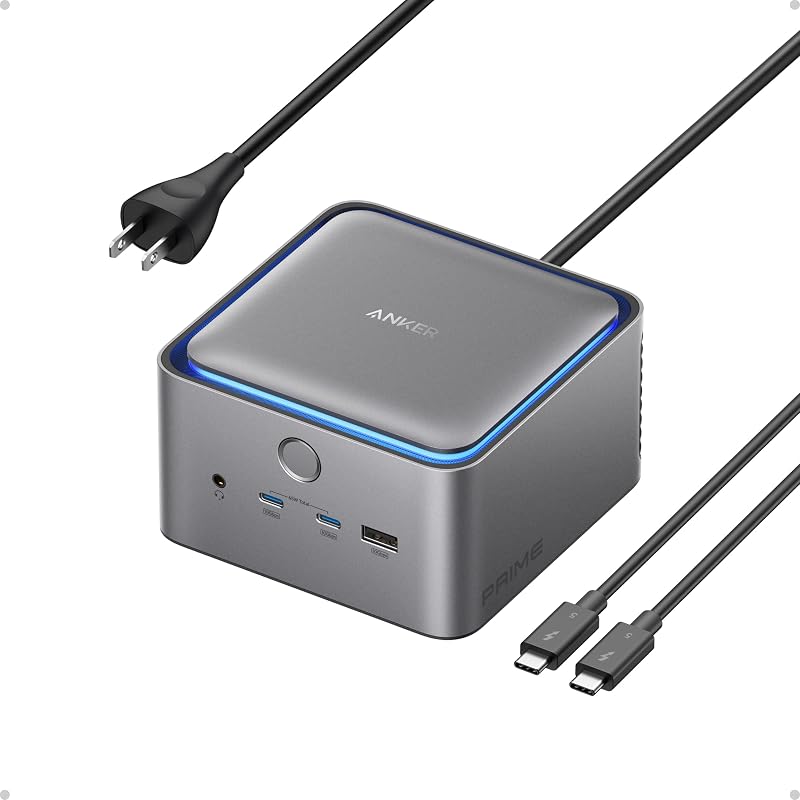
Beyond host charging, the dock handles auxiliary hardware power smoothly through its distributed layout. The front panel includes two USB-C ports that share a combined total of 45W, making them well suited for fast-charging phones, wireless accessory cases, or external power banks right at your desk. Power is supplied directly to the unit via an integrated AC input and an included 6-foot AC power cord, which eliminates the awkward inline power brick that clutters many setups. For desks that require expansive power distribution alongside monitor elevation, alternatives like the anker 675 usb-c docking station explore different workstation layouts, but this dock prioritizes compact raw wattage.
Monitor Support and Multi-Display Flexibility
Visual workspace configuration is critical for modern workstations, and anker prime dock dual monitor support provides extensive options depending on the connected host operating system. The station supports up to an 8K resolution at 60Hz on a single external display, delivering ultra-crisp visuals for color grading, high-end photography, or detailed visual design work. For dual-screen configurations, the dock can run two 8K displays at 60Hz simultaneously when connected to compatible Thunderbolt 5 Windows laptops.
Display routing is handled through a versatile hardware selection, offering one dedicated HDMI 2.1 or DisplayPort 2.1 connection alongside two downstream Thunderbolt 5 video outputs. This inclusion of an anker prime dock displayport 2.1 port gives owners of next-generation gaming or professional monitors the physical connection required to unlock elevated refresh rates and resolutions. Mac users must note platform limitations: while the dock supports dual display routing hardware, macOS handles multi-monitor stream distribution differently than Windows, meaning multi-display configurations depend closely on the specific Apple processor inside your machine.
Port Selection and Hardware Compatibility
Examining the anker prime charging docking station specs reveals a comprehensive 14-in-1 layout built to consolidate an entire desk of peripherals. The station includes eight total USB ports distributed across high-speed Thunderbolt 5, standard USB-C, and three legacy USB-A ports for everyday accessories like mice, keyboards, and flash drives. Wired networking is handled by a 2.5Gbps Ethernet port, providing lower latency and faster local network transfers than standard Gigabit connections, while built-in SD and TF (microSD) card slots offer convenient ingest for camera media.
When selecting the anker prime docking station for macbook pro setups, system compatibility requires careful attention. The dock supports Apple laptops powered by M4 Standard, M4 Pro, or M4 Max chips, as well as M1, M2, and M3 Pro or Max models. However, Anker lists a minimum required operating system version of macOS 15 Sequoia for Mac functionality. Windows users will need a laptop equipped with Thunderbolt 5 or Thunderbolt 4 ports to interface with the dock. Users seeking a different port arrangement or lower bandwidth overhead for everyday peripherals can look into the anker nano 13-in-1 docking station, which provides broad connectivity for less intensive setups.
Chassis Footprint, Thermals, and Build Design
Desktop real estate is always at a premium, and the Anker Prime TB5 Dock features a compact, upright form factor measuring 4.56 inches long, 4.56 inches wide, and 2.95 inches high. Weighing in at 2.4 pounds, the solid gray chassis provides substantial heft, preventing the dock from sliding around your desk surface when plugging or unplugging heavy cables. The package includes a 3.3-foot Thunderbolt 5 cable and a 6-foot AC power cable, providing enough slack to route cables cleanly behind monitors or beneath cable management trays.
Because running 120Gbps data streams, 140W power routing, and dual 8K display pipelines generates considerable heat, the unit incorporates an advanced active cooling system. This internal thermal design circulates air across the internal components to maintain stable throughput during prolonged, high-load data transfers. The active cooling prevents thermal throttling across the Thunderbolt controllers, ensuring that multi-gigabyte transfers and demanding multi-monitor outputs maintain stable performance during long workdays.
Anker Prime TB5 Dock Pros and Cons
Pros
- Blazing 120Gbps Thunderbolt 5 transfer speeds
- High-wattage 140W Power Delivery 3.1 host charging
- Dual 8K 60Hz display support on Windows
- Comprehensive 14-in-1 desktop port expansion
- Fast 2.5Gbps Ethernet connection
- Internal AC input eliminates bulky power bricks
Cons
- Requires macOS 15 Sequoia on Mac laptops
- Dual 8K output restricted to Windows systems
- Heavier desktop footprint at 2.4 pounds
Check Anker Prime TB5 Dock on Amazon
Who Should Buy the Anker Prime TB5 Dock
Deciding is the anker prime tb5 dock worth it comes down to the age of your computer hardware and how aggressively you push your data pipelines. It is a premium workstation accessory built to eliminate desk friction for high-demand users, but it is over-engineered for basic computing tasks.
Buy It If
- You own a Thunderbolt 5 Windows laptop or supported Apple Silicon Mac running macOS 15 Sequoia.
- You routinely transfer massive video files, databases, or creative project directories to high-speed external storage.
- You require up to 140W host charging to power a demanding high-performance laptop via a single cable.
- You want 2.5Gbps wired networking, high-speed SD/TF ingest, and multi-display 8K output potential in a single hub.
Skip It If
- You only use your laptop for web browsing, word processing, and standard productivity software.
- Your Mac is running an operating system older than macOS 15 Sequoia and you cannot or do not want to upgrade.
- Your external displays are standard 1080p or basic 60Hz office panels that do not benefit from high-bandwidth ports.
Anker Prime TB5 Dock Alternatives Worth a Look
If your daily workflow does not demand the extreme data transfer rates or 140W power delivery of Thunderbolt 5, several practical alternatives provide desktop expansion tailored to different workstation configurations.
Dual HDMI USB C Dock

The Dual HDMI USB C Dock is an 8-in-1 multi-port hub designed for USB-C laptops, including XPS and similar systems. It features dual 4K HDMI ports, 1Gbps Ethernet, SD and TF card readers, and up to 85W max Power Delivery passthrough charging, though an external charger is not included in the box. Shoppers working with standard 4K dual-monitor office setups who do not need 120Gbps Thunderbolt speeds will find this an effective, lightweight option.
Universal Dock

The Universal Dock is an enterprise-oriented Dell Pro WD25 laptop docking station providing USB-C connectivity with 100W Power Delivery charging. Equipped with Ethernet, USB-A, USB-C, DisplayPort, and HDMI connections, it supports up to quad displays for compatible corporate environments. Business users seeking a plug-and-play desktop hub for standard office multi-monitor configurations will appreciate its balanced port selection.
for Windows and Mac

The for Windows and Mac dock (Plugable UD-3900) is a universal docking station that interfaces over standard USB 3.0 or USB-C connections. It provides dual HDMI display support, Gigabit Ethernet, an audio jack, and six USB ports using driver-based technology. This hub is ideal for users with legacy laptops or mixed-platform office desks who need dual monitor functionality without requiring high-wattage host charging or native Thunderbolt hardware.
Final Verdict
The Anker Prime TB5 Dock stands as a premier connectivity solution for power users seeking to maximize the performance of their modern laptops. By uniting 120Gbps transfer ceilings, 140W Power Delivery 3.1 charging, 2.5Gbps Ethernet, and dual 8K display capability into a sturdy, actively cooled chassis, it resolves nearly every connectivity bottleneck a creative professional might encounter. It simplifies cable management by replacing bulky laptop chargers and multiple dongles with one unified desk anchor.
For individuals with standard office workloads or older laptops lacking Thunderbolt 5 or Thunderbolt 4 ports, this station offers more capability than is strictly necessary. However, if your setup relies on moving massive datasets, driving high-resolution displays, and charging power-intensive laptops, the Anker Prime TB5 Dock delivers top-tier performance that will keep your workspace equipped for years of computing demands.
FAQ
Does the Anker Prime TB5 Dock support dual 8K monitors?
Yes, the dock supports dual 8K displays at 60Hz specifically when connected to compatible Thunderbolt 5 Windows laptops. It also supports up to an 8K resolution at 60Hz for a single display setup.
What operating system is required to use this dock with a Mac?
Mac users must be running at least macOS 15 Sequoia. Supported Mac models include MacBooks powered by the M4 standard, Pro, or Max processors, as well as M1, M2, and M3 Pro or Max chips.
How much charging wattage does the dock deliver to the host laptop?
The dock provides up to 140W maximum upstream power over the Thunderbolt 5 connection using the Power Delivery 3.1 protocol, which is sufficient to power demanding high-performance laptops.
What cables and accessories are included in the box?
The package contains the Anker Prime Docking Station, a 3.3-foot Thunderbolt 5 cable, a 6-foot AC power cable, a safety sheet with a QR code linking to the user manual, and customer service documentation backed by a 24-month warranty.
How much power do the front-facing USB-C ports provide?
The two front-facing USB-C ports share a combined total output of up to 45W, making them suitable for fast-charging smartphones, wireless headphones, and other compact desk accessories simultaneously.