
As Amazon Associates, we earn from qualifying purchases. This means we may receive a small commission at no extra cost to you if you click through and make a purchase.
The Intel NUC 12 Pro is a palm-sized desktop computer engineered to deliver desktop-grade multitasking without consuming desk real estate. Powered by a 12th-generation Intel Core i7-1260P hybrid processor, 32GB of DDR4 memory, and a fast 1TB PCIe 4.0 NVMe solid-state drive, this tiny unit serves as a direct substitute for a bulky, power-hungry workstation tower. In practical terms, this mini PC offers exceptional computing density, high-speed modern connectivity, and robust multi-screen capabilities for high-demand business environments.
This compact system is tailored for office managers, remote knowledge workers, data analysts, and multi-monitor power users who need reliable responsiveness across dozens of browser tabs, spreadsheets, and communication apps. However, creative professionals requiring dedicated graphics cards for heavy 3D rendering or competitive PC gamers seeking top-tier frame rates should look past this machine toward full-sized desktop hardware.


Intel NUC 12 Pro at a Glance
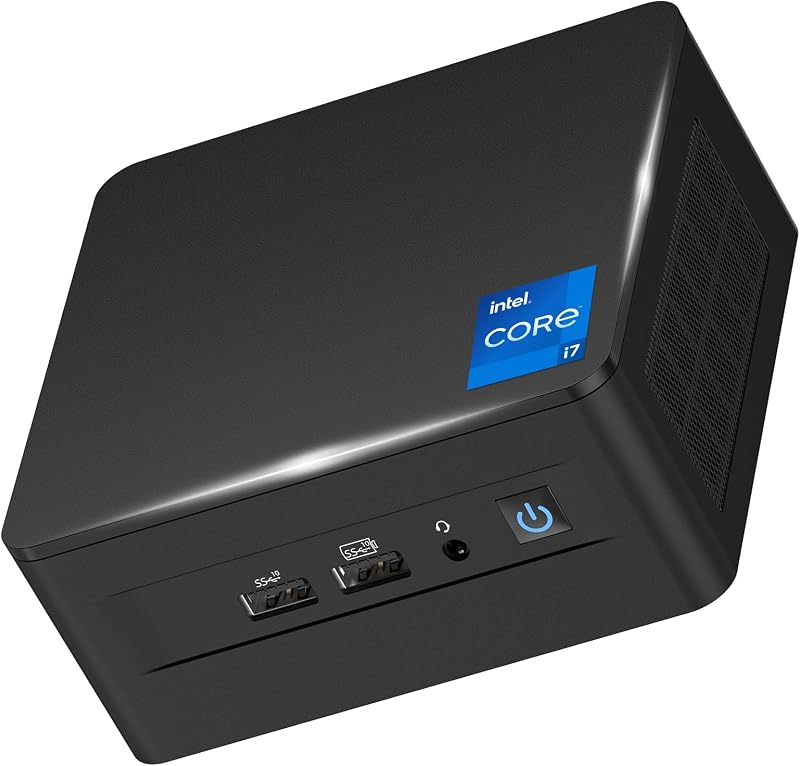
| Feature | Specification |
|---|---|
| Processor | Intel Core i7-1260P (12 cores, 16 threads, up to 4.7GHz, 18MB L3 cache) |
| Memory | 32GB DDR4-3200 SODIMM (supports up to 64GB) |
| Primary Storage | 1TB PCIe 4.0 NVMe SSD |
| Secondary Storage Support | Supports 2.5-inch PCIe Gen4 SSD or SATA HDD (drive not included) |
| Operating System | Windows 11 Pro |
| Video Outputs | 2x HDMI 2.0, 2x Thunderbolt 4, DisplayPort 2.1 support |
| Networking | 2.5GbE (2500MB) Ethernet, Wi-Fi 6E (2.4GHz, 5GHz, 6GHz), Bluetooth 5.3 |
| USB Connectivity | 4x USB 3.2 Gen 2 Type-A |
| Audio | 3.5mm headphone/microphone combo jack, integrated microphone |
Processing Power and Everyday Office Work
At the center of this machine is the 12th Generation Core i7-1260P chip, which utilizes Intel hybrid core architecture. It divides tasks between 4 high-frequency Performance cores and 8 power-sipping Efficient cores, managing 16 simultaneous computing threads. This architecture is especially advantageous when evaluating the Intel NUC i7-1260P for office work. Daily productivity software—such as document authoring, enterprise resource suites, cloud management consoles, and dense communication hubs—often runs concurrently. The operating system offloads secondary background processes to the efficiency cores while keeping primary applications silky smooth on the performance cores.
Shoppers reading an Intel NUC 12 Pro i7 review generally want to know whether a mobile-derived processor can realistically handle massive productivity demands. Because the processor features an 18MB L3 cache and a boost clock reaching up to 4.7 GHz, single-core burst workloads execute rapidly. Opening massive data spreadsheets, processing large PDF archives, or compiling blocks of code happens without the lag typical of lower-wattage mini systems. When stacked against massive workstation components like the intel core i7 12700kf, this compact chip naturally prioritizes thermal efficiency, yet it supplies more than enough raw processing muscle to anchor a demanding corporate workstation.
Real-world Intel NUC 12 Pro performance remains consistent even when juggling heavy web applications, virtual private networks, and background cloud sync operations simultaneously. With Windows 11 Pro installed out of the box, advanced management features such as BitLocker disk encryption, remote desktop support, and domain joining are operational right away. This combination of hybrid silicon and enterprise-ready software makes the unit exceptionally practical for business settings where desktop reliability cannot be compromised.
Memory, Storage, and Expandability
System responsiveness depends heavily on capacity and data transfer speeds. As a modern mini PC 32GB RAM 1TB SSD package, the Intel NUC 12 Pro eliminates immediate hardware bottlenecks. The machine comes outfitted with 32GB of dual-channel DDR4-3200 SODIMM memory. Having 32GB readily available means power users can comfortably run local virtual machines, database staging environments, and dozens of media-heavy browser tabs without bumping into system swap files or memory limits. For users with even heavier memory appetites, the motherboard supports expansions up to 64GB of DDR4 memory.
Storage performance is equally robust. The pre-installed 1TB solid-state drive relies on a high-speed PCIe 4.0 NVMe x4 interface. Boot times are near-instantaneous, large application libraries open immediately, and file transfers execute smoothly. Reviewing the detailed Intel NUC i7-1260P specs reveals that the chassis accommodates internal expansion. In addition to the primary M.2 slot, the internal drive bay supports an optional 2.5-inch PCIe Gen4 solid-state drive or 2.5-inch SATA hard disk drive (the listing notes that this secondary drive is not included).
This dual-drive capacity represents an important asset for enterprise buyers. Organizations can preserve the rapid PCIe 4.0 boot drive strictly for operating systems and business programs, while dedicating a secondary internal 2.5-inch drive for bulk local backups, project archives, or offline client folders. Having this level of modularity packed within a chassis this small ensures the hardware remains relevant as corporate data footprints expand.
Multi-Display Connectivity and Thunderbolt 4
Workplace productivity frequently hinges on screen space, and the display configuration on this Intel NUC 12th gen mini PC is one of its strongest selling points. The back and front panels incorporate a broad array of video outputs, including two native HDMI 2.0 ports and two high-bandwidth Thunderbolt 4 Type-C connections. Because Thunderbolt 4 transports high-speed data alongside DisplayPort video protocols, the machine can drive an expansive Intel NUC i7-1260P multi display workstation without requiring third-party display splitters or external graphics amplifiers.
Specifically, the system hardware supports driving up to four independent 4K displays simultaneously at full HDR fidelity. For high-end creative or financial setups, the Thunderbolt 4 outputs can also drive a single ultra-high-resolution 8K display. Traders tracking rapid financial charts, developers debugging code across three vertical monitors, or office administrators referencing multi-page records will find this display flexibility invaluable. The presence of DisplayPort 2.1 capability expands compatibility with newer high-resolution productivity screens on the market.
Beyond driving monitors, the Intel NUC i7 Thunderbolt 4 ports deliver massive peripheral utility. Thunderbolt 4 provides up to 40Gbps bidirectional transfer rates, enabling lightning-fast communication with external RAID storage arrays, audio production interfaces, and high-speed network adapters. Complemented by four USB 3.2 Gen 2 Type-A ports, a dedicated 3.5mm audio jack, and an integrated microphone, the machine connects to webcams, conference speakers, external peripherals, and flash drives without running short of accessible ports.
Cooling, Acoustic Design, and Networking
Concentrating a 12-core processor inside a palm-sized chassis requires a carefully designed thermal profile. The Intel NUC i7-1260P cooling system is engineered for continuous 7×24 hours quiet operation. In standard business routines—such as email drafting, document processing, and video calls—internal fan profiles remain low, keeping ambient noise negligible. When intensive batch calculations or system updates demand peak CPU utilization, the fan ramps up smoothly to exhaust heat out of the ventilation grilles without producing high-pitched acoustic whines.
Data connectivity is equally well appointed. The physical rear panel contains a 2.5GbE (2500MB) Ethernet port, giving wired networking setups significantly higher bandwidth headroom than traditional gigabit ports. This elevated transfer speed accelerates local file transfers between network-attached storage (NAS) devices and office workstations. For compact desk setups that look to alternate platforms like the msi cubi z, having standard 2.5GbE connectivity makes this machine an excellent candidate for local network tasks and rapid data routing.
On the wireless side, the system incorporates modern Wi-Fi 6E technology alongside Bluetooth 5.3. Wi-Fi 6E operates across three dedicated bands: 2.4GHz, 5GHz, and the clean 6GHz spectrum. The inclusion of the 6GHz frequency avoids network congestion from legacy smart-home devices, preserving high bandwidth and minimal latency during voice and video conferencing. Meanwhile, Bluetooth 5.3 maintains energy-efficient, stable connections over longer distances for wireless mice, keyboards, and office headsets.
Intel NUC 12 Pro Pros and Cons
Pros
- 12-core Intel Core i7-1260P hybrid processor
- Generous 32GB DDR4 memory expandable to 64GB
- Fast 1TB PCIe 4.0 NVMe storage drive
- Supports up to four 4K displays simultaneously
- Dual Thunderbolt 4 and 2.5GbE networking ports
- Tri-band Wi-Fi 6E and Bluetooth 5.3 included
Cons
- Integrated graphics limit demanding 3D workstation tasks
- Secondary 2.5-inch storage drive not included in chassis
- Utilizes DDR4 rather than newer DDR5 memory
Check Intel NUC 12 Pro on Amazon
Who Should Buy the Intel NUC 12 Pro
Buy It If
- You need a tidy, ultra-compact office workstation that runs multiple spreadsheets, web tools, and enterprise programs simultaneously without lag.
- Your desk setup demands multi-monitor capability, requiring up to four 4K displays or a single 8K display directly from the mini PC.
- You want expandable internals, including out-of-the-box 32GB RAM, a fast 1TB NVMe drive, and room for a secondary 2.5-inch storage drive.
- Your infrastructure benefits from high-speed wired 2.5GbE networking and modern Wi-Fi 6E wireless access.
Skip It If
- You need dedicated workstation graphics hardware for heavy 3D rendering, complex animation workflows, or high-end AAA PC gaming.
- You prefer newer platforms utilizing DDR5 memory standards over DDR4 configurations.
- You want a barebones configuration where you bring your own operating system, memory sticks, and internal drive.
Intel NUC 12 Pro Alternatives Worth a Look
If your specific computing requirements or connectivity plans call for an alternate configuration, several other mini desktop computers cater to different office and home setups.
KAMRUI Pinova P2 Mini PC

The KAMRUI Pinova P2 Mini PC features an AMD Ryzen 7330U processor built on Zen 3 architecture with 4 cores, 8 threads, and an 8MB L3 cache. It comes equipped with 16GB of RAM and a 256GB SSD, alongside triple 4K display support. This option suits home office shoppers who handle lighter administrative duties, document editing, and web browsing, and who do not require the 12-core multitasking power or 32GB memory footprint of the main product.
GMKtec Mini PC

The GMKtec Mini PC provides an Intel Core i3-10110U processor, 16GB of dual-channel DDR4 memory, and a 512GB storage drive. It includes dual 4K HDMI video outputs, USB 3.2 ports, Wi-Fi 6, Bluetooth 5.2, and a 2.5GbE Ethernet port. Everyday users looking for an entry-level mini PC dedicated to point-of-sale systems, light clerical work, or basic web tasks can consider this dual-HDMI setup.
16GB RAM 512GB SSD

The 16GB RAM 512GB SSD model (BOSGAME E5) utilizes an AMD Ryzen 5300U processor paired with 16GB of RAM and a 512GB solid-state drive under Windows 11 Pro. It features triple display outputs, dual LAN ports, Wi-Fi 5, and Bluetooth 5.0. It is a viable pick for network-focused setups requiring dual physical Ethernet jacks for network segmentation or budget-conscious home offices with moderate storage demands.
Final Verdict
When asking is Intel NUC i7-1260P worth it, the answer depends on your performance requirements and space constraints. The Intel NUC 12 Pro packs considerable computing capability into an enclosure that easily mounts behind a monitor or tucks quietly into a small desk corner. Its 12-core, 16-thread Core i7-1260P processor works seamlessly with 32GB of RAM and a 1TB PCIe 4.0 drive to eliminate system hiccups during intensive office multitasking, enterprise management, and heavy web browsing.
The inclusion of dual Thunderbolt 4 ports, two HDMI 2.0 connections, 2.5GbE Ethernet, and Wi-Fi 6E turns this mini desktop into a powerhouse connectivity hub capable of driving up to four 4K displays. While users looking forward to future architecture developments might explore an asus nuc 16 pro mini pc or similar next-gen hardware down the line, this 12th-generation system remains an exceptionally balanced, highly capable machine that effortlessly replaces full-sized office towers.
FAQ
Can the Intel NUC 12 Pro support four 4K monitors at the same time?
Yes. The system utilizes its two HDMI 2.0 ports alongside its two Thunderbolt 4 ports to output video signals to up to four independent 4K displays simultaneously, or to a single 8K display.
Can I upgrade the internal memory and storage on this mini PC?
Yes. The unit comes equipped with 32GB of DDR4-3200 memory and supports upgrades up to 64GB across its SODIMM slots. In addition to the pre-installed 1TB PCIe 4.0 NVMe SSD, the chassis supports an optional 2.5-inch PCIe Gen4 SSD or SATA HDD in its internal drive bay.
Does the Intel NUC 12 Pro include a pre-installed operating system?
Yes, the computer comes configured with Windows 11 Pro pre-installed, offering enterprise-grade security features like BitLocker device encryption and built-in remote desktop functionality.
What wireless standards are supported by this unit?
The system features Wi-Fi 6E connectivity spanning the 2.4GHz, 5GHz, and 6GHz bands for high bandwidth and lower latency. It also includes Bluetooth 5.3 for pairing wireless peripherals, headsets, and accessories over extended distances.
Does the listing include customer warranty or technical support?
Yes. The listing notes that product support is provided by the waitloan support team, featuring 3 years of product support, 2 years of unconditional return and exchange, and lifetime user support. The listing also notes a 3-year EU spare part availability duration.


