As Amazon Associates, we earn from qualifying purchases. This means we may receive a small commission at no extra cost to you if you click through and make a purchase.
As an Amazon Associate we earn from qualifying purchases. Links on this page are affiliate links.
Finding the best qehi prebuilt gaming PCs with DDR4 requires matching your target resolution with the right core hardware. We evaluated 2 options strictly against the specifications published on the listings.
The Qehi RTX 5060 Ryzen 7 Gaming Desktop takes the top position because its AMD Ryzen 7 processor and 1TB SSD deliver greater hardware capacity than the other models. This guide helps you decide which desktop configuration fits your daily workload and gaming resolution.
Choose by graphics and storage capacity
Base your choice on GPU and storage capacity. The Qehi RTX 5060 Ryzen 7 Gaming Desktop provides an AMD Ryzen 7 processor, an RTX 5060, and a 1TB SSD. The Qehi Ryzen 5 3500X RX 560 Gaming PC offers a Ryzen 5 CPU, an RX 560 4GB card, and 512GB storage.
| # | Product | Best for | Price |
|---|---|---|---|
| 1 | Qehi RTX 5060 Ryzen 7 Gaming Desktop Best overall | DDR4-based 1080p and 1440p gaming | |
| 2 | Qehi Ryzen 5 3500X RX 560 Gaming PC Best ryzen 5 | Entry-level esports gaming and daily office tasks |
The best fit for you
- You play games at 1440p resolution. – Qehi RTX 5060 Ryzen 7 Gaming Desktop – Its dedicated RTX 5060 graphics card and eight-core Ryzen 7 processor handle demanding 1440p workloads.
- You need an entry-level esports desktop. – Qehi Ryzen 5 3500X RX 560 Gaming PC – Its Ryzen 5 processor and 4GB RX 560 graphics card supply reliable performance for competitive esports titles.
- You edit video and stream gameplay. – Qehi RTX 5060 Ryzen 7 Gaming Desktop – Its 1TB NVMe SSD and eight-core processor support large video editing files and active streaming.

Qehi RTX 5060 Ryzen 7 Gaming Desktop
Best for: DDR4-based 1080p and 1440p gaming
- Memory Type
- DDR4
- Graphics Card
- GeForce RTX 5060 8GB
- Processor
- Ryzen 7 4700LE
- RAM Capacity
- 16GB
- Storage Capacity
- 1TB
- Storage Type
- NVMe SSD
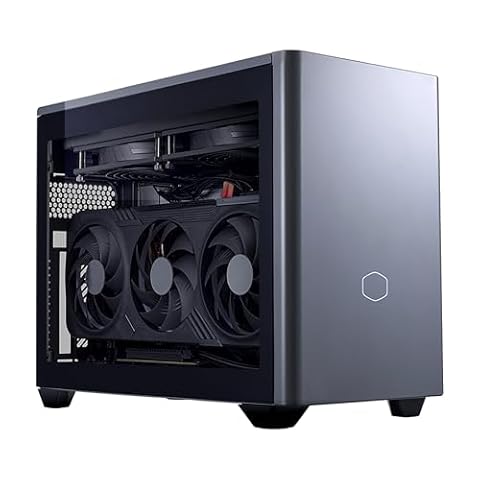
This prebuilt desktop pairs an 8-core AMD Ryzen 7 4700LE processor with an Nvidia GeForce RTX 5060 8GB graphics card. You get 16GB of DDR4 memory and a 1TB NVMe solid-state drive for game storage. Integrated Wi-Fi 6 handles wireless connections. It suits you if you want a complete system for 1080p or 1440p gaming and video editing.
- GeForce RTX 5060 8GB graphics card
- AMD Ryzen 7 4700LE processor with 8 cores and 16 threads
- 1TB NVMe solid-state drive
- Built-in Wi-Fi 6 connectivity and 650W power supply
- Uses DDR4 memory instead of newer DDR5 platforms
- Product specifications do not list Bluetooth support
- You need a dedicated RTX 5060 GPU for 1080p or 1440p gaming.
- You want 1TB NVMe storage out of the box for games and files.
- You rely on Wi-Fi 6 for wireless network connectivity.
- You require a newer DDR5 memory configuration.
- You need built-in Bluetooth connectivity for wireless accessories.
Verdict: Qehi Ryzen 7 RTX 5060 Gaming PC suits gamers and creators seeking dedicated RTX 5060 graphics and an 8-core processor on a DDR4 platform. Its 1TB NVMe SSD and six cooling fans provide ready-to-run hardware for high-frame-rate 1080p and 1440p workloads.

Qehi Ryzen 5 3500X RX 560 Gaming PC
Best for: Entry-level esports gaming and daily office tasks
- Memory Type
- DDR4
- Graphics Card
- AMD Radeon RX 560
- Processor
- AMD Ryzen 5 3500X
- RAM Capacity
- 16GB
- Storage Capacity
- 512GB
- Storage Type
- NVMe PCIe SSD
This prebuilt gaming tower pairs an AMD Ryzen 5 3500X 6-core processor with 16GB of DDR4 memory and an AMD Radeon RX 560 4GB graphics card. You get a 512GB NVMe solid-state drive for fast system boots and built-in WiFi 6 for wireless networking. It suits you if you need a desktop for esports titles and daily productivity.
- AMD Ryzen 5 3500X 6-core processor reaching 4.1GHz boost
- 16GB DDR4 memory paired with a 512GB NVMe PCIe SSD
- Built-in WiFi 6 wireless connectivity
- Dual tempered glass chassis with integrated RGB lighting
- Radeon RX 560 provides only 4GB VRAM for entry-level graphics
- 512GB storage capacity fills quickly with modern game installs
- Ryzen 5 3500X processor has 6 threads without multithreading
- You play lightweight esports titles like CS:GO or League of Legends at entry-level settings.
- You need 16GB of DDR4 RAM and WiFi 6 for smooth daily multitasking.
- You intend to run demanding modern AAA games that require more than 4GB of VRAM.
- You need at least 1TB of internal storage out of the box.
Verdict: Qehi Ryzen 5 RX 560 Gaming PC delivers a balanced configuration for esports gamers and home office users who need 16GB DDR4 RAM and WiFi 6. Its 4GB discrete graphics card and 6-core CPU reliably support moderate gaming and routine computing.
Specifications side by side
| Spec | Qehi RTX 5060 Ryzen 7 Gaming Desktop | Qehi Ryzen 5 3500X RX 560 Gaming PC |
|---|---|---|
| Graphics Card | GeForce RTX 5060 8GB | AMD Radeon RX 560 |
| Processor | Ryzen 7 4700LE | AMD Ryzen 5 3500X |
| RAM Capacity | 16GB | 16GB |
| Storage Capacity | 1TB | 512GB |
| Memory Type | DDR4 | DDR4 |
| Storage Type | NVMe SSD | NVMe PCIe SSD |
| Memory | 16GB RAM | 16GB RAM |
| Use | Home, Office, Streaming, Video Editing | Home, Office |
| Dimensions | 13.3 × 11.8 × 12.9 inches | – |
| Weight | 17.6 pounds | – |
| Color | Black | Black |
| Model | Qe300A | Qe300A |
| Size | – | RX 560 4G+16G-512G |
How to Choose a Qehi DDR4 Desktop
Evaluate Dedicated Graphics Hardware
Assess the graphics card to match your display resolution and rendering needs. Modern titles demand dedicated video memory to sustain stable frame rates. A setup with an RX 560 provides 4GB of video memory, which suits lighter esports titles and standard office monitors. Higher graphical fidelity requires more modern architecture. You should compare GPU models directly against the visual demands of your primary games before choosing a configuration.
Match Processor Cores to Workload
Check the processor model and core count to support your everyday workflow. A 6-core processor handles web browsing, basic productivity, and esports smoothly. If you plan to stream gameplay or export video projects, prioritize an 8-core AMD Ryzen 7 processor. More cores allow the desktop to manage background applications without dropping frames in your active window. Compare CPU tiers based on whether your daily computing involves content creation or standard tasks.
Check Solid-State Drive Capacity
Examine the solid-state drive capacity to ensure adequate room for installations and local media. Operating systems and modern game installations consume substantial space quickly. A smaller 512GB drive accommodates essential software and a modest gaming library. The Qehi RTX 5060 Ryzen 7 Gaming Desktop provides a 1TB NVMe SSD, giving you extra headroom for larger project files. Check drive capacity on the spec sheet against your typical installation sizes.
Review Preinstalled Case Fans
Review the internal thermal setup to confirm the chassis maintains adequate airflow during continuous computing. Sustained gaming sessions generate component heat that requires active ventilation. Configurations equipped with six cooling fans, such as the Qehi RTX 5060 Ryzen 7 Gaming Desktop, circulate fresh air through the interior to keep temperatures stable under load. Verify the cooling hardware in the specifications if you plan to push the system with intensive gaming or rendering tasks.
Verify Wireless Networking Support
Inspect network adapter specifications if your desk setup cannot reach a hardwired router. Fast wireless communication reduces latency during multiplayer gaming and quickens downloads. The Qehi Ryzen 5 3500X RX 560 Gaming PC lists integrated WiFi 6 support for high-throughput wireless connections. Checking for modern wireless protocols ensures the desktop maintains reliable local network connectivity. Compare the networking specifications to confirm the machine matches your home router standard without needing external adapters.
Measure Desktop Chassis Clearance
Measure your available desk space before selecting a desktop tower. Tower dimensions determine how much surface area remains for monitors, keyboards, and mouse movement. Model Qe300A measures 11.8 inches wide, 12.9 inches high, and 13.3 inches long, with a weight of 17.6 pounds. A compact footprint simplifies placement in tight home offices or study areas. Compare published case dimensions against your work surface to ensure proper clearance and unblocked intake vents.
Frequently asked questions
How much system memory do these Qehi gaming desktops include?
Both featured Qehi desktops come equipped with 16GB of DDR4 RAM. This capacity provides sufficient bandwidth for modern multitasking, gaming, and productivity applications without bottlenecking system responsiveness. Having 16GB allows you to run modern titles while keeping background chat or web browser tabs open simultaneously.
What case form factor and dimensions does the Qehi Qe300A chassis use?
The Qehi Qe300A chassis measures 13.3 inches long, 11.8 inches wide, and 12.9 inches high, weighing 17.6 pounds. This compact desktop footprint fits comfortably on top of standard workstations or underneath desks, giving you a manageable build profile while still leaving adequate room inside for component airflow.
How does cooling hardware differ across Qehi DDR4 configurations?
The Qehi RTX 5060 configuration explicitly incorporates six dedicated cooling fans inside its chassis. Dedicated case fans promote continuous intake and exhaust airflow, keeping your processor and graphics card within safe operating temperatures during sustained multi-hour gaming sessions or demanding video editing renders.
What wireless connectivity standard is available on the Qehi Ryzen 5 model?
The Qehi Ryzen 5 3500X desktop includes integrated WiFi 6 networking support out of the box. WiFi 6 provides improved local wireless network efficiency, reduced latency, and stable connection speeds, which helps you maintain reliable online gaming sessions and smooth file downloads without running an Ethernet cable.
Which Qehi DDR4 prebuilt is better suited for video editing and content creation?
The Qehi RTX 5060 desktop is specifically listed for video editing and streaming workloads. Its 8-core AMD Ryzen 7 processor and 1TB NVMe SSD deliver faster file caching and multicore rendering performance than a 6-core setup, giving you the necessary throughput to manage complex timeline exports.
How do the internal storage options compare between these prebuilts?
Qehi equips these systems with solid-state drives ranging from 512GB to 1TB in capacity. The Ryzen 7 build includes a 1TB NVMe SSD for larger game libraries, while the Ryzen 5 version utilizes a 512GB SSD suitable for primary operating system files and everyday productivity programs.
What processor core counts do these Qehi gaming PCs offer?
These Qehi machines feature processors with either 6 or 8 computing cores. The Ryzen 5 3500X provides 6 cores for standard computing and esports titles, whereas the AMD Ryzen 7 model supplies 8 cores to handle intensive multi-threaded workloads, gaming broadcasts, and background applications.