As Amazon Associates, we earn from qualifying purchases. This means we may receive a small commission at no extra cost to you if you click through and make a purchase.
The HP 524pf is an everyday business display engineered to combine space-conscious desktop ergonomics with comfortable viewing for full workdays. Serving as an adaptable full HD solution for home offices and corporate desks alike, our verdict is that this display excels as an ergonomic, dependable multi-screen productivity workhorse without overcomplicating your workspace.
It suits professionals, administrative workers, and students who require extensive physical adjustability, broad viewing angles, and a built-in peripheral hub to keep their desks organized. Those who should look elsewhere include dedicated competitive gamers demanding ultra-high refresh rates, as well as creative professionals who need high-density 4K resolutions for intricate visual authoring.


HP 524pf at a Glance

| Feature | Specification |
|---|---|
| Screen Size | 24 inches |
| Resolution | Full HD (1920 x 1080) |
| Panel Technology | In-Plane Switching (IPS) |
| Refresh Rate | 100 Hz |
| Brightness | 350 nits |
| Contrast Ratio | 1500:1 |
| Color Gamut Support | 100% sRGB |
| Viewing Angles | 178 degrees horizontal / 178 degrees vertical |
| Stand Adjustments | Height, Swivel, Pivot, and Tilt (-5 to +23 degrees) |
| Connectivity Ports | 1 x HDMI, 1 x DisplayPort, 4 x USB Type-A, 1 x USB Type-B |
Ergonomic Adjustability and Desk Setup
The standout feature of this display is its mounting flexibility. The HP 524pf ergonomic stand allows users to customize their physical viewing posture through dedicated height adjustment, left-to-right swivel, full portrait-to-landscape pivot, and an adjustable tilt range spanning from -5 to +23 degrees. Finding a neutral eye-level position requires minimal effort, which reduces neck fatigue and upper back tension during extended computer sessions.
Physical footprint is equally important for compact workstations. Measuring 7.46 inches deep, 21.24 inches wide, and 19.81 inches high with the stand assembled, the panel occupies a modest amount of surface area while remaining stable at 10.8 pounds. The 3-sided borderless micro-edge bezel keeps visual seams minimal, making it an excellent candidate for dual-screen arrangements. If you are comparing multi-monitor office options, displays like the dell 24 plus monitor – s2425hsm showcase similar business-first design philosophies, but HP prioritizes full mechanical motion right out of the box.
The ability to pivot the display 90 degrees into portrait orientation offers notable utility for programmers, data analysts, and writers. Scrolling through extensive spreadsheets, reading legal briefs, or reviewing long code blocks becomes significantly more intuitive when oriented vertically. The stand transitions smoothly between orientations without wobbling or loosening over time.
Display Clarity and Color Reproduction
Visual fidelity on the HP 524pf monitor is anchored by its 24-inch In-Plane Switching (IPS) panel. Featuring a native resolution of 1920 x 1080 with a 0.28 pixel pitch, the screen yields sharp text rendering and clear application windows at standard desk distances. The wide 178-degree viewing angles preserve image integrity and contrast consistency, ensuring you do not see color shifts when shifting your sitting position or sharing your screen with a colleague.
Color performance is particularly strong for a business-tier display. Thanks to HP 524pf color accuracy backed by 100% sRGB coverage, documents, web pages, and product photography appear lifelike and balanced. Furthermore, the monitor boasts a static contrast ratio of 1500:1, which is higher than the standard 1000:1 ratio common among traditional office IPS panels. This results in deeper dark tones and cleaner separation between subtle shades.
While creators who handle high-end color grading or fine print work may ultimately opt for professional large-format panels like the dell u3225qe ultrasharp 32in 4k monitor, this unit delivers reliable everyday color consistency. Backlight brightness reaches 350 nits (also cataloged as 350 lux), paired with an anti-glare matte coating that effectively diffuses ambient lighting from nearby windows or harsh office fixtures.
Refresh Rate and Visual Fluidity
The HP 524pf refresh rate tops out at 100 Hz, offering a marked improvement over conventional 60 Hz business displays. While 60 Hz has long served as the corporate baseline, running at 100 Hz introduces immediate, noticeable fluidity to cursor tracking, drag-and-drop actions, and document scrolling. The faster frame delivery makes rapid window management feel much more responsive and reduces motion jitter during daily web navigation.
For after-hours use, the 100 Hz ceiling allows for casual gaming and video streaming. Although it lacks the specialized low-latency tuning found on dedicated gaming displays like the samsung odyssey g5 32 inch, it bridges the gap nicely between basic office gear and recreational home entertainment. Fast-moving media retains clarity without distracting stutter.
This elevated refresh rate operates over both digital display inputs without demanding excessive graphics processing power. Office laptops and basic integrated desktop graphics can comfortably sustain 1080p output at 100 Hz, giving home office users an immediate upgrade in visual smoothness without requiring upgraded computer hardware.
Connectivity Ports and Peripherals Management
Workstation efficiency relies heavily on connectivity, and the HP 524pf connectivity ports deliver a practical array of options. Video input is managed through one HDMI port and one DisplayPort connection, ensuring straightforward compatibility with desktop towers, corporate docking stations, and personal laptops. However, the listing does not specify the exact revision numbers for the HDMI and DisplayPort inputs.
Beyond video signaling, the monitor acts as a convenient desktop hub. It houses a total of five USB connections, comprising one USB Type-B upstream port and four USB Type-A downstream ports. Connecting the upstream cable to your PC transforms the monitor into a multi-port station, letting you plug in keyboards, mice, webcams, and flash drives directly into the screen chassis rather than reaching under your desk.
To further bolster peripheral connectivity, the package includes a portable Dockztorm data hub, providing an additional sync rate of up to 5Gbps. For users who switch frequently between a work notebook and a home setup, having accessible USB access keeps cords managed and simplifies desk maintenance.
Workstation Usability and Eye Care
Selecting the HP 524pf for home office use comes with meaningful ergonomic benefits aimed at combating visual fatigue. HP integrates Eye Ease technology, an always-on low-blue light filter that actively reduces blue light emissions. Unlike conventional software-based blue light filters that introduce an aggressive amber or yellow tint across the screen, HP Eye Ease preserves accurate color presentation while limiting eye strain throughout long shifts.
The screen also incorporates flicker-free technology, preventing the microscopic backlight pulsing that often triggers headaches or visual exhaustion during twelve-hour workdays. Paired with the matte anti-glare finish, the screen prevents distracting reflections in bright rooms. If you appreciate clean white or bright aesthetic setups such as the msi pro mp275w e2 white, you will find this panel achieves a similarly tidy presentation on the desk while placing heavy emphasis on certified eye protection.
The 24-inch form factor balances productivity with desk conservation. It fits comfortably on compact writing desks or within narrow cubicle spaces where larger screens might overwhelm the surface. Navigating side-by-side browser windows remains easy to read without requiring excessive head turning.
HP 524pf Pros and Cons
Pros
- Complete ergonomic stand with pivot, swivel, and height adjustments
- Smooth 100 Hz refresh rate for fluid everyday scrolling
- Built-in USB hub with four Type-A peripheral ports
- Accurate 100% sRGB color gamut with 1500:1 contrast
- HP Eye Ease low-blue light filter prevents color shift
- Bright 350-nit panel with anti-glare matte coating
Cons
- Limited to standard 1080p full HD resolution
- Only one HDMI and one DisplayPort video input
- Listing does not specify pixel response time
Who Should Buy the HP 524pf
Buy It If
- You need full ergonomic movement, including height adjustment, tilt, swivel, and portrait pivot.
- You want a built-in USB hub with four Type-A ports to keep desktop cables tidy.
- You spend extended hours reading text and require built-in low-blue-light and flicker-free eye care.
- You want a smoother 100 Hz refresh rate for everyday office navigation and spreadsheet work.
Skip It If
- You require a native 4K or 1440p resolution for high-density image manipulation.
- You prioritize dedicated competitive gaming features with extreme refresh rates above 144 Hz.
- You prefer an expansive ultrawide or large 32-inch single-display canvas.
HP 524pf Alternatives Worth a Look
If your specific setup demands different dimensions, gaming-focused refresh rates, or simpler features, several nearby monitors are worth considering alongside this business panel.
Sceptre New 22-Inch Gaming Monitor

The Sceptre New 22-Inch Gaming Monitor offers a 1080p full HD panel that steps up the refresh rate to 144 Hz while introducing built-in speakers. Shoppers dealing with tight desk dimensions who want integrated sound and higher gaming refresh rates should look at this compact alternative.
1ms

The 1ms Acer monitor delivers a larger 27-inch 1080p IPS display with a 120 Hz refresh rate, 99% sRGB coverage, and AdaptiveSync support alongside legacy VGA and HDMI inputs. Users who prioritize a physically bigger screen area for comfortable reading over an adjustable stand will find it a compelling option.
Dell 24 Monitor

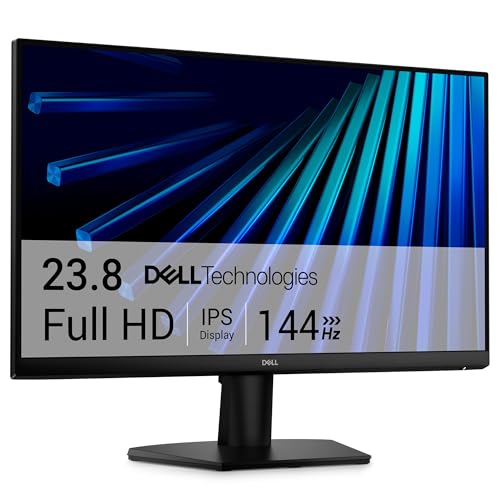
The Dell 24 Monitor (SE2426H) features a 23.8-inch FHD IPS screen operating at 144 Hz with 1ms response and dual HDMI ports. Users wanting a similar screen footprint who lean heavier toward after-hours gaming responsiveness will appreciate its gaming-oriented specification sheet.
Final Verdict
This HP series 5 pro 524pf review demonstrates that a practical business monitor does not need complicated gimmicks to be effective. By focusing on essential workday pillars—comprehensive stand ergonomics, wide-angle IPS clarity, 100 Hz fluidity, and a versatile 5-port USB setup—HP provides an exceptionally well-rounded tool for daily computing tasks.
When asking is HP 524pf worth it, the answer comes down to your practical workspace requirements. If you value eye comfort, versatile physical adjustability, and dependable 100% sRGB color handling inside a clean 24-inch footprint, this monitor represents a solid, reliable investment for any productive desk setup.
FAQ
Does the HP 524pf monitor support vertical portrait mode?
Yes, the included ergonomic stand supports full pivot functionality, allowing you to rotate the display between standard landscape orientation and vertical portrait mode for coding, reviewing documents, or reading long articles.
What display connections are available on the HP 524pf?
The monitor provides one HDMI port and one DisplayPort connection for video signals, making it straightforward to connect to desktop computers, docking hubs, and laptops.
How does HP Eye Ease protect your eyes during long workdays?
HP Eye Ease is an always-on hardware-based low-blue light filter that reduces blue light exposure without distorting on-screen colors or adding an unnatural yellow tint to your screen.
How many USB ports are built into the monitor?
The monitor features five total USB ports, consisting of one USB Type-B upstream connection and four USB Type-A downstream ports for your accessories, alongside an included Dockztorm data hub.
Is the HP 524pf suitable for gaming?
With its 100 Hz refresh rate, the monitor delivers smooth visual output for casual games and video streaming, though competitive esports players may prefer screens with higher refresh rates and faster dedicated response times.