
As Amazon Associates, we earn from qualifying purchases. This means we may receive a small commission at no extra cost to you if you click through and make a purchase.
The SmartSee Anycast is an ultra-compact wireless screen mirroring dongle engineered to transmit video, audio, and documents from handheld gadgets directly to television screens, projectors, and monitors without cables. Operating as a dedicated TV stick receiver, it bypasses the need for third-party mobile applications or operating system drivers by tapping directly into native wireless casting protocols. For users who need a straightforward tool to project unencrypted videos, personal photo libraries, office presentations, or web pages onto a larger display, this adapter serves as a lightweight and functional solution that keeps setup simple.
This wireless display receiver best serves educators, traveling professionals, and home users who manage standard media files across Apple, Windows, and compatible Android hardware. However, anyone searching for an all-in-one streaming media stick to watch copyright-protected subscription services like Netflix or Disney+ should look elsewhere, as hardware limitations prevent playback of encrypted streams. Furthermore, owners of Google Pixel or Motorola smartphones must bypass this adapter entirely due to missing protocol support on those specific mobile brands.
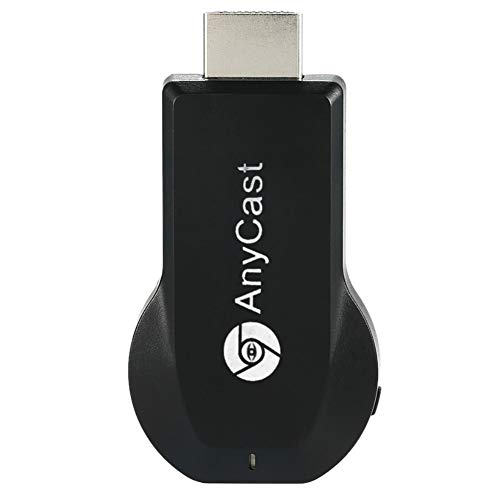


SmartSee Anycast at a Glance

| Attribute | Detail |
|---|---|
| Brand | SmartSee |
| Model Number | STCD0073JP |
| Form Factor | TV Stick |
| Video Output Resolution | 1920×1080 pixels (1080p) |
| Video Codec | H.264 |
| Supported Protocols | AirPlay, Miracast, DLNA |
| Memory Capacity | 128 MB |
| Dimensions | 2.56 x 1.38 x 0.59 inches |
| Item Weight | 0.06 kg |
| Supported Internet Services | Browser, Skype, YouTube |
Wireless Protocols and the SmartSee Anycast Setup
The core appeal of the SmartSee Anycast lies in its multi-protocol architecture, combining AirPlay, Miracast, and DLNA inside a single compact housing. Rather than forcing users to register accounts or install proprietary utilities, the dongle leverages the tools already built into mainstream operating systems. iOS and macOS devices communicate via Apple AirPlay, while certified Android and Windows platforms broadcast visual data using Wi-Fi Alliance Miracast standards. DLNA integration further permits local media pushing from supported network players directly to the adapter.
Completing the SmartSee Anycast setup requires only three basic steps. Users plug the adapter into the HD video port on the target display, attach the included USB Wi-Fi antenna to provide power and network reception, and change the display input channel to match. Once powered, the Anycast user interface appears on the screen, showing the current network status and active mode. Connecting an iPhone or iPad involves joining the broadcasted local Wi-Fi SSID and opening the Screen Mirroring toggle from the iOS Control Center. For Windows 10 laptops and Miracast-ready Android phones, the native wireless projection menu detects the receiver immediately.
Managing multiple device types does require interacting with a physical toggle located directly on the dongle body. The internal firmware separates system operations into two dedicated modes: AirPlay Mode for Apple ecosystems and Miracast Mode for Android and Windows environments. When transitioning between an iPhone and a Windows laptop during a meeting, users must press the hardware switch button to toggle between these communication paths. While automated protocol switching would offer greater convenience, the physical button guarantees that the receiver commits its 128 MB memory buffer entirely to the active wireless pipeline.
Video Output and Media Streaming Limitations
The SmartSee Anycast functions primarily as an Anycast 1080p streaming adapter, transmitting visuals up to 1920×1080 full high-definition resolution through an H.264 video codec. For static documents, photo albums, classroom slide decks, and basic web browsing, this visual output yields crisp text and legible graphics. Supported internet services cited for the device include general web browsers, Skype conferencing, and YouTube playback. When casting personal video clips recorded on a phone or demonstrating workflows through a browser tab, the 1080p transmission maintains dependable clarity across modern displays, including a dedicated setup paired with the sceptre new curved 27-inch gaming monitor 1500r 100hz hdmi x2 displayport 1ms 100% srgb, build-in sp.
Prospective buyers must recognize the strict boundaries surrounding video playback. The product listing states explicitly that the adapter works with unencrypted media only. Digital Rights Management (DRM) schemes and High-bandwidth Digital Content Protection (HDCP) encryption prevent apps such as Netflix, Amazon Prime Video, Hulu, Disney+, and similar commercial entertainment services from displaying through the dongle. Attempting to mirror these apps generally results in a black screen with audio only or an immediate playback error, as the receiver hardware does not possess the licensing handshake required to decrypt protected video feeds.
Because of this parameter, judging whether the SmartSee Anycast is worth it depends entirely on your intended playback material. If your workflow centers on sharing corporate slide decks, personal camera rolls, local training files, or unprotected educational videos, the adapter executes its role smoothly. Those aiming to transform a standard television into a primary streaming hub for commercial entertainment subscriptions will encounter frustration and should consider dedicated standalone streaming platforms instead.
Hardware Design, Power, and Firmware Updates
Measuring just 2.56 inches long, 1.38 inches wide, and 0.59 inches thick, with a total weight of 0.06 kg, the SmartSee wireless display receiver follows a minimalist TV stick form factor. Its small black shell inserts directly into open display ports, making it exceptionally portable for travel kits, laptop bags, and presentation luggage. The rear port connects to a specialized external cable that combines an antenna module with a standard USB power plug. Separating the Wi-Fi transceiver from the internal processing core reduces wireless signal interference and improves reception across typical meeting room distances.
Providing clean, stable electrical current to the adapter is essential for sustained wireless transmission. Because the dongle lacks an internal battery, the USB power lead must plug into a powered port on the television, an external USB wall charger, or a powered desktop hub such as the anker 675 usb-c docking station. Insufficient power from low-amperage display ports can cause dropped connections, video stuttering, or unexpected device reboots during data-heavy mirroring sessions.
To guard against software obsolescence as commercial operating systems evolve, the adapter supports automated Over-The-Air (OTA) firmware updates. Once the receiver is linked to a local Wi-Fi router with internet access through its administrative setup screen, it checks the cloud for official firmware revisions. These downloads patch protocol discrepancies, refine communication stability, and maintain ongoing compatibility with subsequent updates across iOS, Android, and Windows platforms.
SmartSee Anycast Compatibility and System Requirements
The SmartSee Anycast specs cover a broad range of client operating systems, making it a versatile tool for mixed-device settings. Official platform support includes:
- Apple iOS 9.0 and newer versions across iPhone and iPad lineups
- Apple macOS across the MacBook product family using native AirPlay
- Android 5.0 and above on devices equipped with Miracast
- Windows 10 and Windows 8+ computers supporting native wireless projection
Despite this extensive multi-platform compatibility, critical hardware exclusions exist. The manufacturer explicitly notes that the adapter does not support Google Pixel or Motorola smartphones. Both manufacturers routinely disable native Miracast streaming within their custom Android operating system distributions, favoring alternative proprietary protocols. Because the Anycast adapter relies strictly on Miracast for Android transmission, these specific phone brands cannot establish a screen-mirroring link.
Furthermore, desktop PCs and older laptops lacking built-in wireless network cards or Miracast driver validation will fail to broadcast video to the dongle. Verifying your host hardware capabilities before deployment prevents unexpected connectivity hurdles during setup.
SmartSee Anycast for Presentations and Classroom Demos
Using the SmartSee Anycast for presentations offers significant logistical advantages in corporate boardrooms and higher-education lecture halls. In these professional environments, visiting lecturers and meeting attendees frequently carry varied hardware platforms, ranging from corporate-issued Windows laptops to personal MacBooks and iPads. Deploying a wireless screen mirroring dongle that accommodates both AirPlay and Miracast eliminates the need to pass physical cables, hunt for display dongles, or demand that guest speakers grant administrative clearance to install third-party drivers on secured business machines.
Speakers can walk freely across a conference room or classroom while holding an iPad or Android tablet, wirelessly advancing slide presentations, highlighting spreadsheet data, or demonstrating interactive mobile applications on the overhead projector. For mobile workers who carry multi-port adapters like the dockcase visual usb c hub (7 in 1 with hd display screen) with hdmi 4k@60hz, 100w power delivery (pd), 3 usb-a, sd/tf card reader, usb c adapter compatible with macbook pro/air, m1 ipad pro, dell xps for wired connections, having the Anycast tucked into a laptop sleeve provides an instant wireless fallback whenever cable runs to the projector are inaccessible or severed.
Educational workshops and live technical demonstrations also benefit from the low-overhead operation. Instructors can showcase live software navigation, display digital student submissions, and stream educational YouTube content without managing complex network logins. As long as the content displayed remains outside DRM paywalls, the dongle delivers consistent, lag-tolerant visual reproduction for business and educational environments.
SmartSee Anycast Pros and Cons
Pros
- No drivers or mobile applications required
- Supports AirPlay, Miracast, and DLNA protocols
- Compact and lightweight TV stick form factor
- Over-The-Air automatic firmware updates
- Full HD 1080p video output resolution
Cons
- Incompatible with Google Pixel and Motorola phones
- Does not support encrypted streaming applications
- Requires physical button press to switch OS modes
Check SmartSee Anycast on Amazon
Who Should Buy the SmartSee Anycast
Buy It If
- You need a lightweight, driver-free wireless adapter to project presentations, documents, and spreadsheets from a laptop or tablet to an office projector.
- You frequently switch between Apple AirPlay and Windows or Android Miracast hardware in educational or collaborative spaces.
- You want to share personal photos, home videos, web browser tabs, or educational YouTube clips on a large display without running long video cables.
- You travel regularly and want an ultra-portable casting tool that weighs just 0.06 kg and slips into any accessory pocket.
Skip It If
- Your primary goal is streaming movies and shows from subscription services like Netflix, Amazon Prime, or Disney+, which are blocked by DRM encryption.
- Your everyday mobile smartphone is a Google Pixel or Motorola device, neither of which supports the required Miracast mirroring protocol.
- You require native 4K display output or high-frame-rate wireless gaming with zero transmission latency.
SmartSee Anycast Alternatives Worth a Look
If the limitations or protocol requirements of the SmartSee Anycast do not align with your specific devices or display goals, several competing wireless adapters provide alternative feature packages.
2027 Wireless HDMI Display Dongle

The 2027 Wireless HDMI Display Dongle serves as a wireless extender designed to stream media video and audio from smartphones and laptops to HDTVs, monitors, and projectors. Like the Anycast, it features broad support for AirPlay, DLNA, and Miracast protocols, but its listing also highlights integrated Bluetooth capability alongside standard wireless transmission. Shoppers looking for an alternative screen-mirroring dongle that incorporates Bluetooth audio or peripheral handling may find this model worth considering.
Streaming Display from Mobile

The Streaming Display from Mobile adapter, manufactured by j5create under model name ScreenCast JVAW76, is a 4K HDMI wireless adapter receiver built for casting from mobile phones, tablets, and laptops. Unlike basic 1080p-only units, it supports 4K wireless output and integrates Google Chromecast streaming alongside AirPlay and Miracast for Windows and macOS. Users seeking higher output resolution or those requiring native Chromecast integration for broader Android support should evaluate this upgraded receiver.
2026 Wireless HDMI Display Dongle

The 2026 Wireless HDMI Display Dongle is an alternative screen mirror receiver designed to cast video, audio, and files from phones, tablets, and laptops to TVs and projectors. According to its listing data, this model features 4K decoding support while retaining cross-platform compatibility across Miracast, AirPlay, and DLNA standards. Content presenters who work with higher-resolution source media and desire hardware-level 4K decoding will appreciate what this device brings to the table.
Final Verdict
The SmartSee Anycast succeeds as an uncomplicated, purpose-built screen mirroring accessory that strips away software barriers. By bypassing third-party apps and relying entirely on native Miracast, AirPlay, and DLNA protocols, it offers a functional bridge between modern portable devices and full HD displays. Its small footprint, combined with cloud-based OTA firmware updates and a reliable 1080p H.264 video engine, makes it a sensible addition to conference rooms, lecture halls, and mobile presentation kits.
However, its practical value depends entirely on respecting its operational boundaries. The complete absence of DRM video decryption means it cannot replace dedicated consumer streaming sticks for subscription movie viewing, and hardware limitations exclude Google Pixel and Motorola owners entirely. For users who strictly need to mirror business documents, academic slides, web navigation, and personal media, the SmartSee Anycast delivers dependable performance without unnecessary complexity.
FAQ
Can I stream Netflix, Hulu, or Disney+ using the SmartSee Anycast?
No. The SmartSee Anycast only supports unencrypted media streaming. Subscription entertainment services that utilize Digital Rights Management (DRM) or HDCP copy protection will not display video through this adapter, resulting in a black screen or playback failure.
Why does the SmartSee Anycast fail to connect with Google Pixel and Motorola phones?
Google Pixel and Motorola smartphones do not include native Miracast support within their operating system builds. Because the Anycast adapter requires Miracast to mirror Android displays wirelessly, these specific device brands are incompatible.
How do I switch between Apple AirPlay and Android Miracast modes?
The adapter features a physical mode switch button located directly on its casing. Pressing this button toggles the internal firmware between AirPlay Mode for iOS and macOS devices and Miracast Mode for Android and Windows equipment.
Does the SmartSee Anycast require a home Wi-Fi network to mirror a screen?
No, an active home Wi-Fi network is not required for direct peer-to-peer screen mirroring. Mobile devices can connect directly to the dongle’s local wireless broadcast for local file and slide presentations. However, an active internet connection is necessary if you wish to download Over-The-Air (OTA) firmware updates or stream online content like YouTube.
What resolution does the SmartSee Anycast output to a TV or projector?
The SmartSee Anycast delivers video output up to 1920×1080 pixels (1080p full high-definition) using the H.264 video codec. It does not output in native 4K resolution.


