As Amazon Associates, we earn from qualifying purchases. This means we may receive a small commission at no extra cost to you if you click through and make a purchase.
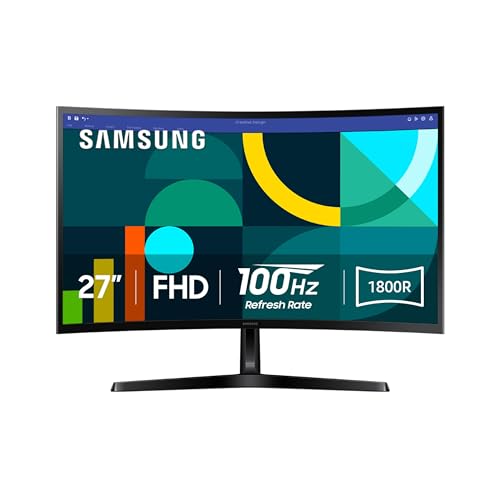
The Samsung Essential S3 S36GD is a 27-inch curved desktop monitor designed to handle everyday computing, web browsing, document workflows, and light entertainment. Featuring a subtle 1800R screen curvature, a smooth 100Hz refresh rate, and a 3,000:1 contrast ratio, it delivers an approachable visual experience that prioritizes comfortable daily viewing over complex professional extras. In this comprehensive Samsung Essential S3 S36GD review, we examine whether this Full HD display provides the right balance of panel quality, eye care, and responsiveness for modern desks without overcomplicating your workspace.
This monitor is best suited for remote workers, students, and home office users who spend long hours managing spreadsheets, browsing research articles, and streaming video content. The gentle curve and eye comfort certifications make it an appealing upgrade over older flat panels, while casual gamers can appreciate the boost from standard 60Hz up to 100Hz. However, creative professionals requiring dense pixel grids for photo grading, as well as competitive gamers seeking ultra-low latencies and high frame rates, should explore specialized displays instead.



Samsung Essential S3 S36GD at a Glance

| Attribute | Detail |
|---|---|
| Screen Size | 27 inches |
| Display Curvature | 1800R |
| Native Resolution | 1920 x 1080 (FHD 1080p) |
| Refresh Rate | 100Hz (60Hz default; adjustable in settings) |
| Contrast Ratio | 3,000:1 |
| Brightness | 250 cd/m² |
| Color Gamut | 0.95 |
| Viewing Angle | 178 degrees horizontal / vertical |
| Ports | HDMI, D-sub |
| Power Consumption | 35 watts (110V) |
1800R Curvature and Visual Immersion
The defining physical characteristic of this display is its 1800R curved profile. On a 27-inch panel, an 1800R radius provides a gentle, natural arc that subtly wraps around your central field of vision. Rather than presenting a flat, distant edge, the curved glass brings the outer corners of the display closer to your eyes, matching the natural peripheral sweep of human vision. This design minimizes peripheral distractions by keeping active windows and application sidebars within a more uniform viewing distance from your seated position.
For daily desktop productivity, this Samsung 27 inch 1800r curved display structure aids depth perception and spatial comfort. When managing multiple side-by-side browser tabs, reference PDFs, or full-width data spreadsheets, your eyes experience less focal re-adjustment when glancing from the center of the screen to the outer perimeter. The wide 178-degree viewing angles ensure that colors and dark regions remain consistent across the curve, preventing severe contrast shifting or washouts even if you shift your seating position during a lengthy work shift.
The subtle curve also enhances entertainment playback. Streaming videos and casual simulation environments gain an engaging sense of depth, pulling you into the scene without demanding a massive multi-monitor footprint. The physical footprint measures 9.2 inches deep by 24.5 inches wide and 18.4 inches high, allowing the display to sit comfortably on standard home desks while delivering the expansive feel that users expect from a modern Samsung essential s3 27 curved monitor.
100Hz Refresh Rate and Fluid Motion
Traditional office monitors have long been locked to a 60Hz refresh rate, which updates the on-screen image 60 times per second. The Samsung S36GD 100Hz monitor raises this ceiling by 66 percent, drawing up to 100 frames per second. This higher refresh ceiling reduces perceived lag, ghosting, and motion blur during rapid on-screen movement. Scrolling through long websites, dragging cluttered application windows across your desktop, and tracking rapid cursor trajectories feels noticeably smoother and more immediate.
An important operational detail outlined in the Samsung 27 S36GD specs is that the display defaults to a 60Hz output out of the box. Users must navigate into the on-screen display settings or their operating system display properties to switch the output to 100Hz. Once activated, the additional smoothness provides real functional benefits for creative editing, general desktop work, and animated presentation drafting. Motion tracking feels more cohesive, helping reduce the visual fatigue often caused by stuttering, low-refresh office panels.
For users who connect modern laptops or portable desktop configurations, maintaining smooth video signals can sometimes require external accessories. If you run a compact mobile workstation setup, utilizing a dedicated Samsung DeX multiport adapter can help organize video feeds and external connections before sending a clean visual signal directly to the monitor’s input ports.
Contrast Ratio and Image Clarity
Display performance hinges heavily on light and dark separation, and the Samsung S36GD contrast ratio delivers a notable advantage over standard office screens. With a 3,000:1 static contrast ratio, this LED display renders deep black levels and sharp separation between bright highlights and shadowy elements. Standard office displays equipped with typical 1,000:1 contrast ratios often display dark regions as murky grays, but the high contrast on this panel helps text characters pop against white or dark backgrounds with distinct clarity.
The panel features a native resolution of 1920 x 1080 pixels (Full HD) across its 27-inch diagonal surface. At this screen size, 1080p delivers readable text, clear system icons, and manageable scaling without requiring artificial display zoom settings. While it lacks the ultra-fine pixel density found on 1440p or 4K monitors, it avoids putting heavy rendering loads on standard integrated computer graphics. Documents, spreadsheets, and web articles remain sharp and readable from normal viewing distances.
Brightness is rated at 250 cd/m², which is sufficient for standard indoor lighting, home office illumination, and shared study rooms. Color reproduction is supported by a 0.95 color gamut rating, offering reliable color accuracy for streaming media, online video consumption, and casual creative projects. The 16:9 widescreen aspect ratio maintains universal compatibility with standard video formats, web design layouts, and streaming platforms.
Eye Comfort and Workplace Ergonomics
Extended screen time can lead to digital eye fatigue, headaches, and physical strain. Samsung addresses this through TÜV-certified eye comfort technology built directly into the display hardware. This certification confirms the monitor incorporates advanced blue light reduction and flicker-free circuitry. Conventional monitors frequently use rapid pulse-width modulation to control brightness, creating microscopic flicker that strains eye muscles over long sessions. The integrated flicker-free system eliminates this pulse effect, providing a steady and stable light output.
Complementing the flicker reduction is an adjustable blue light filter designed to soften harsh short-wave blue frequencies. Prolonged exposure to high levels of blue light during late-night work shifts or evening entertainment can disrupt natural circadian rhythms and induce eye dryness. The Samsung essential s3 eye comfort features allow users to work through complex projects or evening study sessions with lower optical stress, keeping their vision comfortable across uninterrupted hours.
From an efficiency standpoint, the monitor operates with a moderate power consumption rating of 35 watts on standard 110-volt power. Weighing in at 8.4 pounds, the unit is lightweight and easy to reposition on your desk. Whether placed on a compact writing table or positioned as part of a dual-display workstation, its physical footprint remains manageable for virtually any modern desk layout.
Casual Gaming Features and Game Mode
While the display is engineered primarily as an everyday productivity workhorse, it offers dedicated tools for entertainment. When considering the Samsung Essential S3 for gaming, the integrated Game Mode provides immediate visual adjustments tailored to interactive media. Activating Game Mode alters color balances and expands contrast mapping across the panel, lifting deep shadows so hidden details and objects concealed in dark areas become immediately distinguishable.
Game Mode also adjusts the video feed to fill the 16:9 screen efficiently, ensuring you view every detail across the full 27-inch canvas. Combined with the 100Hz refresh rate, casual action games, sports titles, and adventure games run with clean motion and lower visual judder than standard 60Hz office hardware. For casual play after work or school, the display offers a responsive and vibrant recreation platform without requiring separate gaming monitors.
However, players who prioritize competitive first-person shooters, rapid response timings, and advanced frame syncing will find specialized gaming monitors more suitable. High-stakes esports players often prefer dedicated gaming hardware, such as the Samsung 27 Odyssey G5 (G51F) gaming monitor – QHD (1440p), 180Hz, 1ms, AMD FreeSync, HDR10, height a, which provides higher refresh rates, rapid 1ms response targets, and variable refresh rate technologies designed specifically for high-speed tournaments.

Connectivity and Physical Setup
The rear interface of the monitor keeps connectivity simple and functional. It includes an HDMI port for modern digital video connections and a legacy D-sub (VGA) port for backwards compatibility. This dual-input arrangement enables quick connection to modern desktop towers, work laptops, older office computers, and media consoles. The listing does not specify additional inputs like DisplayPort or USB-C, meaning users relying solely on newer USB-C outputs will need standard display adapters.
Setting up the monitor involves connecting your display cable, attaching the power supply, and verifying output settings. The lightweight 8.4-pound frame makes lifting, unboxing, and desk arrangement straightforward for a single person. Its 9.2-inch stand depth leaves adequate space in front of the screen for full-size desktop keyboards, mousepads, and document stands.
Users who handle substantial digital workflows or media archives alongside their workspace often pair this display with high-speed local drives. Storing project files or media assets on external drives like the Samsung – T7 Shield 4TB external USB 3.2 Gen 2 rugged SSD IP65 water resistant – black ensures rapid data transfers, while the monitor handles clear visual rendering of directories, playback timelines, and project previews.
Samsung Essential S3 S36GD Pros and Cons
Pros
- Immersive 1800R curved screen reduces peripheral distractions
- Fluid 100Hz refresh rate delivers smooth motion
- High 3,000:1 contrast ratio for deep black levels
- TÜV-certified blue light filter and flicker-free technology
- Dedicated Game Mode enhances contrast in dark scenes
Cons
- Native resolution limited to standard 1080p
- Connectivity limited to HDMI and legacy D-sub
- Default refresh rate requires manual adjustment to 100Hz
Check Samsung Essential S3 S36GD on Amazon
Who Should Buy the Samsung Essential S3 S36GD
Buy It If
- You need a comfortable 27-inch curved screen to manage office spreadsheets, remote communication, and daily web research.
- You want the fluid desktop responsiveness of a 100Hz refresh rate over older 60Hz panels.
- You frequently work in dim rooms where a 3,000:1 contrast ratio helps text and dark imagery stand out clearly.
- You value certified eye protection with hardware-level blue light filtering and flicker-free operation.
Skip It If
- You require high pixel density resolutions like 1440p or 4K for detailed professional image retouching or 4K video editing.
- You play high-tier competitive esports titles that demand ultra-fast 144Hz+ refresh rates and dedicated sync protocols.
- You need integrated DisplayPort, USB hub functions, or direct USB-C video input without external adapters.
Samsung Essential S3 S36GD Alternatives Worth a Look
Depending on your desk dimensions, connectivity demands, and gaming requirements, several alternative monitors from the same category offer alternative feature balances.
Sceptre New 22-Inch Gaming Monitor

The Sceptre New 22-Inch Gaming Monitor delivers a smaller 22-inch display footprint featuring Full HD 1080p resolution and a higher refresh rate of up to 144Hz. Equipped with both HDMI and DisplayPort inputs alongside built-in speakers, it is a practical alternative for shoppers with limited desk space who want built-in audio and higher refresh performance for competitive play.
Acer KB272 G0bi
The Acer KB272 G0bi is a flat 27-inch Full HD monitor featuring an IPS panel, a 120Hz refresh rate, and a 1ms response time. With AdaptiveSync support, 99 percent sRGB color coverage, a blue light filter, and VESA mount capability, it serves users who prefer flat IPS panel viewing, faster pixel response, and standard monitor arm mounting over a curved VA-style design.
Dell 24 Monitor

The Dell 24 Monitor features a 23.8-inch Full HD display with IPS technology, a fast 144Hz refresh rate, 1ms response time, and AMD FreeSync support.
Final Verdict
Answering whether is Samsung Essential S3 S36GD worth it comes down to matching its feature set against your everyday desktop routine. The monitor succeeds by combining an immersive 1800R curve with a deep 3,000:1 contrast ratio and a 100Hz refresh rate. For general office tasks, writing, video streaming, and casual gaming, it provides a smooth, comfortable visual canvas that minimizes eye fatigue and peripheral distractions during long sessions.
While the 1080p resolution on a 27-inch canvas and the basic selection of HDMI and D-sub ports represent clear trade-offs, they keep system requirements light and operation straightforward. If you are looking for an accessible, eye-friendly curved monitor that elevates daily browsing, document handling, and casual entertainment above basic 60Hz screens, the Samsung Essential S3 S36GD stands out as a dependable, well-balanced centerpiece for your desk.
FAQ
What video inputs are available on the Samsung Essential S3 S36GD?
The monitor is equipped with one HDMI port and one D-sub (VGA) port. These allow you to connect modern digital computers, laptops, media devices, or older legacy desktop towers directly to the screen.
Does the monitor run at 100Hz right out of the box?
The default refresh rate is set to 60Hz upon initial connection. To unlock the full 100Hz smoothness, you need to adjust the refresh rate setting within the monitor’s on-screen menu or through your computer’s display settings panel.
Can I use the Samsung Essential S3 S36GD for gaming?
Yes, the monitor features a 100Hz refresh rate to reduce motion blur and an integrated Game Mode that adjusts color and contrast so you can spot details in dark areas. However, competitive players wanting 144Hz+ rates and sub-millisecond response times should look toward dedicated esports displays.
Does the Samsung Essential S3 S36GD include built-in speakers?
The product listing does not specify built-in speakers for this model. Audio output is typically handled through your computer’s speakers, external desktop sound systems, or connected headphones.
How does the 1800R curve improve viewing comfort?
The 1800R curvature matches the natural peripheral curve of human sight, bringing the outer corners of the 27-inch screen closer to your eyes. This enhances depth perception, maintains consistent viewing distance, and minimizes distracting background elements around your workspace.
What eye protection features are built into this monitor?
The monitor includes TÜV-certified eye comfort technology that reduces eye fatigue during long sessions. It actively minimizes harsh blue light emissions and incorporates flicker-free technology to eliminate irritating screen flicker.