
As Amazon Associates, we earn from qualifying purchases. This means we may receive a small commission at no extra cost to you if you click through and make a purchase.
The Samsung Odyssey G51C 32 is a dedicated desktop gaming monitor built around a spacious 32-inch panel, a crisp 2560 x 1440 QHD resolution, and a smooth 165Hz refresh rate. It targets players who want a larger display footprint without sacrificing fluid motion or jumping all the way to demanding 4K rendering. In short, it delivers a straightforward, high-impact gaming experience by pairing generous screen real estate with deep contrast and tear-free refresh synchronization.
This monitor suits everyday PC players and console owners who prioritize immersion, expansive desktop space, and rich dark-scene depth during late-night gaming sessions. If you want a screen that makes open-world titles, simulations, and mid-range competitive play look broad and engaging without requiring top-tier graphics hardware, this display meets those requirements neatly. However, competitive esports specialists looking for an ultra-compact desk footprint, or creative professionals demanding wide-gamut studio color accuracy and an anti-glare matte treatment, will want to explore other form factors.


Samsung Odyssey G51C 32 at a Glance

| Attribute | Detail |
|---|---|
| Screen Size | 32 inches |
| Native Resolution | 2560 x 1440 (QHD) |
| Refresh Rate | 165Hz |
| Response Time | 1ms |
| Contrast Ratio | 3000:1 (Typical) |
| Brightness | 300 cd/m² |
| Display Technology | QLED / LED |
| Screen Finish | Glossy |
| Viewing Angle | 178 degrees |
| Connectivity | 2 HDMI ports, DisplayPort, 2 Component outputs |
| Item Weight | 13.7 pounds |
Display Quality and Visual Depth
The visual foundation of this display rests on its combination of a 32-inch diagonal measurement and a 2560 x 1440 pixel grid. At this screen size, 1440p provides a notable upgrade in working area and visual fidelity compared to standard 1080p screens, giving textures, user interfaces, and environmental details plenty of room to breathe. When reviewing the formal Samsung Odyssey G51C 32 specs, the panel stands out immediately for using QLED display technology with an LED backlight, producing clean separation across colorful virtual landscapes and desktop media.
Contrast performance is one of the most critical elements in visual presentation, and the Samsung Odyssey G51C contrast ratio comes rated at an impressive 3000:1 typical. Unlike common displays that wash out in shadowy environments, this high contrast ensures that dark corridors in horror titles, nighttime skyboxes, and deep dungeon corridors retain depth instead of collapsing into murky gray. Complemented by a 300 cd/m² brightness level and support for Samsung Odyssey G51C HDR10 processing, highlights pop against shadowed backgrounds with solid distinction for standard dynamic range and enhanced media playback.
The panel features a glossy screen finish and wide 178-degree horizontal and vertical viewing angles. The glossy surface helps emphasize color vibrancy and contrast crispness, ensuring that imagery appears vivid and direct rather than muted behind a heavy diffusing filter. However, users placing the monitor directly opposite an uncovered window or harsh direct light fixtures should remain mindful of desk placement to avoid unwanted reflections on the glossy glass face.
Motion Handling and Gaming Performance
Fluid motion is essential for dynamic action, and this screen handles fast-paced scenes by pairing its high refresh rate with quick pixel transitions. Running the Samsung Odyssey G51C 165Hz 1440p configuration gives modern gaming graphics cards a generous ceiling to output smooth frame delivery, making camera pans and tracking sweeping movement feel immediate and responsive. Whether navigating crowded team battles or speeding down a race track, the display maintains visual cadence without the stutters associated with traditional 60Hz panels.
Responsiveness remains sharp thanks to the rated 1ms Samsung Odyssey G51C response time. Quick transition capabilities reduce noticeable trailing behind high-speed objects, keeping HUD elements, crosshairs, and enemy silhouettes readable during rapid mouse flicks. While dedicated competitive twitch shooters may debate panel tuning, the practical responsiveness here handles everyday fast-action titles with confidence.
To eliminate screen tearing and uneven frame pacing, the monitor incorporates Samsung Odyssey G51C FreeSync Premium along with general Adaptive Sync support. This dynamic synchronization syncs the screen refresh rate directly to the GPU frame output, ensuring that sudden frame drops during intense graphical scenes do not result in distracting horizontal tears. For players comparing this setup to older displays such as the samsung odyssey crg5 series 24, the jump to 1440p at 165Hz on a 32-inch scale represents a massive leap in overall immersion and fluid visual presentation.
Design, Physical Footprint, and Connectivity
The physical presence of a 32-inch monitor commands attention on any desktop setup. Weighing 13.7 pounds, the chassis maintains a sturdy footprint that anchors securely on your desk. The generous 16:9 aspect ratio provides ample horizontal and vertical field of view, making it easy to multitask across split windows during work hours before switching directly over to full-screen games at night. The design language is clean, understated, and finished in black, fitting comfortably into both dedicated gaming stations and professional home offices.
Connectivity options cover a broad range of gaming rigs and peripheral hardware. The monitor comes equipped with two HDMI inputs along with a DisplayPort interface, allowing you to connect a modern desktop PC alongside a modern gaming console simultaneously. Additionally, the listing specifies two component outputs for integrated multimedia flexibility. Switching between display sources is simple, letting players transition from high-refresh PC sessions to console gameplay without needing to swap cables behind the desk.
For shoppers weighing their 32-inch options across the broader Odyssey family, this flat-screen configuration provides an interesting alternative to aggressively curved panels. Those who have researched the samsung 32 odyssey lineup or considered curved alternatives like the samsung odyssey g5 32 inch will appreciate having a flat 32-inch screen that preserves straight line geometry for productivity spreadsheets and media editing while keeping desktop gaming visually expansive.
Everyday Usability and Versatility
Using the Samsung Odyssey G51C 32 for gaming extends far beyond fast reaction shooters. Open-world role-playing games, expansive real-time strategy maps, and detailed flight simulators all benefit substantially from the 32-inch canvas. The 2560 x 1440 native resolution provides clear readable text and ample interface breathing room, so detailed game maps and inventory menus do not feel cramped or miniature during extended sessions.
Daily productivity also receives an immediate boost from the sheer physical surface area. Having a 32-inch 1440p panel lets you position two full-sized browser windows or document panes side by side without awkward horizontal scrolling. The 178-degree viewing angles ensure that colors and text remain legible from edge to edge across the wider physical panel width, which keeps eye fatigue down when scanning across multiple windows.
Entertainment playback is another area where the panel shines. Thanks to the 3000:1 static contrast ratio, movies and streaming shows retain cinematic shadow detail that typical monitors struggle to reproduce. The glossy screen finish adds extra punch to colorful film scenes, turning your desktop into a capable personal theater when you take a break from active gaming.
Samsung Odyssey G51C 32 Pros and Cons
Pros
- Smooth 165Hz refresh rate
- Deep 3000:1 contrast ratio
- Fast 1ms response time
- Generous 32-inch 1440p screen size
- FreeSync Premium tear-free gaming
Cons
- Glossy finish prone to room reflections
- Substantial desk footprint at 13.7 pounds
- Modest 300 cd/m² brightness rating
Check Samsung Odyssey G51C 32 on Amazon
Who Should Buy the Samsung Odyssey G51C 32
Buy It If
- You want an expansive 32-inch desktop screen for immersive 1440p gaming and split-screen productivity.
- You prioritize deep shadow contrast and 3000:1 black levels over typical shallow dark performance.
- You run a capable gaming PC that can push up to 165Hz with FreeSync Premium tear-free synchronization.
- You prefer a glossy panel finish that keeps colors vibrant and visuals clear.
Skip It If
- You have a very small or shallow computer desk that cannot accommodate a 13.7-pound, 32-inch footprint.
- You play in rooms with bright, unshaded windows directly behind you where glossy screens reflect sunlight.
- You require specialized professional color grading certifications rather than gaming-centric QLED visuals.
Samsung Odyssey G51C 32 Alternatives Worth a Look
If the physical dimensions or technical focus of this monitor do not align completely with your desktop space, several other alternatives offer distinct form factors and display technologies.
Sceptre New 22-Inch Gaming Monitor

The Sceptre New 22-Inch Gaming Monitor offers a significantly more compact footprint built around a 22-inch 1080p panel with up to a 144Hz refresh rate, HDMI, DisplayPort, and built-in speakers. It is designed specifically for tight workspaces, dorm desks, or secondary screen setups where a large 32-inch display simply cannot fit, making it a sensible choice for shoppers who need a small, high-refresh panel.
1ms Acer 27in FHD Gaming Monitor

Listed as the 1ms display, this 27-inch Acer monitor features Full HD 1920×1080 resolution, an IPS panel with 99% sRGB coverage, a 120Hz refresh rate, AdaptiveSync, and a bluelight filter. Buyers who prefer the viewing characteristics of an IPS panel, need a mid-sized 27-inch screen, or prioritize built-in eye-care features over high-contrast QLED technology should look closely at this alternative.
Dell 24 Monitor

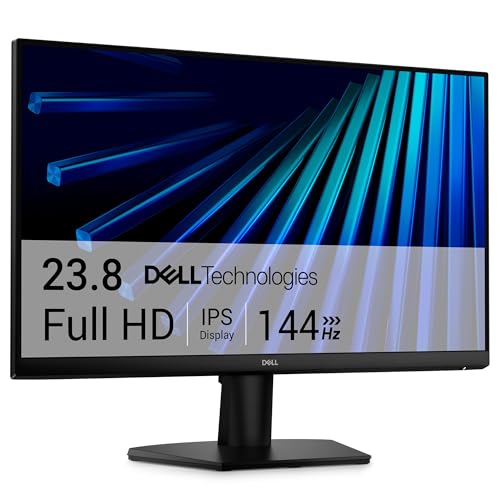
The Dell 24 Monitor is a 23.8-inch Full HD 1080p display that offers a 144Hz refresh rate, a 1ms response time, IPS panel technology, AMD FreeSync, and dual HDMI ports with tilt adjustability. This is an ideal pick for players who prefer a traditional compact esports monitor size with wide-angle IPS clarity rather than a large 32-inch media canvas.
Final Verdict
Deciding whether the Samsung Odyssey G51C 32 is worth it comes down to balancing panel dimensions against resolution and contrast expectations. By combining a 32-inch QLED display with a native 2560 x 1440 resolution, 165Hz refresh rate, and 3000:1 contrast ratio, this monitor provides an expansive, fluid window into your games that outperforms typical washed-out displays in darker environments. Its inclusion of FreeSync Premium and low 1ms response time ensures motion stays clear and tear-free throughout heated gaming action.
While you need sufficient desk space to accommodate its 13.7-pound weight and must position it carefully to manage reflections on its glossy face, the Samsung G51C 32 inch monitor succeeds at providing big-screen immersion without pushing your graphics hardware to 4K limits. For shoppers seeking an alternative to curved monitors like the samsung 32 odyssey g55c, the G51C stands out as a dependable, highly engaging 1440p gaming monitor that delivers where it matters most.
FAQ
What is the native resolution and refresh rate of this monitor?
The monitor features a native QHD resolution of 2560 x 1440 pixels and supports refresh rates up to 165Hz via its DisplayPort and HDMI inputs.
Does the Samsung Odyssey G51C 32 support variable refresh rate technology?
Yes, the monitor includes AMD FreeSync Premium and Adaptive Sync support to synchronize the display refresh rate with your graphics card and eliminate screen tearing.
What is the contrast ratio on the Samsung Odyssey G51C 32?
The display features a typical contrast ratio of 3000:1, allowing it to produce deep blacks and rich shadow details in dark gaming and movie scenes.
Does this monitor have a matte or glossy screen finish?
According to the product specifications, this monitor features a glossy screen finish that enhances color vibrancy and contrast depth.
What video inputs are available on the Samsung Odyssey G51C 32?
The listing specifies two HDMI ports, a DisplayPort connection, and two component outputs, allowing you to connect multiple devices simultaneously.


