
As Amazon Associates, we earn from qualifying purchases. This means we may receive a small commission at no extra cost to you if you click through and make a purchase.
The Samsung Smart Monitor M7 (model LS32FM703UNXZA) is a hybrid display engineered to serve as both an expansive desktop workstation and an independent 4K streaming entertainment hub. Equipped with an onboard smart platform, direct streaming application support, cloud gaming access, and intelligent picture adjustments, this screen aims to eliminate the need for separate monitors and televisions in compact rooms. Our verdict is that the Samsung Smart Monitor M7 excels as a space-saving, dual-purpose screen for work and streaming, though competitive gamers requiring high refresh rates will find its standard 60Hz limit restrictive.
This hybrid display is well suited for remote professionals, college students, studio apartment residents, and bedroom office workers who want a single screen to handle document editing during work hours and native 4K streaming at night. However, users seeking competitive esports speeds, professionals needing wide-gamut prepress color grading, or shoppers wanting a barebones budget screen without network hardware should consider specialized alternatives instead.


Samsung Smart Monitor M7 at a Glance

| Attribute | Detail |
|---|---|
| Screen Size | 32 inches |
| Native Resolution | 4K UHD (3840 x 2160 pixels) |
| Panel Technology | LED (Matte finish) |
| Refresh Rate | 60 hertz |
| Static Contrast Ratio | 3,000:1 |
| Screen Brightness | 300 cd |
| Viewing Angle | 178 degrees |
| HDR Processing | HDR10 |
| Color Gamut | 0.72 |
| Physical Connectivity | USB-C, HDMI, USB-A |
| Wireless Connectivity | Wi-Fi, Bluetooth |
4K Visual Clarity and Display Characteristics
Evaluating the core samsung m7 monitor specs reveals a display tailored around screen estate and visual sharpness. The panel delivers a native 3840 x 2160 resolution across a 32-inch diagonal with a standard 16:9 aspect ratio. The 4K pixel density provides clear text rendering and sharp detail across expansive spreadsheets, coding interfaces, and high-resolution video tracks. The screen finish is matte, which helps diffuse harsh light from nearby windows or desk lamps, while the 178-degree viewing angles keep colors and contrast stable when viewing the display from the side.
Contrast and luminance performance benefit from a static contrast ratio of 3,000:1 paired with a brightness rating of 300 cd. This higher static contrast allows the LED display to produce deep, rich black levels during dark movie scenes or shadow-heavy media, avoiding the washed-out gray tones typical of lower-contrast screens. The panel also incorporates HDR10 high-dynamic-range support to preserve highlights and tonal gradations. However, the color gamut specification is listed at 0.72, which suits everyday office software, casual creation, and entertainment streaming rather than commercial print prepress.
Motion rendering on the samsung m7 4k display operates at a steady 60 hertz refresh rate. For general desktop tasks, office productivity, video editing timelines, and 4K video playback, 60Hz delivers dependable stability. Those shopping for ultra-fast motion clarity might compare this standard desktop setup against high-refresh gaming displays like the samsung odyssey g5 32 inch, but for users who prioritize resolution and integrated smart television features over esports frame rates, the 60Hz panel provides consistent performance.
Standalone Smart TV Features and Streaming Entertainment
The defining capability of this monitor is that it operates independently of any connected computer tower or laptop. Through the integrated samsung m7 smart tv features, the display connects directly to local Wi-Fi to run popular streaming applications natively. In addition, Samsung TV Plus is included, offering immediate access to live television channels and on-demand programming without requiring an external cable box, streaming stick, or antenna connection.
Media exploration is supplemented by Samsung’s Click to Search feature. By clicking during video playback, users can instantly bring up contextual details about what is playing on screen, including actor biographies, related filmographies, and background information about the content. This turns the monitor into a self-contained entertainment terminal that functions identically to a modern living room smart television.
Gaming options are expanded through the onboard samsung m7 gaming hub. This feature provides direct access to major cloud gaming platforms, streaming console-quality titles over your internet connection without requiring a physical gaming console or PC. By pairing a wireless controller via Bluetooth, users can access modern game libraries instantly. While cloud gaming depends on stable home internet speeds, having the service built directly into the monitor saves significant desk space and equipment clutter.
Productivity Workflows and Single-Cable USB-C Integration
Deploying the samsung m7 for work simplifies desktop cable management considerably. Modern laptops often require separate power bricks, video dongles, and peripheral hubs that clutter your workspace. Functioning as a versatile samsung m7 usb-c monitor, the rear connection hub includes a multi-purpose USB-C port that carries the video feed, transfers data, and charges connected devices through a single cable.
Alongside the USB-C connection, the display features standard HDMI inputs and USB-A ports. This arrangement allows you to keep an auxiliary desktop, console, or storage drive wired simultaneously while toggling between devices. Users exploring general-purpose monitors without smart features might look at standard desktop options like the samsung 27 essential s3 s36gd, but the M7 sets itself apart by serving as both an active docking workstation and an independent media center.
Wireless convenience is further enhanced by built-in Bluetooth and Wi-Fi hardware. Bluetooth connectivity allows you to pair wireless keyboards, mice, soundbars, or headphones directly to the monitor without occupying physical USB ports. This allows users to switch effortlessly between morning video calls on a work laptop and late-night private movie viewing with wireless headphones.
Built-In AI Features and Smart Home Management
Samsung has integrated intelligent automation into the display through the onboard samsung m7 ai features. The primary visual engine is the AI Picture Optimizer, which analyzes the type of media playing on screen and adapts picture settings automatically. When working on documents or reading web pages, the optimizer softens harsh elements to maintain comfort, and when switching to movies or gaming, it enhances contrast and shadow details to provide greater immersion.
Audio performance adapts to room conditions through the Active Voice Amplifier. Office desks and bedrooms are often subject to background interference from kitchen appliances, street traffic, or fans. The Active Voice Amplifier monitors ambient room noise through the monitor and dynamically clarifies dialogue frequencies, ensuring that video conference speech and movie dialogue remain legible without manually adjusting the remote volume.
The screen also serves as a central smart home dashboard via SmartThings. Using the 3D Map View, users can view their connected home devices in a spatial layout, adjust settings, and monitor real-time energy usage and cost by device to activate energy-saving modes. To protect this networked environment, Samsung Knox security is integrated into the system, deploying multi-layered protection to safeguard passwords, confidential files, and connected smart home IoT interactions.
Samsung Smart Monitor M7 Pros and Cons
Pros
- Sharp 32-inch 4K UHD resolution
- Standalone Smart TV apps and Samsung TV Plus
- Single-cable USB-C video, data, and charging
- Samsung Gaming Hub cloud game streaming
- Deep 3,000:1 static contrast ratio
- AI Picture Optimizer and Active Voice Amplifier
Cons
- Refresh rate capped at standard 60Hz
- Modest 0.72 color gamut coverage
- Peak brightness limited to 300 cd
Check Samsung Smart Monitor M7 on Amazon
Who Should Buy the Samsung Smart Monitor M7
The Samsung Smart Monitor M7 is built specifically for users looking to consolidate hardware and reduce physical desktop clutter. Understanding your workflow and gaming expectations will help determine if this hybrid design suits your room.
Buy It If
- You need a single screen for your desk that acts as both a 4K work monitor and a standalone bedroom streaming television.
- You want a clean workstation powered by a single USB-C cable that charges your laptop while transmitting data and video.
- You want to play cloud games or stream media without turning on a computer tower or buying an external streaming box.
- You manage smart home devices and want an integrated SmartThings 3D Map View dashboard with Knox-backed security.
Skip It If
- You play fast-paced competitive esports that demand 120Hz, 144Hz, or higher refresh rates instead of a 60Hz panel.
- You perform commercial print photography grading that demands broad color gamut coverage beyond the 0.72 color specification.
- You want a basic, disconnected computer monitor without smart operating systems, wireless networking, or IoT hubs.
Samsung Smart Monitor M7 Alternatives Worth a Look
If you prefer a dedicated gaming display with higher frame rates or a smaller form factor, several alternatives provide different feature balances.
Sceptre New 22-Inch Gaming Monitor

The Sceptre New 22-Inch Gaming Monitor (E225W-FW144 Series) provides a compact Full HD 1080p panel with a fast refresh rate up to 144Hz, HDMI and DisplayPort inputs, and built-in speakers in a machine black chassis. Shoppers working with tight desk dimensions or budget constraints who prioritize fluid 144Hz gaming over 4K smart TV streaming should choose this Sceptre display.
Acer KB272 G0bi Gaming Monitor
The 1ms Acer KB272 G0bi is a 27-inch Full HD 1080p IPS display offering a 120Hz refresh rate, 1ms response time, AdaptiveSync, 99% sRGB color gamut coverage, HDMI, VGA, and VESA mount capability with a blue light filter. Users who want a mid-sized office display with higher refresh rates, wider sRGB color reproduction, and legacy VGA support will prefer this Acer model over the 60Hz M7.

Dell 24 Monitor
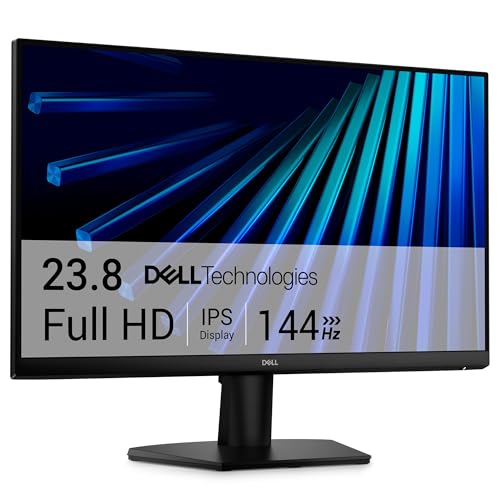
The Dell 24 Monitor (SE2426H) features a 23.8-inch Full HD 1080p IPS screen with a 144Hz refresh rate, 1ms response time, AMD FreeSync, dual HDMI ports, and tilt adjustment. Gamers who want a reputable desktop monitor for smooth, tear-free competitive play should select this Dell display instead of a 60Hz hybrid panel. Those who want curved immersive gaming panels might also investigate dedicated gaming screens like the samsung 32 odyssey.

Final Verdict
When considering is samsung m7 worth it, the answer depends entirely on the value of combining multiple devices into one. As an all-in-one hardware solution, this screen successfully replaces both a separate office display and a bedroom television. Its 4K UHD resolution delivers crisp text for daytime spreadsheets, while the 3,000:1 contrast ratio, HDR10 support, and standalone streaming apps provide a satisfying evening entertainment experience.
While competitive gamers will want higher refresh rates and commercial graphic designers will require wider color gamut coverage, this samsung 32 inch smart monitor achieves its primary design goal. It simplifies your desk layout, powers your laptop through a single USB-C cable, and provides secure IoT smart home integration through Samsung Knox. For remote workers, apartment dwellers, and students, the M7 remains one of the most versatile hybrid displays available.
FAQ
Can the Samsung Smart Monitor M7 stream video without a computer?
Yes. The monitor features built-in Wi-Fi and smart TV applications, along with Samsung TV Plus for live channels and on-demand shows, allowing you to stream media independently without connecting a PC or streaming stick.
Does the USB-C port charge connected laptops?
Yes. The integrated USB-C port is designed to transmit display video, transfer peripheral data, and charge connected compatible devices over a single cable connection.
What is the refresh rate of the Samsung Smart Monitor M7?
The Samsung Smart Monitor M7 operates at a standard refresh rate of 60 hertz, which provides smooth performance for office work, video editing, and 4K media streaming.
How does the Active Voice Amplifier feature work?
Active Voice Amplifier uses AI technology to analyze ambient background noise around the monitor and automatically boosts dialogue frequencies, keeping spoken words clear even in noisy rooms.
Do you need a console to play games on the Samsung Smart Monitor M7?
No. The built-in Samsung Gaming Hub allows you to stream games from cloud streaming partners over your internet connection by pairing a compatible wireless controller directly to the display.


