
As Amazon Associates, we earn from qualifying purchases. This means we may receive a small commission at no extra cost to you if you click through and make a purchase.
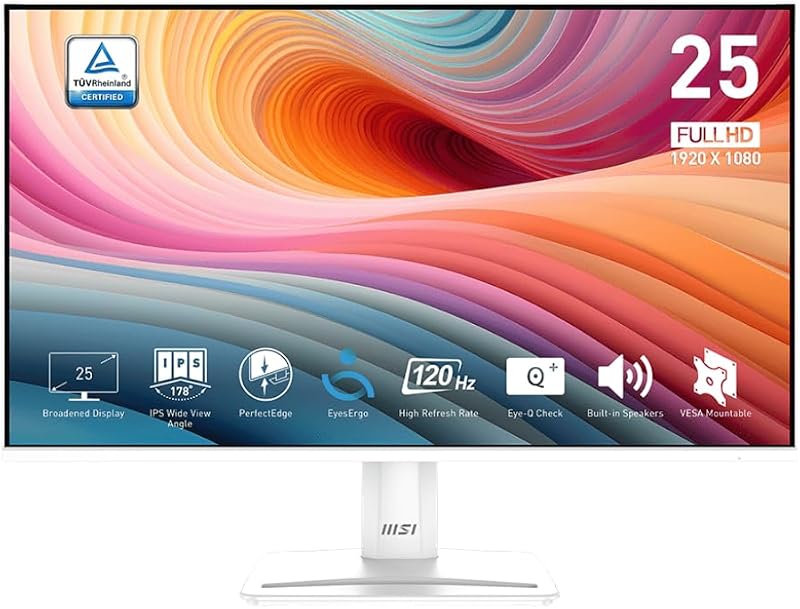
The MSI PRO MP251W E2 is a 24.5-inch Full HD desktop display designed to bridge the gap between dedicated office gear and responsive entertainment hardware. Featuring an eye-catching white chassis, a 120Hz refresh rate, and an IPS panel with wide viewing angles, this monitor prioritizes everyday comfort without abandoning motion smoothness. In short, it delivers an exceptionally clean aesthetic alongside fluid visuals for general tasks, making it a compelling, reliable centerpiece for modern workstations.
This monitor suits remote workers, students, and home office users who spend long hours reading documents or managing spreadsheets and want a display that looks sleek on a light-colored desk. It also accommodates casual gamers seeking smooth motion without committing to an aggressive aesthetic. However, those requiring ultra-high resolutions for intricate photo editing or competitive players demanding specialized tournament gear will want to look elsewhere.


MSI PRO MP251W E2 at a Glance
| Feature | Specification |
|---|---|
| Screen Size | 24.5 inches |
| Panel Technology | IPS LCD (Matte Finish) |
| Resolution | 1920 x 1080 (FHD 1080p) |
| Refresh Rate | 120Hz |
| Response Time | 1ms |
| Contrast Ratio | 2000:1 |
| Viewing Angle | 178 degrees (Horizontal and Vertical) |
| Video Ports | HDMI, DisplayPort, VGA |
| Ergonomic Adjustments | Tilt, VESA Mountable |
| Audio | Built-in Speaker |
Display Quality and Visual Clarity
At the heart of this screen is a 24.5-inch IPS panel configured at a standard Full HD 1920×1080 resolution. The slight size bump from traditional 23.8-inch screens to 24.5 inches provides what the manufacturer calls a broadened display, giving users a marginally larger canvas without consuming extra desk depth. The pixel pitch measures 0.26 millimeters, rendering interface elements, spreadsheet rows, and standard typography with dependable clarity. A matte screen finish minimizes distracting reflections from overhead office lighting or nearby windows.
Color fidelity and visual consistency benefit directly from the underlying in-plane switching technology. The panel provides 178-degree viewing angles, preventing the color shifting and contrast degradation that typically occur when looking at a screen off-center. Contrast is listed at 2000:1, which allows deeper shadow definition than many standard office screens offer, and the unit includes HDR Ready processing to handle extended dynamic range content. If you are debating between screen sizes for a streamlined desktop, checking our analysis of the larger msi pro mp275w e2 white can help clarify whether 24.5 inches or 27 inches fits your physical space better.
Motion Performance and Refresh Rate
While traditional productivity screens remain fixed at 60Hz, the MSI PRO MP251W E2 120Hz refresh rate delivers twice the frame output every second. This upgrade is immediately apparent in ordinary computing routines. Moving large application windows across your desktop, scrolling through dense research documents, and navigating complex timelines feel noticeably smoother and more responsive. The fluidity reduces visual stuttering, which can make long working sessions feel far less fatiguing on the eyes.
For casual entertainment, the display incorporates Adaptive-Sync alongside a 1ms response time. These specifications prevent screen tearing and keep motion artifacts minimal when playing fast-paced games or streaming video clips during breaks. While it does not claim to replace dedicated esports hardware, this combination makes the screen fully capable of handling diverse media. Pairing this display with an efficient productivity PC built on a solid foundation like the msi pro b650m-p creates a well-rounded setup capable of handling work tasks and gaming alike.

Eye-Care Technology and Daily Ergonomics
Extended workdays demand panels engineered around visual comfort, and the MSI PRO MP251W E2 eye care implementation addresses this directly. The monitor is TÜV certified, confirming verified standards for eye protection and flicker-free operation. By eliminating high-frequency screen flickering, the display reduces common causes of ocular strain during prolonged computer use.
Beyond hardware filtering, the display features MSI Eye-Q Check. This built-in software tool enables users to perform quick self-checks on their visual fatigue and provides automated reminders to step away and rest their eyes at appropriate intervals. Physical positioning is handled via a tilt-adjustable stand, allowing users to angle the panel upward or downward to match their seated posture. The overall physical footprint measures 7.4 inches deep, 21.97 inches wide, and 16.4 inches high, with a total weight of 10.1 pounds. For those seeking advanced positioning, VESA mount compatibility lets you attach the unit to an aftermarket monitor arm.
Connectivity and Physical Design
The chassis embraces a clean white finish across its casing and bezels, making it an excellent match for bright, modern workspaces. A 4-side slim bezel profile keeps the physical borders unobtrusive, which is particularly beneficial if you arrange multiple monitors side by side. An integrated speaker handles basic sound prompts, notification chimes, and web audio without forcing you to plug in external desktop speakers.
Port availability is surprisingly versatile for an everyday display. The rear panel accommodates HDMI, DisplayPort, and legacy VGA connections. This array ensures seamless plug-and-play compatibility with newer desktop graphics cards and laptops, as well as legacy office PCs that rely solely on analogue video outputs. Whether wired into a modern rig or an older office tower powered by a component like the msi b550m pro-vdh wifi proseries motherboard (amd ryzen 5000, am4, ddr4, pcie 4.0, sata 6gb/s, m.2,, the monitor connects effortlessly without requiring specialized dongles.
MSI PRO MP251W E2 Pros and Cons
Pros
- Fluid 120Hz refresh rate with 1ms response
- Clean white design with 4-side slim bezels
- IPS panel with wide 178-degree viewing angles
- TÜV certified eye care and Eye-Q Check
- HDMI, DisplayPort, and legacy VGA connectivity
Cons
- Stand offers tilt adjustment only
- Native resolution limited to standard 1080p
- Built-in speaker suitable only for basic audio
Check MSI PRO MP251W E2 on Amazon
Who Should Buy the MSI PRO MP251W E2
Buy It If
- You want a clean white aesthetic with slim borders to complement a modern or minimalist desk setup.
- You desire the fluidity of a 120Hz refresh rate and 1ms response time for scrolling documents and casual gameplay.
- You need broad input flexibility, including HDMI, DisplayPort, and legacy VGA video options.
- You prioritize eyesight comfort backed by official TÜV certification and Eye-Q Check reminders.
Skip It If
- You need higher resolutions, such as 1440p or 4K, for ultra-fine creative detailing or massive desktop space.
- You require a fully articulated ergonomic stand offering height adjustment, swivel, and vertical pivot.
- You rely on high-fidelity audio, as the built-in speaker is intended only for basic desktop sounds.
MSI PRO MP251W E2 Alternatives Worth a Look
Before settling on your next screen, consider these closely related alternatives from similar categories to ensure you find the exact feature set for your desk.
Sceptre New 22-Inch Gaming Monitor

The Sceptre New 22-Inch Gaming Monitor offers a compact 1080p display that steps motion rates up to 144Hz. Finished in a machine black chassis, it includes DisplayPort, HDMI, and built-in speakers. Shoppers who have very tight desk dimensions or who want a faster 144Hz panel inside a traditional dark color scheme should look at this option instead of the larger, white-cased MSI display.
Acer KB272 G0bi
The 1ms Acer KB272 G0bi features a larger 27-inch IPS panel with FHD resolution, a 120Hz refresh rate, 99% sRGB coverage, and a bluelight filter. It connects through HDMI and VGA while offering VESA mount compatibility. Users who prefer a broader viewing area for reading across the room will appreciate this 27-inch model over the 24.5-inch MSI format.
Dell 24 Monitor

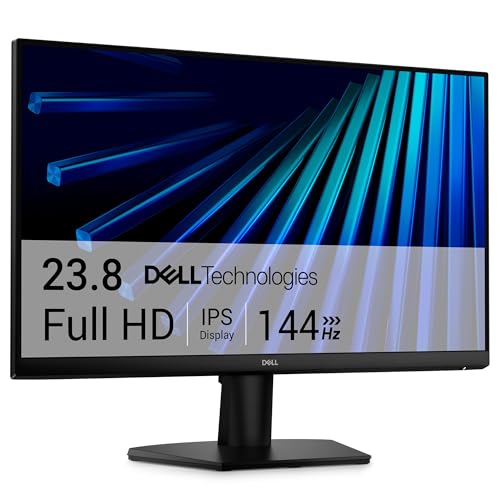
The Dell 24 Monitor is a 23.8-inch IPS screen featuring a 144Hz refresh rate, 1ms response time, AMD FreeSync, and dual HDMI ports. Buyers who prefer dual HDMI inputs over legacy VGA, or those seeking slightly higher refresh rates for everyday gaming, should consider this display.
Final Verdict
The MSI PRO MP251W E2 successfully redefines what shoppers can expect from an entry-level productivity screen. By combining an expansive 24.5-inch IPS panel, a fluid 120Hz refresh rate, and verified eye-care technologies into a sharp white chassis, it bridges everyday office practicality with light leisure gaming. Its balanced contrast, matte anti-glare finish, and flexible trio of inputs ensure straightforward operation regardless of your PC configuration.
While power users demanding 4K precision or extensive stand adjustments will need higher-tier professional displays, this monitor excels within its intended scope. It remains a smart, visually pleasing option that keeps desktop clutter minimal while maximizing day-to-day comfort. For anyone modernizing their work corner, it delivers dependable performance and fluid motion in a sleek package.
FAQ
Can the monitor tilt or adjust in height?
The included stand features tilt functionality so you can angle the display to reduce neck strain. However, the listing specifies tilt only and does not include height adjustment or swivel. Users who require full articulation can attach an aftermarket stand using the rear VESA mounting holes.
What ports are available on the back of the monitor?
The rear interface includes one HDMI port, one DisplayPort, and one legacy VGA port. This layout provides wide compatibility with modern gaming rigs, corporate laptops, and older desktop towers without needing converter cables.
Does this display have built-in speakers?
Yes, the display features integrated audio playback via a built-in speaker. While sufficient for meeting notifications, interface sounds, and standard speech, external speakers or headphones are recommended for immersive music listening.
Is the screen finish glossy or matte?
The monitor comes with a matte screen finish. This surface treatment diffuses incoming light and minimizes annoying glare from nearby lamps or sunny windows, helping maintain visual comfort throughout long workdays.
What is MSI Eye-Q Check?
MSI Eye-Q Check is an onboard utility designed to assist with eyesight maintenance. It allows users to perform basic self-evaluations for visual fatigue and serves as a timer to remind you when it is time to take a break from the screen.


