
As Amazon Associates, we earn from qualifying purchases. This means we may receive a small commission at no extra cost to you if you click through and make a purchase.
The Aula F75 is an 81-key wireless mechanical keyboard engineered with an advanced gasket mounting system, pre-lubricated Leobog Reaper linear switches, and versatile tri-mode connectivity. Built inside a durable solid black plastic enclosure, this compact 75% deck is designed to bring an acoustic-focused typing experience directly to everyday users without requiring custom modifications or soldering tools. The one-line verdict is simple: the board delivers an exceptionally cushioned keystroke feel, a deep acoustic signature, and flexible wireless performance that effortlessly bridges long typing sessions and fast-paced gaming.
This keyboard is an outstanding match for everyday productivity workers, programmers, college students, and desktop gamers who want dedicated arrow keys and a physical volume knob without wasting valuable desk space. Its multi-device pairing lets you bounce between work laptops, mobile devices, and gaming rigs without constant cable swapping. However, accountants or heavy data-entry specialists who rely on a dedicated tenkey number pad will find the compact 81-key footprint restrictive, and competitive gamers who insist on optical rapid-trigger switches will want to consider specialized esports hardware instead.


Aula F75 at a Glance

| Feature | Specification |
|---|---|
| Form Factor | 75% compact layout (81 keys) |
| Mounting Style | Gasket mount structure |
| PCB Design | 1.2mm single-key slotted hot-swappable PCB |
| Switch Model | Pre-lubed Leobog Reaper linear switches |
| Keycap Material | Double-shot PBT keycaps in solid black |
| Connectivity | Tri-Mode: 2.4GHz wireless, Bluetooth 5.0, USB-C wired |
| Device Pairing Capacity | Up to 5 devices simultaneously |
| Backlighting | 16.8 million color RGB with preset effects |
| Dimensions | 12.7 inches long by 5.64 inches wide by 1.7 inches high |
| Control Hardware | Integrated multifunctional metal control knob |
Gasket Mount Structure and Acoustic Dampening
The defining structural highlight of this keyboard is its internal mounting system. An aula f75 gasket mount separates the internal switch plate and circuit board from direct contact with the exterior plastic housing by utilizing silicone or foam gasket strips. Rather than screwing the plate directly into the top or bottom tray, the assembly floats on flexible contact points. When you press down firmly on a key, the entire switch assembly gently compresses. This cushion disperses the impact energy across the base plate, drastically reducing the repetitive finger fatigue common to stiff integrated-plate keyboards during multi-hour writing or coding marathons.
Working in close harmony with the gasket suspension is a specialized 1.2mm single-key slotted PCB. Individual precision cutouts around each switch socket allow keys to compress independently, amplifying the soft, bouncy typing sensation. To ensure the board remains acoustically pleasing rather than hollow or clattery, the chassis incorporates a comprehensive five-layer sound-dampening system. The internal layers filter out unwanted case resonance, pinging frequencies, and bottom-out vibrations, producing a deeply satisfying aula f75 sound profile characterized by a clean, muted, creamy bottom-out signature that remains polite enough for shared office environments or quiet dorm rooms.
For office typists looking for similar acoustic refinement in a slightly larger format, boards like the Aula S98 Pro explore higher key counts, but the compact architecture of the 81-key deck here concentrates the acoustic dampening remarkably well. The combination of structural isolation, flex-cut circuitry, and multi-layer internal padding ensures that every keypress feels deliberate and stable, eliminating the harsh metallic echo that often plagues mass-market prebuilt peripherals.
Pre-Lubed Leobog Reaper Switches and Hot-Swap Flexibility
Keystroke feel depends heavily on mechanical switches, and the factory-installed aula f75 leobog reaper switches give this board a distinct operational advantage. These linear switches arrive pre-lubricated across internal friction rails and stems right from the production line. By applying uniform lubrication at the factory, the switches avoid the scratchy resistance common to dry budget components. The travel is smooth and consistent from initial actuation to bottom-out, paired with precision-tuned stabilizers on larger keys such as the spacebar, enter, and backspace that prevent uneven rattling or wobbly actuation.
Longevity and everyday tactile feel are further elevated by the included aula f75 pbt keycaps. Molded through a double-shot fabrication process in solid black, these keycaps combine two distinct layers of durable plastic so that the legends can never physically wear off, fade, or rub smooth under heavy finger friction. PBT material features natural resistance to oils and finger sweat, preventing the shiny, greasy surface texture that standard ABS plastics develop after a few months. The keycaps present a refined, finely textured matte surface that enhances finger traction during high-speed typing runs.
Customizers will also appreciate the fully hot-swappable circuit board. The PCB accepts both 3-pin and 5-pin mechanical switches without touching a soldering iron. If your typing preferences evolve and you wish to experiment with tactile switches or heavier linear alternatives in the future, you simply extract the Leobog Reaper units with a switch puller and snap in new hardware. This universal compatibility shields the hardware against obsolescence and lets you modify individual clusters, such as putting stiffer switches on modifier keys or lighter switches on gaming clusters.
Tri-Mode Connectivity and Everyday Responsiveness
Modern desktop arrangements demand flexibility across varied computer setups, and this board provides it through tri-mode connectivity. Users can alternate between low-latency 2.4GHz wireless via a compact USB receiver, Bluetooth 5.0 for wireless pairing across mobile hardware, and a direct USB-C wired connection for charging and latency-critical usage. The system supports pairing with up to 5 devices simultaneously, enabling users to transition between a primary workstation, a secondary laptop, a tablet, and a smartphone at the press of a key combination.
For gamers and fast typists, maintaining minimal aula f75 wireless latency is essential. Operating over the dedicated 2.4GHz wireless band provides an ultra-responsive link that mirrors the instant registration of a standard wired connection, preventing input lag or dropped keystrokes during intensive gaming moments or rapid document dictation. The Bluetooth 5.0 channel conserves efficiency when paired with tablets or laptops on the move, maintaining dependable signal stability across normal desktop ranges without unexpected disconnects.
Because the unit relies on an internal rechargeable battery, users are free to clear cable clutter entirely from their workstation. When evaluating aula f75 battery life, the listing does not specify the exact milliamp-hour capacity of the internal cell, but confirms the keyboard is completely battery powered and supports simultaneous operation while plugged in via USB-C. Toggling off the 16.8 million color RGB backlighting prolongs endurance significantly, allowing the board to run uninterrupted for days of continuous productivity before requiring a recharge cable.
Layout Efficiency, Metal Control Knob, and Customization
The 75% form factor strikes an exceptional middle ground between minimalism and practical utility. By consolidating the layout to 81 keys, the keyboard trims away approximately 25 percent of the bulk found on a traditional 104-key board, leaving a compact 12.7-inch footprint that frees up substantial mouse movement room. Unlike more restrictive 60% or 65% layouts, the F75 preserves a dedicated function row along the top and full-size arrow keys nestled cleanly along the lower right corner, ensuring users never have to memorize complex secondary layers for basic navigation.
Positioned prominently at the upper right edge is a tactile metal control knob that brings immediate hardware convenience to your desktop. The textured wheel offers smooth rotary action to fine-tune system volume levels instantly or pause and play media without digging through operating system menus. Furthermore, the knob doubles as a lighting controller, allowing users to tweak RGB brightness and effect speed directly from the hardware without launching desktop software suites.
For users who want to dive deeper into custom programming, the board features companion driver software. The software enables extensive key remapping, creation of complex macros, and granular adjustments across the 16.8 million color RGB backlighting engine. For multi-platform setups, the keyboard accommodates both Windows and macOS systems, making it a great companion whether paired with a primary desktop rig or an external workstation setup like a dock alongside a machine picked up from a MacBook Pro clearance sale.
Performance for Gaming and Desktop Workstations
While the refined sound and cushioned gasket mount make it a typist favorite, the aula f75 for gaming is equally potent. The combination of pre-lubricated linear switches and full N-key rollover ensures that every simultaneous keystroke registers with absolute precision, preventing ghosting during fast inputs. A dedicated Windows key lock function keeps players from accidentally kicking themselves out of a full-screen match to the desktop in the heat of battle.
The physical footprint also plays directly into gaming ergonomics. By condensing the chassis down to 5.64 inches in width and eliminating the numeric pad, the keyboard allows players to position their mouse pad significantly closer to the center of their chest. This ergonomic alignment reduces shoulder strain during prolonged competitive play and provides broad, unrestricted sweeping room for low-DPI mouse sensors. Combined with water-repellent engineering that safeguards against accidental splash damage, the board presents a durable, performance-ready peripheral for everyday gaming.
Overall aula f75 specs reflect a careful balance of enthusiast keyboard features bundled into an accessible consumer package. Built from sturdy plastic materials with ambidextrous usability and standard QWERTY layout orientation, the hardware feels grounded on desktop surfaces without unnecessary weight, making it simple to slide out of the way when clearing workspace for physical notebooks or external drives such as a Samsung – T7 Shield 4TB external USB 3.2 Gen 2 rugged SSD IP65 water resistant – Black.
Aula F75 Pros and Cons
Pros
- Cushioned gasket mount structure
- Factory-lubricated Leobog Reaper linear switches
- Tri-mode connectivity with 5-device pairing
- Durable double-shot PBT keycaps
- Five-layer acoustic sound dampening
- Multifunctional metal control knob
Cons
- Plastic case rather than aluminum
- No integrated numeric number pad
- Exact battery capacity not specified
Who Should Buy the Aula F75
Buy It If
- You want an acoustically tuned, cushioned typing feel straight out of the box without doing custom switch lubrication or foam modifications.
- You frequently work across multiple systems and need smooth tri-mode switching among up to 5 paired devices.
- You value compact desk ergonomics but still need dedicated physical arrow keys and a quick hardware volume knob.
- You prefer durable double-shot PBT keycaps in a clean, minimalist all-black aesthetic that resists shine and fading.
Skip It If
- Your daily workflow involves high-volume data entry or accounting that requires an integrated numeric tenkey pad.
- You strictly prefer an all-metal CNC aluminum chassis over a lightweight plastic enclosure.
- You want ultra-low-profile, shallow-travel keys rather than standard-height mechanical switches.
Aula F75 Alternatives Worth a Look
While the Aula F75 strikes an impressive balance of flex, sound dampening, and multi-device wireless convenience, differing workspace needs and layout preferences may lead some shoppers toward alternate mechanical options.
Redragon Mechanical Gaming Keyboard Wired
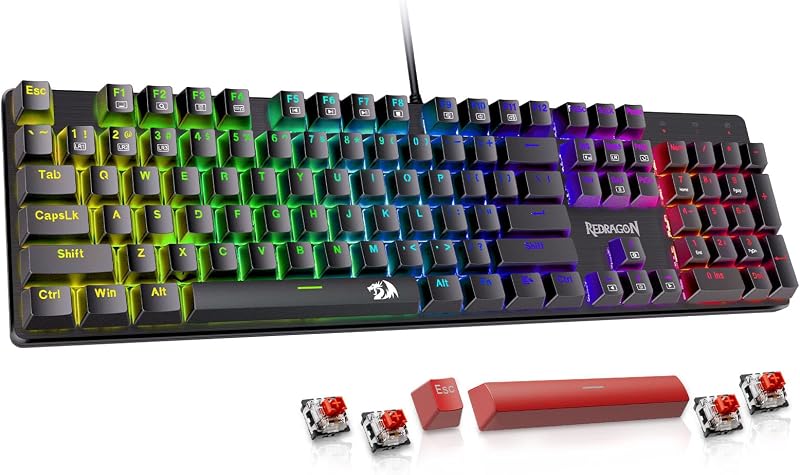
The Redragon Mechanical Gaming Keyboard Wired provides an alternative for shoppers who want a dedicated wired connection without needing internal battery management. Featuring hot-swappable red switches, anti-ghosting, 11 programmable backlit modes, and double-shot PBT keycaps, this board delivers straightforward desktop reliability for users who keep their keyboard permanently tethered to a single PC.
Logitech G413 SE Full-Size Mechanical Gaming Keyboard
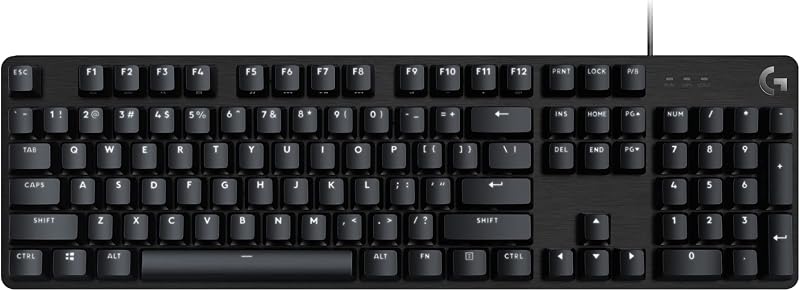
If you require a traditional full-sized layout with a complete numeric keypad, the Backlit Logitech G413 SE Full-Size Mechanical Gaming Keyboard offers an aluminum top case, anti-ghosting performance, and broad compatibility across Windows and macOS. It suits office professionals and data analysts who cannot sacrifice the dedicated tenkey cluster for desk space.
Kisnt KN98 Wireless Mechanical Keyboard
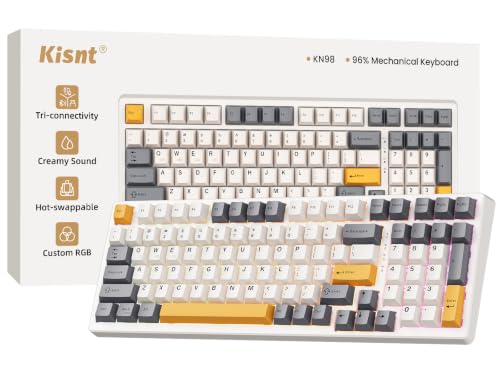
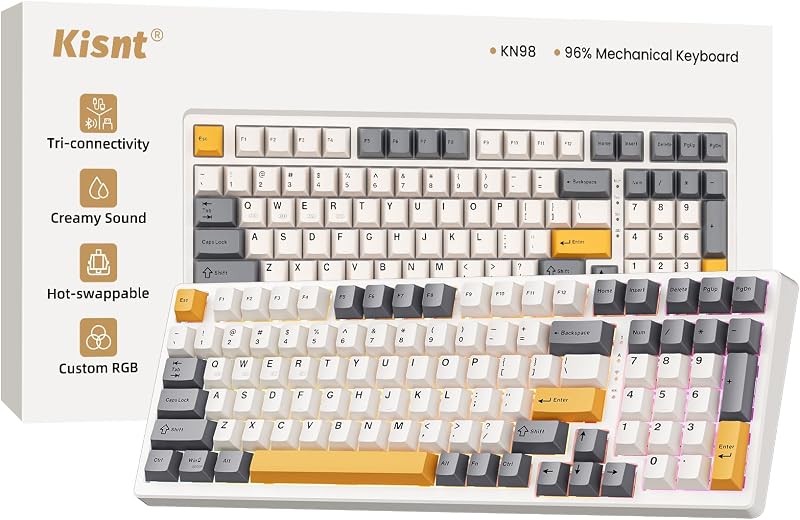
The Kisnt KN98 Wireless Mechanical Keyboard bridges the gap between compact layouts and full numeric functionality by offering a 99-key compact arrangement with an integrated numpad. Packed with Bluetooth, 2.4GHz wireless, USB-C connectivity, custom RGB lighting, hot-swappable switches, and a massive 8000mAh battery, it is an ideal alternative for power users who want creamy acoustics alongside heavy spreadsheet capabilities.
Final Verdict
Taking into account its build quality, typing dynamics, and broad compatibility, this aula f75 black review demonstrates that the keyboard punches far above standard expectations for prebuilt peripherals. By integrating enthusiast-grade components—including an advanced gasket mount suspension, a single-key slotted PCB, pre-lubed Leobog Reaper linear switches, and five layers of acoustic dampening—the board eliminates the hollow clatter and stiff bottom-out feel typical of conventional office decks.
So, is aula f75 worth it for the typical desktop user? If you are looking for a reliable 75% mechanical keyboard that offers versatile tri-mode wireless flexibility, comfortable typing ergonomics, resilient PBT keycaps, and a clean black aesthetic, the board represents one of the most compelling all-around packages available today. It seamlessly satisfies the demands of daily productivity, long writing assignments, and dynamic PC gaming.
FAQ
Does the Aula F75 work with both Mac and Windows computers?
Yes, the keyboard provides full compatibility across Windows and macOS operating systems, alongside support for laptops, tablets, smartphones, and gaming consoles. You can easily switch between operating modes and pair up to 5 devices simultaneously across its tri-mode wireless and wired interfaces.
Are the Leobog Reaper switches removable on the Aula F75?
Yes, the keyboard features a fully hot-swappable circuit board that supports both 3-pin and 5-pin mechanical switches. You can swap out the stock Leobog Reaper switches using a standard switch puller without any soldering required.
What wireless connection options are included with the Aula F75?
The keyboard includes tri-mode connectivity: Bluetooth 5.0 for multi-device pairing, a low-latency 2.4GHz wireless connection using an included USB dongle, and a standard wired USB-C mode that charges the internal battery while in use.
Can you customize the RGB backlighting and key bindings?
Yes, the keyboard features 16.8 million color RGB backlighting with built-in preset lighting effects that can be adjusted using key combinations or the metal knob. Advanced customization, macro recording, and key remapping are accessible through the companion driver software.
What is the battery capacity of the Aula F75?
The listing confirms that the keyboard is battery powered for wireless operation and charges via USB-C, though the listing does not specify the exact milliamp-hour capacity. Disabling or dimming the RGB lighting helps extend wireless runtimes between charges.


