
As Amazon Associates, we earn from qualifying purchases. This means we may receive a small commission at no extra cost to you if you click through and make a purchase.
The Attack Shark X68 Pro HE is a compact 60% gaming keyboard built around Hall Effect magnetic switches, an ultra-fast 8000Hz polling rate, and an aircraft-grade anodized aluminum top frame. By swapping traditional mechanical leaf contacts for contactless magnetic sensors, this keyboard delivers near-instantaneous reset travel, customizable actuation points, and a rated 0.125ms input latency. Our verdict is that it provides an exceptionally responsive foundation for fast-paced competitive titles, bridging the gap between tournament-grade magnetic switch responsiveness and versatile everyday wireless connectivity.
This keyboard suits competitive first-person shooter enthusiasts who require instantaneous key registration, rapid counter-strafing, and deep actuation customizability without sacrificing precious desk space. Gamers who split their time between multiple setups will also appreciate the tri-mode wireless flexibility across PC, Mac, consoles, and mobile devices. However, typists and office workers who demand a dedicated number pad, physical function row, or silent tactile switches should look elsewhere, as the compact 66-key layout prioritizes pure gaming speed over general productivity real estate. If you often pair your lightweight setup with other high-performance peripherals like the attack shark r5 ultra, this keyboard fits right into a minimalist desk configuration.


Attack Shark X68 Pro HE at a Glance

| Attribute | Detail |
|---|---|
| Layout | Compact 60% layout, 66 keys, QWERTY |
| Switch Type | Hall Effect magnetic switches (Linear, Hot-swappable) |
| Polling Rate & Latency | 8000Hz polling rate, 0.125ms latency |
| Chassis Material | Aircraft-grade anodized aluminum frame |
| Internal Acoustics | Dual-layer PORON dampening foam |
| Connectivity Modes | Tri-mode: 2.4GHz wireless, Bluetooth 5.2, USB-C wired |
| Lighting | 16.8 million color RGB backlighting modes |
| Software Interface | QMK.TOP web driver |
| Platform Compatibility | PC, Laptop, Mac, PS, Switch, Linux, Windows, select Fire tablets |
| Included Accessories | Detachable wrist rest, detachable banner, shielded 1.5m Type-C cable |
Hall Effect Magnetic Switches and Rapid Trigger Performance
The centerpiece of the Attack Shark X68 Pro HE is its implementation of self-developed Hall Effect magnetic switches. Unlike traditional mechanical switches that rely on two physical metal contacts snapping together to register a keystroke, an attack shark x68 pro he magnetic switch measures changes in electromagnetic flux as the stem descends toward a hall sensor on the circuit board. Because there are no mechanical contacts to bounce or wear down, the keyboard completely eliminates standard debounce delay, allowing keystroke registrations to happen at the exact physical depth you designate.
This electromagnetic design powers the attack shark x68 pro he rapid trigger feature, which fundamentally alters movement responsiveness in competitive titles. With conventional switches, a key must travel all the way back up past a fixed reset point before you can press it again. Rapid Trigger dynamically resets the key the fraction of a millimeter it begins upward travel, regardless of its position in the switch housing. For players using the attack shark x68 pro he for fps games, this enables razor-sharp counter-strafing, instant jiggle-peeking, and micro-adjustments in tactical shooters where standing still accurately dictates shot placement.
Beyond reset speeds, the switches support customizable actuation points across individual keys alongside Dual-Action Key Function capability. Dual-action binding allows a single key to trigger two discrete commands based on depression depth, such as walking on a shallow partial press and sprinting on a bottomed-out stroke. Because the switches are linear and hot-swappable, users retain the freedom to customize the board without desoldering, all while benefiting from the smooth travel characteristic of contactless magnetic stems.
8000Hz Polling Rate and Input Latency
Raw switch mechanics mean little if the onboard controller cannot deliver those inputs to your machine promptly. The Attack Shark X68 Pro HE features an 8000Hz polling rate that transmits keystroke data 8,000 times every second. Standard gaming keyboards operate at 1000Hz with a 1-millisecond reporting interval, whereas an 8000Hz update cycle slashes that reporting interval down to a mere 0.125 milliseconds. This attack shark x68 pro he latency advantage ensures that input states are queued and read with negligible transmission overhead.
In high-stakes competitive matches running on high-refresh-rate gaming monitors, this low-latency data pipeline ensures that rapid multi-key sequences and sudden direction shifts are communicated without delay. The internal controller processes the magnetic flux measurements continuously, translating microscopic switch travel directly into system inputs. This tight feedback loop between the switch sensor and the USB pipeline makes rapid-fire inputs feel connected directly to the on-screen action.
It is worth noting that extracting the full performance benefits of an 8000Hz polling rate requires a reasonably modern PC processor capable of handling high-frequency USB interrupts. In wireless operation over Bluetooth or standard 2.4GHz connections, polling rates typically scale to conserve power, but wired connection via the included shielded cable allows the full 8000Hz pipeline to operate without signal degradation or environmental interference.
Chassis Build Quality and Internal Acoustics
The keyboard is engineered with an aircraft-grade anodized aluminum frame that delivers high structural rigidity without introducing unnecessary bulk. This attack shark x68 pro he aluminum build prevents chassis flexing during aggressive, rapid-fire inputs, anchoring the keyboard firmly to your desk surface. The black anodized finish provides a clean, matte texture that resists surface wear and gives the keyboard an understated, professional gaming aesthetic.
Acoustic management inside compact keyboards is often overlooked, but the X68 Pro HE incorporates dual-layer PORON dampening foam inside the casing. In many hollow aluminum boards, bottoming out linear switches creates high-pitched case resonance and unwanted metallic pinging. The dual layers of PORON absorb shock vibrations and suppress sound reverberation, yielding a deeper, more satisfying keystroke sound profile often referred to as HIFI acoustics.
Complementing the acoustic engineering is the compact 60% layout containing 66 keys. By omitting the separate numerical pad, navigation island, and dedicated function row, the board maximizes usable desk space for wide, low-DPI mouse sweeps. The ambidextrous layout design ensures a comfortable hand position regardless of keyboard angle, while 16.8 million color RGB backlighting shines through the switches with customizable lighting modes to illuminate key legends in low-light gaming environments.
Tri-Mode Connectivity and Web Driver Software
Versatility is central to the Attack Shark X68 Pro HE specs, supported by tri-mode connectivity that includes low-latency 2.4GHz wireless, Bluetooth 5.2, and USB-C wired connection. The 2.4GHz wireless link delivers cable-free responsiveness for desktop gaming setups, while Bluetooth 5.2 enables quick switching between secondary devices like laptops and tablets. Wired USB mode ensures continuous operation, zero wireless interference, and simultaneous charging from any standard USB-A port using the supplied cable.
Platform compatibility extends across standard desktop environments including Windows and Linux, as well as Mac, PlayStation, Nintendo Switch, and select Amazon Fire tablet models such as the Fire 7, Fire HD 8, and Fire HD 10. While the listing notes battery power for wireless operation, it does not specify the exact milliamp-hour battery capacity rating. Users who frequently travel to competitive LAN events or carry external gear like a sandisk 1tb creator phone ssd can pack the board easily thanks to its detachable cabling and modest footprint.
Customization is handled via the attack shark x68 pro he software ecosystem using the QMK.TOP web driver. Unlike traditional peripheral suites that require heavy desktop software installations running continuously in your Windows background, the web driver allows users to remap keys, configure complex macros, dial in individual switch actuation depths, and calibrate Rapid Trigger thresholds directly inside an internet browser. Settings are stored on the board, ensuring your custom profiles persist even when connecting to different host systems.
Ergonomics and In-Box Accessories
High-profile mechanical keyboards can cause wrist fatigue during marathon gaming sessions if proper support is absent. Attack Shark addresses this by bundling a detachable soft-edged wrist rest inside the box. The wrist rest provides an elevated, cushioned platform that aligns your palms with the keycaps, reducing wrist extension and strain during extended competitive sessions.
In addition to the wrist rest, the keyboard comes equipped with a customizable detachable banner along the frame, offering an accent area for personal flair on an otherwise minimalist chassis. The package also includes a 1.5-meter Type-C cable constructed with integrated magnetic shielding. The magnetic shielding filter blocks electromagnetic noise and radio interference, ensuring that high-speed 8000Hz polling data flows consistently between keyboard and computer.
Attack Shark X68 Pro HE Pros and Cons
Pros
- Hall Effect magnetic switches with Rapid Trigger
- Ultra-fast 8000Hz polling rate and 0.125ms latency
- Aircraft-grade anodized aluminum frame
- Dual-layer PORON acoustic dampening foam
- Driverless configuration via QMK.TOP web driver
- Tri-mode 2.4GHz, Bluetooth 5.2, and wired connectivity
Cons
- Compact 66-key layout lacks dedicated numpad
- Linear switch feel with no tactile options
- Listing does not specify battery milliamp-hour capacity
Check Attack Shark X68 Pro HE on Amazon
Who Should Buy the Attack Shark X68 Pro HE
Buy It If
- You play fast-paced competitive FPS games and need Rapid Trigger to execute instant counter-strafing and rapid peek maneuvers.
- You want granular control over switch actuation points and dual-action key bindings via a lightweight web driver interface.
- You desire an aircraft-grade aluminum top plate and dual-layer PORON dampening foam for a solid desk feel and muted acoustic profile.
- You switch frequently between multiple systems and prefer having 2.4GHz, Bluetooth 5.2, and wired USB-C connectivity on hand.
Skip It If
- Your daily workflow involves heavy spreadsheet management, data entry, or office software that requires a physical numeric pad and dedicated arrow cluster.
- You prefer heavy tactile feedback bumps or clicky switches, as this board uses smooth linear magnetic mechanisms exclusively.
- You prefer a simple, non-backlit standard office keyboard without the need for web-based key calibration or gaming features.
Attack Shark X68 Pro HE Alternatives Worth a Look
If the magnetic gaming focus or compact 66-key form factor of this keyboard does not match your specific computing routine, several alternative desktop keyboards cater to entirely different usage patterns.
Amazon Basics Wired QWERTY Keyboard
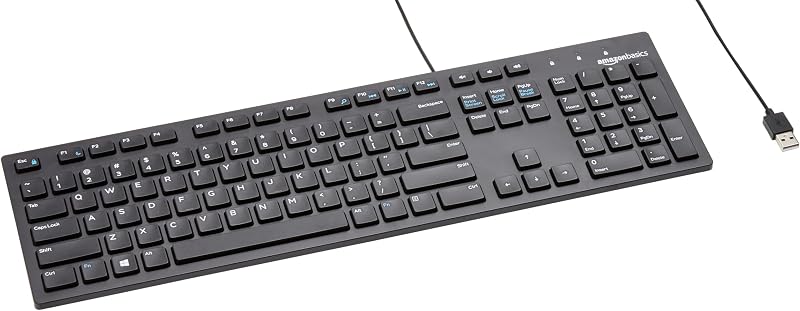
The Amazon Basics Wired QWERTY Keyboard is a full-sized, plug-and-play wired keyboard designed for general Windows desktop use. It features standard media controls, a dedicated numeric pad, and simple USB connectivity. Buyers who spend most of their day doing basic typing, spreadsheet work, or administrative tasks and do not need gaming-specific rapid trigger actuation will find this traditional layout much more practical for desk work.
Full size keyboard with spill-resistant
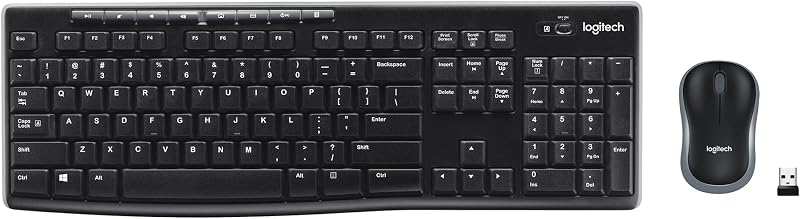
The Full size keyboard with spill-resistant design is a Logitech MK270 combo featuring a full-size wireless keyboard paired with an ambidextrous mouse. Connecting through a single USB-A nano receiver, it delivers basic cord-free convenience with built-in spill resistance for everyday office desks. It suits users looking for an all-in-one productivity bundle rather than an aluminum-framed magnetic esports device.
Creamy Computer Keyboard for PC

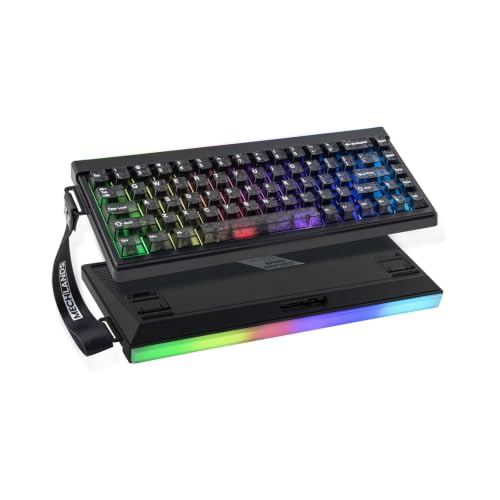
The Creamy Computer Keyboard for PC represents the MechLands Halo68, a 68-key silent wireless gaming board utilizing a membrane structure, carbon fiber keycaps, RGB backlights, a light box, and an integrated 2000mAh battery. Gamers who prioritize a silent membrane typing sensation and pre-styled carbon fiber aesthetics over adjustable Hall Effect magnetic sensors may find this alternative appealing.
Final Verdict
In evaluating this attack shark x68 pro he review, the keyboard stands out as a purpose-built gaming peripheral that brings cutting-edge magnetic switch capabilities to a versatile 60% form factor. The combination of self-developed Hall Effect switches, dynamic Rapid Trigger reset points, an 8000Hz polling rate, and an aircraft-grade anodized aluminum chassis gives competitive players tangible input advantages. Paired with dual-layer PORON foam for dampening keystroke ping and the driverless QMK.TOP web interface, it streamlines configuration without cluttering your operating system.
Deciding whether is attack shark x68 pro he worth it comes down to your primary use case. If you spend significant time in competitive tactical shooters and demand instantaneous switch reset speeds, minimal input delay, and maximized mouse sweep space, this board provides an exceptional feature set. Conversely, if your PC time is dominated by productivity tasks that mandate dedicated arrow keys or a tenkey pad, a traditional full-sized layout remains the more sensible choice.
FAQ
How does Rapid Trigger work on the Attack Shark X68 Pro HE?
Rapid Trigger utilizes Hall Effect magnetic sensors to detect key travel dynamically. Instead of requiring the keycap to travel past a fixed physical reset switch point, the sensor immediately resets the key registration the moment it detects upward motion, allowing you to reactivate the key instantly for faster consecutive inputs.
Do I need to install desktop software to adjust actuation points?
No desktop application installation is necessary. The Attack Shark X68 Pro HE uses the QMK.TOP web driver, allowing you to customize actuation points, map macros, adjust Rapid Trigger sensitivity, and configure RGB lighting directly inside an internet browser.
Can the keyboard connect wirelessly to game consoles?
The keyboard listing identifies compatibility with PlayStation and Nintendo Switch consoles alongside PC and Mac. While basic wired USB connections work standardly on console hardware, wireless functionality can depend on specific console platform restrictions for peripheral inputs.
Can I hot-swap the magnetic switches on this keyboard?
Yes, the Attack Shark X68 Pro HE features a hot-swappable PCB. However, because it relies on Hall Effect magnetic sensor technology rather than standard dual-pin mechanical sockets, any replacement switches must be compatible Hall Effect magnetic switches designed for electromagnetic detection.
What accessories are included in the package?
The keyboard ships with a detachable soft-edged wrist rest for ergonomic palm support, a customizable detachable banner for chassis personalization, and a 1.5-meter Type-C to USB-A cable equipped with magnetic shielding to prevent signal interference.


