
As Amazon Associates, we earn from qualifying purchases. This means we may receive a small commission at no extra cost to you if you click through and make a purchase.
The Razer BlackWidow V4 Low-Profile is a full-size wireless mechanical keyboard engineered to combine competitive gaming responsiveness with a remarkably slim physical profile. Built around low-profile Razer Orange tactile switches, dual-layer sound-dampening foam, textured doubleshot PBT keycaps, and a 5052 aluminum top case, this keyboard is designed to eliminate the excessive bulk traditionally associated with mechanical battlestations. Our evaluation shows that it serves as an exceptionally sleek, ergonomic hybrid input device that delivers crisp, quiet feedback for long working days and low-latency wireless speed for high-stakes PC gaming.
This keyboard is an ideal match for typists, hybrid office professionals, and gamers who suffer from wrist fatigue and prefer a flat, natural wrist angle without relying on an oversized desk pad or wrist rest. It also caters directly to multi-device operators who regularly alternate between a primary gaming PC and office laptops throughout the day. However, competitive gamers who demand a compact tenkeyless or 60-percent tournament footprint, as well as mechanical keyboard purists who prefer the deep bottom-out distance of tall traditional switches, will likely want to look elsewhere. Those configuring a streamlined desk aesthetic alongside compact workstation components like an nvidia rtx 4000 graphics setup will appreciate how cleanly this board integrates into tight spaces.


Razer BlackWidow V4 Low-Profile at a Glance

| Attribute | Detail |
|---|---|
| Switch Type | Razer Orange Low-Profile Mechanical Switches (Tactile & Quiet) |
| Actuation Specs | 1.6 mm actuation distance, 45 g actuation force |
| Wireless Connectivity | 2.4 GHz HyperSpeed Wireless, Bluetooth (up to 3 devices) |
| Battery Life | Up to 980 hours (in Power Saving Mode) |
| Front Height & Dimensions | 18.5 mm front height; 18.12″ L x 6.32″ W x 1.37″ H |
| Top Case Material | 5052 aluminum alloy |
| Plate Construction | Stainless steel plate with dual sound-dampening foam layers |
| Keycaps | Textured doubleshot PBT with optimized legends |
| Control Features | Clickable multi-function roller, 11 control buttons (including 4 dedicated macros) |
| Layout & Size | Full Size (104 keys), standard QWERTY layout |
Ergonomics and Low-Profile Build Quality
The defining physical characteristic of the Razer BlackWidow V4 Low-Profile is its ultra-low 18.5 mm front height. Traditional mechanical keyboards frequently sit between 30 mm and 40 mm above the desk surface, which forces the wrists into an upward, angled extension known as dorsiflexion. Over prolonged gaming or typing sessions, this steep angle strains the tendons and forearms unless the user props their wrists up on a thick wrist rest. By shaving the profile down to 18.5 mm at the front edge, this razer low profile mechanical keyboard permits a neutral, relaxed wrist posture where your palms rest naturally close to the desktop surface without needing supplementary wrist support.
Underneath the keys, the structural integrity of the chassis relies on a 5052 aluminum alloy top case. This grade of aluminum yields notable structural stiffness across the full 18.12-inch length of the deck, eliminating deck flex during aggressive key striking or fast-paced gaming maneuvers. The listing notes that a stainless steel plate sits below the switches, reinforced by dual sound-dampening foam layers and factory-lubricated stabilizers. These internal dampening elements actively suppress the hollow metallic ping and plastic rattle that often plague slim keyboard housings, resulting in a solid, muted typing feel.
The exterior finish is rounded out with textured doubleshot PBT keycaps. Unlike standard ABS plastic caps that become slick and shiny after weeks of exposure to finger oils, doubleshot PBT uses a two-layer molding process that keeps the surface matte and the legends clear. The listing highlights optimized legends designed to promote greater RGB backlight illumination through the caps, ensuring that keys remain legible in low-light environments without introducing uneven hot spots across the layout.
Razer Orange Switches and Typing Feel
Central to the user experience are the proprietary razer blackwidow v4 low profile orange switches. In standard full-height keyboards, mechanical switches typically feature an actuation point between 2.0 mm and 2.2 mm with a total travel depth close to 4.0 mm. Razer compresses this movement significantly: these low-profile Orange switches actuate at just 1.6 mm and require a light 45 grams of actuation force. This shallow throw provides immediate key registration while requiring significantly less finger exertion across thousands of daily keystrokes.
In terms of tactile feedback, the Orange switches provide a noticeable tactile bump right at the point of actuation, allowing the typist to confirm that the input registered without needing to violently bottom out the switch against the steel plate. Because Razer engineered these switches as tactile and quiet, there is no loud audible clicker mechanism inside the housing. When paired with the dual internal sound-dampening foam layers, the razer blackwidow v4 low profile typing feel delivers a crisp, subdued acoustic signature suitable for shared office environments and live voice chat lobbies alike.
For precision inputs where immediate mechanical feedback is paramount—similar to the rapid physical execution demanded by competitive arcade controllers like the haute42 m ultra—the shortened switch travel reduces physical lag between intent and action. Users coming from traditional laptop chicklet keyboards will find the transition seamless, while those accustomed to heavy, deep-travel mechanical switches will notice a faster, lighter actuation curve that cuts down on finger fatigue during extended writing or spreadsheet work.
Gaming Performance and Dedicated Controls
When assessing the razer blackwidow v4 low profile for gaming, input latency and layout utility take center stage. The keyboard utilizes 2.4 GHz HyperSpeed wireless technology, delivering instantaneous, lag-free signal transmission comparable to a direct wired connection. The multi-device pairing feature supported by the HyperSpeed dongle allows players to link a compatible Razer wireless mouse to the exact same USB receiver, freeing up an additional port on your gaming PC or laptop dock.
Beyond raw switch performance, the keyboard includes an extensive array of onboard navigation tools. Positioned at the top edge is a clickable multi-function roller that provides smooth tactile scrolling for volume adjustments, zoom levels, or track scrubbing. Beside it sit dedicated media and connectivity buttons, accompanied by quick-access shortcuts to manage background music, toggle between devices, and trigger AI prompts without minimizing your active full-screen application.
Gamers and macro power users also gain access to four specialized hardware macro buttons. These razer blackwidow v4 low profile macro keys let you program complex keystroke sequences, ability rotations, or workflow shortcuts directly into easily accessible keys along the frame. Having dedicated macro hardware prevents you from having to sacrifice standard function keys or create awkward multi-key combinations in the middle of an intense multiplayer encounter.
Wireless Connectivity and Battery Life
Flexibility across multiple devices is one of the strongest suits outlined in the razer blackwidow v4 low profile hyperspeed specs. The board supports both ultra-fast 2.4 GHz HyperSpeed wireless and multi-point Bluetooth pairing. Through razer blackwidow v4 bluetooth pairing, users can store up to three distinct Bluetooth host profiles in memory. Toggling between your desktop rig, an office laptop, and an auxiliary mobile tablet requires only a press of the dedicated connectivity buttons, making desk management seamless for hybrid workers.
The razer hyperspeed wireless keyboard battery life is rated for up to 980 hours when operating in Power Saving Mode. This extensive ceiling ensures that users who prioritize wireless endurance over intense backlighting can go weeks or even months between charging sessions. When backlighting is active, power consumption will naturally increase, but the underlying high-capacity battery provides reliable headroom for multi-day gaming sessions without requiring an emergency cable tether.
This wireless independence makes it an excellent centerpiece for clean desktop layouts that value minimal cable clutter. If you run an uncluttered workspace paired with internal components designed for sleek efficiency, such as a rig running low-profile xpg gammix d10 memory modules, eliminating heavy keyboard cables keeps your entire desktop aesthetic cohesive, tidy, and modern.
Razer BlackWidow V4 Low-Profile Pros and Cons
Pros
- Ultra-low 18.5 mm front height for neutral wrist posture
- Quiet, tactile Razer Orange switches with 1.6 mm actuation
- Up to 980 hours battery life in Power Saving Mode
- Sturdy 5052 aluminum alloy top case and steel plate
- Dual 2.4 GHz HyperSpeed wireless and 3-device Bluetooth pairing
- Clickable roller, dedicated media buttons, and 4 macro keys
Cons
- Full 104-key layout takes up considerable desk space
- Shallow switch travel may not suit heavy mechanical typists
- Package does not include a wrist rest
Check Razer BlackWidow V4 Low-Profile on Amazon
Who Should Buy the Razer BlackWidow V4 Low-Profile
Buy It If
- You want a flat, strain-free typing angle with an ultra-low 18.5 mm front height that eliminates the need for a bulky wrist rest.
- You need quiet, tactile feedback with a fast 1.6 mm actuation point and 45 g force for gaming and typing in shared spaces.
- You manage multiple devices and want to alternate between a 2.4 GHz gaming PC and three Bluetooth systems with dedicated buttons.
- You rely on extensive onboard control, including a clickable roller, media buttons, and four dedicated macro keys.
Skip It If
- You prefer deep, long-travel mechanical keystrokes with traditional 4.0 mm bottom-out depths.
- You have limited desktop real estate and require a compact 60-percent or tenkeyless (TKL) layout rather than a full 104-key board.
- You are looking for an ultra-basic, entry-level office keyboard that does not require battery management or wireless syncing.
Razer BlackWidow V4 Low-Profile Alternatives Worth a Look
While the BlackWidow V4 Low-Profile provides an advanced set of low-profile wireless features, different desk environments, workspace limitations, and connectivity preferences may warrant looking at alternative keyboard formats.
Amazon Basics Wired QWERTY Keyboard
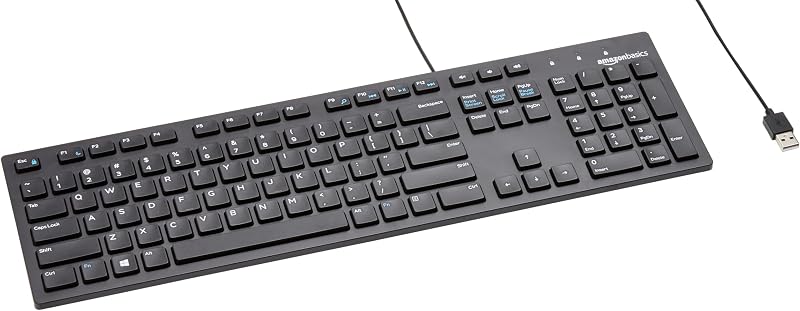
The Amazon Basics Wired QWERTY Keyboard is a straightforward, full-sized Windows keyboard that focuses entirely on plug-and-play simplicity. Featuring integrated media controls and a standard wired connection, it eliminates all concerns regarding battery charging, pairing procedures, or wireless interference. Shoppers who simply need a reliable, tethered peripheral for basic office data entry without specialized mechanical switches or wireless dongles should consider this basic option.
Full size keyboard with spill-resistant
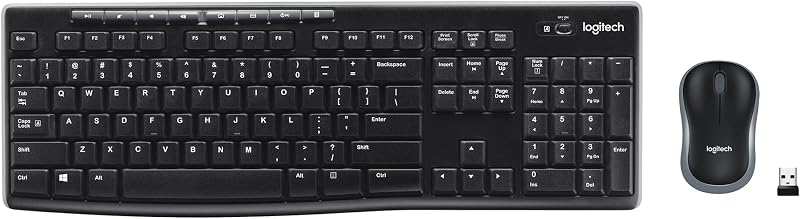
The Full size keyboard with spill-resistant design combo includes a full-size wireless keyboard alongside a compact ambidextrous mouse, operating via a single included USB-A nano receiver. Designed with everyday spills and simple home office productivity in mind, it provides a functional dual-input solution out of one package. Users seeking a no-fuss desktop wireless bundle that covers both typing and cursor tracking without requiring premium aluminum framing will find this combo practical.
Creamy Computer Keyboard for PC

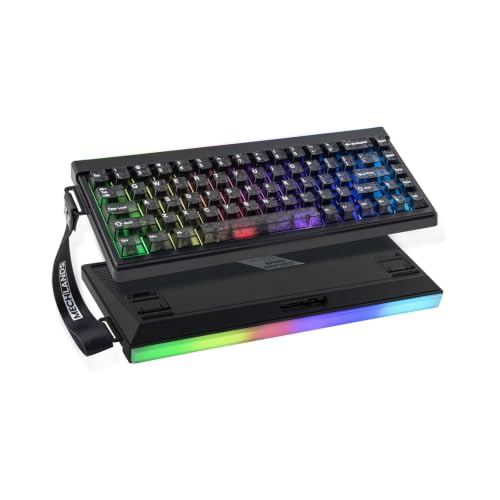
The Creamy Computer Keyboard for PC features a compact 68-key form factor utilizing a membrane structure, carbon fiber keycaps, RGB backlights, a light box, and a built-in 2000mAh battery. For users who want a quiet, silent typing board that occupies significantly less desk room than a full 104-key mechanical frame, this 68-key wireless option presents an intriguing compact footprint for home and gaming spaces.
Final Verdict
When weighing whether the is razer blackwidow v4 low profile worth it question holds true for your setup, the answer comes down to your ergonomic priorities and control needs. By condensing a full-size mechanical layout into an 18.5 mm front height, Razer successfully resolves the wrist angle problems that make tall mechanical keyboards cumbersome for prolonged typing. Combined with the refined feel of low-profile Orange tactile switches, dual sound-dampening foam, and rigid 5052 aluminum alloy construction, the hardware achieves a remarkably polished, responsive typing feel.
The trade-offs primarily involve its overall desk footprint and low-profile travel profile. Because it is a complete 104-key board equipped with a roller and macro columns, it demands plenty of horizontal desk space. If you have the room and desire a premium wireless deck that effortlessly juggles high-speed gaming, multi-device Bluetooth workflows, and quiet tactile actuation, the Razer BlackWidow V4 Low-Profile is an outstanding investment for your battlestation.
FAQ
What makes the Razer Orange switches different from standard mechanical switches?
The low-profile Razer Orange mechanical switches are engineered for tactile yet quiet actuation. They feature a shorter 1.6 mm actuation distance and a light 45-gram actuation force, providing a clear physical bump without an audible click mechanism.
How many devices can this keyboard connect to simultaneously?
The keyboard can connect via low-latency 2.4 GHz HyperSpeed wireless using its USB dongle, and it can store up to three separate Bluetooth device connections, allowing you to toggle between four total connected machines using onboard controls.
Can you pair a mouse to the same wireless dongle?
Yes. The HyperSpeed multi-device pairing support allows you to pair a compatible Razer wireless mouse to the keyboard’s single 2.4 GHz USB dongle, saving an extra USB port on your PC.
How long does the battery last in everyday use?
The manufacturer listing states that the keyboard can achieve up to 980 hours of total battery life when operated in Power Saving Mode, making it viable for long stretches of wire-free productivity.
What material is used for the keycaps and chassis?
The top case is constructed from solid 5052 aluminum alloy over an internal stainless steel plate. The keycaps are made from textured doubleshot PBT, which resists surface wear, shine, and fading over prolonged use.


