As Amazon Associates, we earn from qualifying purchases. This means we may receive a small commission at no extra cost to you if you click through and make a purchase.
The Razer Naga Hex is a specialized wired gaming mouse engineered specifically for multiplayer online battle arena titles and action role-playing games. Built around a distinctive mechanical thumb wheel featuring six raised switches, the peripheral streamlines tactical inputs without overwhelming your hand with the massive twelve-button grids found on standard MMO hardware. For competitive arena players who demand fast, tactile item activations and error-free spell casting, it provides a reliable, focused layout that keeps critical commands right beneath your thumb.
This controller suits gamers who frequently play titles like League of Legends or action RPGs where navigating six inventory slots or primary abilities quickly is essential to success. It is also an appealing match for players who want tactile mechanical feedback and find crowded numerical grids prone to misclicks during chaotic team fights. Conversely, competitive first-person shooter fans who need ultra-lightweight frames and five-digit optical sensitivity settings should look elsewhere, as should anyone seeking a cordless desk setup. If you run your gaming sessions from a high-performance machine like the Razer Blade 16, adding a dedicated MOBA controller can help keep your key inputs organized and responsive.


Razer Naga Hex at a Glance

| Attribute | Detail |
|---|---|
| Model Number | RZ01-00750200-R3U1 |
| Sensor Mechanism | Laser |
| Maximum Sensitivity | 3000 DPI |
| Total Button Count | 11 programmable buttons |
| Thumb Layout | 6 mechanical thumb buttons |
| Click Performance | Up to 250 clicks per minute |
| Connectivity | Wired USB |
| Color and Style | Hex Red / Wraith Red Edition |
| Hand Orientation | Ambidextrous styling (right-hand thumb cluster) |
| Platform Compatibility | Personal Computer / PC |
Mechanical Thumb Grid and Button Performance
The defining characteristic of the razer naga hex gaming mouse is its circular six-button side cluster. Standard MMO controllers typically present a flat grid of twelve identical rectangular switches, which can lead to accidental activations in the heat of battle. By contrast, this razer naga hex thumb grid arranges six mechanical switches in a hexagon around a central thumb rest. This hollow-center design provides a stable resting point for your thumb, allowing you to lift or reposition the peripheral without inadvertently triggering an inventory slot or summoner spell.
Actuation speed is critical in fast-paced arena combat, and the razer naga hex buttons are built to keep pace with intensive play styles. The mechanical switches are rated to register up to 250 clicks per minute, providing the rapid-fire capability needed when spamming abilities or chugging consumable potions. Each click delivers a distinct tactile bump accompanied by a sharp audible click, giving you immediate physical confirmation that your command registered before you refocus your attention on the screen.
Having immediate access to six physical switches makes the razer naga hex for moba matches a tactical advantage. Most modern battle arena games feature six dedicated inventory slots alongside your primary ability bar. While traditional controls force players to stretch their left fingers upward toward the keyboard number row, mapping inventory active items directly to the thumb wheel keeps your left hand anchored over your core movement and attack keys.
Laser Sensor Tracking and Sensitivity Thresholds
Tracking duties on this controller are handled by a laser sensor that delivers a razer naga hex dpi ceiling of 3000 dots per inch. While contemporary mice designed for twitch shooters often push optical sensitivity into astronomical figures, 3000 DPI is well matched to the demands of strategy and arena titles. In top-down isometric perspectives, steady and predictable pointer movement across lane creeps and enemy champions is far more valuable than erratic ultra-high sensitivity sweeps.
Laser sensors read surface textures by detecting microscopic surface variations, making them compatible with both hard and soft mouse mats. When configuring your gaming space alongside dedicated audio gear such as the Razer Nommo V2, keeping your tracking surface clean ensures that the laser mechanism registers continuous, jitter-free pointer travel across your monitor. A 3000 DPI ceiling gives players sufficient range to traverse wide battlefields with subtle wrist motions without overshooting target hitboxes.
Examining the razer naga hex specs helps put this tracking engine into perspective. If your daily gaming rotation revolves around fast-twitch tactical shooters that demand high-speed flick shots and zero hardware smoothing, a 3000 DPI laser sensor may feel dated compared to modern optical designs. However, for lane-pushing strategy titles, dungeon crawlers, and action RPGs, the sensor delivers dependable tracking that translates your strategic inputs into accurate on-screen positioning.
Ergonomics, Physical Weight, and Build Quality
Aesthetically, the razer naga hex red finish—officially designated as the Wraith Red Edition—delivers an eye-catching appearance on your desk. The glossy red top shell is offset by dark side grips and illuminated accents around the mechanical thumb wheel. While the retail specifications indicate an ambidextrous hand orientation design, the physical layout places the hexagonal thumb cluster strictly on the left flank. As a result, the hardware is configured specifically for right-handed thumb operation, providing a natural grip that settles comfortably into the palm.
Physical heft is another notable feature of this peripheral. The listing notes a shipping weight of 1.5 pounds, indicating a solid, anchored feel on the desk rather than the hollow, featherweight construction favored by modern first-person shooter peripherals. Strategy players who prefer an intentional, grounded controller will appreciate the steady glide that prevents unintentional cursor drift when aggressively mashing the thumb switches during team fights.
The top shell features an ergonomic slope that accommodates both palm and claw grips. Your index and middle fingers rest naturally over the primary left and right buttons, which match the responsive click dynamics of the side cluster. The wired USB connection delivers continuous data transmission to your PC hardware platform, eliminating latency fluctuations, wireless interference, and the need to recharge batteries midway through an extended gaming session.
Software Integration via Razer Synapse 2.0
Customization across the hardware is managed through the dedicated razer naga hex software platform, Razer Synapse 2.0. This configuration tool allows users to customize all 11 programmable buttons across the device. You can reassign individual thumb keys to keyboard strokes, complex macro sequences, or basic operating system functions, adapting the layout to fit different character builds or application needs.
Through Synapse 2.0, you can establish game-specific profiles that automatically activate when you boot up a specific title. This feature allows you to preserve your standard productivity bindings for web browsing, then instantly transition into a dedicated MOBA button layout the moment your match client loads. The software also provides options to adjust sensitivity stages and modify polling behavior to match your monitor resolution.
Using a centralized configuration platform makes it easy to maintain your peripheral preferences across different setups. If your workspace also features productivity-focused hardware like the Razer Pro Click V2 for daily office tasks, relying on established software suites ensures that your custom bindings stay synchronized. Synapse 2.0 stores your profile configurations in the cloud, so you do not have to reprogram your six-button thumb wheel when switching between personal computers.
Razer Naga Hex Pros and Cons
Pros
- Six mechanical thumb buttons
- Switches rated for 250 clicks per minute
- Central thumb rest minimizes misclicks
- 11 fully programmable buttons
- Reliable wired USB connectivity
Cons
- Laser sensor capped at 3000 DPI
- Thumb buttons configured for right-handed use
- Substantial 1.5-pound listed weight
Check Razer Naga Hex on Amazon
Who Should Buy the Razer Naga Hex
Choosing the right gaming controller comes down to the genres you spend the most time playing and how you prefer to manage in-game shortcuts. The mechanical six-button cluster bridges the gap between basic two-button office mice and overwhelming twelve-button MMO panels.
Buy It If
- You primarily play MOBAs, action RPGs, or strategy games requiring rapid access to six active item or spell slots.
- You find twelve-button side grids cramped and want a central thumb rest that reduces accidental misclicks.
- You prefer a stable wired USB connection that never requires recharging during long sessions.
- You want high-performance mechanical switches capable of withstanding up to 250 clicks per minute.
Skip It If
- You are a competitive first-person shooter player who needs a featherweight frame and extreme optical DPI.
- You are left-handed, as the thumb button cluster is positioned exclusively on the left side for right-handed players.
- You require a cordless setup to maintain a wireless, cable-free desktop layout.
Razer Naga Hex Alternatives Worth a Look
If your gaming library spans multiple genres or you require different hardware specifications such as wireless freedom or ultra-high tracking speeds, several compelling options exist across the gaming mouse category.
Logitech G305 Lightspeed
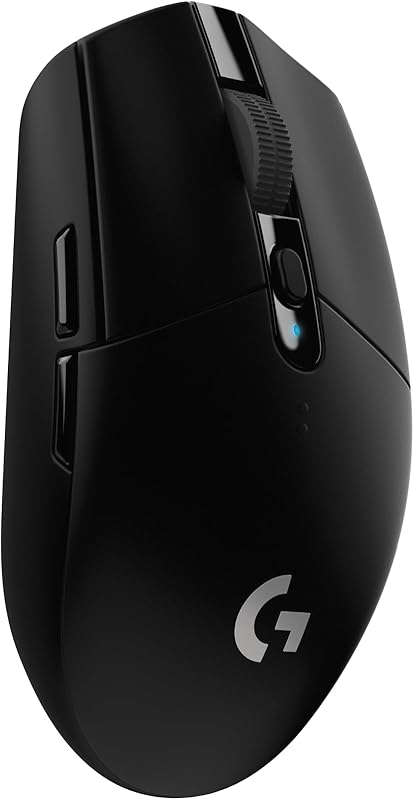
The 12,000 DPI Logitech G305 Lightspeed Wireless Gaming Mouse is an ultra-portable, lightweight wireless option featuring a 12,000 DPI optical sensor, 6 programmable buttons, on-board memory, and up to 250 hours of battery life. Compatible with both PC and Mac, this peripheral provides an outstanding alternative for gamers who want to eliminate cable drag entirely and prefer a sleeker, minimalist design over a specialized thumb wheel.
Logitech G502 Hero
For gamers who crave heavy customization, broad multi-genre versatility, and an extreme sensitivity ceiling, the High performance Logitech G502 Hero Wired Gaming Mouse offers a massive 25,600 DPI sensor, customizable RGB lighting, adjustable tuning weights, on-board memory, and 11 programmable buttons. Players who transition regularly between fast-paced FPS shooters and complex strategy titles will appreciate the expanded DPI flexibility and customizable balance system.

ASUS ROG Keris
The 400 IPS speed ASUS ROG Keris Ultra Lightweight Wired Gaming Mouse brings high-velocity tracking to the desktop with a 16,000 DPI sensor, 400 IPS tracking speed, hot-swap switches, PBT keys, ROG feet, paracord cabling, and smooth glide performance. Gamers who prioritize lightning-fast reflexes, swappable switch components, and a modern featherweight chassis will find this an appealing alternative to traditional heavier laser mice.

Final Verdict
Evaluating whether this controller fits your setup comes down to a straightforward question: is razer naga hex worth it for your specific gaming habits? If your competitive energy is focused on laning phases, tactical cooldowns, and action-RPG dungeon runs, the hardware delivers genuine utility. The mechanical hexagonal thumb array provides a tactile, error-free method to trigger items and spells that traditional mice simply cannot replicate, eliminating the thumb confusion common to crowded twelve-button layouts.
At the same time, the peripheral remains an unapologetically specialized tool. With its 3000 DPI laser sensor, substantial frame, and wired USB connection, it does not attempt to mimic the featherweight optical mice designed for competitive first-person shooters. But for dedicated MOBA tacticians seeking reliable mechanical actuations up to 250 clicks per minute wrapped in a bold red chassis, the hardware delivers focused performance where it matters most.
FAQ
How many thumb buttons does the Razer Naga Hex have?
The mouse features six mechanical thumb buttons arranged in a circular hexagonal pattern around a central resting point on the side panel.
What is the maximum DPI on the Razer Naga Hex?
The mouse features a laser sensor with a maximum sensitivity of 3000 dots per inch, configurable through Razer Synapse 2.0.
Is the Razer Naga Hex suitable for left-handed gamers?
Although the technical specifications describe an ambidextrous styling, the six mechanical thumb buttons are located on the left flank, making them accessible only with a right-handed thumb.
How fast can the mechanical buttons be pressed?
The high-performance mechanical switches are engineered to register up to 250 clicks per minute for rapid ability activation.
Does the Razer Naga Hex require batteries?
No, the mouse uses a wired USB connection to connect to personal computers, drawing power directly from the PC without requiring batteries.