As Amazon Associates, we earn from qualifying purchases. This means we may receive a small commission at no extra cost to you if you click through and make a purchase.
The Wacom Movink 13 is a dedicated OLED creative pen display built for digital illustrators, animators, and visual designers who demand uncompromising color fidelity in a genuinely ultra-portable form factor. For years, creators seeking a portable drawing surface turned to heavy all-in-one machines, but this display serves as an ultra-slim modern wacom mobilestudio pro 13 alternative by stripping away the heavy internal battery, cooling fans, and computing motherboard in favor of an agile external panel driven entirely through a single connection. Our verdict: this innovative wacom oled drawing tablet delivers reference-grade contrast, virtually zero pen parallax, and professional-grade stylus responsiveness in the thinnest chassis Wacom has ever engineered, setting a remarkable standard for mobile creative workflows.
This portable drawing tablet for mac and windows is ideally suited for working illustrators, freelance concept artists, photography editors, and traveling teachers who already carry a capable laptop or mobile computer and want an accurate, responsive wacom 13 inch display without adding physical bulk to their gear bag. Conversely, those seeking an independent, standalone computer with its own internal processor, storage, and operating system will need to look elsewhere, as the display functions solely as an external monitor and digitizer that requires a compatible host machine.



Wacom Movink 13 at a Glance

| Attribute | Detail |
|---|---|
| Display Panel | OLED Touchscreen with Anti-Glare Glass |
| Physical Dimensions | 4 mm to 6.6 mm thickness; weight under 1 lb |
| Pressure Sensitivity | 8192 levels |
| Included Stylus | Wacom Pro Pen 3 with 3 side switches and rear nib storage |
| Color Support | 10-bit color, 100,000:1 contrast ratio, Pantone verified |
| Hardware Presets | Adobe RGB, sRGB, DCI-P3, Rec. 709, Rec. 2020, EBU |
| Connectivity | USB-C / Thunderbolt 3 or 4 with DisplayPort Alt Mode |
| OS Compatibility | macOS, Windows, ChromeOS, Android |
| Hardware Controls | 2 physical ExpressKeys, multi-touch input, on-screen shortcuts |
| Manufacturer Warranty | 2-year manufacturer warranty |
OLED Visual Clarity and Color Precision
The centerpiece of the display is its OLED panel, which fundamentally alters the drawing experience compared to traditional backlit liquid crystal displays. Because OLED pixels produce their own light, individual pixels can shut off completely, generating true, deep black levels alongside an extraordinary 100,000:1 contrast ratio. This technical advantage eliminates the backlight bleed and washed-out dark tones that frequently plague mobile artists working in dimly lit environments, allowing for subtle tonal gradations in digital painting and precise shadow detail in photographic retouching.
Professional color management is deeply integrated into the panel. The wacom movink color accuracy profile features full 10-bit color depth and official Pantone verification, giving visual artists access to smooth color gradients without noticeable banding. The hardware includes dedicated factory-calibrated color presets tailored for established industry color spaces, including Adobe RGB, sRGB, DCI-P3, Rec. 709, EBU, and Rec. 2020. Whether producing print-ready illustrations or grading video assets tethered to a high-end mobile workstation like an m5 pro 48gb machine, artists can switch between specialized color spaces quickly without needing manual profile tinkering.
Glare reduction is another critical factor when working in varying ambient light conditions. The panel is surfaced with specially treated anti-glare glass that diffuses harsh overhead reflections while preserving optical sharpness. Because the OLED structure is naturally thinner than multi-layer LCD stacks, the physical gap between the pen tip and the active pixels is minimized to a degree rarely achieved on portable displays. This optical bonding virtually eliminates parallax, meaning lines appear directly beneath the stylus tip exactly where your hand intends.
Stylus Engineering and Drawing Feel
A drawing display is only as good as its pen digitizer, and using the wacom movink 13 for drawing demonstrates the refinement of Wacom’s electromagnetic resonance technology. The included wacom movink 13 pro pen 3 operates completely without internal batteries or charging cables, pulling operating power directly from the display’s magnetic field. Supporting 8192 levels of pressure sensitivity, the stylus detects minute variations in hand pressure, translating delicate pencil shading and bold ink strokes with consistent linearity.
The physical design of the Pro Pen 3 included with this display features clever functional tailoring for artists on the go. The rear end of the pen unscrews to reveal a built-in nib storage chamber, preventing the frustration of misplacing tiny replacement nibs while traveling between client studios or classrooms. Along the barrel, three programmable side switches allow users to map frequent brush adjustments, right-click actions, or modifier keys directly to their fingertips for swift access.
The surface texture of the anti-glare glass provides tactile resistance that closely simulates traditional paper, avoiding the slick, glassy slide common on standard consumer tablets. Wacom includes a standalone nib holder containing three replacement nibs: one standard nib for a smooth glide and two felt nibs that produce a softer, higher-friction stroke resembling traditional graphite or charcoal. Artists accustomed to older desktop drawing surfaces like the wacon intuos pro series will immediately recognize the familiar tactile feedback and predictable response curve.
Design, Portability, and Connectivity Standards
Examining the wacom movink 13 specs highlights a dramatic leap in physical ergonomics. The unit tapers from 6.6 mm down to an astonishing 4 mm at its thinnest edge, while weighing less than 1 lb. This featherweight build makes the unit lighter and thinner than nearly any dedicated creative display in its class, sliding effortlessly into a slim laptop sleeve alongside work notebooks or sketchpads without straining your shoulder during daily commutes.
Cable clutter is kept to an absolute minimum thanks to streamlined connectivity. The tablet interfaces with host systems using a single included 1-meter USB-C cable, which handles the video signal, digitizer communication, and operating power simultaneously. To utilize this single-cable simplicity, the host computer must feature a USB-C or Thunderbolt 3/4 port capable of DisplayPort Alternate Mode and adequate power delivery. The broad operating system support encompasses macOS, Windows, ChromeOS, and Android devices, allowing concept artists to sketch directly off a compatible smartphone paired with high-speed portable media like a sandisk creator phone ssd for rapid file offloading.
Despite its slender footprint, the physical construction feels rigid and durable. The materials resist flexing under normal drawing pressure, and the sealed glass surface protects the active digitizer against everyday studio wear. A two-year manufacturer warranty provides extended peace of mind for traveling professionals who rely on the display as an indispensable daily production tool across academic, studio, and home settings.
Touch Controls and Workspace Ergonomics
Navigating digital canvases requires smooth cooperation between stylus input and auxiliary controls. The display integrates multi-touch capabilities alongside its pen digitizer, allowing users to pinch to zoom, two-finger rotate, and pan across expansive high-resolution canvases using intuitive hand gestures. The anti-glare glass coating allows fingers to glide effortlessly without leaving excessive oily friction on the drawing area.
For custom shortcuts, the chassis provides two physical ExpressKeys positioned on the upper bezel, complemented by customizable on-screen menus and shortcut hubs. While physical buttons are kept minimal to preserve the ultra-thin form factor, software shortcuts provide quick access to layer toggles, undo commands, and canvas flipping, similar to working with the adaptive context-sensitive keys found on a macbook pro with touch bar setup. Artists can assign unique hotkey layouts per software application, whether working in 3D modeling programs, vector design suites, or frame-by-frame animation software.
The tablet also includes a dedicated touch toggle switch to prevent accidental palm inputs while drawing. When palm rejection is activated through the driver settings or hardware toggle, the surface ignores resting hands completely, focusing exclusively on the Pro Pen 3 input. This seamless transition between pen-only drawing and fluid multi-touch navigation keeps creative sessions natural and uninterrupted.
Wacom Movink 13 Pros and Cons
Pros
- Ultra-thin profile measuring between 4mm and 6.6mm
- Weighs less than one pound for effortless transport
- Vibrant OLED panel with 100,000 to 1 contrast ratio
- Hardware color presets including Adobe RGB and DCI-P3
- Pro Pen 3 with integrated nib storage and 8192 pressure levels
Cons
- Requires a host device with DisplayPort Alt Mode support
- Does not operate as an independent standalone computer
- Only includes two physical ExpressKeys on the chassis
Check Wacom Movink 13 on Amazon
Who Should Buy the Wacom Movink 13
Buy It If
- You need an exceptionally thin, sub-one-pound display to create a portable digital art studio with your existing laptop or compatible Android phone.
- Your visual work demands strict color accuracy, high contrast ratios, and factory presets for Adobe RGB, DCI-P3, and Rec. 709.
- You prefer the natural tactile resistance of anti-glare glass and the precision of an unpowered 8192-level stylus with swappable felt nibs.
- You want a clutter-free single-cable USB-C connection without carrying bulky external power bricks.
Skip It If
- You are searching for an independent standalone tablet computer that runs creative applications without being tethered to a host device.
- Your primary computer lacks a modern USB-C or Thunderbolt port equipped with DisplayPort Alternate Mode video output.
- You require a large desktop display workspace exceeding 13 inches for complex multi-window studio editing.
Wacom Movink 13 Alternatives Worth a Look
If you are exploring different types of digital drawing devices, writing boards, or input tablets across various creative needs, several other options exist on the market.
4 Pack LCD Writing Tablet
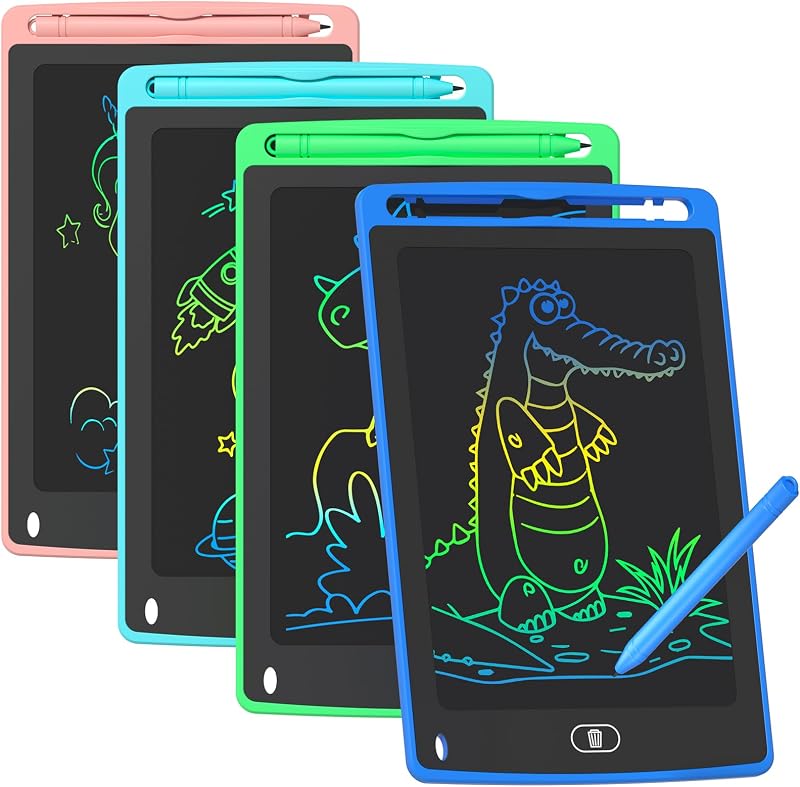
For young learners and parents seeking basic doodle surfaces rather than professional graphic displays, the 4 Pack LCD Writing Tablet provides an 8.5-inch colorful doodle board format. It is designed purely as an educational learning toy for children rather than a computer-connected digitizer. Shoppers who need simple, battery-powered scribble pads for kids to practice handwriting or casual sketches without connecting to a computer should pick this multi-pack instead of an advanced creative display.
3600mAh Rechargeable Light Up Art

The 3600mAh Rechargeable Light Up Art board offers an illuminated 16-inch double-layer LED surface with 12 light effects and an internal rechargeable battery supporting up to 32 hours of run time. Built as an interactive creative craft board for children and young hobbyists, it provides glowing visual effects for recreational art projects. Buyers wanting an illuminated recreational drawing gift rather than a calibrated digital illustration monitor will find it far more suitable for entertainment.
8192 Pressure Levels HUION Inspiroy H1060P

Artists seeking an expansive desktop drawing tablet without a built-in screen will appreciate the 8192 Pressure Levels HUION Inspiroy H1060P Graphics Drawing Tablet. Featuring a generous 10 by 6.25-inch active drawing area, a battery-free stylus with 8192 levels of pressure sensitivity, and a comprehensive array of 12 physical hot keys plus 16 soft keys, it works with Mac, Windows PC, and Android devices. Creators who prefer looking up at a large desktop monitor while drawing on an indirect slate tablet will find this traditional graphics tablet a practical alternative.
Final Verdict
When asking whether the wacom mobilestudio pro 13 legacy has found a worthy spiritual successor in modern workflows, the Movink 13 answers decisively. By eliminating heavy computing components and dedicating every millimeter to display quality and pen responsiveness, Wacom has created an ultra-streamlined tool that solves the weight and bulk issues of past portable displays. The integration of a 10-bit OLED screen, true blacks, factory-calibrated color spaces, and virtually nonexistent parallax creates an immersive drawing surface that rivals high-end studio gear.
Ultimately, deciding if the wacom movink 13 is worth it comes down to how and where you work. If you already own a capable laptop or portable machine and require uncompromising visual precision for professional illustration, concept art, or retouching on the move, its featherweight profile and Pro Pen 3 digitizer represent an outstanding investment in creative freedom. It stands out as a focused, purpose-built creative companion that delivers professional pen performance anywhere your work takes you.
FAQ
Does the Wacom Movink 13 work without a computer?
No, the display is not an independent standalone tablet computer. It operates purely as an external pen display and touchscreen digitizer, meaning it must be connected to a host computer running macOS, Windows, or ChromeOS, or to a compatible Android smartphone that provides the processing power, operating system, and creative applications.
Can I connect the tablet using a single cable?
Yes, provided your host computer or smartphone features a USB-C or Thunderbolt 3 or 4 port that supports DisplayPort Alternate Mode and delivers adequate bus power. The included 1-meter USB-C cable transmits the display signal, touch information, stylus coordinates, and electrical power simultaneously over that single connection.
What nibs are included with the Pro Pen 3?
The package includes a standalone nib holder containing three replacement nibs: one standard plastic nib for a firm glide and two felt nibs that provide higher surface friction resembling traditional paper. In addition, the Pro Pen 3 features a hollow rear barrel that unscrews to store extra nibs directly inside the stylus body.
Is the screen calibrated for professional color work?
Yes, the 10-bit OLED panel is Pantone verified and features a contrast ratio of 100,000:1. It includes built-in hardware presets for standard production color spaces such as Adobe RGB, sRGB, DCI-P3, Rec. 709, Rec. 2020, and EBU, allowing photographers, animators, and designers to work with consistent color fidelity across various media workflows.
Can you turn off the touch screen while drawing?
Yes, the display provides multi-touch functionality for intuitive canvas navigation like pinch-to-zoom and two-finger rotation, but it also includes dedicated controls to disable touch input. This allows you to draw exclusively with the Pro Pen 3 without any risk of accidental marks or gestures from resting your palm on the glass surface.