
As Amazon Associates, we earn from qualifying purchases. This means we may receive a small commission at no extra cost to you if you click through and make a purchase.
The Samsung Galaxy Chromebook Go 14 is an entry-level laptop designed to provide dependable durability, straightforward cloud productivity, and extended unplugged runtimes. Operating on Google Chrome OS and powered by an energy-efficient dual-core processor, this portable computer targets daily computing basics without unnecessary system bloat. For shoppers looking for an ultra-resilient notebook capable of handling routine classroom projects, web navigation, and media streaming, it offers a reliable, no-fuss computing platform.
This compact machine is ideal for primary and secondary students, remote workers focused on web-based suites, and busy households needing an unobtrusive second computer. Users who require heavyweight multitasking capabilities, local creative software suites, high-end PC gaming, or full desktop environments should instead explore performance laptops like the Samsung Book 4 Pro or higher-tier Chromebooks built with faster chip architectures.


Samsung Galaxy Chromebook Go 14 at a Glance

| Feature | Specification |
|---|---|
| Screen Size and Type | 14.0-inch LED, Anti-Glare Coating |
| Processor | Intel Celeron N4500 |
| Graphics | Integrated Intel UHD Graphics |
| System Memory | 4GB RAM |
| Storage Capacity | 320GB Total (64GB eMMC + 256GB SD Card) |
| Wireless Connectivity | Wi-Fi 6 and Bluetooth |
| Operating System | Chrome OS (Auto Update Expiration: June 2031) |
| Physical Dimensions | 12.88 x 8.88 x 0.63 inches |
| Weight | 3.2 pounds |
| Battery Life Claim | Up to 12 Hours with Fast Charging |
Chassis Ruggedness and Military-Grade Durability
Durability serves as a core engineering pillar for this 14-inch portable notebook. Built with a military-grade design, the chassis is reinforced to survive the routine mishaps, minor drops, and surface dings common in backpacks, lecture halls, and living rooms. Samsung integrated a spill-resistant keyboard designed to prevent minor liquid splashes from penetrating delicate internal logic boards, adding valuable peace of mind for parents and busy students alike.
The display hinge represents another structural highlight, utilizing a 180-degree lay-flat configuration that prevents accidental hinge snap when opening the lid carelessly. This flat-folding hinge allows users to lay the screen entirely level with a desk, facilitating collaborative group assignments or shared screen reading. At 0.63 inches thick and weighing 3.2 pounds, the laptop retains a slender, packable silver profile that slips smoothly into standard school bags without placing an excessive burden on your back or shoulders.
While the exterior materials lean toward utility rather than luxury finishes, the rigid construction resists chassis flexing during daily transit. The keyboard deck remains stable under firm typing pressure, and the display casing offers appropriate rigidity to protect the underlying panel during transit. Buyers looking for budget-friendly classroom computers often compare this housing to alternatives like the Acer Chromebook 314, finding that Samsung prioritized structural toughness to withstand rough handling across multiple school terms.
Everyday Performance and Software Lifecycle
Under the hood, the Samsung Galaxy Chromebook Go performance relies on an Intel Celeron N4500 processor paired with 4GB of RAM and integrated Intel UHD Graphics. The Celeron N4500 is engineered for thermal efficiency and everyday web processing rather than computational brute force. In practical use, this configuration handles standard Google Docs editing, multiple browser tabs, PDF reading, and single-stream video playback smoothly without generating distracting thermal fan noise.
Because the machine runs Chrome OS, system overhead is low, letting the dual-core processor focus resources directly on active web tasks and cloud applications. Users can access Google Play store software, Microsoft 365 web apps, Adobe Express, and lightweight Android games like Minecraft without significant hurdles. However, pushing beyond six to eight active browser tabs while streaming background media or hosting heavy video meetings will expose the memory ceiling of the 4GB RAM allocation, making this laptop best suited for structured, single-task workflows.
Software longevity is one of the strongest selling points of the platform. Samsung Galaxy Chromebook Go 14 specs outline an official Chrome OS Auto Update Expiration date running until June 2031. This multi-year support window ensures the laptop receives ongoing operating system updates, background security patches, and browser upgrades straight from Google. For academic institutions or families seeking a secure workstation that remains compliant with modern web standards for years to come, this long-term support adds immense practical value.
Storage Configuration and Expansion Realities
Managing files on this model involves a hybrid approach that separates base system software from secondary user data. The hardware provides 320GB of total storage, achieved through 64GB of soldered eMMC flash storage paired with an included 256GB SD card. The internal 64GB eMMC drive houses the Chrome OS system files and primary application installations, delivering responsive system boot sequences and brisk native application load times.
The bundled 256GB memory card slots directly into the built-in Micro SD card reader, effectively multiplying local storage capacity for media files, local downloads, and offline video collections. This expanded storage setup includes a distinct three-year warranty on the memory card component from Issaquah Highlands Tech, alongside the one-year manufacturer warranty covering the base laptop hardware. Users should note that external flash cards generally exhibit slower read and write transfer rates than integrated solid-state drives, making the secondary card best suited for static file archives rather than running intensive real-time applications.
For cloud-first ecosystems, these Galaxy Chromebook Go storage options strike a sensible middle ground. Standard Chrome OS workflows naturally store document drafts, spreadsheets, and drive folders inside Google cloud infrastructure, leaving the 64GB internal drive largely free of clutter. When paired with the 256GB card, students have ample local space to store offline textbooks, class audio recordings, and downloaded media without constantly receiving low-disk warnings.
Display Clarity and Peripheral Connectivity
Visual output is handled by a 14.0-inch LED screen featuring an anti-glare matte coating. This matte treatment diffuses harsh reflections from fluorescent classroom lights and outdoor sun glare, reducing eye strain during marathon typing sessions or study groups. The screen provides standard definition viewing suitable for reading web text, writing assignments, and watching educational videos, though shoppers seeking vibrant creative displays should remember this panel focuses strictly on basic document clarity.
Connectivity options are unusually robust for an entry-level mobile computer. The chassis includes two USB Type-C ports, one USB 3.2 Type-A port, a 3.5mm headphone and microphone combo jack, and the Micro SD card slot. The two Type-C connections support versatile multi-monitor configurations, allowing users to drive up to two external displays at 4K resolution at 60Hz simultaneously without requiring an expensive intermediate docking station. This feature transforms the laptop into a capable home office command station when anchored to desktop monitors.
Wireless communication is powered by Wi-Fi 6 and Bluetooth, ensuring fast data synchronization with modern routers and dependable pairing with wireless earbuds or external mice. A front-facing 720p webcam and built-in HD audio hardware support daily video conferences, remote classes, and virtual meetings. The camera and microphone array captures clear speech and adequate video in well-lit environments, ensuring smooth remote participation without external accessories.
Samsung Galaxy Chromebook Go Battery Life and Daily Mobility
Portability represents a primary reason buyers seek out low-power Chromebooks, and the Samsung Galaxy Chromebook Go battery life claim of up to 12 hours delivers true all-day freedom from power outlets. Because the Intel Celeron N4500 operates on minimal wattage, the internal battery easily endures a continuous schedule of note-taking, research browsing, and video viewing without draining rapidly. Real-world battery life varies based on display brightness and active peripheral usage, but most users can comfortably leave their charger at home for a full school day.
When the battery does deplete, integrated fast charging over USB Type-C allows rapid recovery, returning usable operating hours with minimal wall outlet downtime. Because both Type-C ports accept power input, users can charge the laptop conveniently from either side of their desk or study carrel. Furthermore, the universal nature of USB Type-C charging means the machine can share power bricks with compatible smartphones and tablets, reducing cable clutter inside travel bags.
Weighing only 3.2 pounds, this laptop sits comfortably on a lap during train commutes or on small desk surfaces in cramped lecture halls. Unlike bulky older notebooks, the slim 0.63-inch thickness prevents wrist fatigue during typing. For buyers needing an agile travel companion that pairs prolonged battery endurance with straightforward charging mechanics, this model meets everyday mobile computing requirements effortlessly.
Samsung Galaxy Chromebook Go 14 Pros and Cons
Pros
- Military-grade durability with spill-resistant keyboard
- Up to 12 hours of battery life with fast charging
- Dual 4K 60Hz external display support via USB-C
- Chrome OS updates supported through June 2031
- Lightweight 3.2-pound chassis with 180-degree hinge
Cons
- Modest Intel Celeron N4500 processing power
- Limited 4GB RAM constrains heavy multitasking
- Secondary storage relies on external SD card
Check Samsung Galaxy Chromebook Go 14 on Amazon
Who Should Buy the Samsung Galaxy Chromebook Go 14
Buy It If
- You need a rugged laptop with a spill-resistant keyboard and military-grade durability to survive backpack travel.
- You want guaranteed Chrome OS updates that keep the system secure through June 2031.
- You need all-day battery endurance up to 12 hours paired with versatile dual-monitor 4K display output.
- Your primary workflows center on web browsing, Google Classroom, Microsoft 365 web apps, and media streaming.
Skip It If
- You need to run complex desktop software, heavy video production suites, or native Windows enterprise tools.
- Your workload involves intensive multitasking with dozens of concurrent browser tabs that exceed 4GB of RAM.
- You require a high-brightness creative panel for color-accurate photo editing or professional digital design.
Samsung Galaxy Chromebook Go 14 Alternatives Worth a Look
Evaluating competing hardware helps verify whether this specific laptop meets your individual balance of processing speed, screen quality, and system memory.
HP 14″ HD Chromebook Laptop

The HP 14″ HD Chromebook Laptop features an Intel Quad-Core N4120 processor, 4GB of RAM, 64GB of eMMC storage, and an advertised 14-hour battery life. It also includes a dedicated HDMI port alongside USB-A and USB-C connections. Shoppers who prioritize extended battery endurance and direct HDMI display connectivity without USB-C adapters may prefer this HP alternative.
14″ FHD IPS 300 nits

The 14″ FHD IPS 300 nits ASUS CX14 Chromebook provides a 300-nit Full HD IPS display, an Intel Celeron N50 processor, 4GB of LPDDR5 RAM, and 576GB of total storage via a 64GB SSD and a 512GB dock set. Users who prioritize a sharper, brighter IPS screen and faster LPDDR5 memory for viewing media should select this ASUS model over the Samsung unit.
64GB eMMC
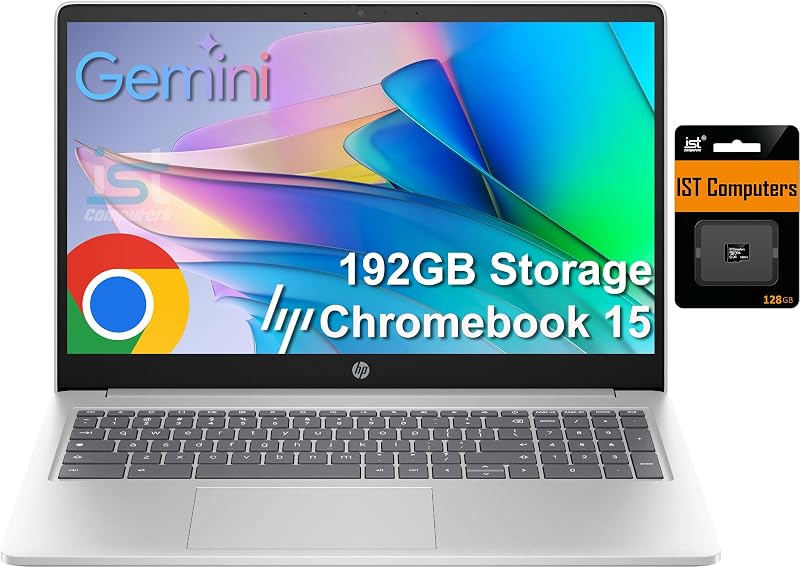
The 64GB eMMC HP Chromebook 15 offers a larger 15.6-inch anti-glare display, an upgraded Intel N200 processor, 8GB of DDR5 RAM, and a full numeric keypad with 192GB total storage (64GB eMMC plus a 128GB SD card). Shoppers who require double the system memory for heavier multitasking and prefer a physical numeric keypad should consider this larger HP laptop. Those needing premium convertible hardware might also look into modern Windows convertibles like the Samsung Galaxy Book 5 360.
Final Verdict
In this Samsung Galaxy Chromebook Go 14-inch review, the machine establishes itself as a purposeful, durable notebook crafted for practical digital essentials. By pairing a military-grade chassis and spill-resistant keyboard with up to 12 hours of battery life and support for dual 4K external displays, Samsung built a reliable companion for classrooms, libraries, and home workstations. While the Intel Celeron N4500 and 4GB RAM configuration imposes firm limits on heavy multitasking, the low-overhead Chrome OS environment ensures fluid operation for standard cloud productivity.
Ultimately, deciding whether the Samsung Galaxy Chromebook Go is worth it hinges entirely on your computing scope. If you need a resilient, low-maintenance laptop that handles student homework, web browsing, and streaming video without constant worry over drops or liquid spills, this model delivers dependable value backed by Google security updates through 2031. Users needing superior multitasking power or professional software support should explore higher-spec alternatives, but for everyday basics, this rugged Chromebook remains a smart, road-ready choice.
FAQ
How long does the battery last on the Samsung Galaxy Chromebook Go 14?
The listing states the laptop delivers up to 12 hours of battery life on a full charge. It also features fast-charging support over USB Type-C, allowing users to replenish runtime quickly using compatible chargers.
What processor powers this Chromebook?
This laptop is powered by an Intel Celeron N4500 dual-core processor with integrated Intel UHD Graphics, designed for energy efficiency and everyday cloud computing tasks.
How is the 320GB of storage divided on this model?
The storage setup consists of 64GB of internal eMMC flash memory for the operating system and essential applications, supplemented by a 256GB Micro SD card that slots directly into the onboard card reader for secondary storage.
Can I connect external monitors to this laptop?
Yes. The laptop features two USB Type-C ports that support external monitor output, allowing you to connect up to two external displays at up to 4K resolution at 60Hz without needing an external docking station.
How long will this Chromebook receive official Chrome OS updates?
According to the product specifications, this device has an official Auto Update Expiration (AUE) date of June 2031, guaranteeing years of automated security fixes and operating system improvements directly from Google.


