As Amazon Associates, we earn from qualifying purchases. This means we may receive a small commission at no extra cost to you if you click through and make a purchase.
The Lenovo ThinkPad X1 Carbon Gen 13 is an ultra-portable business machine that pairs a high-end display with substantial system memory and modern artificial intelligence capabilities. This particular configuration combines an Intel Core Ultra 7 processor, 32GB of RAM, and a 1TB solid-state drive inside a chassis weighing just 2.17 pounds. If you need a premium executive ultraportable that handles intense productivity suites without stuttering or slowing down under heavy tab counts, this laptop delivers exceptional competence in an impossibly light frame.
This laptop suits traveling executives, consultants, financial analysts, and power users who balance large datasets, continuous video conferences, and dense web workflows. However, buyers looking for a low-cost everyday notebook or a dedicated gaming machine with discrete graphics should look elsewhere, as this machine is built purely around enterprise efficiency, high-end display fidelity, and extreme lightweight mobility.
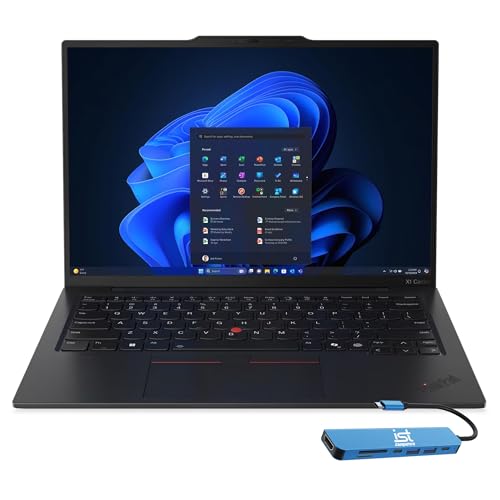



Lenovo ThinkPad X1 Carbon Gen 13 at a Glance
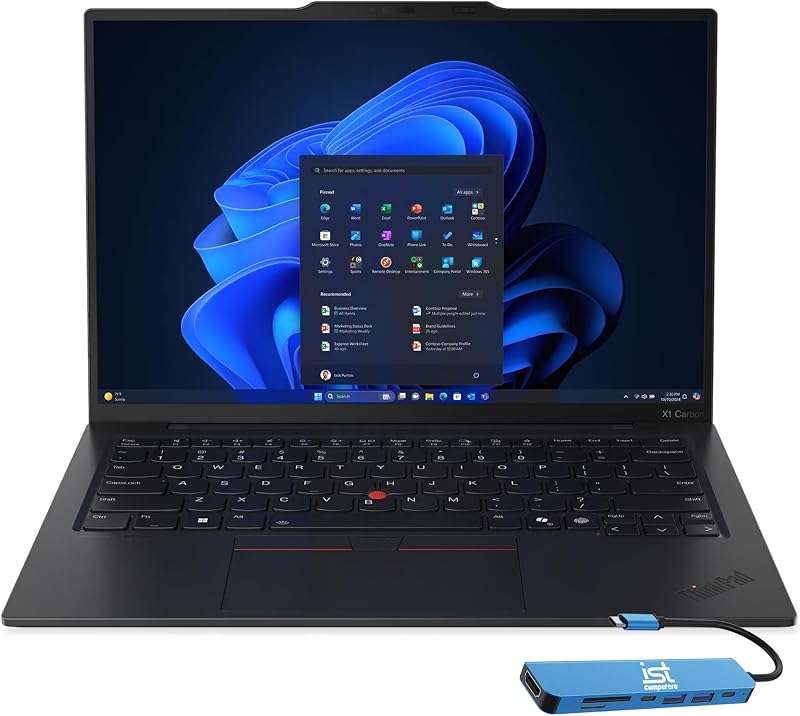
| Feature | Specification |
|---|---|
| Processor | Intel Core Ultra 7 258V (8 cores, up to 4.8GHz, 47 TOPS NPU) |
| Memory | 32GB RAM |
| Storage | 1TB Solid State Drive |
| Display | 14-inch 2.8K QHD+ (2880×1800) OLED, 500 nits, 120Hz VRR, 100% DCI-P3 |
| Graphics | Intel Arc Graphics 140V (Integrated / Shared) |
| Operating System | Windows 11 Pro |
| Weight and Dimensions | 2.17 lbs; 12.31″L x 8.45″W x 0.67″Th |
| Built-in Ports | 2x Thunderbolt 4, 2x USB-A 3.2 Gen 1, HDMI 2.1, headphone/mic combo |
| Included Accessory | IST Computers 7-in-1 Hub (HDMI, USB-C, USB 2.0, PD, SD/TF card reader) |
| Warranty | 3-year on upgraded SSD (Issaquah Highlands Tech), 1-year Lenovo on remaining components |
Memory and Multitasking Performance
When evaluating thinkpad x1 carbon 32gb ram specs, the primary question is whether having this much system memory makes a daily difference. For professionals running massive enterprise spreadsheets, multiple communication clients like Zoom and Microsoft Teams, and dozens of active browser tabs, memory headroom prevents system slowdowns. In configurations with limited memory, Windows often resorts to virtual memory swapping on the drive, which can cause micro-stutters during screen sharing or rapid app switching.
The thinkpad x1 carbon 32gb multitasking performance ensures that heavy multi-application workflows run without running out of breathing room. Because the integrated Intel Arc Graphics 140V shares system memory with the operating system, having 32GB ensures graphics tasks and external 4K monitor outputs do not starve your core applications. Those exploring similar business workhorses might also review the lenovo thinkpad t14 32gb to see how memory handling compares across different chassis designs.
Beyond current office tasks, 32GB provides vital future-proofing for running local artificial intelligence models. As Windows Copilot+ and on-device features mature, local processing requires dedicated RAM allocation. Having a 32GB ceiling ensures the system continues to operate swiftly as software updates and modern web frameworks demand more baseline resources over the next several years.
Processing Power and Artificial Intelligence
At the heart of the thinkpad x1 carbon gen 13 aura edition is the Intel Core Ultra 7 258V processor, which reaches clock speeds up to 4.8GHz across 8 cores. This processor introduces dedicated silicon for machine learning tasks via a 47 TOPS neural processing unit (NPU). Having dedicated hardware for artificial intelligence means tasks like background blur in video calls, voice isolation, and local language models run efficiently without consuming primary CPU cycles.
The thinkpad x1 carbon core ultra 7 architecture is engineered to balance performance with low thermal output. In an ultraportable chassis measuring just 0.67 inches thick, heat management is critical. The processor coordinates with Windows 11 Pro to handle background indexing and BitLocker encryption smoothly while keeping the laptop cool during long meetings and intense document creation sessions.
Graphics processing is managed by the integrated Intel Arc Graphics 140V. While it uses shared memory rather than a standalone dedicated GPU, it capably drives high-resolution displays, presentation graphics, and media editing tasks. Creative professionals working on presentation decks, data visualizations, and high-bitrate video playback will find the processor and graphics combination more than adequate for business-oriented workflows.
Visual Quality and the 2.8K OLED Display
The thinkpad x1 carbon 2.8k oled panel is one of the most prominent highlights of this machine. Offering a resolution of 2880×1800 on a 14-inch canvas, text appears exceptionally sharp, eliminating pixelation on spreadsheets and dense code. The display supports a 120Hz variable refresh rate (VRR), which makes scrolling through documents, browsing websites, and moving application windows feel noticeably smoother than standard 60Hz business panels.
Visual fidelity is further elevated by 100% DCI-P3 color gamut coverage, 500 nits of peak brightness, and DisplayHDR True Black 500 certification with Dolby Vision. Because OLED technology illuminates each pixel independently, black levels are absolute, providing rich contrast for presentations, streaming media, and photo analysis. An anti-glare coating helps mitigate reflections in bright office environments, maintaining viewing comfort throughout long workdays.
The listing does not specify touch functionality for this screen, so buyers should treat it as a traditional non-touch display focused purely on color accuracy and contrast. For professionals who stare at their screen for eight to ten hours a day, the combination of high resolution, smooth refresh rates, and crisp contrast significantly reduces visual fatigue.
Battery Life and Road-Warrior Portability
Weighing just 2.17 pounds, this ultralight laptop is purpose-built for mobile professionals who move frequently between conference rooms, airports, and client offices. Its dimensions of 12.31 inches long, 8.45 inches wide, and 0.67 inches thick allow it to slip easily into briefcases and messenger bags without adding noticeable bulk or shoulder strain.
According to the manufacturer specifications, the thinkpad x1 carbon battery life reaches up to 15 hours on a single charge. Real-world longevity naturally varies depending on screen brightness, refresh rate settings, and active software loads, but the energy-efficient Core Ultra processor is designed to optimize power draw during standard productivity tasks. If you frequently work away from power outlets, checking out a larger option like the thinkpad t16 32gb ram can provide perspective on how screen size impacts overall mobile endurance.
In addition to its featherlight frame, the laptop retains key ThinkPad physical traits. It features a spill-resistant backlit keyboard that protects internal components against accidental coffee splashes, along with a built-in fingerprint reader that integrates directly with Windows 11 Pro security to streamline biometric logins.
Port Selection and Peripheral Connectivity
Many ultra-thin laptops sacrifice physical connections in pursuit of a slim silhouette, but the lenovo thinkpad x1 carbon ports offer a solid built-in baseline. The chassis includes two Thunderbolt 4 ports for high-speed data and charging, two USB-A 3.2 Gen 1 ports for legacy peripherals, an HDMI 2.1 output for external monitors, and a headphone/mic combo jack. This setup allows you to connect flash drives, external mice, and display cables without immediate dongle clutter.
To further expand its connectivity, the package comes bundled with an IST Computers 7-in-1 Hub. This accessory provides an additional HDMI port supporting 4K at 30Hz, a USB-C 2.0 port, two USB 2.0 ports, Type-C Power Delivery pass-through, and dedicated SD and TF card reader slots. For photographers or analysts transferring data from memory cards, this included hub eliminates the need to buy separate third-party adapters.
For users comparing enterprise connectivity, looking at alternatives such as the thinkpad t14 gen 4 helps highlight how different ThinkPad designs handle native Ethernet and expansion slots. On the X1 Carbon, the combination of native Thunderbolt 4 and the included external hub covers virtually any workstation setup.
Lenovo ThinkPad X1 Carbon Gen 13 Pros and Cons
Pros
- Generous 32GB RAM for multitasking
- Vivid 2.8K 120Hz OLED display
- Featherlight 2.17-pound chassis
- Intel Core Ultra 7 with AI NPU
- Bundled 7-in-1 expansion hub
Cons
- Resealed package for SSD upgrade
- Split warranty across two companies
- Integrated graphics share system memory
Check Lenovo ThinkPad X1 Carbon Gen 13 on Amazon
Who Should Buy the Lenovo ThinkPad X1 Carbon Gen 13
Deciding whether the thinkpad x1 carbon for business is the right investment comes down to your portability needs and memory requirements. If you frequently juggle dozens of browser tabs alongside memory-hungry enterprise tools, asking is thinkpad x1 carbon 32gb worth it yields a clear affirmative answer.
Buy It If
- You travel frequently and demand a premium business laptop weighing barely over two pounds.
- Your workflow involves massive spreadsheets, local virtualization, or heavy multi-app multitasking that overwhelms 16GB systems.
- You want an OLED display with 120Hz refresh rates and deep contrast for detailed document and creative work.
- You require Windows 11 Pro security features, biometric login, and on-device AI acceleration in a single package.
Skip It If
- You need a dedicated graphics card for high-end 3D rendering or intense gaming.
- You prefer a factory-sealed unit with unified warranty coverage directly from a single manufacturer.
- Your computing needs are limited to basic web browsing and email that do not require 32GB of RAM.
Lenovo ThinkPad X1 Carbon Gen 13 Alternatives Worth a Look
If your budget or technical requirements lead you toward entry-level computing rather than an executive ultraportable, several low-cost alternatives exist for basic daily tasks.
2026-2027 edition

The 2026-2027 edition is an HP 14 laptop computer powered by an Intel N150 processor, featuring 4GB of DDR5 RAM, a 128GB SSD, 1TB of cloud storage, and Windows 11 with Microsoft 365. This machine is designed strictly for basic document typing, homework, and web navigation. Buyers should pick this option only if they need a rudimentary machine for light secondary tasks rather than a heavy enterprise workstation.
Supports 1TB TF Card Expansion

The notebook marketed as Supports 1TB TF Card Expansion is a gray 15.6-inch laptop featuring an Intel N4020 processor, 4GB of DDR4 RAM, 128GB eMMC storage, a Full HD LCD screen, and Windows 11. It provides a larger screen for home office basics and storage expansion via TF cards, making it an option for shoppers on an extreme budget who only need basic media playback and simple typing.
Copilot AI

The HP essential laptop branded under Copilot AI is a natural silver notebook featuring an Intel processor, 128GB of storage, an LED display, 1TB cloud storage, and Windows 11 with Office 365. It represents a portable, lightweight entry-level unit for students and casual users who want basic cloud-assisted tools without paying for high-performance enterprise hardware.
Final Verdict
The Lenovo ThinkPad X1 Carbon Gen 13 represents the pinnacle of lightweight business computing. By pairing 32GB of RAM with the Intel Core Ultra 7 258V processor, Lenovo has created a laptop that eliminates multitasking bottlenecks while maintaining a whisper-light weight of just 2.17 pounds. The addition of a 2.8K 120Hz OLED screen and native Thunderbolt 4 connectivity ensures your visual and workspace needs are thoroughly addressed.
The only notable caveat is the resealed packaging resulting from the customized 1TB SSD upgrade, which introduces a split warranty between Lenovo and Issaquah Highlands Tech. However, for mobile executives, consultants, and power users who need uncompromised multitasking in an ultraportable chassis, this configuration delivers outstanding productivity and long-term utility.
FAQ
Why is the packaging resealed on this ThinkPad X1 Carbon?
The computer was opened and resealed to upgrade the internal storage to a 1TB solid-state drive. Because of this customization, the upgraded SSD is backed by a three-year warranty from Issaquah Highlands Tech, while the remaining factory components carry a one-year warranty from Lenovo.
Can the 32GB of RAM be upgraded later?
The listing does not specify whether the RAM is user-accessible or soldered to the motherboard. In modern ultraportables of this class, memory is typically integrated, making the choice of 32GB upfront a smart decision for long-term multitasking.
What ports are built directly into the laptop chassis?
The laptop includes two Thunderbolt 4 ports, two USB-A 3.2 Gen 1 ports, an HDMI 2.1 port, and a combined headphone/microphone audio jack. It also comes with an external 7-in-1 hub for additional USB ports and SD card reading.
Does this laptop feature biometric security?
Yes, the laptop includes an integrated fingerprint reader for secure, password-free biometric authentication through Windows 11 Pro, alongside enterprise features like BitLocker drive encryption.
Is the 2.8K OLED screen suitable for outdoor use?
The 14-inch OLED display produces up to 500 nits of brightness and features an anti-glare coating, making it significantly easier to view in bright environments and near windows than standard glossy displays.