As Amazon Associates, we earn from qualifying purchases. This means we may receive a small commission at no extra cost to you if you click through and make a purchase.
The Intel Core i9-9900KS is an unlocked 9th Gen desktop processor designed to deliver maximum clock speeds across every available core without manual frequency adjustments. As a Special Edition release on the LGA 1151 socket, it offers an out-of-the-box 5.0 GHz turbo frequency across all 8 cores, representing the peak factory performance profile of its platform generation.
This chip suits existing desktop owners who run a high-grade Z390 motherboard, possess substantial cooling hardware, and want a top-tier drop-in upgrade without rebuilding their system. Those assembling a brand-new computer from the ground up or seeking modern platform standards should look toward current generations such as the core i9 14900k instead.
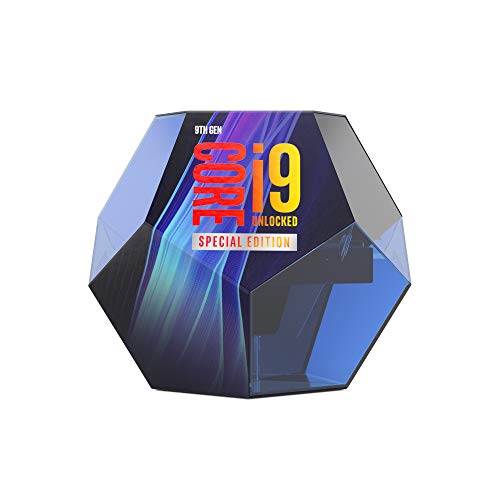



Intel Core i9-9900KS at a Glance

| Specification | Listing Detail |
|---|---|
| Processor Series | Core i9 |
| Processor Core Count | 8 cores |
| Processor Speed | 5.0 GHz all-core turbo |
| Socket Compatibility | LGA 1151 |
| Secondary Cache | 16 MB |
| Thermal Design Wattage | 127 watts |
| Recommended Chipset | Z390 |
| Thermal Solution Included | No cooler included in box |
| Operating Platform | Windows |
| Model Number | BX80684I99900KS |
All-Core Clock Speeds and Gaming Execution
The standout characteristic of the core i9 9900ks is its factory-set operating speed. Standard desktop processors commonly scale down their turbo frequencies as more cores become active, hitting their peak numbers only under light single-threaded loads. In contrast, the i9-9900ks all core 5ghz configuration guarantees that whenever high processing throughput is demanded, all 8 cores run at a full 5.0 GHz out of the box. This provides unwavering consistency under heavy computing loads and eliminates the trial-and-error often required when manually dialing in multipliers and voltages.
Evaluating the i9 9900ks for gaming reveals the direct benefits of this clock rate consistency. Frame pacing and high refresh rate output in modern titles remain closely tied to the frequency of the primary execution threads. Operating across 8 cores with 16 MB of secondary cache, this chip handles physics calculations, game simulation, and draw calls with high efficiency. Gamers running high-end graphics cards at high refresh rates will find reliable delivery with minimized frame drops during demanding scenes.
While newer platforms evaluated in our core ultra 9 285k coverage introduce mixed performance and efficiency core layouts, the 9900KS maintains a uniform structure. Under Windows, every one of the 8 cores functions identically, preventing background OS tasks from interfering with thread assignment. For titles that thrive on high uniform clock rates, this Special Edition silicon offers an exceptionally stable baseline.
Motherboard Compatibility and Chipset Demands
Hardware platform requirements require careful scrutiny when considering this component. The core i9 9900ks motherboard compatibility is tied to the LGA 1151 socket, but running 8 cores at a sustained 5.0 GHz imposes severe demands on the underlying circuit board. Intel explicitly recommends pairing this processor with a motherboard based on the Z390 chipset to ensure reliable operation.
Examining core i9 9900ks z390 performance explains why this recommendation matters. Pushing 5.0 GHz across all cores continuously generates high electrical load through the motherboard voltage regulator modules (VRMs). High-end Z390 boards feature multi-phase power delivery systems and substantial aluminum heatsinks that maintain safe thermal boundaries under sustained loads. Budget or entry-level 300-series boards, even if capable of booting the chip via a firmware update, risk VRM thermal throttling and reduced operational stability.
Additionally, selecting this processor means operating at the final ceiling of the LGA 1151 interface. Intel produced no subsequent architectural updates for this socket. An existing system owner with a premium Z390 board can treat this chip as the absolute maximum performance upgrade possible, but it offers no forward expansion into future component generations.
Thermal Dissipation and Cooling Requirements
Managing temperatures is a central operational factor with this hardware. The official i9 9900ks cooling requirements are elevated because the processor pushes high sustained clocks across all cores without throttling down. Crucially, the listing notes that a thermal solution is not included in the box. Intel leaves thermal dissipation entirely to the user, and standard entry-level air coolers cannot handle the thermal output generated by this processor under load.
To avoid thermal throttling, users must deploy high-performance cooling equipment. A dual-tower air cooler with multiple heat pipes or a closed-loop liquid cooling system equipped with a 280mm or 360mm radiator is appropriate for keeping temperatures within acceptable limits. Internal PC chassis airflow is equally important; sufficient intake fans and unobstructed exhaust pathways are necessary to evacuate heat from the processor area and prevent heat soak around the socket.
If temperatures rise too high, automated safeguards reduce frequencies, negating the primary advantage of the factory 5.0 GHz all-core specification. The product listing also notes an overclocking protection plan for select unlocked processors to cover replacement in the event of failure. While that plan provides added assurance for performance enthusiasts seeking extra headroom, maintaining robust day-to-day cooling is essential for regular use.
Power Consumption and Electrical Stability
Power delivery is another critical consideration for this flagship component. The i9-9900ks power draw is reflected in its official base specification of 127 watts, a notable increase over standard 95-watt mainstream desktop processors. This higher wattage envelope reflects the continuous electrical delivery required to stabilize 8 cores at 5.0 GHz simultaneously right from the factory.
Under heavy multi-threaded productivity tasks or intensive stress benchmarks, electrical demands will exceed the 127-watt baseline. Builders must ensure their power supply unit provides sufficient wattage and stable 12V rails to handle sharp transient power spikes. Combining this CPU with a dedicated graphics card warrants a reliable 750-watt or 850-watt power supply to prevent unexpected system shutdowns under peak computing loads.
Reviewing the complete intel core i9-9900ks specs demonstrates that raw performance was prioritized over electrical efficiency. Modern hardware families, such as those analyzed in our core i9 ultra discussions, offer enhanced architectural efficiency per watt. In contrast, the 9900KS accomplishes its speed through substantial electrical throughput, meaning system builders must account for power consumption and heat output across their entire hardware configuration.
Silicon Binning and Practical Value
The manufacturing rationale behind this Special Edition processor centers on silicon binning. Rather than leaving high clock speeds to the variability of the silicon lottery, Intel screened and selected chips capable of maintaining 5.0 GHz across all cores at standard operating parameters. This gives the user factory-backed stability at peak frequencies without the instability, crashes, or extensive tuning associated with manual overclocking attempts.
Whether this translated value aligns with your computing goals depends on your current configuration. If a user already operates an existing Core i9-9900K, the jump to the KS variant delivers only slight incremental gains. However, for builders moving up from an 8th-generation Core i5 or i7 on an existing enthusiast-grade motherboard, moving to 8 full cores at 5.0 GHz provides a noticeable improvement in system responsiveness and computational capacity.
Intel Core i9-9900KS Pros and Cons
Pros
- Factory 5.0 GHz all-core turbo out of the box
- No manual frequency tuning required for peak speeds
- 8 cores with 16 MB secondary cache
- Drop-in upgrade for compatible Z390 motherboards
- Overclocking protection plan coverage available
Cons
- No CPU cooler included in the box
- High 127-watt thermal and power demand
- Final upgrade path on the LGA 1151 socket
Check Intel Core i9-9900KS on Amazon
Who Should Buy the Intel Core i9-9900KS
Determining whether is core i9 9900ks worth it depends on the hardware already installed in your computer chassis. Because this component sits at the top tier of an older socket, it serves a distinct niche of desktop users.
Buy It If
- You own a quality Z390 motherboard with robust VRM cooling and want to maximize the LGA 1151 socket.
- You want a guaranteed 5.0 GHz all-core turbo speed right out of the box without manual overclocking.
- You already have a high-end dual-tower air cooler or liquid cooling setup capable of handling a 127W base profile.
- You prefer uniform 8-core desktop execution on Windows for high-frame-rate gaming.
Skip It If
- You are building a brand-new desktop system from scratch where modern sockets offer better longevity.
- Your current motherboard features basic power delivery phases that will struggle with 127-watt operation.
- You need an included cooler in the box and prefer an energy-efficient desktop configuration.
Intel Core i9-9900KS Alternatives Worth a Look
Shoppers exploring hardware listings will find a variety of components across matching search results. Below are three alternatives from related catalog data that cater to different system configurations and search needs.
AMD RYZEN 7 9800X3D 8-Core

The AMD RYZEN 7 9800X3D 8-Core is a modern desktop processor with 8 cores and 16 threads. Builders starting a new PC build from scratch will find this modern desktop component far more appropriate than investing in an older platform interface, offering current architectural features and forward-looking motherboard compatibility.
Simple Stack & Press Design

The Simple Stack & Press Design is a 350-watt electric vegetable chopper and mini food processor from Hamilton Beach equipped with stainless steel blades for mincing, dicing, and pureeing. While appearing in processor product searches due to catalog overlap, this small kitchen appliance is designed for food preparation rather than computing builds.
2-Speed Electric Food Chopper

The 2-Speed Electric Food Chopper from Ganiza is a 450-watt food processor featuring 8-cup glass and stainless steel bowls along with dual blade sets. Anyone coming across this unit during hardware research should note it is strictly a culinary tool intended for grinding meat and chopping vegetables.
Final Verdict
The Intel Core i9-9900KS represents the absolute peak of the LGA 1151 platform. By locking in a factory 5.0 GHz turbo across all 8 cores, Intel produced a turnkey solution for users who want top-tier single-threaded responsiveness and multi-core throughput without spending hours configuring system settings. For an owner of a high-end Z390 motherboard, it stands as the ultimate drop-in processor upgrade.
At the same time, its 127-watt thermal profile, requirement for substantial aftermarket cooling, and end-of-line socket placement mean it is not suited for new system builds. If your existing rig has the cooling capacity, power supply headroom, and motherboard VRM hardware to support it, the 9900KS delivers impressive performance that maxes out its platform generation.
FAQ
Does the Intel Core i9-9900KS include a thermal cooler in the box?
No, the product listing explicitly confirms that a thermal solution is not included in the package. Because of its 127-watt base wattage and 5.0 GHz all-core operating profile, you must provide a high-end aftermarket air or liquid cooler.
Which motherboard chipset is recommended for this processor?
Intel recommends using a motherboard based on the Z390 chipset. Quality Z390 motherboards supply the robust power delivery and VRM cooling necessary to handle sustained 5.0 GHz frequencies across all 8 cores.
Does this processor require manual tuning to hit 5.0 GHz on all cores?
No manual tuning is required. The processor features a factory-configured 5.0 GHz turbo frequency across all 8 cores out of the box, assuming compatible motherboard firmware and sufficient cooling.
What operating system platform does the listing specify?
The listing states Windows as the supported operating platform for this desktop component.
What is the secondary cache capacity of the processor?
The processor comes equipped with 16 MB of secondary cache memory to support rapid data access during intense computing and gaming workloads.