
As Amazon Associates, we earn from qualifying purchases. This means we may receive a small commission at no extra cost to you if you click through and make a purchase.
The Dockcase MagSafe M.2 NVMe Enclosure is a specialized external drive housing engineered specifically for mobile videographers, smartphone creators, and portable gaming enthusiasts. Equipped with an integrated magnetic mounting ring, an onboard visual health display, dual USB Type-C ports, and hardware-based power loss protection, it provides a dedicated workflow solution for recording high-bitrate video directly to external storage. For content creators seeking a secure, reliable way to capture footage without dangling dongles or fearing sudden drive disconnects, this enclosure stands out as an exceptional, purpose-built accessory.
This dockcase smart magsafe m.2 nvme ssd enclosure directly suits mobile filmmakers shooting Apple ProRes footage on compatible smartphones, handheld gaming console owners who need concurrent charging and storage expansion, and tech enthusiasts who value real-time drive diagnostics. However, everyday shoppers who simply need an inexpensive backup case for standard full-length desktop solid-state drives, or editors who require multi-bay RAID storage for desktop workstations, should look toward conventional alternatives instead.
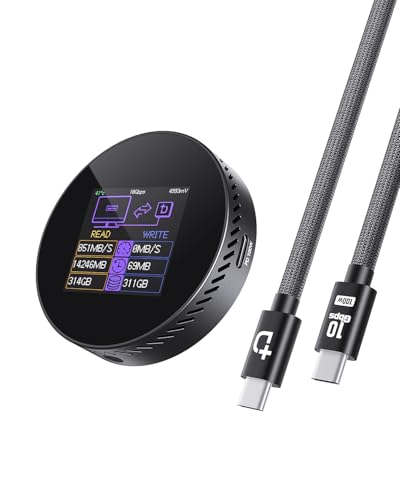


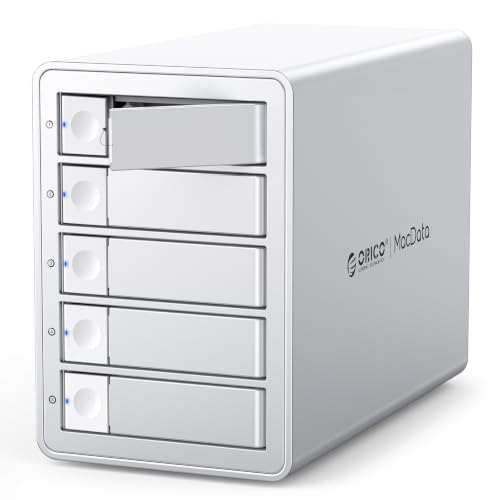
Dockcase MagSafe M.2 NVMe Enclosure at a Glance

| Attribute | Specification |
|---|---|
| Hardware Interface | USB 3.2 Gen 2 / USB 3.2 Gen 2×2 Type-C (10Gbps, up to 1000MB/s) |
| Supported Drive Form Factors | M.2 NVMe PCIe in sizes 2230 and 2242 |
| Maximum Storage Capacity | Up to 2TB |
| Power Loss Protection | 3-second hardware PLP via supercapacitor and RTL9210 controller |
| Onboard Monitoring | Integrated HD display for SSD lifespan, usage cycles, capacity, and health status |
| Charging and Power Delivery | Dual USB-C ports with 100W PD pass-through charging support |
| Mounting Method | Built-in magnetic MagSafe structure with included auxiliary magnetic ring |
| Dimensions and Weight | 2.33 inches long by 0.57 inches wide by 2.33 inches high; 53.8 grams |
| Chassis Material and Finish | Plastic construction in black |
| Model and Part Number | Model Black-100W PD; Mfr Part Number DSWC1R |
MagSafe Attachment and ProRes Video Workflow
The defining operational highlight of this dockcase magsafe enclosure for iphone prores recording is its magnetic mounting system. When filming 4K ProRes footage at 60Hz or 120Hz on compatible devices like the iPhone 15 Pro, iPhone 15 Pro Max, iPhone 16 Pro, and iPhone 16 Pro Max, the enormous bitrate quickly fills onboard device memory. Writing video directly to an attached external drive bypasses internal storage constraints entirely. Instead of leaving a traditional aluminum drive enclosure dangling from the phone’s charging port or taping it to a mobile rig, this unit snaps securely against the back of MagSafe-compatible cases.
Dockcase also includes an adhesive magnetic ring inside the packaging. This ring enables users of non-MagSafe devices, including various Android phones and protective cases without built-in magnets, to establish the exact same secure magnetic connection. Having a firm, flush magnetic mount minimizes physical movement at the connector, which significantly reduces the risk of accidental cable disconnection while moving around a set or filming handheld action shots. It represents an ergonomic leap forward compared to standard external drive enclosures that require specialized mounting cages or awkward grip mounts.
For users who have evaluated other pocket-sized drives, such as the sharge disk pocket size enclosure for ssd, having integrated magnetic attachment right out of the box eliminates the need for third-party adhesive strips or bulky camera clamps. The small square footprint of 2.33 inches by 2.33 inches ensures the enclosure remains tucked neatly behind the smartphone without blocking camera lenses or interfering with mobile gimbal balancing.
Data Safety and Hardware Power Loss Protection
Sudden power loss or unexpected cable disconnections pose a catastrophic risk during heavy disk writes, frequently leading to damaged partition tables, truncated video clips, or complete file system corruption. The dockcase m.2 nvme enclosure power loss protection addresses this vulnerability directly through a dedicated hardware design. Anchored by an advanced Realtek RTL9210 bridge controller and an onboard supercapacitor, the enclosure provides approximately three seconds of emergency reserve power following an unexpected cable pull or sudden power drop.
During these critical three seconds, the internal supercapacitor supplies enough electricity to the installed solid-state drive to flush its cache, complete pending write instructions, and gracefully update the file allocation tables before power cuts out completely. This hardware safeguard is particularly vital when recording continuous 4K ProRes streams, where a split-second disruption could otherwise ruin an entire shoot. In conventional enclosures lacking a supercapacitor, ripping the cable free while recording often results in an unreadable file that requires third-party recovery software to salvage.
This protective layer operates automatically at the hardware level, requiring no special background software or host operating system drivers. Whether connected to a smartphone, a tablet, or a computer, the enclosure continuously monitors power integrity, ensuring that critical production data remains intact even when field conditions lead to accidental cable snags.
Smart Screen Monitoring and Drive Telemetry
The integrated HD display transforms the Dockcase into a true visual smart ssd enclosure, offering a level of real-time operational feedback rarely seen on external storage accessories. While typical external cases rely on a single flashing indicator light that tells you nothing about internal operating conditions, the Dockcase screen delivers detailed diagnostics at a glance. It actively tracks SSD lifespan, accumulated read and write usage cycles, remaining available storage capacity, and overall drive health status.
For videographers and technical users, this continuous visual feedback provides practical peace of mind. Prior to beginning an extended recording session, a creator can glance at the screen to verify available capacity and confirm that the installed solid-state drive is functioning within safe health parameters. This eliminates the guesswork of plugging the drive into a desktop computer just to run disk health utility checks.
Furthermore, the screen acts as an immediate diagnostic tool during troubleshooting. If a host device fails to read the drive or drops a connection, the onboard display clarifies whether the drive is properly powered, recognized by the bridge controller, and negotiating the data link. This level of clarity saves valuable time on set and helps users identify drive degradation before catastrophic hardware failure occurs.
Dual USB-C Ports and 100W Power Delivery Pass-Through
High-resolution video capture and fast NVMe data transfers demand substantial power, which can drain a mobile device battery rapidly. Dockcase resolves this operational bottleneck by outfitting this dockcase 100w pd ssd enclosure with two distinct USB Type-C ports: one dedicated primary port for high-speed data transmission, and a secondary auxiliary port designated for 100W Power Delivery input.
This dual-port configuration allows users to connect an external power source directly to the enclosure while simultaneously transferring files to their smartphone, laptop, or portable gaming console. When filming an extended live event or lengthy interview, you can connect a high-capacity power bank or wall charger to the 100W PD port, keeping both the internal drive running and the recording smartphone battery fully charged throughout the production.
This architecture is equally valuable for portable gaming devices such as the Steam Deck or ROG Ally, as well as compact laptops like a MacBook. Gamers and mobile professionals can expand their active game library or file storage over high-speed USB while maintaining full charging speeds through a single connection point to the host device. When pairing modern components, like a high-performance crucial t500 pcie 2 ssd in desktop workflows, power management is always paramount, and having a dedicated secondary charging input prevents host port starvation.
Drive Form Factor, Speeds, and Capacity Limits
To achieve its remarkably compact dimensions and lightweight profile of just 53.8 grams, the dockcase 2230 2242 nvme enclosure is tailored strictly around smaller M.2 drive form factors. The chassis accommodates M.2 NVMe PCIe solid-state drives in either the 2230 or 2242 physical dimensions, supporting storage capacities up to 2TB. The listing does not specify support for SATA-based M.2 drives, meaning buyers must ensure they select an NVMe PCIe drive.
In terms of data throughput, the enclosure operates across a USB 3.2 Gen 2 pipeline delivering transfer rates up to 10Gbps, which translates to real-world data speeds reaching approximately 1000MB/s. This 10Gbps bandwidth easily satisfies the sustained write throughput demanded by 4K 60Hz and 120Hz ProRes recording formats, while also accelerating general file backups, photo transfers, and video editing workflows.
The compact design does come with natural trade-offs. Because the internal bay fits only 2230 and 2242 drives, users cannot repurpose standard 2280 desktop drives inside this casing. Additionally, high-capacity drives like a p3 plus 4tb drive exceed both the physical length and the 2TB maximum capacity ceiling specified for this hardware. The exterior housing is made of black plastic, making it lightweight for pocket transport, though buyers prioritizing all-metal aluminum shells will note the plastic construction.
Dockcase MagSafe M.2 NVMe Enclosure Pros and Cons
Pros
- Hardware 3-second power loss protection prevents corruption
- Onboard smart display shows real-time health and capacity
- Integrated MagSafe magnetic attachment with included ring
- Dual USB-C ports support 100W pass-through charging
- Direct external 4K ProRes capture up to 120Hz
Cons
- Limited to compact 2230 and 2242 drive sizes
- Maximum storage capacity capped at 2TB
- Plastic exterior chassis instead of aluminum
Check Dockcase MagSafe M.2 NVMe Enclosure on Amazon
Who Should Buy the Dockcase MagSafe M.2 NVMe Enclosure
Buy It If
- You regularly shoot 4K ProRes video on an iPhone 15 Pro, 16 Pro, or compatible smartphone and want a secure, flush MagSafe mount.
- You want hardware-level protection against sudden file corruption via an integrated 3-second supercapacitor power backup.
- You want real-time visibility into drive health, remaining storage capacity, and SSD lifespan without relying on computer diagnostic apps.
- You need to charge your phone, laptop, or handheld console via 100W PD pass-through while actively accessing external storage.
Skip It If
- You already have standard full-length 2280 M.2 SSDs that you want to repurpose into an external drive.
- You require more than 2TB of storage capacity in a single portable external drive enclosure.
- You prefer an all-metal aluminum exterior casing rather than a lightweight plastic build.
Dockcase MagSafe M.2 NVMe Enclosure Alternatives Worth a Look
While the Dockcase MagSafe enclosure excels as an active mobile video capture tool, different computing and storage tasks require different hardware form factors and expansion capabilities. Here are three alternatives suited for other specific storage applications.
Tool-free M.2 PCIe case
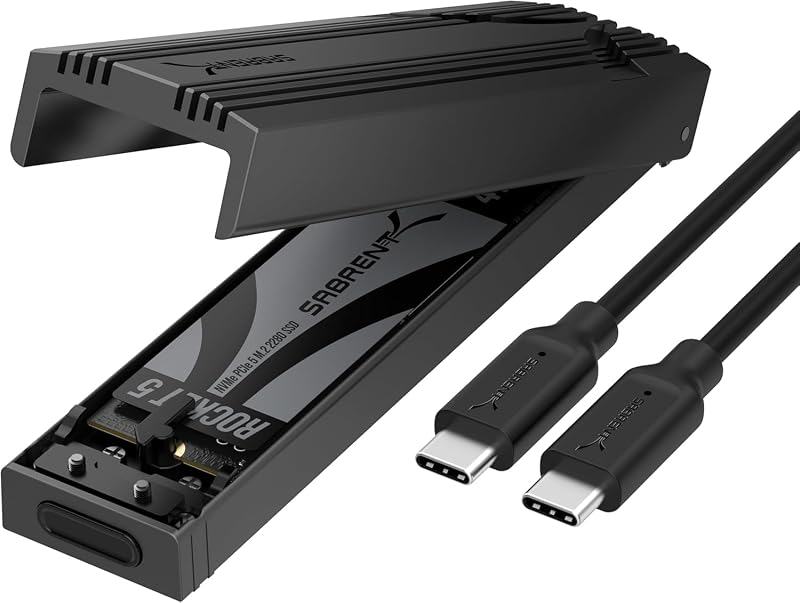
The Tool-free M.2 PCIe case from Sabrent is an external NVMe enclosure and reader built with an aluminum cooling chassis that supports standard drive sizes from 2230 all the way up to full-length 2280 sticks. Operating over USB 3.2 Gen 2 at 10Gbps, it features a completely tool-free installation mechanism. Shoppers who already have standard 2280 desktop drives lying around, or who prefer heavy aluminum heat dissipation over an onboard display screen and magnetic mount, will find this a more practical option.
Adapter Reader Supports M

The Adapter Reader Supports M from UGREEN is a versatile USB-C M.2 NVMe SSD enclosure supporting 10Gbps transfer speeds and broad compatibility across M-key and B&M-key drives in sizes 2230, 2242, 2260, and 2280. If your main objective is general-purpose external data storage, PC drive cloning, or moving files between computers without needing MagSafe phone attachment, pass-through charging, or supercapacitor safety buffers, this traditional adapter provides solid everyday utility.
20Gbps,RAID Modes

The 20Gbps,RAID Modes multi-bay enclosure from ORICO is a heavy-duty 5-bay desktop storage station powered by a JMS591 chip and USB 3.2 Gen 2×2 connectivity capable of 20Gbps speeds. Supporting up to 104TB total capacity across multiple hot-swappable drives, hardware RAID configurations, and professional design suites, this unit is built strictly for stationary video editing suites and corporate IT environments where massive multi-drive desktop pools are mandatory.
Final Verdict
The Dockcase MagSafe M.2 NVMe Enclosure successfully solves the most frustrating friction points associated with mobile high-resolution video production. By combining a reliable MagSafe magnetic mount, a real-time health and capacity display, 100W Power Delivery pass-through charging, and an essential 3-second hardware power loss protection circuit, it elevates external SSD handling far beyond what standard adapters provide. It allows videographers to record ProRes 4K directly without dangling cables or fear of sudden data loss.
While the restriction to 2230 and 2242 SSD lengths and the 2TB maximum capacity ceiling limit its appeal for desktop storage hoarders, these trade-offs are intentional design choices to maintain a miniature, pocket-friendly form factor. If you need a reliable, professional-grade magsafe external ssd for iphone video shoots or handheld gaming storage, this visual smart enclosure represents a thoughtfully engineered investment that pays dividends in convenience and file safety.
FAQ
Does the Dockcase MagSafe M.2 NVMe Enclosure come with an SSD included?
No, the listing specifies that the package includes the SSD enclosure and a USB-C data cable along with the magnetic ring. You must purchase and install a compatible M.2 NVMe PCIe SSD separately.
What sizes of SSDs fit inside this enclosure?
This enclosure is designed exclusively to accommodate compact M.2 NVMe PCIe solid-state drives in either the 2230 or 2242 form factor, supporting storage capacities up to 2TB. Full-length 2280 drives will not fit inside the chassis.
Which iPhone models support direct ProRes video recording to this drive?
Direct external recording of 4K ProRes video at 60Hz and 120Hz is supported on the iPhone 15 Pro, iPhone 15 Pro Max, iPhone 16 Pro, and iPhone 16 Pro Max via their high-speed USB-C connectivity.
How does the 3-second power loss protection work?
The enclosure features an internal supercapacitor paired with a Realtek RTL9210 controller. If the USB cable is accidentally unplugged or power is interrupted while the drive is writing, the supercapacitor supplies emergency power for approximately 3 seconds, giving the drive time to flush its cache and safeguard the file system against corruption.
Can you charge your phone or laptop while using the drive?
Yes, the enclosure features two separate USB-C ports. One port handles high-speed data transfer to the host device, while the second port accepts up to 100W Power Delivery, enabling you to pass charging power straight through to your connected phone, laptop, or gaming console during file transfers.
For creators demanding uninterrupted ProRes capture and hardware-level power protection, this magnetic drive enclosure offers unmatched stability in mobile production rigs. While casual users might prefer standard USB enclosures, mobile videographers seeking reliable portable storage can explore our comprehensive NVMe Verdict to see how its sustained transfer speeds stack up against competing external drives.


