
As Amazon Associates, we earn from qualifying purchases. This means we may receive a small commission at no extra cost to you if you click through and make a purchase.
The HP Pavilion 15.6 pairs an entry-level dual-core processor with an unexpectedly generous memory and storage package, delivering a straightforward, reliable workhorse for everyday computing. Many standard laptops in this class cut corners on memory or use sluggish hard drives that bog down after a few months of routine tasks. By outfitting this machine with an upgraded 16GB of system memory and a 1TB solid-state drive, HP eliminates the memory bottlenecks that typically hinder basic machines, producing a reliable notebook for typing, web research, administrative duties, and media streaming.
This laptop hp pavilion configuration is an ideal match for students, remote administrators, and household organizers who juggle dozens of active browser tabs, documents, and spreadsheets simultaneously. However, creative professionals who need high-precision color reproduction, video editors working with dense 4K timelines, and dedicated PC gamers will find the entry-level graphics coprocessor and HD display panel too limited for their demands.




HP Pavilion 15.6 at a Glance
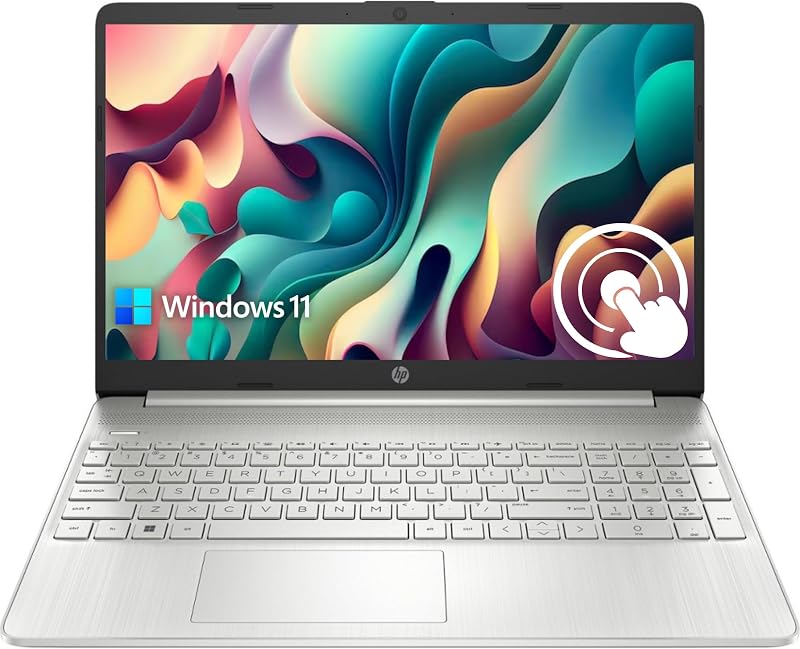
| Component | Specification Details |
|---|---|
| Processor | Intel Core i3-1115G4 (2 cores, 4 threads, up to 4.1 GHz with Turbo Boost, 6 MB L3 cache) |
| Memory | 16GB high-bandwidth RAM (upgraded) |
| Internal Storage | 1TB PCIe NVMe Solid State Drive (upgraded) |
| Display | 15.6-inch diagonal HD (1366 x 768), touch, micro-edge, BrightView, 220 nits, 45% NTSC |
| Graphics | Integrated Intel UHD Graphics (1 GB WRAM) |
| Battery Longevity | Up to 11 hours (7.4 volts) |
| Operating System | Windows 11 Home |
| Port Selection | 1 USB Type-C 5Gbps, 2 USB Type-A 5Gbps, 1 HDMI 1.4b, 1 headphone/mic combo, 1 AC pin |
| Chassis Weight | 1.7 kg (approximately 3.75 lbs) |
| Camera | Front-facing webcam |
Memory and Storage Balanced Against Core Processing
When evaluating this machine, the most striking aspect of the hardware profile is the pairing of an entry-level central processor with substantial memory and storage reserves. The heart of the machine is the Intel Core i3-1115G4, an 11th-generation chip featuring two physical cores and four threads, with a base operation that can boost up to 4.1 GHz through Intel Turbo Boost Technology. In a conventional budget configuration carrying only 4GB or 8GB of memory, a dual-core chip often stumbles when asked to handle background updates, browser windows, and office applications at once. However, this configuration includes an upgraded 16GB of high-bandwidth RAM, fundamentally changing the machine’s operational baseline.
Because the operating system has 16GB of memory to work with, Windows 11 Home can cache essential applications and keep dozens of browser tabs alive without continually offloading data to virtual memory. In this hp pavilion i3 laptop review context, the generous RAM ensures that switching between a PDF reader, a word processor, music playback, and cloud-based office software happens smoothly and without interface freeze-ups. For shoppers wondering how this setup compares to higher-end processing tiers, our analysis of the hp – 15.6 full hd touch-screen laptop – intel core i7 1355u 2023 – 16gb memory – 512gb ssd – natural highlights how multi-core Core i7 silicon accelerates intense video conversion and heavier workloads, whereas this Core i3 model focuses strictly on routine office tasks.
Storage is another clear highlight of the hp pavilion 16gb ram 1tb ssd configuration. The included 1TB PCIe NVMe solid-state drive provides instant boot times and rapid file indexing while giving you an enormous repository for offline data. Having a full terabyte of fast local storage means you do not have to worry about constantly pruning local downloads, offloading photo albums, or managing multiple external storage drives. The combination of swift NVMe read/write speeds and generous RAM provides reliable hp pavilion daily use performance that feels snappy during cold starts, large file transfers, and general desktop navigation.
Display Quality and Touchscreen Usability
The screen on this notebook presents a mix of modern convenience and straightforward, entry-tier display specifications. The headline feature is the hp pavilion 15.6 touchscreen, which allows users to interact with Windows 11 through direct touch gestures. Tapping on screen prompts, dragging application windows, scrolling through long PDF documents, and zooming into web articles feels responsive. The micro-edge bezel design keeps the screen borders relatively slim along the sides, maximizing the viewable area and giving the laptop an updated, clean appearance on your desk.
Where buyers need to set realistic expectations is the underlying resolution and panel brightness. The hp pavilion 15.6 specs indicate a native resolution of 1366 x 768 pixels, commonly referred to as standard HD. On a 15.6-inch diagonal screen, this resolution yields a lower pixel density than Full HD (1920 x 1080) panels. Individual text characters and icons appear slightly softer around the edges, and you have less screen real estate for viewing two large windows side-by-side without horizontal scrolling. If your daily work relies on sprawling financial spreadsheets with hundreds of visible rows, the vertical space of 768 pixels will feel somewhat compressed.
The panel features HP BrightView technology alongside an anti-glare coating, delivering a rated brightness of 220 nits and 45% NTSC color gamut coverage. A brightness level of 220 nits is well-suited for typical indoor environments such as dorm rooms, home offices, and classrooms under standard fluorescent lighting. However, it will struggle against direct outdoor sunlight or bright window glares. The 45% NTSC color reproduction means colors are tuned for readability and everyday viewing rather than color-critical photo retouching or video grading. For standard media consumption, web browsing, and document handling, the screen performs its duties reliably.
Battery Longevity and Everyday Portability
Portability is essential for users who frequently move between rooms, take notes in lecture halls, or commute between the home and workplace. The manufacturer specifies up to 11 hours of hp pavilion 15 battery life under optimal, low-drain conditions, powered by a 7.4-volt battery architecture. The low-voltage operation of the 15-watt Intel Core i3-1115G4 processor plays a significant role in preserving energy during basic tasks like typing documents or playing back saved media files. While heavy multitasking, sustained high brightness, and continuous wireless network activity will inevitably lower actual runtime compared to laboratory maximums, the power efficiency allows you to work untethered through standard meetings and study sessions.
Weighing in at 1.7 kg (roughly 3.75 pounds), this silver clamshell laptop strikes an agreeable balance between physical screen size and manageable travel weight. While it is not as tiny or ultra-light as a compact convertible like the hp pavilion x360 14, it slides into standard backpack compartments and shoulder messenger bags without exerting excessive strain. The slim chassis profile also makes it easy to stow away on a bookshelf or slip into a desk drawer when not in use.
Thermal management is another benefit of utilizing a dual-core 11th-generation processor inside a full-sized 15.6-inch chassis. Because the internal volume is spacious compared to smaller 13-inch notebooks, the cooling system does not have to work aggressively under normal productivity loads. The machine stays quiet during document preparation and web browsing, avoiding the persistent fan whine that often plagues compact ultraportables under modest computational strain.
Port Selection and Peripheral Connectivity
One notable advantage of choosing a standard 15.6-inch form factor over an ultra-thin subnotebook is the retention of essential physical ports. Modern thin laptops frequently eliminate standard connections in favor of two lone USB-C ports, requiring users to purchase separate adapters and dongles. The HP Pavilion 15.6 avoids this inconvenience by including a well-rounded physical layout capable of connecting directly to existing peripherals, external displays, and flash media.
The physical port assortment includes:
- 1 SuperSpeed USB Type-C port with a 5Gbps signaling rate, perfect for modern flash drives and external backup enclosures
- 2 SuperSpeed USB Type-A ports with a 5Gbps signaling rate, ideal for plugging in standard wireless mouse receivers, flash drives, and keyboards
- 1 HDMI 1.4b port for quick video output to external office monitors, desktop displays, or conference room projectors
- 1 headphone/microphone combo jack for wired headsets, earbuds, or external stereo speakers
- 1 dedicated AC smart pin port for charging the laptop without occupying any data-transfer ports
This layout is particularly advantageous for home offices and study spaces. The dedicated HDMI port allows you to establish a dual-monitor workstation on your desk with zero setup friction, letting you expand your visual workspace onto a larger external monitor while using the laptop screen for auxiliary chat or email windows. For shoppers interested in how this physical format compares across the broader Pavilion family, reading our overview of the standard hp pavilion 15 laptop line provides helpful context on chassis dimensions and port placements.
HP Pavilion 15.6 Pros and Cons
Pros
- Upgraded 16GB RAM enables smooth multitasking
- Spacious 1TB PCIe NVMe solid-state drive
- Responsive 15.6-inch touch screen interface
- Generous port selection including HDMI and USB-C
- Up to 11 hours stated battery life
- Lightweight chassis at 1.7 kg
Cons
- Modest 1366 x 768 HD screen resolution
- Entry-level dual-core Intel Core i3 processor
- Screen brightness limited to 220 nits
Check HP Pavilion 15.6 on Amazon
Who Should Buy the HP Pavilion 15.6
Deciding whether this specific laptop fits your routine comes down to matching your workflow against its unique component balance. The generous memory and storage make it exceptionally capable in some areas, while its display resolution and dual-core processor define its boundaries.
Buy It If
- You need extensive local storage: The pre-installed 1TB PCIe NVMe SSD gives you massive room for offline documents, media libraries, and system files without paying recurring cloud subscription fees.
- You multitask across multiple desktop programs: The upgraded 16GB RAM prevents freezing, slowdowns, and browser reloading when running numerous applications simultaneously.
- You want intuitive touch navigation: The responsive 15.6-inch touchscreen allows you to tap, pinch, and scroll through documents and web pages naturally.
- You use standard wired accessories: Built-in USB Type-A, USB Type-C, and full-size HDMI ports let you connect flash drives, monitors, and mice without carrying extra adapters.
Skip It If
- You require a high-resolution display: The 1366 x 768 HD resolution lacks the sharp pixel density and screen real estate of Full HD panels for detailed visual work.
- You do heavy rendering or 3D gaming: The dual-core Intel Core i3-1115G4 processor and integrated Intel UHD Graphics cannot handle modern AAA gaming or heavy multi-threaded video encoding.
- You need an ultra-bright outdoor screen: The 220 nits brightness rating is designed primarily for indoor use and struggles in direct sunlight.
HP Pavilion 15.6 Alternatives Worth a Look
If the specific trade-offs of this HP Pavilion configuration do not align with your computing needs, several other laptops provide alternative hardware balances, differing storage formats, or distinct portability profiles.
2026-2027 edition

The 2026-2027 edition is an HP 14 laptop computer powered by an Intel N150 processor, carrying 4GB of DDR5 RAM, 128GB of internal solid-state storage, 1TB of cloud storage, and Windows 11 with Microsoft 365. This model is tailored for users who prefer a smaller 14-inch footprint and rely predominantly on cloud productivity rather than massive local storage or heavy local multitasking.
Shoppers who want a lighter travel machine for simple document drafting and who are comfortable working within cloud environments will appreciate its compact form factor, though it lacks the expansive 16GB memory and 1TB local SSD of the Pavilion 15.6.
Supports 1TB TF Card Expansion

The Supports 1TB TF Card Expansion notebook is a 15.6-inch gray laptop featuring an Intel Celeron N4020 processor, 4GB of DDR4 RAM, 128GB of eMMC storage, Windows 11, and a Full HD (FHD) LCD display. This laptop is built specifically for students and home office users seeking basic document and media capabilities.
Buyers who prioritize a sharper Full HD screen resolution for reading text and watching videos—and who are comfortable using a TF memory card to expand their storage—may prefer this unit over the lower-resolution HD panel of the main Pavilion, provided they do not require heavy multitasking performance.
Copilot AI

The Copilot AI option is an HP 2026 Essential laptop finished in Natural Silver, featuring an Intel processor, 128GB of onboard storage, an LED display, 1TB of cloud storage, Windows 11, and Office 365 integration. It emphasizes lightweight portability and integrated artificial intelligence assistance for routine productivity.
Users who want modern operating system AI conveniences and streamlined cloud office integration will find this model appealing, especially if their daily computing habits revolve around web services rather than storing large local project files.
Final Verdict
So, is hp pavilion 15 worth it for the typical home or office user? The answer depends on which specifications matter most to your daily satisfaction. By combining an upgraded 16GB RAM capacity and a 1TB PCIe NVMe SSD with the Intel Core i3-1115G4 processor, this machine addresses the two most common failure points of entry-tier laptops: insufficient active memory and cramped, sluggish storage. It boots instantly, opens files rapidly, and juggles multiple office programs without the frustrating stutter typical of lesser-equipped budget machines.
The trade-offs are clear and centered around the display and graphical capabilities. The 1366 x 768 resolution panel and integrated Intel UHD Graphics are built for everyday document work and video streaming rather than precision creative work or gaming. If you recognize those boundaries and want a dependable, clutter-free personal computer with plenty of local storage headroom and full-size port connectivity, the HP Pavilion 15.6 provides a practical, balanced solution for home, study, and office productivity.
FAQ
Can the HP Pavilion 15.6 handle modern 3D PC gaming?
No, this laptop is not built for demanding gaming. It features integrated Intel UHD Graphics with 1 GB of allocated memory and an entry-level dual-core Intel Core i3-1115G4 processor. While it can run casual web-based titles, puzzle games, and older lightweight applications, it does not meet the hardware requirements for modern AAA games.
Why is 16GB of RAM beneficial with an Intel Core i3 processor?
While the Core i3 processor handles basic computational tasks, running low on system memory causes an operating system to freeze or slow down as it swaps data to the disk. Outfitting the machine with 16GB of RAM allows you to run multiple applications, keep dozens of browser tabs open, and run background utilities simultaneously without performance degradation.
Does the HP Pavilion 15.6 display support touch gestures?
Yes, the 15.6-inch screen includes touch functionality. You can interact directly with Windows 11 Home using your fingers to scroll through pages, tap buttons, select text, and navigate applications without relying solely on a trackpad or mouse.
Is the 1TB SSD sufficient for long-term home and school use?
A 1TB PCIe NVMe solid-state drive provides generous capacity for typical household, school, and office needs. It holds thousands of high-resolution photos, extensive document libraries, video clips, and software installations, allowing you to store your files locally without immediately needing external drives or paid cloud plans.
What ports are available for connecting external monitors and accessories?
The laptop includes one USB Type-C port (5Gbps), two USB Type-A ports (5Gbps), a full-size HDMI 1.4b port, an AC power pin, and a 3.5mm headphone/microphone audio jack. This selection allows you to attach external displays, standard mice, external keyboards, and backup drives without carrying USB dongles.


