
As Amazon Associates, we earn from qualifying purchases. This means we may receive a small commission at no extra cost to you if you click through and make a purchase.
The ASUS Zenbook Duo is a specialized 2-in-1 notebook built around two full-size 14-inch OLED touchscreens and a detachable magnetic keyboard, designed to solve the cramped screen space problems that mobile professionals face every day. Rather than forcing you to rely on external monitors or constantly minimize windows, this machine packs two high-resolution displays into a single portable chassis with an integrated kickstand. The verdict is clear: for mobile multitaskers who need reference material open alongside their primary work, the Zenbook Duo delivers transformative desktop-grade organization on the go.
This laptop is ideally suited for spreadsheet power users, programmers, content coordinators, and researchers who constantly juggle split-screen windows and cross-referencing tasks. On the other hand, shoppers who want a traditional, lightweight clamshell notebook for basic email writing or those looking for an entry-level computing option will likely find the dual-screen configuration unnecessary and overly complex for standard everyday tasks.



ASUS Zenbook Duo at a Glance

| Feature | Specification |
|---|---|
| Displays | Dual 14-inch 3K (144 Hz) ASUS Lumina OLED touchscreens |
| Processor | Intel Core Ultra 9 Processor 386H (16 cores) |
| AI Hardware | 50 TOPS on Copilot |
| System Memory | 32 GB RAM |
| Internal Storage | 1 TB SSD |
| Graphics | Integrated Intel Graphics (DDR5 SDRAM) |
| Battery & Charging | 99Wh battery with fast charging to 60% in 49 minutes |
| Chassis Build | Full Ceraluminum chassis, hinge, and integrated kickstand |
| Ports | 2x Thunderbolt 4, 1x USB 3.2 Gen 2, 1x HDMI 2.1 FRL |
| Connectivity | Wi-Fi 7 and Bluetooth 5.4 |
| Included Accessories | Protective sleeve and ASUS Pen 3.0 stylus |
Dual OLED Screen Setup and Multitasking Efficiency
The centerpiece of this machine is its dual-panel architecture. The asus zenbook duo dual oled screen system consists of two identical 14-inch 3K ASUS Lumina OLED touch displays operating at a fluid 144Hz refresh rate. In contrast to earlier designs like the asus zenbook duo ux482 that relied on a narrower secondary display strip, this setup gives you two full-sized screens with 100% DCI-P3 color coverage and up to 1000 nits of HDR brightness. The panels also feature an anti-reflection coating, low blue light technology, and an E Reading mode that softens contrast during extended reading sessions.
Evaluating the asus zenbook duo for multitasking reveals how quickly it changes everyday productivity. By propping the unit on its integrated kickstand, you can stack the displays vertically or spread them horizontally side by side. Writers can keep research notes and source documents open on the lower display while typing into a word processor on the upper screen. Project managers can run a video conference on one panel while taking notes or reviewing project timelines on the other, eliminating the frustration of alt-tabbing between overlapping windows throughout the workday.
Both screens accept touch input and work with the included ASUS Pen 3.0 stylus, turning the secondary panel into an active digital writing surface. Annotating PDFs, signing contracts, and sketching rough wireframes feel natural because the lower display sits at an accessible angle directly in front of you. When you do not want to set up dual monitors on a narrow cafe table, you can snap the physical keyboard over the bottom screen and operate the device as a standard 14-inch notebook.
Intel Core Ultra 9 Processing and System Performance
Under the hood, the asus zenbook duo performance is driven by the 16-core Intel Core Ultra 9 Processor 386H. This silicon platform combines high-efficiency cores with heavy compute capability, paired with 32 GB of memory. If you are comparing configurations across the line, having an asus zenbook 32gb ram setup provides the headroom required to support dozens of browser tabs, communication apps, and large data files simultaneously without noticeable slowdown.
The asus zenbook duo core ultra 9 hardware is paired with 50 TOPS of dedicated AI processing power on Copilot. In everyday workflows, this on-device engine powers background productivity tasks such as fast local file retrieval, instant document summaries, and rapid searches without introducing workflow pauses. For creative duties like light 4K video editing, photo organization, and data manipulation, the 1 TB SSD ensures quick application launches and responsive scratch disk read-and-write speeds.
Graphics duties are handled by integrated Intel graphics utilizing DDR5 SDRAM. While the integrated GPU easily manages multi-monitor 3K playback, media consumption, and general creative suites, it is not intended for high-end dedicated 3D rendering or competitive gaming. The listing specifies that the machine is intended for personal computing and heavy multitasking workflows, so users expecting a standalone graphics card will need to consider their specific rendering requirements before buying.
Detachable Magnetic Keyboard and Everyday Ergonomics
One of the biggest concerns with dual-screen laptops is usability when typing away from a desk. The asus zenbook duo detachable keyboard addresses this directly by providing a traditional physical typing layout that attaches magnetically over the bottom screen. When attached via its physical contact pins, the laptop handles identically to an ordinary ultrabook, making it comfortable to use on your lap or on a compact airline tray table.
When you detach the keyboard, it functions wirelessly over Bluetooth, allowing you to position it anywhere on your desk while the laptop rests on its built-in kickstand. The hinge and kickstand are made entirely from ASUS Ceraluminum, a specialized material designed to withstand repeated adjustments without loosening over time. Unlike standard clamshell laptops such as the asus zenbook s14, this 2-in-1 hybrid requires a few extra seconds of desk setup when deploying both screens, but the resulting screen area offers unmatched viewing flexibility.
From an everyday review perspective, build quality is solid throughout the entire Moher Gray chassis. The device measures 12.21 inches long, 8.21 inches wide, and 0.77 inches thick, packing both displays and the keyboard into a single transportable profile that slides into your bag. ASUS includes a dedicated protective sleeve in the box, which helps safeguard the outer chassis surfaces and dual glass panels from scratches while commuting between the home, office, or classroom.
Battery Capacity and Fast-Charging Speeds
Powering two 3K OLED panels at a 144Hz refresh rate naturally requires more energy than running a standard single-screen laptop. To address this, ASUS equips the machine with a large 99Wh battery setup. In practical everyday use, running both screens at high brightness with animated windows active will draw more power than working in single-screen laptop mode with the lower panel turned off.
When you need to top up before a meeting, the integrated fast-charge technology brings the 99Wh battery to 60% capacity in 49 minutes. This rapid recharge speed makes it feasible to grab a significant power boost during a lunch break or layover. For users who commute regularly, managing brightness levels and utilizing single-screen mode during transit helps stretch the battery throughout the day, while full dual-screen mode can be engaged whenever you are near a power outlet.
Ports, Connectivity, and Included Accessories
Many slim mobile computers sacrifice physical ports to achieve a thin profile, forcing owners to carry multi-port dongles. The Zenbook Duo avoids this limitation by providing a well-rounded physical port selection directly on the chassis. Users get two Thunderbolt 4 ports for high-speed external storage and external displays, one standard USB 3.2 Gen 2 Type-A port for older flash drives and peripherals, and a full-size HDMI 2.1 FRL video output.
Wireless connectivity is equally modern, sporting Wi-Fi 7 and Bluetooth 5.4 for reliable low-latency connections to external networks and accessories. For audio and media playback, the chassis houses six internal speakers with Dolby Atmos support, delivering rich, spacious sound for video calls and entertainment. Unlike ultra-minimalist options like the asus laptop zenbook a14, having dedicated full-size HDMI and Type-A ports built in means you can connect to conference room projectors and office peripherals without packing extra adapters.
The retail package also provides notable out-of-the-box value by including essential accessories. You receive the ASUS Pen 3.0, which features wireless charging and MPP 2.6 protocol support for accurate pressure sensitivity and tilt responsiveness. A tailored protective sleeve is also included in the box, saving you from having to shop for third-party protective gear that fits the unique 0.77-inch dual-screen dimensions.
ASUS Zenbook Duo Pros and Cons
Pros
- Twin 14-inch 3K 144Hz OLED touchscreens
- Powerful 16-core Intel Core Ultra 9 processor
- Spacious 32GB RAM and 1TB SSD storage
- Fast charging reaches 60% in 49 minutes
- Includes ASUS Pen 3.0 and protective sleeve
Cons
- Integrated graphics lack dedicated GPU gaming power
- Dual-screen setup requires extra desk space
Check ASUS Zenbook Duo on Amazon
Who Should Buy the ASUS Zenbook Duo
Buy It If
- You regularly work across multiple documents, spreadsheets, or reference tabs and hate switching between overlapping windows.
- You want a portable dual-monitor workstation that sets up anywhere without carrying a separate portable external monitor.
- You need the power of a 16-core Intel Core Ultra 9 processor combined with 32 GB of memory for heavy productivity workloads.
- You actively take digital notes, sketch, or markup documents using a pressure-sensitive stylus directly on screen.
Skip It If
- You strictly want a simple, traditional clamshell laptop for basic web browsing, typing, and video streaming.
- You require a dedicated discrete graphics processor for high-end 3D rendering or competitive PC gaming.
- You prefer an ultra-lightweight entry-level device that minimizes hardware moving parts and detachable components.
ASUS Zenbook Duo Alternatives Worth a Look
If you are exploring the laptop market and want to see how simpler or different configurations compare, several alternatives offer distinctly different computing experiences based on listing details.
2026-2027 edition

The 2026-2027 edition is an HP 14-inch laptop computer powered by an Intel N150 processor, 4GB of DDR5 RAM, and a 128GB SSD, accompanied by 1 TB of cloud storage and Windows 11 with Microsoft 365. This machine is built for elementary computing tasks, making it a viable consideration for shoppers who only need basic web browsing and document editing on a traditional single screen rather than high-end multitasking hardware.
Supports 1TB TF Card Expansion
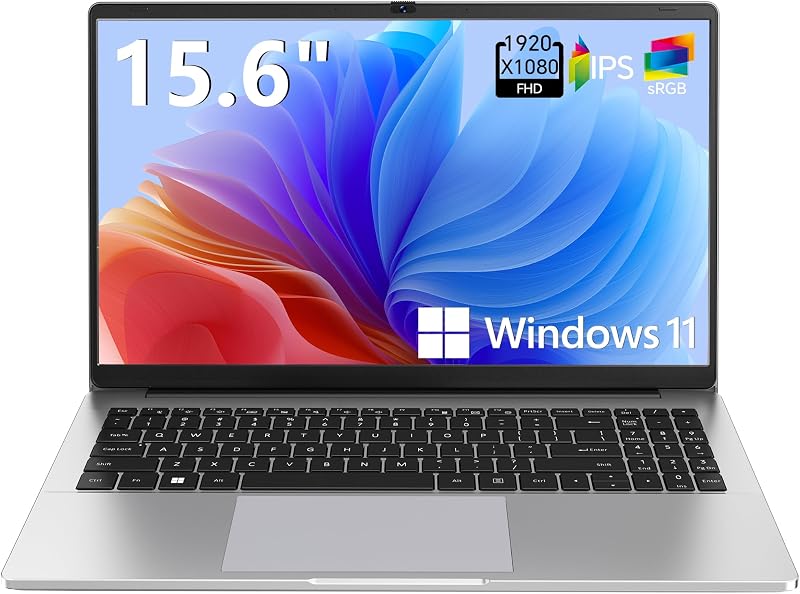
The Supports 1TB TF Card Expansion notebook is a 15.6-inch laptop featuring an FHD LCD display, an Intel N4020 processor, 4GB of DDR4 RAM, and 128GB of eMMC storage running Windows 11. Designed for students and light home office duties, it provides a larger traditional screen format and expandable storage via memory card for those who do not require dual OLED panels or advanced processing performance.
Copilot AI

The Copilot AI HP 2026 Essential Laptop is a lightweight, portable single-display computer in Natural Silver that features an Intel processor, 128GB of internal storage, an LED display, 1TB of cloud storage, and Office 365 with Copilot AI integration. Buyers who want integrated AI assistance features within a conventional lightweight clamshell body will appreciate its simple single-screen layout over the dual-display Zenbook.
Final Verdict
The ASUS Zenbook Duo is a well-engineered response to the limitations of mobile productivity. By combining two gorgeous 14-inch 3K 144Hz OLED panels with a full Ceraluminum chassis, a 16-core Intel Core Ultra 9 processor, and 32 GB of system memory, ASUS has created a device that genuinely replaces a multi-monitor desk setup while fitting neatly into a backpack sleeve.
When considering whether the Zenbook Duo is worth the investment, the answer comes down to your work habits. If you constantly feel constrained by a single 14-inch screen when working away from your desk, the ability to detach the keyboard, prop up twin displays, and work across both panels provides real, tangible value that traditional laptops simply cannot match.
FAQ
Does the ASUS Zenbook Duo come with a stylus and case?
Yes, the listing states that the laptop includes a protective sleeve and the ASUS Pen 3.0, which features wireless charging and MPP 2.6 support for precise pen input.
Can you use the ASUS Zenbook Duo as a regular clamshell laptop?
Yes, the included magnetic keyboard snaps directly over the lower display, allowing you to use the Zenbook Duo exactly like a conventional 14-inch clamshell notebook on your lap or small surfaces.
How fast does the battery charge on the ASUS Zenbook Duo?
The listing specifies that the 99Wh battery features fast-charge technology that restores up to 60% of battery capacity in 49 minutes.
What ports are available on the ASUS Zenbook Duo?
The laptop comes equipped with two Thunderbolt 4 ports, one USB 3.2 Gen 2 Type-A port, and an HDMI 2.1 FRL port, alongside Wi-Fi 7 and Bluetooth 5.4 connectivity.
Does this model have a dedicated graphics card?
No, the listing confirms that this configuration features integrated Intel graphics with DDR5 SDRAM rather than a dedicated discrete graphics card.
What operating system comes pre-installed on the device?
The ASUS Zenbook Duo comes with Windows 11 Home installed, featuring integrated Copilot AI acceleration that delivers 50 TOPS of performance.


