As Amazon Associates, we earn from qualifying purchases. This means we may receive a small commission at no extra cost to you if you click through and make a purchase.
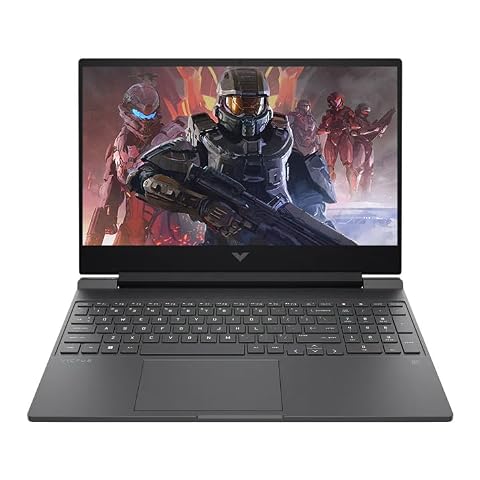
The Acer Nitro 16S AI enters the portable gaming space as a streamlined machine designed to deliver modern graphical performance without the hefty bulk typical of older gaming rigs. Built around an AMD Ryzen AI 7 350 processor and the NVIDIA GeForce RTX 5060 Laptop GPU, this laptop focuses on high-efficiency computing, intelligent upscaling, and responsive esports visuals in an ultra-portable frame. For everyday gamers and power users seeking a sleek machine that bridges the gap between daily productivity and demanding gaming sessions, it offers a well-rounded combination of speed, display quality, and hardware-accelerated processing.
This laptop is ideally suited for university students, remote workers, and gaming enthusiasts who require a single machine capable of handling spreadsheet workflows by day and AAA gaming titles by night. Because it packs dedicated Blackwell graphics and an 8-core processor into a chassis measuring less than an inch thick, mobile users will appreciate not having to lug around an oversized chassis. However, shoppers searching for a basic, low-cost word processor or those who insist on massive 17-inch desktop-replacement form factors will want to look at alternative designs better matched to those extremes.




Acer Nitro 16S AI at a Glance

| Feature | Specification |
|---|---|
| Processor | AMD Ryzen AI 7 350 (8 Cores, 66 Overall AI TOPS) |
| Graphics Coprocessor | NVIDIA GeForce RTX 5060 Laptop GPU (8GB GDDR7) |
| Neural Processing Power | 572 AI TOPS (GPU) |
| Display | 16-inch WUXGA (1920 x 1200) IPS, 180Hz, 3ms, 16:10 |
| Color Gamut | 100% sRGB |
| Memory | 16GB DDR5 |
| Storage | 1TB Solid State Drive |
| Chassis Dimensions | 14.05 inches long by 10.85 inches wide by 0.83 inches thick |
| Weight | 4.8 pounds |
| Operating System | Windows 11 Home (Copilot+ PC) |
Graphics Power and Modern Gaming Capabilities
Evaluating the Acer Nitro 16S AI for gaming reveals significant hardware advancements under the hood. Equipped with an Acer Nitro 16S AI RTX 5060 laptop graphics chip, this computer leverages NVIDIA’s Blackwell architecture to bring modern rendering techniques to portable formats. Backed by 8GB of next-generation GDDR7 memory, the dedicated graphics chip is capable of handling full ray tracing in modern releases while maintaining stable frame rates. Gamers upgrading from older budget platforms, such as an acer nitro v 15 rtx 4050, will notice immediate improvements in texture handling and overall visual fidelity.
A primary highlight of this graphics setup is its dedicated 572 AI TOPS horsepower, which enables advanced neural rendering technologies. Through DLSS 4, the system uses Multi Frame Generation, enhanced Ray Reconstruction, and Super Resolution to significantly elevate output frames without placing pure computational strain on the raster engines. This neural framework is specifically engineered to lower input latency and sharpen rendered details, allowing fast-paced action titles to remain crisp and fluid during intense on-screen sequences.
The combination of dedicated hardware ray tracing and AI-assisted rendering ensures that players can tackle both competitive esports titles and demanding narrative adventures. Whether you are running high-refresh multiplayer shooters or exploring complex open-world environments, the dedicated GPU delivers balanced visual output at the laptop’s native display resolution. Dedicated video output through HDMI and DisplayPort connections also allows users to hook up external displays when they want an expansive desktop gaming setup at home.
Processing Muscle and Copilot Integration
At the heart of the system sits an Acer Nitro 16S AI Ryzen 7 platform powered by the AMD Ryzen AI 7 350 processor. Featuring an 8-core layout, this chip is built on the AMD Ryzen AI 300 Series architecture, giving it the headroom required for heavy multitasking, AAA gaming, and simultaneous background processes. Multithreaded tasks, such as rendering media or processing large code bases, benefit directly from the 8 physical cores, keeping system operations snappy even when numerous productivity applications run concurrently.
In addition to traditional computing power, this platform delivers 66 Overall AI TOPS, categorizing the system as an official Copilot+ PC running Windows 11 Home. This dedicated neural processing capability offloads local AI features—such as live translation, real-time background effects, and productivity assistants—away from the main CPU cores, preserving system responsiveness for demanding software. Everyday productivity feels smooth, offering noticeable agility compared to older entry-level configurations often found in a baseline laptop acer nitro design.
The core configuration is supported by 16GB of DDR5 system memory and a fast 1TB SSD. This internal hardware configuration ensures quick operating system boot times, rapid game loading, and sufficient bandwidth for running creative suites alongside everyday web browsing. For users who stream high-resolution content or manage heavy daily workloads, the processor architecture handles 4K HDR media playback effortlessly without taxing system stability.
Visual Presentation and Panel Responsiveness
The Acer Nitro 16S AI display serves as a major focal point for both gaming and creative work. The laptop is outfitted with a 16-inch WUXGA panel sporting a 1920 x 1200 resolution. This 16:10 aspect ratio provides slightly more vertical screen space than traditional widescreen displays, which translates to extra visible lines of code, text documents, or timeline tracks when working on productivity assignments.
Fluidity is handled by an impressive 180Hz refresh rate alongside an ultra-low 3ms response time. Fast-moving objects remain sharp, minimizing motion blur and screen tearing during critical moments in competitive online matches. The underlying IPS panel ensures broad viewing angles, so contrast and color fidelity do not degrade when viewing the screen from off-center angles during collaborative sessions or casual viewing.
Color fidelity is equally well addressed, with the panel providing 100% sRGB color gamut coverage. This wide and accurate color reproduction ensures that digital games appear vibrant and lifelike, exactly as the developers intended. Furthermore, having accurate color coverage makes this machine a viable tool for photography enthusiasts, student designers, and content creators who require dependable color representation without needing an external color-calibrated monitor.
Chassis Build, Thermal Design, and Portability
Balancing thin dimensions with internal heat management is a perennial challenge in portable computing, making the Acer Nitro 16S AI cooling performance a central topic for mobile players. Acer addresses thermal dissipation through a dedicated quad-intake cooling system. This airflow layout actively pulls cooler air into the chassis to help manage internal heat levels generated by the high-power processor and dedicated graphics coprocessor during prolonged gameplay sessions.
From an exterior standpoint, the laptop sports an ultra-portable profile, measuring approximately 14.05 inches long, 10.85 inches wide, and just 0.83 inches thick. At this slim thickness, the machine fits easily into standard laptop backpacks and messenger bags. The Acer Nitro 16S AI weight comes in at 4.8 pounds, which remains relatively modest for a full 16-inch gaming notebook, especially when contrasted with bulky 17-inch desk-bound options such as the acer nitro 17.
Regarding Acer Nitro 16S AI battery life, the listing does not specify exact runtime hours or internal battery watt-hour ratings. Like most gaming laptops packing dedicated graphics and high-refresh screens, high-demand gaming will naturally require wall power to sustain peak clock speeds and frame rates, while general office use will yield lighter power draw. The physical body also houses a backlit keyboard for working in dimly lit rooms, a memory card slot for expandable storage or photo transfers, and versatile connectivity including Wi-Fi 6E for low-latency wireless networks.
Acer Nitro 16S AI Pros and Cons
Pros
- NVIDIA RTX 5060 with fast GDDR7 memory
- Fluid 180Hz display with 100% sRGB coverage
- Slim 0.83-inch ultra-portable chassis design
- 8-core AMD Ryzen AI 7 350 processor
- Dedicated quad-intake cooling system
Cons
- Listing does not specify battery runtimes
- No internal optical drive included
- Dedicated gaming demands nearby AC power
Check Acer Nitro 16S AI on Amazon
Who Should Buy the Acer Nitro 16S AI
Deciding whether the system fits your lifestyle depends largely on how you balance gaming performance with mobility. Reviewing the overall Acer Nitro 16S AI specs highlights that this computer aims directly at users who want serious hardware without the physical heft of traditional gaming rigs. Looking closely at typical usage patterns clarifies whether this setup delivers the right balance for your daily routine.
Buy It If
- You want next-generation graphics powered by the RTX 5060 with GDDR7 memory and DLSS 4 frame generation in a slim chassis under an inch thick.
- You need a versatile 16-inch 16:10 display featuring 100% sRGB color accuracy for a mix of content creation and high-speed 180Hz gaming.
- You rely on Windows 11 Copilot+ PC capabilities, utilizing local AI processing with 66 CPU AI TOPS and 572 GPU AI TOPS.
- You require a portable 4.8-pound gaming laptop equipped with modern Wi-Fi 6E, HDMI, DisplayPort, and a built-in memory card slot.
Skip It If
- You are hunting for an entry-level computing setup strictly meant for basic typing and lightweight browsing without dedicated gaming graphics.
- You prefer a massive 17-inch or 18-inch desktop-replacement form factor that prioritizes maximum chassis space over travel friendliness.
- Your workflow requires built-in legacy optical media hardware, as this model features no internal optical drive.
Acer Nitro 16S AI Alternatives Worth a Look
If your computing priorities lean toward ultra-basic tasks, simple cloud storage, or lighter software needs rather than heavy 3D rendering and ray-traced gaming, several alternative machines offer distinct feature profiles tailored to those use cases.
2026-2027 edition

The 2026-2027 edition is an HP 14 laptop computer powered by an Intel N150 processor, 4GB of DDR5 RAM, and a 128GB SSD, accompanied by 1TB of cloud storage and Windows 11 with Microsoft 365. This compact 14-inch machine is built exclusively for basic office software, school essays, and cloud-focused browsing. Shoppers who have no interest in AAA gaming and simply want an ultra-light notebook for writing and web applications should look toward this model instead of a heavy-duty gaming rig.
Supports 1TB TF Card Expansion

This portable notebook, listed under the model title Supports 1TB TF Card Expansion, features a 15.6-inch FHD LCD display, an Intel N4020 processor, 4GB of DDR4 RAM, 128GB of eMMC storage, and Windows 11. Designed specifically for home office basics and student note-taking, it highlights expandable memory through its 1TB TF card slot. Buyers working with minimal hardware demands who do not need dedicated graphics or high-refresh gaming displays will find it tailored strictly to essential tasks.
Copilot AI

The Copilot AI model is an HP 2026 Essential Laptop in Natural Silver, featuring an Intel processor, 128GB of internal storage, an LED display, 1TB of cloud storage, and Windows 11 with Office 365. Built with a focus on portability and lightweight handling, this machine targets users who need straightforward cloud integration and basic Microsoft productivity tools. It serves as a sensible alternative for people who want standard Copilot productivity assistance without the dedicated thermal systems or graphics chips found on performance laptops.
Final Verdict
When considering whether the machine meets everyday demands, answering whether the Acer Nitro 16S AI is worth it comes down to your need for balanced mobility and graphical power. By integrating NVIDIA’s Blackwell-based RTX 5060 GPU with 8GB of fast GDDR7 memory alongside the 8-core AMD Ryzen AI 7 350 processor, Acer has engineered a gaming notebook that punches well above its slim 0.83-inch profile. The addition of dedicated AI hardware across both the CPU and GPU provides modern performance enhancements like DLSS 4 frame generation, giving players access to high-fidelity gameplay in a clean, modern form factor.
Beyond raw processing numbers, the laptop excels in practical usability thanks to its 16-inch 180Hz IPS display, which combines ultra-smooth motion handling with 100% sRGB color fidelity. While power users must remember that the listing does not specify exact unplugged battery runtimes and heavy gaming still requires outlet power, the quad-intake cooling system and modest 4.8-pound weight make it an impressive hybrid choice. For students, remote workers, and mobile gamers seeking one versatile machine to handle high-level creative software and modern AAA gaming, this laptop stands out as a thoroughly compelling choice.
FAQ
What graphics coprocessor is built into the Acer Nitro 16S AI?
The laptop is equipped with a dedicated NVIDIA GeForce RTX 5060 Laptop GPU powered by the Blackwell architecture. It includes 8GB of GDDR7 graphics memory and supports advanced visual capabilities, including full ray tracing and DLSS 4 neural rendering.
What are the display specifications of this laptop?
The laptop features a 16-inch WUXGA display with a 1920 x 1200 resolution and a 16:10 aspect ratio. It utilizes an IPS panel with a 180Hz refresh rate, a rapid 3ms response time, and 100% sRGB color gamut coverage for accurate color representation.
How much does the Acer Nitro 16S AI weigh?
The laptop weighs approximately 4.8 pounds. With a thickness of 0.83 inches and length and width dimensions of 14.05 by 10.85 inches, it is categorized as an ultra-portable design within the 16-inch gaming category.
Does the Acer Nitro 16S AI include an optical drive?
No, the listing specifies that this laptop does not have an internal optical drive. Software installation and media access are handled via digital downloads, USB storage devices, or the built-in memory card slot.
What thermal cooling design does the Acer Nitro 16S AI use?
The laptop utilizes a quad-intake cooling system designed to pull fresh air into the slim chassis from multiple points, helping dissipate heat generated by the AMD Ryzen AI processor and dedicated RTX graphics during demanding workloads.