As Amazon Associates, we earn from qualifying purchases. This means we may receive a small commission at no extra cost to you if you click through and make a purchase.
The HP Pavilion x360 14 brings the flexibility of a 2-in-1 convertible into an accessible everyday form factor, combining a responsive 14-inch Full HD touchscreen with an Intel Core i5 processor. In this HP Pavilion x360 14 review, the machine stands out as an adaptable computing solution that transitions easily between traditional typing and tactile screen interactions. The overall verdict is clear: it delivers dependable everyday performance and versatile viewing modes for general home, office, and educational tasks without introducing unnecessary hardware complexity.
This convertible setup suits students, remote workers, and everyday multitaskers who switch frequently between drafting papers, marking up digital documents, and streaming media. However, users who require workstation-tier rendering capabilities or dedicated graphics processing for heavy modern 3D gaming will find the integrated Intel UHD graphics restrictive. Similarly, anyone seeking a larger traditional clamshell with a dedicated numeric keypad might find a standard hp pavilion 15 laptop better aligned with stationary desktop workflows.
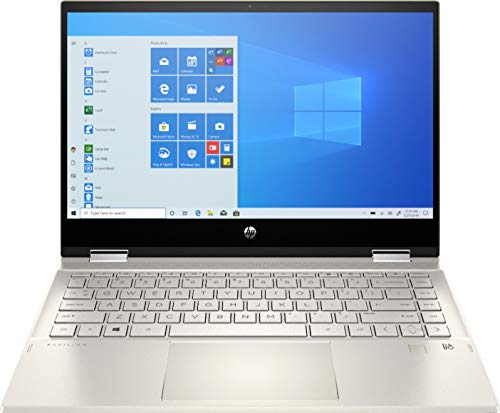


HP Pavilion x360 14 at a Glance

| Feature | Specification |
|---|---|
| Processor | 10th Gen Intel Core i5-1035G1 (1.0 GHz base, up to 3.6 GHz Turbo) |
| Display | 14-inch Full HD (1920 x 1080) WLED IPS Multitouch |
| System Memory | 8GB DDR4 SDRAM |
| Internal Storage | 256GB PCIe SSD + 16GB Intel Optane |
| Graphics Hardware | Intel UHD Graphics (Integrated) |
| Operating System | Windows 10 Home (64-bit) |
| Biometric Security | Integrated Fingerprint Reader |
| Wireless Connectivity | 802.11ac Wi-Fi and Bluetooth |
| Unit Weight | 3.6 pounds |
| Chassis Color | Silver |
Processing Power and Multitasking Performance
At the center of the system sits an Intel Core i5-1035G1 mobile processor built on an ultra-low-voltage platform. Featuring quad-core, eight-way processing, the chip operates at a baseline clock of 1.0 GHz and leverages Intel Turbo Boost Technology to reach dynamic peak speeds up to 3.6 GHz when heavier computing demands arise. This setup provides efficient daily operation, dynamically allocating processing overhead when opening large applications, crunching spreadsheet formulas, or toggling between browser windows.
Multitasking capabilities are supported by 8GB of DDR4 system memory alongside a hybrid storage configuration combining a 256GB PCIe solid-state drive with 16GB of Intel Optane memory. The solid-state interface handles rapid read and write routines, while the Optane cache accelerates frequently accessed files and operating system commands to maintain fast boot times. For HP Pavilion x360 14 everyday multitasking, this hardware combination prevents bottlenecks during general productivity sessions involving multiple open browser tabs, background document synchronization, and simultaneous media streaming.
Graphics rendering relies on integrated Intel UHD Graphics. While this architecture provides more than enough visual bandwidth for high-definition video playback, virtual classroom calls, and basic graphic layouts, buyers should understand its limitations. The integrated graphical architecture shares system memory rather than utilizing a discrete GPU with dedicated VRAM, meaning high-end modern 3D gaming and heavy video timeline rendering are outside the practical scope of these components.
Convertible Touchscreen Display and Flexibility
The 14-inch Full HD multitouch screen offers a resolution of 1920 x 1080 pixels, delivering crisp text reproduction and vibrant colors for daily media consumption. Utilizing IPS panel technology, the display preserves color accuracy and contrast across wide viewing angles, which proves especially beneficial when sharing presentations or viewing video clips with colleagues. An energy-efficient WLED backlight helps maintain consistent illumination across the glass panel while managing overall power draw.
As an HP Pavilion x360 14 2 in 1 convertible, the primary mechanical advantage is the 360-degree hinge mechanism that allows the laptop to fold into multiple operational stances. Users can position the unit in conventional clamshell mode for intensive typing, fold it into a tent configuration for hands-free video conferencing on narrow desks, stand it upright to watch streaming content, or fold the keyboard flush against the back to use the device as a large handheld slate. Compared to smaller ultra-portable touch devices like the hp pavilion x2 red, this 14-inch workspace delivers far more visual canvas for split-screen research and spreadsheet navigation.
Tactile responsiveness is a key selling point, as HP Pavilion x360 14 touchscreen performance allows users to touch, tap, and glide through interface elements without relying solely on the trackpad. Running on Windows 10 Home, the display pairs natively with interactive features like Microsoft Edge web markup, enabling users to circle paragraphs, annotate documents, and highlight diagrams directly on web pages with a fingertip. This hands-on navigation creates a natural bridge between standard office work and creative freehand interaction.
Port Selection and Everyday Connectivity
The system features a well-rounded physical interface array designed to accommodate standard desktop peripherals and external monitors without requiring dedicated dongles. The chassis includes:
- 1 USB 3.1 Gen 1 Type-C port supporting 5 Gb/s signaling rates for high-speed data transfer.
- 2 USB 3.1 Gen 1 Type-A ports for standard thumb drives, wired mice, or external keyboards.
- 1 HDMI 1.4 video output port for direct connection to monitors, classroom projectors, or television screens.
- 1 headphone/microphone combo audio jack for wired headsets.
- 1 AC smart pin barrel port dedicated to wall power connection.
Understanding port functionality is essential when evaluating the HP Pavilion x360 14 battery life and ports configuration. The USB Type-C port on this model is specified for data transfer only, meaning it does not supply external display output or accept incoming system power. To recharge the laptop, owners must use the standard AC smart pin connector rather than a universal USB-C power delivery charger. Regarding overall battery endurance, the listing does not specify exact run-time hours or battery watt-hour ratings, so carrying the included AC adapter is advisable during full-day library or travel outings.
Wireless networking and peripheral pairing are handled by an integrated 802.11ac wireless LAN adapter alongside built-in Bluetooth connectivity. The 802.11ac standard delivers stable connections over modern dual-band home and office routers, providing steady transfer rates for cloud storage backups and smooth video calls. Bluetooth enables clutter-free desk setups by pairing wirelessly with wireless mice, headphones, and external speakers without occupying the physical USB-A slots.
Design, Build Quality, and Daily Usability
Weighing in at 3.6 pounds, the convertible chassis features a clean silver finish that looks appropriate in professional conference rooms, university lecture halls, and home offices alike. The physical hinges feel firm and hold the screen securely at chosen angles, preventing screen wobble during touchscreen taps in clamshell or stand orientations. While 3.6 pounds remains easy to slip into a backpack, using the device as a one-handed tablet for extended periods can cause arm fatigue, making lap-supported or desk-propped tablet use the preferred approach.
Biometric security is integrated directly into the chassis via a dedicated fingerprint reader. This sensor links into Windows 10 security protocols to enable fast, password-free account sign-in with a single touch, protecting personal data from shoulder surfers in public spaces. In addition, an integrated webcam sits along the top bezel of the display to handle Zoom calls, virtual classes, and remote interviews without needing an aftermarket USB camera.
The preinstalled 64-bit Windows 10 Home operating system provides a familiar computing environment centered on productivity and ease of use. It reinstates the traditional Start Menu layout popularized by earlier Windows versions while integrating modern application management, desktop virtual workspaces, and broad compatibility with mainstream school and office software suites.
HP Pavilion x360 14 Pros and Cons
Pros
- Versatile 360-degree folding hinge design
- Responsive Full HD IPS multitouch display
- Fast 256GB PCIe SSD with 16GB Optane
- Built-in fingerprint reader for secure login
- Reliable quad-core Intel Core i5 performance
Cons
- USB-C port supports data transfer only
- Integrated graphics limit demanding gaming
- Heavier than traditional non-convertible 14-inch laptops
Check HP Pavilion x360 14 on Amazon
Who Should Buy the HP Pavilion x360 14
Buy It If
- You need a versatile 2-in-1 convertible that easily switches between typing essays, presenting slides, and touchscreen media streaming.
- You want reliable HP Pavilion x360 14 for students capabilities, combining note-taking touch interaction with solid quad-core processing power.
- You value biometric security and want quick fingerprint authentication to bypass manual password entry in public environments.
- You prefer having standard USB-A and dedicated full-size HDMI ports built directly into the chassis for quick connection to legacy accessories.
Skip It If
- You plan to play modern graphics-intensive 3D video games that require a high-performance discrete graphics card.
- You want an ultralight tablet replacement weighing under three pounds for effortless one-handed reading.
- You require single-cable USB-C power delivery and display output, as this system relies on a dedicated AC pin for charging.
HP Pavilion x360 14 Alternatives Worth a Look
Shoppers exploring the 2-in-1 convertible category often weigh their choices against traditional clamshell notebooks or specialized models with different storage and display formats, such as a high-powered hp – 15.6 full hd touch-screen laptop – intel core i7 1355u 2023 – 16gb memory – 512gb ssd – natural option. Depending on your storage preferences, operating system needs, and screen size requirements, several alternative machines are available.
2026-2027 edition

The 2026-2027 edition is an HP 14 Laptop Computer powered by an Intel N150 processor, 4GB of DDR5 RAM, and a 128GB SSD, accompanied by 1 TB of cloud storage and Windows 11 with Microsoft 365. Readers who prioritize newer DDR5 memory architecture, native Windows 11 integration, and bundled cloud productivity tools over 360-degree convertible touch flexibility should consider this straightforward clamshell alternative.
Supports 1TB TF Card Expansion
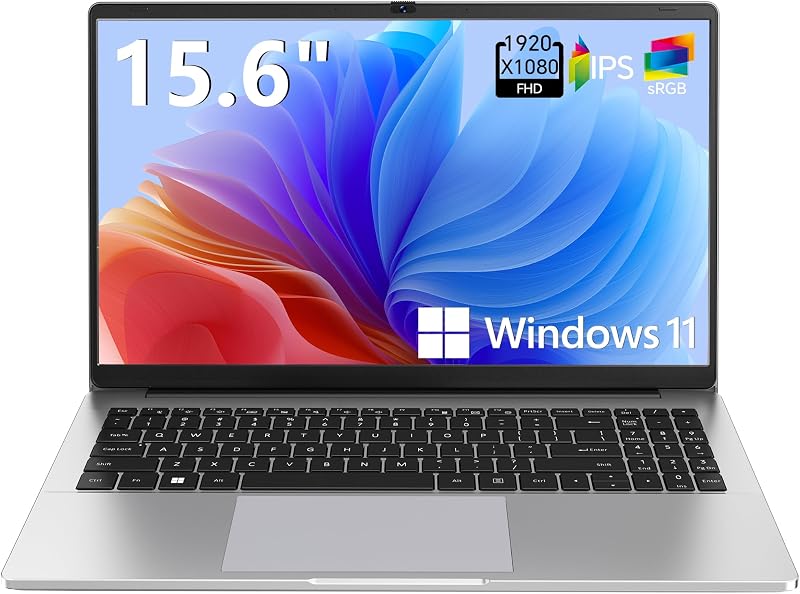
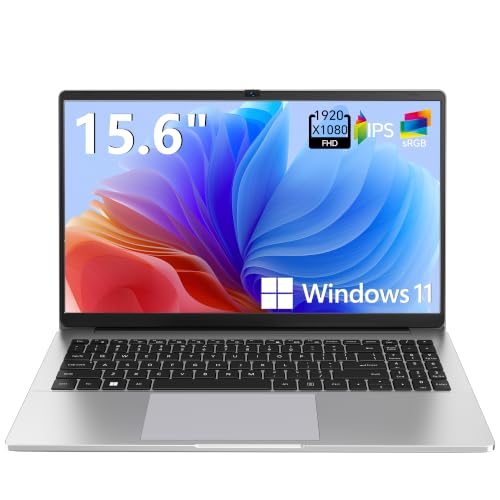
Featuring an Intel N4020 processor, 4GB of DDR4 RAM, 128GB of eMMC storage, and Windows 11, this portable notebook named Supports 1TB TF Card Expansion carries a larger 15.6-inch Full HD LCD display. It is tailored for students and home office users who prefer a larger desktop workspace and the ability to expand internal storage easily via a 1TB TF memory card rather than a 14-inch convertible frame.
Copilot AI

The Copilot AI is an HP 2026 Essential Laptop featuring an Intel processor, 128GB of storage, Windows 11 with integrated Copilot AI, Office 365, and 1TB of cloud storage in a lightweight Natural Silver build. Shoppers seeking a portable, travel-friendly standard notebook that emphasizes built-in artificial intelligence assistance and cloud workflows over a rotating multitouch hinge will appreciate this option.
Final Verdict
When asking is hp pavilion x360 14 worth it, the answer depends on how much you value tactile interaction and physical versatility. The combination of a 10th Gen Intel Core i5 processor, 8GB of DDR4 system memory, and a dual-drive 256GB PCIe SSD with 16GB of Intel Optane memory provides dependable speed for daily browser multitasking, office productivity, and streaming entertainment. The 360-degree hinge adds genuine functional value, allowing the machine to adapt to cramped study spaces, presentation podiums, and comfortable couch viewing.
While the data-only USB-C port and integrated Intel graphics limit its utility for hardcore gamers and single-cable docking enthusiasts, the HP Pavilion x360 14 specs remain well balanced for general home and school workloads. For shoppers looking for an adaptable, well-built 2-in-1 convertible that pairs a crisp 1080p IPS touchscreen with biometric fingerprint security, this notebook proves to be a practical everyday companion.
FAQ
Can the HP Pavilion x360 14 fold completely backward into a tablet?
Yes. The machine features a durable 360-degree hinge that allows the screen to fold completely flat against the bottom chassis, transforming the laptop into a 14-inch touchscreen slate for reading, drawing, or touch-based navigation.
Does the HP Pavilion x360 14 have a fingerprint reader?
Yes, this laptop includes a built-in fingerprint reader that works with Windows 10 biometric security protocols, allowing you to log into your user account securely without entering a manual password.
Can I charge this laptop using the USB-C port?
No. The USB 3.1 Gen 1 Type-C port on this laptop is designated for data transfer only with a 5 Gb/s signaling rate. System charging must be done using the dedicated AC smart pin barrel connector and the included wall charger.
Is the HP Pavilion x360 14 suitable for heavy 3D gaming?
No. The system uses integrated Intel UHD Graphics rather than a dedicated discrete graphics processor. While it handles basic browser games and video playback smoothly, it does not have the graphical power required for demanding modern 3D games.
What operating system comes preinstalled on the laptop?
The laptop comes preinstalled with 64-bit Windows 10 Home English, featuring the standard Start Menu, built-in security protections, and native touchscreen navigation support.