As Amazon Associates, we earn from qualifying purchases. This means we may receive a small commission at no extra cost to you if you click through and make a purchase.
The Raspberry Pi 5 16GB represents the highest memory capacity ever offered on the flagship single-board computer platform, pairing an updated 2.4GHz quad-core processor with a substantial 16GB memory pool. Built around a modern disaggregated chiplet architecture with custom internal I/O routing, this compact board delivers the computational capability and memory headroom required for multitasking, compiling, and running local network services. Our research indicates that this 16GB model is an exceptional piece of hardware for developers and power users who routinely push small single-board computers to their operational limits, providing the necessary room to run heavy background workloads without bottlenecking system responsiveness.
This high-memory configuration directly benefits builders seeking a reliable platform for virtualization, container stacks, local databases, and intensive workstation tasks. The expanded memory space ensures that memory-heavy operations execute smoothly rather than thrashing storage drives with swap files. However, everyday tinkerers focusing on basic electronics projects, light Python automation scripts, or dedicated retro gaming will likely find this capacity excessive for their day-to-day requirements. For those lighter use cases, simpler options such as the raspberry pi 4 4gb provide more than enough operational memory without leaving gigabytes of unused hardware capacity idling on a benchtop.


Raspberry Pi 5 16GB at a Glance
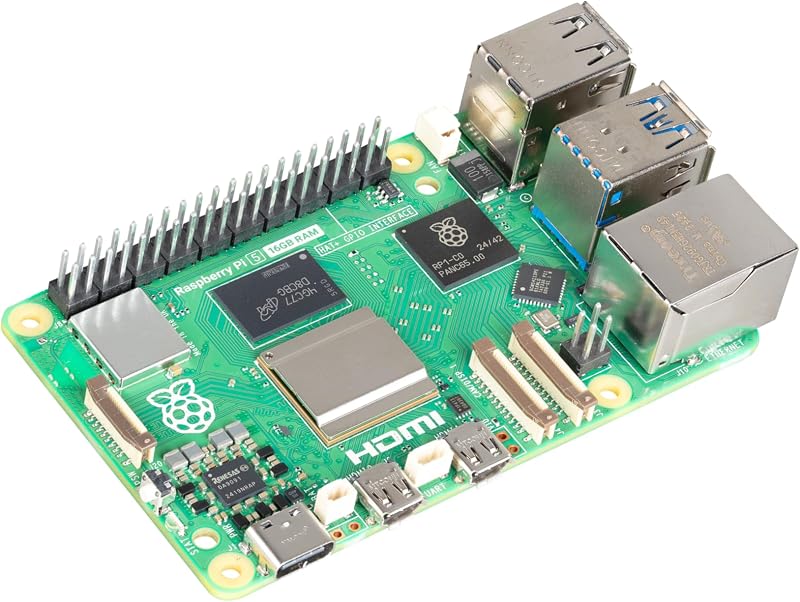
| Feature | Specification |
|---|---|
| Processor | Broadcom BCM2712 quad-core ARM Cortex-A76 at 2.4GHz |
| Installed RAM | 16GB LPDDR4X |
| Graphics Processor | VideoCore VII supporting Vulkan 1.2 and OpenGL ES 3.1 |
| I/O Controller | Raspberry Pi RP1 custom controller |
| Power Management | Renesas DA9091 PMIC with RTC and physical power switch |
| Wireless Connectivity | 802.11ac Wi-Fi and Bluetooth |
| Video Output | Dual 4K micro HDMI ports |
| Expansion Interface | PCIe FPC connector |
| USB Ports | 4 total ports (USB 3.0 and USB 2.0) |
| Dimensions and Weight | 3.55 x 2.76 x 1.18 inches; 45 grams |
Processing Architecture and Raspberry Pi 5 16GB Performance
At the center of the hardware layout sits the Broadcom BCM2712 system-on-chip, which utilizes a 2.4GHz quad-core ARM Cortex-A76 processor. This setup represents a notable generational leap in computational throughput compared to legacy boards, giving the device snappy execution speeds across multi-threaded applications. The graphics subsystem features the VideoCore VII GPU, which supports both Vulkan 1.2 and OpenGL ES 3.1 graphics standards. When combined with the high clock frequency of the central cores, the raspberry pi 5 16gb performance delivers rapid code compilation, smooth visual rendering on high-resolution displays, and reliable handling of concurrent background operations.
A key architectural development in the raspberry pi 5 bcm2712 design is the implementation of a disaggregated chiplet layout. Rather than forcing the main processor silicon to manage every peripheral signal, external communication interfaces are routed through the custom RP1 I/O controller. This dedicated chip directly governs the USB ports, Ethernet networking, camera lines, and display interfaces. By separating I/O operations from core arithmetic and memory processing, the board maintains clean data bandwidth across connected peripherals, preventing bus congestion when high-speed USB devices and networking streams operate simultaneously.
Thermal and electrical regulation is handled by the integrated Renesas DA9091 power management integrated circuit. This specialized PMIC incorporates a real-time clock backed by external power supply circuitry, enabling precise timekeeping even when disconnected from active networks. Furthermore, the board integrates a dedicated PC-style physical power button that supports both hard and soft shutdown events. This hardware switch eliminates the historic requirement of yanking out power cables to reset the system, reducing the risk of filesystem corruption during power cycles.
Evaluating the Raspberry Pi 5 RAM Upgrade and Capacity
The primary attraction of this specific configuration is the 16GB LPDDR4X memory pool. For users evaluating whether the raspberry pi 5 ram upgrade makes practical sense, the answer depends almost entirely on workload scale. When running typical single-board computer tasks, such as reading digital temperature sensors or hosting a single static webpage, system memory utilization rarely climbs beyond two gigabytes. In those scenarios, an extra memory buffer remains dormant. However, when orchestrating multi-container environments, heavy database indexing, or complex machine learning frameworks, the expansive capacity prevents sudden out-of-memory kernel panics.
In a direct comparison of the raspberry pi 5 vs 8gb models, the primary operational difference emerges when multitasking under sustained memory pressure. An 8GB board handles moderate desktop productivity and standard homelab services without hesitation, but it quickly encounters swap file usage when running concurrent virtual instances or processing large in-memory data sets. Upgrading to 16GB doubles that operational ceiling, ensuring that memory-hungry services avoid writing temporary cache files to slower flash storage media. When considering compute module integrations like the compute module 5 for embedded products, understanding the memory ceiling helps hardware designers plan for extended deployment lifecycles.
Determining if the raspberry pi 5 16gb is worth it ultimately comes down to system longevity and resource independence. Software stacks continually grow in size and complexity, and modern web browsers easily consume gigabytes of memory across multiple open tabs. By opting for the 16GB tier, users build a system capable of absorbing future software updates and larger dataset requirements without needing a hardware replacement. For power users and software developers running local test environments, having this substantial operational buffer transforms the single-board experience into something comparable to a dedicated mini desktop computer.
Hardware Expansion and Raspberry Pi 5 PCIe Support
Storage speed and expansion bandwidth have historically been bottlenecks on compact computing boards, but the inclusion of raspberry pi 5 pcie support dramatically shifts that dynamic. The board features an onboard PCIe FPC connector, allowing users to route high-speed lanes directly to storage expansion boards and external peripherals. While the unit still supports standard microSD cards for initial system booting and flexible media storage, the PCIe lane enables direct communication with high-speed solid-state drives via compatible adapter hardware. This setup provides rapid read and write speeds that match the capabilities of the 16GB memory subsystem.
Wired and wireless communication arrays on the board are comprehensive. Networking relies on built-in 802.11ac Wi-Fi for wireless local area connectivity alongside an integrated Gigabit Ethernet port for stable wired network deployments. Bluetooth support is also present for pairing wireless human interface devices and sensor equipment. Physical peripheral connectivity includes four total USB ports split between high-speed USB 3.0 interfaces and standard USB 2.0 ports. This combination ensures ample bandwidth for external hard drives, keyboards, mice, and webcams without saturating peripheral channels.
Display connectivity is anchored by two micro HDMI ports capable of driving dual 4K video streams concurrently. Power delivery is supplied through a USB-C connection designed to deliver stable current across the board under sustained computational loading. Combined with the RP1-managed camera and display ports, these expansion points make the board an extremely capable foundation for advanced digital signage, dual-monitor workstations, and multi-sensor robotics rigs that demand stable high-speed I/O communication.
Raspberry Pi 5 16GB Desktop Use and Server Hosting
Deploying the board for regular productivity demonstrates how viable the platform has become for daily computing tasks. In terms of raspberry pi 5 16gb desktop use, the board supports modern Linux distributions including Debian, Ubuntu, and official Raspberry Pi operating systems. Paired with standard desktop peripherals like a keyboard, mouse, and monitors, the system functions as a quiet, power-efficient daily driver for drafting documents, managing spreadsheets, and conducting web research. While users seeking a self-contained keyboard form factor might look toward options like the raspberry pi 400 computer kit, this standalone board delivers vastly higher processing headroom and double the memory for multi-window productivity.
Server deployment is where the platform truly excels. Utilizing the raspberry pi 5 16gb for home server applications allows homelab enthusiasts to consolidate multiple background services onto a single physical board. The 16GB RAM pool allows administrators to spin up dozens of isolated Docker containers, self-hosted cloud storage systems, media streaming daemons, and network-wide ad blockers simultaneously. Because server services frequently consume memory without heavily loading the processor cores, having sixteen gigabytes available prevents system lockups during peak traffic hours.
Examining the complete raspberry pi 5 16gb specs reveals an architecture that bridges the gap between maker prototyping and production-grade network appliances. With its quad-core processing speeds, dedicated hardware video decoding, flexible storage pathways, and substantial memory buffer, the board reliably performs whether tasked with real-time media encoding or round-the-clock home automation logging. Its compact 45-gram footprint allows it to hide cleanly behind a monitor, mount inside a server rack, or integrate directly into custom project enclosures.
Raspberry Pi 5 16GB Pros and Cons
Pros
- Massive 16GB LPDDR4X memory pool
- Fast 2.4GHz quad-core BCM2712 processor
- Dedicated RP1 silicon for peripheral I/O
- PCIe FPC connector for expansion
- Dual 4K micro HDMI display outputs
Cons
- Power supply and cooling sold separately
- Capacity exceeds basic electronics project needs
- Micro HDMI ports require specific adapter cables
Check Raspberry Pi 5 16GB on Amazon
Who Should Buy the Raspberry Pi 5 16GB
Buy It If
- You run complex multi-container homelabs, media managers, and local network servers that exhaust standard 4GB or 8GB memory limits.
- You need a compact, dual-display desktop computer running Linux distributions like Debian or Ubuntu for coding, web browsing, and document editing.
- You compile extensive software packages, build operating system images, or execute in-memory data processing directly on the board.
- You want a future-proof development board equipped with high-speed PCIe expansion and 16GB of RAM to handle advancing software footprints.
Skip It If
- Your primary projects consist of basic sensor monitoring, light micro-controller programming, or simple school science demonstrations.
- You only plan to build a lightweight retro gaming arcade or a basic single-purpose audio streaming receiver.
- You prefer an out-of-the-box system complete with an included power adapter, cooling case, and pre-formatted storage rather than a bare circuit board.
Raspberry Pi 5 16GB Alternatives Worth a Look
While this flagship board offers immense memory and modern processing architecture, alternative boards from other manufacturers cater to buyers who prioritize included accessories or lower hardware capacities for entry-level workloads.
Libre Computer Le Potato Mini

The Libre Computer Le Potato Mini Single Board Computer with USB WiFi 4 and Heatsink provides a 2GB single-board computing option finished in Libre Blue. Unlike bare-board offerings, this model comes bundled with a dedicated heatsink for immediate thermal dissipation and an external USB Wi-Fi 4 dongle to facilitate wireless local networking.
Shoppers should consider this alternative if their planned projects involve simple media tasks, learning foundational Linux commands, or running basic home automation scripts where a large memory footprint is unnecessary. It serves as an accessible starting point for makers who want an immediate hardware bundle without the extra computational capacity provided by a 16GB board.
Final Verdict
The Raspberry Pi 5 16GB represents an impressive technical evolution for the single-board computing community, delivering unprecedented memory capacity alongside the Broadcom BCM2712 quad-core processor and RP1 I/O controller. Features like PCIe expansion support, dual 4K video outputs, and dedicated PMIC power switching resolve long-standing hardware requests from experienced developers. The board transitions seamlessly from an ultra-compact desktop workstation into an always-on homelab server capable of handling heavy containerized workloads.
While the expanded memory pool provides diminishing returns for basic electronics hobbyists and simple automated scripts, it is an exceptional investment for software engineers, homelab builders, and power users. If your project goals require heavy multitasking, extensive caching, or hosting multiple independent services on a single energy-efficient board, this 16GB single-board computer delivers the exact hardware resilience and capacity needed for sustained performance.
FAQ
Does the Raspberry Pi 5 16GB include a physical power button?
Yes, the board features an integrated PC-style power button managed by the Renesas DA9091 PMIC. This button supports both soft power-down sequences to safely park filesystems and hard power-off operations when required.
What operating systems can run on the Raspberry Pi 5 16GB?
The hardware is officially compatible with Linux distributions including Debian, Ubuntu, and Raspberry Pi OS, providing a wide variety of software environments for both desktop productivity and headless server deployments.
How does the RP1 controller improve overall board performance?
The custom RP1 I/O controller functions as an independent routing hub for peripheral traffic, managing the USB ports, Ethernet networking, camera inputs, and display lines. By offloading these data paths, the central BCM2712 processor can dedicate its full computational bandwidth to core processing tasks.
Can I connect high-speed storage via the PCIe port?
Yes, the board incorporates an onboard PCIe FPC connector that supports peripheral hardware expansion. With appropriate third-party adapter accessories, users can connect high-speed drives directly to the PCIe lane instead of relying exclusively on standard microSD cards.
Is 16GB of RAM necessary for retro gaming and basic coding?
For standard retro emulation and basic script writing, 16GB is far more memory than the underlying applications can actively consume. Those lighter tasks run comfortably on lower-capacity boards, reserving this 16GB model for heavy multitasking, compilation, and container hosting.