
As Amazon Associates, we earn from qualifying purchases. This means we may receive a small commission at no extra cost to you if you click through and make a purchase.
The Dell WD19 is a dedicated desktop docking station designed to turn a modern notebook into an expansive workstation through a single cord. Operating as a capable wd19 usb c dock with high-wattage charging and comprehensive video outputs, the one-line verdict is that it provides a sturdy, highly reliable docking foundation for Dell laptop users who need seamless multi-monitor expansion and robust system power delivery.
This dock is ideally suited for hybrid professionals, office workers, and students who pair compatible Dell business laptops with multiple peripherals, external displays, and wired network connections. Those using non-Dell computers or requiring specialized high-speed accessories like SD card readers or Thunderbolt-specific data lanes should look elsewhere, as its maximum features and high charging rates cater directly to Dell’s ecosystem.
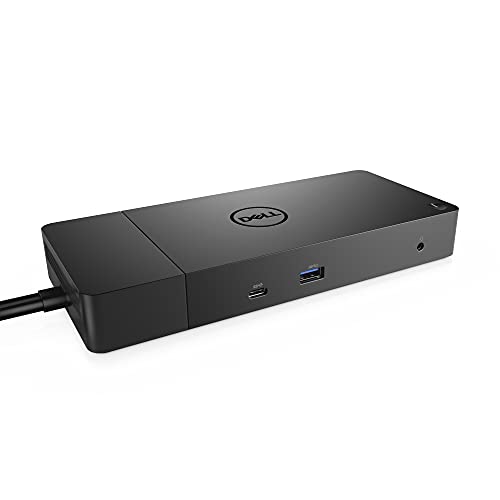

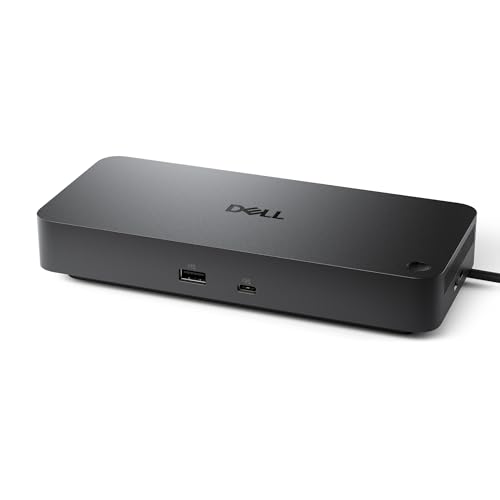

Dell WD19 at a Glance

| Feature | Specification |
|---|---|
| Docking Interface | USB-C with attached 3.3 ft SuperSpeed cable |
| Total Port Count | 13 ports |
| Video Outputs | 2x DisplayPort 1.4, 1x HDMI, 1x USB-C multifunction DisplayPort |
| USB Connectivity | 1x USB-C 3.1 Gen 2, 1x USB-A 3.1 Gen 1 with PowerShare, 2x USB-A 3.1 Gen 1 |
| Audio Ports | 1x combo audio/headset jack, 1x audio out jack |
| Networking | 1x Gigabit Ethernet RJ45 |
| Power Adapter | 180 Watt AC adapter (120/230 V, 50/60 Hz) |
| System Power Delivery | 130W Power Delivery to supported devices |
| Dimensions & Weight | 8.1 x 3.5 x 1.1 inches; 1.3 pounds (20.63 ounces) |
Display Outputs and Multi-Monitor Configurations
Display expansion serves as a primary benchmark for any desktop hub, and the Dell WD19 delivers a generous selection of video connections. Built with two DisplayPort 1.4 ports, one HDMI port, and a multifunction USB-C DisplayPort connection, the dock gives users multiple routes to attach desktop monitors without relying on secondary display adapters. Having multiple physical DisplayPort outputs makes it especially practical for enterprise and home office environments where modern monitors natively utilize DisplayPort connections.
Setting up a dell wd19 dual monitor setup is straightforward when pairing modern displays. Users can plug one monitor into the primary DisplayPort and a second into either the auxiliary DisplayPort or the HDMI port. While the listing does not specify maximum refresh rate figures or multi-monitor resolution caps across every configuration, the hardware interface leverages modern video standards to support extended desktop layouts across multiple screens for daily spreadsheets, web browsing, and multi-window productivity tasks.
Those who frequently switch between video conferencing tools, extensive documents, and presentation screens will appreciate having their screens driven through a single hub. Compared to newer revisions like the dell wd19s 180w docking station, this model retains dedicated audio jacks alongside its visual outputs, ensuring both visual media and external audio monitoring run from the same central hub on your desk.
Power Delivery and Charging Output
Power management is a standout factor in this dell wd19 180w review. Equipped with an external 180-watt AC power brick, the docking station provides up to 130 watts of direct charging power back to compatible host machines over the attached USB-C cable. Standard laptop docks frequently cap charging at 60 or 85 watts, which often causes power-hungry enterprise or creative laptops to discharge under heavy load or display battery-throttling warnings. The WD19 avoids this issue on supported machines by delivering substantial wattage overhead.
This dell wd19 power delivery capacity ensures that high-draw notebooks receive consistent current while simultaneously energizing connected accessories. Because the docking unit draws from a full 180-watt power supply, it does not cannibalize charging speed when you connect power-drawing external storage drives, mobile accessories, or keyboard lighting. The dock dedicates the remaining 50 watts of overhead to running internal circuitry, driving video signals, and powering connected peripheral ports.
The front-facing USB-A port also features Dell’s PowerShare capability, which allows connected mobile devices or wireless headsets to draw power even when the host laptop is unplugged or powered down. This charging flexibility makes the station double as an always-ready charging station on your desk, reducing the number of individual wall chargers required for everyday gear.
Port Selection and Peripheral Connectivity
With 13 physical ports, the wd19 docking station ports configuration covers nearly every standard peripheral need in an office environment. The distribution separates temporary and permanent connections intuitively. On the front of the unit, users get quick-access connections including one USB-C 3.1 Gen 2 port, one USB-A 3.1 Gen 1 port with PowerShare, and a combo audio/headset jack. This front array makes it easy to plug in thumb drives, communication headsets, or phone charging cables without reaching behind the unit.
The rear panel handles permanent desktop infrastructure. Here, the dock houses two additional USB-A 3.1 Gen 1 ports, a dedicated audio out jack, a Gigabit Ethernet RJ45 network port, two DisplayPort 1.4 jacks, an HDMI port, and the multifunction USB-C DisplayPort. Having Gigabit Ethernet directly onboard guarantees low-latency, stable internet connectivity for video meetings and large file transfers, which is invaluable in environments where office Wi-Fi can be unstable or congested. Those weighing compact hubs like the anker nano 13-in-1 docking station will notice that the WD19 provides enterprise-grade networking and dedicated audio outs suited for fixed desks.
The presence of two distinct audio interfaces—a 3.5mm headset combo on the front and a 3.5mm line-out jack on the back—gives users the freedom to route desktop speakers out of sight while keeping the front jack open for quick headset plug-ins during calls. The total of five USB ports accommodates keyboards, mice, external storage, and webcams simultaneously, making desktop decluttering an achievable goal.
Build Quality, Form Factor, and Hardware Setup
Physically, the Dell WD19 sports a professional, low-profile black enclosure measuring 8.1 inches long, 3.5 inches wide, and 1.1 inches high, weighing in at 1.3 pounds (20.63 ounces). The matte finish resists visible fingerprint smudges, and the low-profile rectangular chassis stays anchored on the desk rather than sliding around under the tension of thick display cables. It keeps a clean aesthetic that fits seamlessly into modern home offices or formal corporate cubicles.
Connecting the dock to your machine requires zero guesswork thanks to the integrated 3.3-foot SuperSpeed USB-C tether. This cable provides enough length to position the dock off to the side, behind a monitor stand, or underneath a laptop riser. Because the cable is permanently attached to the dock, users never have to worry about misplacing the host cord, though it does mean the cable cannot be swapped out for a longer custom line. For workers managing compact desk layouts against larger desktop gear like the anker prime tb5, the WD19 presents a streamlined, horizontal footprint that slides neatly beneath standard monitor risers.
A crucial factor to examine is dell wd19 docking station compatibility. The product data explicitly notes compatibility with Dell Notebooks and Tablet PCs, pointing users to the product description for detailed compatibility requirements. While standard USB-C data connections and display output may function on generic systems, Dell’s 130W proprietary power handshake is specifically engineered for Dell hardware. Laptops from other manufacturers may experience reduced charging throughput or limited display configurations depending on their internal USB-C controller specifications.
Dell WD19 Pros and Cons
Pros
- 130W laptop charging with included 180W adapter
- Generous 13-port desktop connectivity array
- Dual DisplayPort 1.4 and HDMI video outputs
- Dedicated front headset and rear audio-out jacks
- Integrated 3.3-foot SuperSpeed USB-C cable
Cons
- Optimized primarily for Dell laptops
- Lacks integrated SD or microSD card slots
- Large external power adapter footprint
Who Should Buy the Dell WD19
Buy It If
- You use a Dell notebook or tablet PC that benefits from up to 130W of fast USB-C power delivery.
- You need a dedicated dual-display setup utilizing standard DisplayPort 1.4 or HDMI connections.
- You want a complete 13-port connectivity solution with front audio, rear speaker out, and Gigabit Ethernet.
- You prioritize clean desk organization using a single cable connection to handle power, video, and peripherals.
Skip It If
- You primarily use Apple MacBook hardware or non-Dell laptops that cannot negotiate Dell’s proprietary high-wattage charging protocols.
- You frequently work with photography or video gear that requires built-in SD or microSD memory card slots on the dock.
- You need an ultra-compact, bus-powered portable hub that fits into a laptop sleeve for daily travel without an external AC brick.
Dell WD19 Alternatives Worth a Look
If the WD19 does not align perfectly with your operating system, card reader needs, or multi-platform workstation setup, several alternative docking hubs offer different strengths.
Dual HDMI USB C Dock

The Dual HDMI USB C Dock is an 8-in-1 portable hub that features twin 4K HDMI outputs, Gigabit Ethernet, an integrated SD/TF memory card reader, and support for up to 85W maximum power delivery passthrough. Because it does not come with an included AC power adapter, it operates as a bring-your-own-charger solution. Everyday shoppers who need an integrated memory card reader and prefer dual HDMI ports over DisplayPort will find this option more suited to multimedia and on-the-go productivity.
Universal Dock

The Universal Dock (model WD25) is an office-ready business docking station offering 100W power delivery, DisplayPort, HDMI, USB-A, USB-C, and Gigabit Ethernet alongside support for quad display outputs. Users looking for broader multi-monitor headroom up to four external displays and a universal plug-and-play profile across varied laptop fleets should consider this over the WD19.
for Windows and Mac

The for Windows and Mac dock (UD-3900) is a universal laptop docking station offering two HDMI monitor outputs, six USB ports, audio jacks, and Gigabit Ethernet via either standard USB 3.0 or USB-C connections. Because it operates across platforms using required software drivers, it represents an effective alternative for households or offices managing a mix of older Windows laptops and Apple Mac machines that lack standard USB-C Alt-Mode display support.
Final Verdict
The Dell WD19 stands out as an exceptionally focused docking hub designed specifically to elevate desktop workflows for modern laptop users. Its massive 180W power brick, capable of delivering 130W of clean system charging, completely eliminates battery drain worries during demanding workloads. Backed by 13 well-placed ports, dual DisplayPort connections, HDMI, and dedicated audio jacks, the hardware handles daily office multitasking with remarkable stability and zero cable clutter.
When deciding whether the wd19 docking station is worth it, the answer comes down to your primary laptop hardware. If you operate within Dell’s modern business laptop ecosystem, the WD19 delivers top-tier integration, effortless peripheral consolidation, and unmatched charging speeds. While users outside that ecosystem might encounter compatibility limitations with full charging wattage, Dell laptop owners will find it to be an indispensable upgrade for their daily workspace.
FAQ
What video ports are included on the Dell WD19?
The Dell WD19 features two DisplayPort 1.4 ports, one HDMI port, and one multifunction USB-C DisplayPort output, allowing users to connect external displays using a variety of digital monitor cables.
How much power does the Dell WD19 deliver to a connected laptop?
The dock includes a 180-watt AC power adapter and delivers up to 130 watts of direct power delivery to supported host notebooks, leaving the remaining wattage to power internal dock functions and connected USB peripherals.
Does the Dell WD19 feature built-in audio jacks?
Yes, the Dell WD19 includes two separate audio ports: a front-facing 3.5mm combo audio/headset jack for calls, and a rear 3.5mm audio line-out jack for routing sound directly to external desktop speakers.
Can you set up dual monitors with the Dell WD19?
Yes, the Dell WD19 supports dual monitor setups by pairing its dual DisplayPort 1.4 outputs, or combining a DisplayPort connection with the HDMI port, depending on the input ports on your external screens.
Does the Dell WD19 include an SD card reader?
No, the listing does not include an integrated SD or microSD card reader on the Dell WD19. Users who frequently transfer data from camera memory cards will need to use a separate USB card reader adapter.


