
As Amazon Associates, we earn from qualifying purchases. This means we may receive a small commission at no extra cost to you if you click through and make a purchase.
The OWC Drive Dock is a dual-bay storage appliance engineered to mount, read, and write bare 2.5-inch and 3.5-inch SATA hard drives and solid-state drives over a modern USB connection. Designed by Other World Computing, this desktop unit addresses a common workspace bottleneck by giving technicians, creatives, and home lab builders instant access to internal drives without having to install them into individual enclosures or open up a computer tower. Our verdict is that the dock stands out as one of the most reliable and physically well-engineered bare drive management tools available, providing steady throughput and exceptional workflow flexibility through its separate bay power controls.
This dock is ideally suited for system administrators, photographers, video editors, and power users who handle archives across bare drives or regularly migrate data between disks. If your storage strategy involves handling cold-storage disks or swapping drives regularly, the dock removes friction while keeping your desk organized. Conversely, everyday consumers who only need simple external backups might find traditional enclosed solutions, such as a portable western digital my passport external hard drive, much lighter and more practical. It is also not the right pick for users who work strictly with modern M.2 NVMe sticks, as this unit focuses exclusively on standard SATA connections.


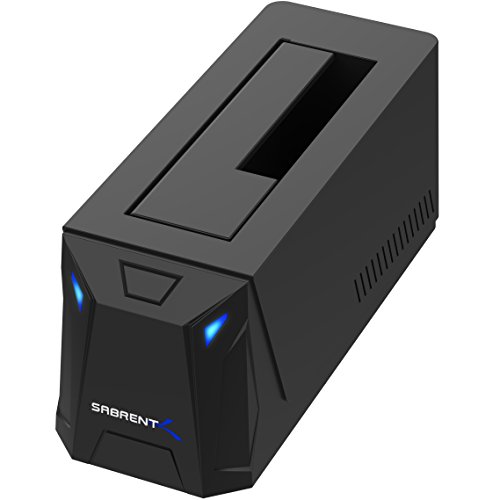

OWC Drive Dock at a Glance

| Attribute | Detail |
|---|---|
| Manufacturer | Other World Computing (OWC) |
| Drive Bays | 2 (dual-bay simultaneous operation) |
| Supported Form Factors | 2.5-inch and 3.5-inch SATA drives |
| Host Interface | USB-C (ASMedia ASM1351 controller) |
| Maximum Data Transfer Speed | Up to 522MB/s |
| Power Architecture | Internal universal power supply |
| Housing Material | Aluminum |
| Dimensions | 6.3 inches L x 5.9 inches W x 3.3 inches H |
| Weight | 3.1 pounds |
| Included Cables | Type-C to Type-C, Type-C to Type-A, standard AC power cable |
Drive Bay Flexibility and Independent Power Control
The primary draw of an owc dual bay sata dock is the convenience of sliding loose drives into open top slots without mounting brackets, sleds, or screws. Each bay in this dock accepts both full-sized 3.5-inch desktop mechanical disks and smaller 2.5-inch laptop drives or solid-state drives. The bays feature spring-loaded internal door flaps that recess neatly when a wider 3.5-inch drive is introduced, while guiding 2.5-inch disks securely toward the SATA data and power headers located at the base of the chamber. This thoughtful mechanical layout eliminates the wobbling and connector strain often found in lower-tier docks.
Where this design truly distinguishes itself from budget alternatives is the inclusion of owc drive dock independent power switches. On conventional dual bay hard drive dock units, pressing the main power switch or unplugging the power cord impacts both drives simultaneously. If you are copying a large dataset to bay A and decide to load or dismount a disk in bay B, an all-in-one switch risks interrupting the active transfer and corrupting file tables. OWC resolves this by equipping each bay with its own dedicated power toggle on the top plate. You can cleanly mount or safely dismount one drive while the neighboring disk continues reading or writing data uninterrupted.
This independent control proves particularly beneficial when working through large stacks of archive media or servicing surveillance equipment. Technicians handling disks like a wd purple surveillance hard drive can inspect security camera archives on one slot while running parity checks, disk health diagnoses, or routine file copies on the other slot without any crosstalk or unexpected power drops.
Transfer Speed and Interface Performance
Understanding real-world data throughput is essential when evaluating any storage tool. The owc drive dock specs outline a modern USB-C connection driven by an ASMedia ASM1351 controller platform. The dock supports bandwidth rates capable of sustaining owc drive dock speed metrics up to 522MB/s. This ceiling is sufficiently wide to saturate the practical throughput limits of SATA III (6Gbps) solid-state storage. When working with fast 2.5-inch SATA SSDs, reading and writing large video timelines or directory databases proceeds at close to the maximum transfer capability of the flash media itself.
When populating the dock with traditional spinning hard disk drives, the operational speed will naturally be bound by the physical limits of magnetic platters. Standard 3.5-inch high-capacity drives typically operate between 150MB/s and 260MB/s depending on platter density, rotational speed, and where data sits on the disk. Because the OWC Drive Dock supports concurrent drive access, both bays can operate simultaneously without choking the USB pipeline, allowing two hard drives to push their top sequential read and write speeds concurrently without bandwidth starvation.
The unit handles extensive read and write operations with stable sustained connectivity. Because the hardware relies on native SATA-to-USB bridging without requiring proprietary drivers, data transfers remain consistent across extended backup sessions. Whether you are transferring raw photo catalogs or streaming backup disk images, the hardware manages data packets smoothly without random disconnects.
Build Quality and Internal Power Supply
Physical construction is a clear strength of this dock. Weighing in at 3.1 pounds, the unit features an aluminum enclosure that feels substantial and sits firmly on a work surface. The weight is an intentional functional feature: docking and unseating full-sized 3.5-inch mechanical drives requires firm downward and upward pressure. Flimsy, lightweight plastic docks frequently lift off the desk or slide around when a heavy drive is pulled from the SATA connector. The OWC dock remains anchored, allowing you to insert and extract bare drives using one hand without destabilizing your workspace.
Another major usability advantage is the internal universal power supply. Most consumer docking stations rely on an awkward external wall-wart power adapter or a bulky inline power brick that crowds power strips and tangles cable management. The OWC Drive Dock houses the entire power transformation assembly inside its aluminum body. The only cable needed to power the unit is a standard, grounded AC cord that plugs directly into the back panel.
OWC bundles two separate host interface cables in the package: a USB 3.1 Gen 2 Type-C to Type-C cable and a USB 3.1 Gen 1 Type-C to Type-A cable. Having both connection types supplied out of the box means users can integrate the dock with brand-new workstations or older desktop rigs without hunting for conversion dongles. The package also includes a standard two-year OWC limited warranty, providing peace of mind regarding manufacturing defects.
Platform Compatibility and Everyday Workflow Integration
The owc drive dock mac pc compatibility ensures frictionless operation across heterogeneous computing setups. The dock functions completely as a plug-and-play peripheral, utilizing standard USB mass storage class drivers native to modern operating systems. No custom drivers or configuration utilities are required to get started; once a drive is seated and its individual bay power switch is toggled, the operating system recognizes the volume within seconds.
For creative environments where teams work across mixed operating platforms, the dock seamlessly integrates into everyday asset ingestion routines. Video production teams can ingest camera footage recorded to SATA SSDs, dismount the drives individually, and pass them over to editing workstations. Because the dock handles simultaneous access, cross-drive transfers (from Bay 1 directly to Bay 2) execute locally through the host computer, making the dock a dependable station for consolidating loose media onto larger backup volumes.
Routine drive maintenance tasks like disk health checks, zero-fill sanitization, partition formatting, and firmware checks are far simpler when using open bays. Instead of prying open external drive enclosures or utilizing loose ribbon adapters that expose drive circuitry to static hazards, the dock keeps drives oriented upright, secure, and properly powered throughout prolonged operational cycles.
OWC Drive Dock Pros and Cons
Pros
- Independent bay power switches
- Internal universal power supply
- Dual-bay simultaneous drive operation
- Sturdy aluminum desktop enclosure
- Includes both USB-C and USB-A cables
- Up to 522MB/s transfer speeds
Cons
- No support for NVMe or IDE drives
- Heavy 3.1-pound footprint limits mobility
- Throughput bounded by SATA interface limits
Check OWC Drive Dock on Amazon
Who Should Buy the OWC Drive Dock
Buy It If
- You regularly manage multiple bare 2.5-inch or 3.5-inch SATA hard drives or solid-state disks.
- You need to swap individual disks in and out without interrupting or rebooting neighboring active drives.
- You want an aluminum desktop accessory with an internal power supply that eliminates bulky wall-wart power bricks.
- You work across both modern USB-C laptops and traditional USB-A desktop computers.
Skip It If
- Your storage workflow relies exclusively on high-speed M.2 NVMe solid-state blades or legacy IDE hardware.
- You need a lightweight, highly portable drive adapter to pack into a compact travel bag.
- You prefer enclosed, sealed external drives and have no interest in handling bare storage components.
OWC Drive Dock Alternatives Worth a Look
While the OWC Drive Dock delivers premium construction and dual independent switches, exploring alternative docking solutions can help you decide which feature set matches your specific budget and workflow needs.
SATA HDD SSD only

The SATA HDD SSD only docking station by Sabrent (model EC-DFLT) is a dedicated single-bay solution intended for users who only need to mount one 2.5-inch or 3.5-inch drive at a time. It uses a lay-flat orientation rather than an upright tower bay, and it utilizes standard USB 3.0 connectivity instead of modern USB-C. This is a practical pick if you only occasionally read bare media, lack desk height for vertical drive insertions, and do not require dual-bay access.
2.5″ 3.5″ SATA HDD &

Another alternative is the 2.5″ 3.5″ SATA HDD & dock by Sabrent (model EC-UBLB), which features a single upright bay supporting UASP over a 5Gbps USB 3.0 connection. It incorporates an automated sleep mode and requires an included external AC power adapter. Users who want a vertical single-drive footprint for routine disk servicing without investing in a heavier dual-slot aluminum dock may prefer this option.
Offline 1-to-1 cloner

For users seeking automated disk copying, the Offline 1-to-1 cloner by Sabrent (model EC-CH2B) provides dual bays with integrated standalone cloning functions. Unlike the OWC unit, which operates primarily as an active host-connected storage dock, this device supports hot-swapping and offline sector-by-sector cloning at the push of a button without needing a host computer connected. Pick this alternative if your daily work involves duplicating bare hard drives for fleet deployment.
Final Verdict
Is owc drive dock worth it for your setup? If your storage requirements involve swapping between multiple bare SATA drives, the convenience, structural durability, and safety features of the OWC Drive Dock justify its place on your workstation. The sturdy 3.1-pound aluminum chassis ensures that inserting and extracting heavy 3.5-inch drives remains effortless, while the built-in internal power supply provides clean cable management free of bulky wall transformers.
By delivering independent power switches for each slot, OWC addresses the biggest practical flaw found in consumer multi-bay docks. You can manage data on one drive with complete confidence that mounting or dismounting another disk will never compromise ongoing transfers. For media managers, IT technicians, and content creators looking for dependable SATA drive access over USB-C, this dual-bay dock remains a top-tier choice.
FAQ
Can the OWC Drive Dock read two drives at the same time?
Yes. The dock supports simultaneous operation of both drive bays. You can mount two independent 2.5-inch or 3.5-inch SATA drives and access their file systems simultaneously on your computer, or transfer data directly from one bay to the other.
Does the OWC Drive Dock support NVMe or M.2 SSDs?
No. The hardware is designed exclusively for standard SATA interfaces in 2.5-inch and 3.5-inch form factors. It does not accept M.2 NVMe, PCIe, or legacy IDE storage drives.
Do you need an external power adapter brick for this dock?
No. The dock features an internal universal power supply housed inside the aluminum enclosure. It connects directly to standard wall outlets using a simple AC power cord, eliminating the need for an external power brick.
Can you turn off one drive without disconnecting the other?
Yes. Each bay has its own dedicated physical power button. You can safely dismount and power off a drive in one slot without interrupting ongoing read or write activities on the neighboring slot.
Does the dock work with both USB-C and standard USB-A ports?
Yes. OWC includes both a USB Type-C to Type-C cable and a USB Type-C to Type-A cable in the package, allowing seamless connectivity with modern USB-C laptops as well as traditional USB-A desktop ports on both Mac and PC systems.


