
As Amazon Associates, we earn from qualifying purchases. This means we may receive a small commission at no extra cost to you if you click through and make a purchase.
The ACASIS Mac mini M4 Dock is an aluminum stand and multi-port expansion hub engineered specifically to expand the workspace and high-bandwidth capabilities of Apple’s compact desktop. Equipped with a 40Gbps host connection, dual internal M.2 NVMe drive bays, and dual DisplayPort outputs, this unit delivers an all-in-one storage and display hub for users seeking to maximize desktop productivity without cluttering their desks.
This dock is an excellent match for creative professionals, video editors, and power users who want rapid local drive access and multi-screen workflows instead of buying expensive factory storage options like a mac mini 1tb configuration. Conversely, everyday users who only need a simple portable USB hub or who do not plan to install internal solid-state storage will find this specialized station far beyond their basic peripheral needs.
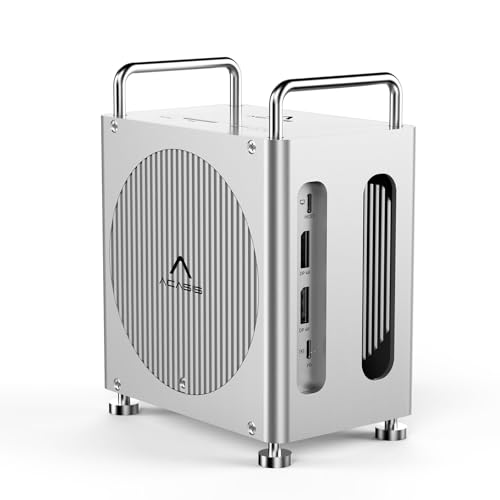



ACASIS Mac mini M4 Dock at a Glance

| Attribute | Detail |
|---|---|
| Host Interface | 40Gbps USB Type-C |
| Internal Storage Bays | Dual M.2 NVMe slots (20Gbps each) |
| RAID Modes | RAID 0, RAID 1, JBOD, Default |
| Storage Capacity Support | Expandable up to 16TB |
| Display Outputs | Dual DisplayPort (Single 4K@144Hz, Dual 4K@60Hz MST) |
| USB Connectivity | 3x USB-A 3.1 (10Gbps) |
| Card Reader | SD and TF reader slots |
| Power Specifications | 100W wattage listing spec, 30W Power Delivery |
| Material and Color | Aluminum, Deep Silver |
| Weight | 930 g |
Dual NVMe Storage and Hardware RAID Performance
The standout feature of this mac mini m4 dock with nvme is its built-in dual-bay solid-state drive enclosure. Operating through individual 20Gbps lanes via the 40Gbps host pipeline, the enclosure supports up to 16TB of total capacity. This setup allows content creators working with high-bitrate 4K footage or extensive sound libraries to bypass external cable clutter entirely while keeping substantial media volumes locally accessible.
Storage management is powered by onboard hardware RAID switches that accommodate multiple drive arrangements. Users looking for pure throughput can configure RAID 0 to unlock transfer speeds up to 40Gbps, whereas those prioritizing data security can select RAID 1 for continuous mirror backups. Standard JBOD and default independent drive modes are also supported, making this mac mini m4 raid dock an adaptable storage solution for editors considering high-performance setups like the mac mini m4 pro 48gb configuration.
Display Connectivity and Multi-Monitor Output
Display expansion is handled via two integrated DisplayPort interfaces utilizing Multi-Stream Transport (MST). When driving a single monitor, the dock supports refresh rates up to 4K at 144Hz, providing fluid visuals for editing, animation, or gaming. In dual-screen setups, both DisplayPort connections support 4K resolution at 60Hz simultaneously.
Because the dock works in conjunction with the host computer, you can combine these DisplayPort feeds with your computer’s native HDMI or Thunderbolt outputs to achieve a triple-display workstation. For professionals searching for a capable mac mini m4 dual monitor dock, this layout delivers significant screen real estate across creative timelines, spreadsheets, and monitoring tools.
Port Selection and Peripheral Integration
In addition to massive drive expansion, the hub serves as a central clearinghouse for traditional peripherals. The front and rear panels include three USB-A 3.1 ports operating at speeds up to 10Gbps, which remain fully backward compatible with older USB 3.0 and USB 2.0 accessories. The listing notes that high-speed external storage can transfer a 4K movie file in approximately 30 seconds over these connections.
Photographers and video operators also gain dedicated access to integrated SD and TF memory card slots for quick offloading of raw assets. By routing standard USB accessories like keyboards, mice, flash drives, and card media through a single desktop unit, the dock eliminates peripheral chaos while reserving the host machine’s remaining native ports for specialized tasks.
Chassis Design and Workspace Integration
Constructed from aluminum with a Deep Silver finish, this unit functions as a dedicated acasis mac mini stand and hub. Its metal casing provides durable physical housing while complementing the industrial design of the machine resting above it. The total package weighs 930 grams, giving it the necessary heft to stay anchored to the desk when peripherals are connected or removed.
Power handling on the dock specifies 100 watts of total system wattage, alongside a 30W Power Delivery output profile. This power distribution ensures that internal NVMe drives receive stable voltage during heavy data read and write operations, avoiding sudden disconnects during high-bandwidth media workflows.
ACASIS Mac mini M4 Dock Pros and Cons
Pros
- Dual M.2 NVMe slots supporting hardware RAID
- Fast 40Gbps host connection throughput
- Dual DisplayPort outputs supporting up to 4K 144Hz
- Three 10Gbps USB-A 3.1 peripheral ports
- Sturdy aluminum chassis matching desktop design
Cons
- Requires separate purchase of M.2 SSD drives
- No built-in HDMI ports on the dock itself
- Weighs 930 grams making it stationary
Check ACASIS Mac mini M4 Dock on Amazon
Who Should Buy the ACASIS Mac mini M4 Dock
Buy It If
- You need internal M.2 NVMe storage expansion supporting RAID 0, RAID 1, or JBOD up to 16TB.
- You require a multi-monitor arrangement using dual 4K DisplayPort outputs alongside host display connections.
- You want high-speed 10Gbps USB-A ports and SD/TF card slots integrated directly into an aluminum desktop stand.
- You manage high-throughput workflows like 4K video editing, rendering, and large archive management.
Skip It If
- You only need a simple, lightweight bus-powered USB dongle for casual travel use.
- You do not intend to install internal M.2 solid-state storage drives.
- Your existing workstation monitors rely exclusively on HDMI inputs and lack DisplayPort cables or adapters.
ACASIS Mac mini M4 Dock Alternatives Worth a Look
While this specialized dual-bay station offers immense high-bandwidth utility, alternative docking stations provide different port combinations, display types, and general connectivity profiles.
Dual HDMI USB C Dock

The Dual HDMI USB C Dock is an 8-in-1 USB-C hub tailored for users who require dual 4K HDMI ports, 1Gbps Ethernet, 85W Max Power Delivery pass-through, and SD/TF card readers. It lacks the internal NVMe storage enclosure of the ACASIS model, making it a better pick for users who prioritize direct HDMI screen connections and hardwired network access over internal drive expansion.
Universal Dock

The Universal Dock from Dell is an enterprise-oriented WD25 station featuring 100W charging, quad display support, DisplayPort, HDMI, gigabit networking, and a suite of USB-A and USB-C connections. Shoppers who need extensive corporate multi-screen connectivity without specialized Mac mini form-fitting stand integration will find this unit well-suited for general office desks.
for Windows and Mac

The for Windows and Mac station from Plugable provides a universal dual HDMI layout, six USB ports, Gigabit Ethernet, and dedicated audio jacks using driver-based display output. It serves multi-platform environments and legacy workstations well, though it does not offer the high-speed 40Gbps host bus or internal drive bays found on the ACASIS dock.
Final Verdict
When assessing the comprehensive acasis mac mini m4 dock specs, it is clear that this accessory targets users with demanding storage and display requirements. By combining a 40Gbps host link, dual 20Gbps M.2 NVMe slots with hardware RAID, and dual DisplayPort video channels, it solves two major constraints of compact desktop workstations: internal storage limits and port reachability.
For shoppers asking is acasis mac mini m4 dock worth it, the answer depends entirely on your need for localized solid-state storage. If you plan to pop in fast NVMe drives for video work and run a high-refresh dual-screen desk, this is easily one of the best dock for mac mini m4 setups on the market. Those seeking simpler, general-purpose hubs like the ugreen mac mini 11-in-1 docking station with ssd expansion can find alternatives, but few match the dual-bay RAID throughput offered here.
FAQ
Does the ACASIS Mac mini M4 Dock include internal storage drives?
No, the dock features an enclosure with dual M.2 NVMe slots, but actual solid-state drives are not included. Users must purchase and install their own M.2 NVMe drives up to the supported 16TB total maximum capacity.
What display resolutions does the dock support?
The dock features dual DisplayPort outputs. A single connected display can reach up to 4K resolution at 144Hz, while dual connected displays output up to 4K resolution at 60Hz using MST protocols.
Which RAID modes can be configured on the dual NVMe slots?
The dual M.2 slots support RAID 0 for maximum speed, RAID 1 for mirrored data redundancy, as well as JBOD and default individual drive addressing modes.
What USB transfer speeds are available on the peripheral ports?
The three USB-A 3.1 ports on the hub operate at data transmission speeds up to 10Gbps, and they maintain backward compatibility with USB 3.0 and USB 2.0 devices.
Can this dock be used with other Mac computers?
While physically shaped to complement the desktop footprint of the newest Apple silicon desktop, any computer with compatible 40Gbps USB-C or Thunderbolt support can interface with the dock, including earlier hardware like the mac mini m2 pro.


