As Amazon Associates, we earn from qualifying purchases. This means we may receive a small commission at no extra cost to you if you click through and make a purchase.
The Acer Nitro 5 (model AN515-54-5812) serves as an entry-level gaming laptop that pairs a 9th Generation Intel Core i5-9300H processor with dedicated NVIDIA GeForce GTX 1650 graphics. Engineered to handle everyday computing alongside steady 1080p gaming, this system provides a practical foundation for users who want dedicated GPU performance without unneeded complexity. The overarching verdict is straightforward: for competitive esports titles and general multimedia tasks, it offers reliable performance backed by exceptional physical expandability.
This laptop best matches casual players, students, and practical computing enthusiasts who want an accessible hardware package with room to install additional drives and memory later. Conversely, competitive gamers seeking high refresh rate screens, advanced ray tracing features, or maximum visual settings on the newest major releases will find the hardware specifications restrictive. Readers interested in comparing configurations across the broader family can read our laptop acer nitro overview, while those seeking an entry-level starter machine will find solid everyday utility here.


Acer Nitro 5 at a Glance

| Component | Specification |
|---|---|
| Processor | Intel Core i5-9300H (9th Gen, 2.4 GHz, up to 4.1 GHz with Turbo Boost) |
| Graphics Coprocessor | NVIDIA GeForce GTX 1650 (4 GB GDDR5 dedicated VRAM) |
| Display Panel | 15.6-inch Full HD (1920 x 1080) widescreen LED-backlit IPS |
| System Memory | 8 GB DDR4 SDRAM (2666 MHz) |
| Primary Storage | 256 GB PCIe NVMe SSD (PCIe x4 interface) |
| Drive Expansion | 2 x PCIe M.2 slots (1 open slot) and 1 available 2.5-inch hard drive bay |
| Wireless Networking | Intel Wireless Wi-Fi 6 AX200 802.11ax (2×2 MU-MIMO, up to 2.4 Gbps) |
| Ethernet Interface | 10/100/1000 Gigabit Ethernet LAN (RJ-45 port) |
| Operating System | Windows 10 Home |
| Item Weight | 5.1 pounds |
Gaming and Graphics Performance
The processing foundation pairs an Intel Core i5-9300H quad-core chip with dedicated NVIDIA GeForce GTX 1650 graphics. The CPU operates at a base clock speed of 2.4 GHz and reaches up to 4.1 GHz under Turbo Boost, providing ample compute power for background processes and game logic. In this Acer Nitro 5 GTX 1650 configuration, the GPU includes 4 GB of dedicated GDDR5 memory. Having isolated video RAM prevents graphical tasks from competing with general system memory, which preserves stable frame pacing during standard gameplay sessions.
Assessing the Nitro 5 for gaming shows that it is best suited for 1080p gaming at moderate fidelity. Widely played esports titles, battle arenas, and online team shooters run comfortably at native Full HD resolution. However, demanding modern releases featuring extensive geometry and heavy lighting effects will test the boundaries of the 4 GB VRAM capacity. Players running those heavier titles will need to lower texture presets and disable demanding ambient effects. Gamers who want access to more modern graphical hardware can read our review of the acer nitro v16 rtx 5050 to see how newer architecture tiers perform.
Audio processing works in tandem with the visual presentation through integrated Waves sound technology and Acer TrueHarmony tuning. Sound output emits through two built-in stereo speakers, delivering clear positional cues for games and crisp dialogue for streaming video. In addition, Acer Purified.Voice technology uses two built-in microphones to isolate spoken communication from background fan noise, ensuring intelligible voice chat during cooperative matches without requiring an immediate headset setup.
Storage Expansion and System Memory
Out of the box, storage is handled by a 256 GB PCIe NVMe solid-state drive running on a PCIe x4 interface. This drive delivers rapid boot speeds and quick application start times, but 256 GB fills quickly after downloading Windows updates and a few modern game installations. Fortunately, the internal layout provides outstanding Nitro 5 storage expansion options. The motherboard houses two PCIe M.2 slots, leaving one slot open for an additional high-speed drive, alongside an entirely available 2.5-inch hard drive bay.
This triple-storage capability is uncommon in entry-level laptops. Owners can keep the primary 256 GB NVMe SSD dedicated to the operating system, mount a secondary M.2 NVMe drive for active games, and install a larger 2.5-inch drive in the bay for media archives. Because an open M.2 slot and drive bay are already present, users do not need to replace or clone their original boot drive to expand capacity, making storage upgrades straightforward and practical.
System memory follows a similar accessible path. The standard package contains 8 GB of DDR4 memory clocked at 2666 MHz. While 8 GB is sufficient for basic web browsing and entry-level gaming, completing a Nitro 5 RAM upgrade by slotting in a second memory stick enables dual-channel operation. Dual-channel memory throughput smooths out frame delivery in complex scenes and prevents micro-stutters when running background communication apps. Reviewing the overall Acer Nitro 5 specs demonstrates that the machine was purposefully designed to support future component additions.
Thermal Management and Cooling Architecture
Heat dissipation is crucial for maintaining consistent processing performance, and the Nitro 5 thermal management system is built around sustained component cooling. Acer incorporates CoolBoost technology, which pairs twin fans with dual exhaust ports to push hot air out of the enclosure. When gaming loads push processing temperatures higher, CoolBoost automatically accelerates fan speeds, pulling airflow across internal thermal hardware to keep both the Core i5-9300H and the GTX 1650 operating within standard parameters.
The physical structure assists the cooling system directly. Weighing 5.1 pounds with a classic black gaming exterior, the chassis incorporates bottom intake grilles and dedicated rear and side exhaust vents. This layout ensures fresh air flows over core motherboard components before hot air exits the chassis. Under full gaming load, the dual fans generate noticeable acoustic noise, which is expected for gaming laptops in this performance class. However, the airflow prevents severe thermal throttling and maintains steady clock speeds.
For daily desktop tasks such as word processing, web research, and media viewing, the cooling system operates quietly. The twin fans lower their rotational speeds during low-wattage operation, keeping fan noise unobtrusive in classroom or office settings. The fans only spin up to full capacity when the dedicated NVIDIA graphics card is actively engaged, providing an effective balance between quiet daily computing and active gaming cooling.
Display Quality and Everyday Usability
Visual output is handled by a 15.6-inch Full HD display featuring a 1920 x 1080 native resolution. Built with an IPS (In-Plane Switching) panel and LED backlighting, the Acer Nitro 5 display quality benefits from wide viewing angles, keeping contrast and color rendering stable when viewed from the side. While the listing does not specify a high refresh rate panel or wide creative color coverage, the Full HD resolution produces sharp text and detailed visuals that work well for routine entertainment and everyday productivity.
Ergonomics and integrated controls are set up for daily convenience. The laptop features a full-sized backlit keyboard complete with a dedicated numeric keypad, allowing comfortable typing in dim lighting conditions. Integrated Alexa compatibility provides voice-activated convenience for setting reminders, checking schedules, and controlling compatible smart equipment. For remote collaboration, the front HD webcam records at 1280 x 720 resolution and features Super High Dynamic Range (SHDR) support to maintain balanced exposure in uneven room lighting.
Port selection and wireless connections are well rounded. Wireless traffic uses an Intel Wireless Wi-Fi 6 AX200 module supporting 802.11ax dual-band operation with 2×2 MU-MIMO technology, achieving speeds up to 2.4 Gbps on compatible networks. For stable low-latency gaming, the chassis includes a dedicated 10/100/1000 Gigabit Ethernet port. Peripheral connectivity includes one USB 3.1 Type-C Gen 1 port (up to 5 Gbps), two USB 3.1 Gen 1 ports with power-off charging support, and HDMI connectivity for external monitors. Shoppers wanting a larger viewing area can read our detailed review of the acer nitro 17 for comparison.
Acer Nitro 5 Pros and Cons
Pros
- Dedicated NVIDIA GeForce GTX 1650 graphics
- Triple internal storage drive expansion support
- Fast Intel Wi-Fi 6 and Gigabit Ethernet
- Full HD IPS display with wide viewing angles
- Acer CoolBoost twin-fan thermal cooling
Cons
- Modest 256 GB base solid-state drive
- Single 8 GB memory module from factory
- Heavier 5.1-pound carrying weight
Who Should Buy the Acer Nitro 5
Choosing the right computer requires aligning hardware specifications with your daily workload and gaming preferences. The Acer Nitro 5 AN515-54-5812 provides dependable value for specific user needs, but it is not intended for high-end enthusiasts.
Buy It If
- You play popular esports and competitive multiplayer games at standard 1080p resolution.
- You want an expandable laptop with an open M.2 slot and an open 2.5-inch drive bay for storage upgrades.
- You need a versatile daily machine equipped with Wi-Fi 6, a backlit keyboard, an Ethernet port, and a built-in webcam.
- You require a dedicated GPU with 4 GB GDDR5 VRAM for multimedia and basic content rendering rather than relying on integrated graphics.
Skip It If
- You plan to play the latest high-end AAA games at maximum graphics settings and high frame rates.
- You need an ultra-portable, lightweight laptop for constant travel, as the 5.1-pound chassis and power brick add noticeable bulk.
- You require massive storage right out of the box without opening the chassis to install extra drives.
Acer Nitro 5 Alternatives Worth a Look
If the hardware configuration of this model does not fully align with your performance targets or screen preferences, several alternative gaming laptops offer different capabilities.
ASUS ROG Strix G16
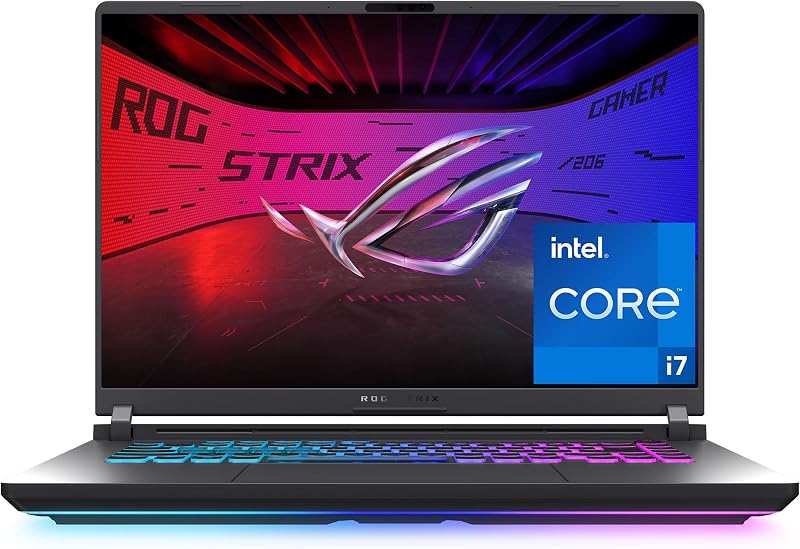
The ASUS ROG Strix G16 is a modern gaming system built with an Intel Core i7 14650HX processor, NVIDIA GeForce RTX 5060 graphics, 16 GB of DDR5 memory, and a 1 TB Gen 4 SSD. It features a 16-inch FHD+ 16:10 display running at 165Hz with a 3ms response time, along with Wi-Fi 7 connectivity. Gamers who have the flexibility for higher-tier hardware and want high frame rates on modern releases should choose this machine over the entry-level Nitro 5.
msi Cyborg 17

The msi Cyborg 17 17.3″ FHD laptop offers a large 17.3-inch Full HD 144Hz display driven by an Intel Core 9-270H processor and NVIDIA GeForce RTX 5060 graphics. It is configured with 16 GB of DDR5 memory, 2 TB total storage (consisting of a 1 TB internal SSD and a 1 TB docking station set), and Wi-Fi 6E. Buyers who want a larger screen format, faster refresh rates, and bundled storage will prefer this option over a standard 15.6-inch laptop.
KAIGERR Gaming Laptop

The KAIGERR Gaming Laptop features an AMD Ryzen 7430U processor running up to 4.3 GHz, 16 GB of DDR4 memory, a 512 GB SSD, and a 1920P FHD display. It includes Wi-Fi 6, USB 3.2, Type-C connectivity, and a physical webcam cover slide. Shoppers seeking a general-purpose laptop with twice the base storage and memory out of the box for office work and light entertainment should consider this alternative.
Final Verdict
When deciding whether is nitro 5 gaming laptop worth it, the answer comes down to your performance requirements and willingness to perform simple hardware upgrades. The Acer Nitro 5 AN515-54-5812 delivers stable 1080p performance through its 9th Gen Intel Core i5-9300H processor and dedicated NVIDIA GeForce GTX 1650 graphics card. While its 256 GB base solid-state drive and 8 GB memory capacity are modest, the chassis stands out by providing exceptional internal expansion bays that allow you to add storage and memory over time.
For players who want an accessible starting point for PC gaming, dependable Intel Wi-Fi 6 networking, and reliable CoolBoost dual-fan cooling, this configuration covers the fundamentals well. To see how Acer incorporates newer hardware features in modern portable designs, you can read our review of the acer nitro 16s ai. For everyday users who need solid 1080p gaming and a clear upgrade path, the Acer Nitro 5 delivers a dependable computing package.
FAQ
Can the Acer Nitro 5 play modern AAA games?
The Acer Nitro 5 features an NVIDIA GeForce GTX 1650 graphics card with 4 GB of dedicated GDDR5 VRAM and an Intel Core i5-9300H processor. It easily handles popular esports titles and competitive online games at 1080p resolution. Demanding modern AAA games will run, but players will need to adjust texture settings and graphical presets to medium or low to maintain steady frame rates.
What storage expansion options are available on this laptop?
The laptop comes with a 256 GB PCIe NVMe SSD and provides generous internal expansion options. Inside the chassis, the motherboard features two PCIe M.2 slots, leaving one slot open for an additional NVMe drive. It also includes an available 2.5-inch hard drive bay, enabling users to add a secondary solid-state or mechanical drive for bulk storage.
Can you upgrade the RAM in the Acer Nitro 5?
Yes, the included 8 GB DDR4 2666MHz memory can be expanded. The system supports memory upgrades, allowing owners to install an additional DDR4 module to take advantage of dual-channel bandwidth for smoother multitasking and enhanced gaming performance.
What display resolution does this model provide?
This model features a 15.6-inch Full HD widescreen display with a resolution of 1920 x 1080. It uses an IPS LED-backlit panel to deliver wide viewing angles and consistent contrast. The listing does not specify a high refresh rate, indicating a standard 60Hz display suitable for regular gaming and video streaming.
What ports are included on the Acer Nitro 5?
The laptop includes one USB 3.1 Type-C Gen 1 port supporting up to 5 Gbps, two USB 3.1 Gen 1 ports (one featuring power-off charging), an HDMI port, and an RJ-45 Gigabit Ethernet port. For wireless connections, it features an Intel Wireless Wi-Fi 6 AX200 card supporting dual-band 802.11ax connectivity.