As Amazon Associates, we earn from qualifying purchases. This means we may receive a small commission at no extra cost to you if you click through and make a purchase.
The ASUS ROG Strix G18 represents an assertive push into high-output, large-format mobile computing, engineered directly for individuals who want substantial visual workspace without assembling an immovable desktop tower. Armed with an Intel Core Ultra 9 275HX processor and an NVIDIA GeForce RTX 5070 Laptop GPU, this laptop combines heavy multi-threaded processing power with modern graphics hardware inside a massive 18-inch frame. Our overall verdict is that this system serves as an exceptional stationary battlestation that delivers desktop-level immersion, provided you are comfortable keeping it tethered to a permanent home desk setup.
This notebook is an ideal match for dedicated gamers who prefer an expansive display, multi-app live streamers, and technical professionals working with intensive data sets. However, mobile workers, college students who carry gear across campus every morning, and frequent airline passengers should look elsewhere, as the substantial footprint and physical presence make traditional portability an impractical choice.


ASUS ROG Strix G18 at a Glance

| Attribute | Detail |
|---|---|
| Processor | Intel Core Ultra 9 275HX (24 cores, 24 threads, up to 5.4 GHz, 36MB cache) |
| Graphics | NVIDIA GeForce RTX 5070 Laptop GPU (8 GB GDDR7) |
| Display Panel | 18-inch 2.5K (2560 x 1600) ROG Nebula Display |
| Refresh Rate | 240Hz, 3ms response time, 500 nits brightness |
| System Memory | 32 GB DDR5 RAM (5600MHz) |
| Storage Drive | 1 TB PCIe Gen4 NVMe M.2 SSD |
| Wireless Connectivity | Wi-Fi 7 (802.11be) Triple Band |
| Physical Finish | Eclipse Gray with 4-Zone RGB Backlit Chiclet Keyboard |
| Operating System | Windows 11 Pro |
Processing Power and Graphics Architecture
Under the chassis, the ASUS ROG Strix G18 relies on the high-end Intel Core Ultra 9 275HX, a flagship chip operating across 24 cores and boosting up to 5.4 GHz. Built to handle complex tasks, this chip provides an integrated Intel AI Boost NPU capable of up to 13 TOPS alongside 36MB of Intel Smart Cache. In day-to-day use, this architecture tackles demanding computational pipelines, from compiling heavy code bases to rendering multi-layered video projects while streaming in the background. The technical specifications indicate a notable 35 percent improvement in multi-core throughput compared to its predecessor generation, allowing the CPU to easily distribute heavy background tasks without bottlenecking ongoing foreground software.
Graphics rendering is handled by the dedicated NVIDIA GeForce RTX 5070 Laptop GPU, backed by 8 GB of high-speed GDDR7 video memory. For modern gaming titles, this graphics setup provides the necessary framework to run complex graphical features, real-time lighting calculations, and high-framerate rendering at the laptop’s native 2560 x 1600 resolution. When comparing system balance, shoppers considering smaller form factor alternatives like the rog strix g16 5070ti will notice that while smaller platforms offer lighter footprints, the thermal headroom inside an 18-inch build allows the hardware inside the ASUS ROG Strix G18 to sustain elevated clock rates during extended play sessions.
Overall asus rog strix g18 rtx 5070 gaming performance remains consistent across competitive titles and hardware-punishing simulation environments alike. The 8 GB GDDR7 memory pipeline ensures rapid asset streaming during high-resolution texture loading, while the pairing of the Core Ultra 9 prevents processor bottlenecks when running simulation-heavy strategy titles or multiplayer matches with dozens of active entities on screen. It is a configuration tuned for stability, maintaining predictable frame pacing when graphical load peaks.
Display Quality and Visual Fidelity
The visual centerpiece of this machine is undeniably the 18-inch 2.5K ROG Nebula Display. Featuring a native resolution of 2560 x 1600 pixels in a 16:10 aspect ratio, the screen provides substantially more vertical room than conventional 16:9 widescreen panels. This extra height aids productivity software such as timeline editors, spreadsheets, and web development consoles, while giving games a taller, more expansive field of view. The anti-glare coating does an effective job of softening ambient light reflections from overhead lamps and open windows, preserving visibility in brightly lit rooms.
Fluidity is a core strength here, as the rog strix g18 nebula display boasts an ultra-fast 240Hz refresh rate combined with a rapid 3ms response time. For players evaluating the asus rog strix g18 for competitive gaming, these display metrics are vital. Fast-moving targets stay sharp, motion blur is kept to a minimum during quick camera pans, and input latency remains low enough to support split-second reactions in fast-paced first-person shooters. Additionally, the panel achieves up to 500 nits of peak brightness, ensuring that high-contrast scenes display with pronounced clarity and vivid color separation.
Beyond competitive matches, the generous 18-inch diagonal creates an immersive environment for single-player adventure games and cinematic media. Sitting in front of this panel feels remarkably close to viewing an external standalone gaming monitor, which largely eliminates the urge to plug in extra desktop displays simply to get an engaging view. The expansive screen dimensions allow you to keep communication apps or game guides docked alongside your primary window without feeling cramped.
Thermal Cooling and Chassis Construction
Harnessing components like a 24-core Intel Core Ultra 9 processor and a high-tier dedicated GPU requires serious airflow, and the physical design directly accommodates that need. The asus rog strix g18 thermal cooling arrangement takes full advantage of the thick 18-inch chassis, giving heat pipes, heatsinks, and intake vents the physical volume required to exchange air steadily. While the manufacturer listing does not specify internal vapor chamber or fan counts, the open ventilation geometry running along the rear and side edges works to keep internal components from suffering performance-throttling heat buildup during continuous play.
The exterior is finished in an understated Eclipse Gray aesthetic that balances gaming heritage with clean structural lines. The keyboard deck houses a 4-Zone RGB Backlit Chiclet keyboard, offering responsive key travel and customizable lighting zones that can be adjusted to match individual desk layouts. Unlike ultra-thin lifestyle machines, this notebook has substantial weight and chassis thickness, meaning it is designed primarily to remain stationary on a dedicated desk surface rather than being balanced comfortably on your lap during transit.
Because of this substantial scale, the platform acts naturally as an asus rog strix g18 desktop replacement. Users migrating from older hardware variants like the asus rog strix g18 g814 will recognize the focus on providing a stable, immovable foundation. The chassis resists flex across the keyboard area and display hinges, maintaining solid rigidity whether you are typing intensely during a competitive match or resting your palms along the broad front deck for hours at a time.
Memory, Storage, and Daily Functionality
Equipped with 32 GB of high-speed DDR5 memory running at 5600MHz, the ASUS ROG Strix G18 handles heavy multi-tasking without noticeable slowdowns. This memory capacity gives content creators and heavy gamers the freedom to run resource-draining game clients, web browsers with dozens of tabs, voice chat channels, and background recording software simultaneously. Backing up the memory is a 1 TB PCIe Gen4 NVMe M.2 solid-state drive, ensuring rapid operating system boot times under Windows 11 Pro and minimal wait times when loading dense game levels.
Physical connectivity options cover a comprehensive range of external hardware requirements. The machine integrates dedicated ports for HDMI, DisplayPort, and Thunderbolt, allowing users to hook up external displays, high-speed storage arrays, or specialized workstation docks with minimal friction. For wireless networking, the inclusion of cutting-edge Wi-Fi 7 (802.11be) triple-band hardware delivers ultra-fast data transfer and reduced latency when paired with modern high-bandwidth wireless routers, making wireless online multiplayer gaming smooth and consistent.
For shoppers wondering is asus rog strix g18 5070 worth it from a daily usability standpoint, the hardware balance provides substantial utility for users who want clean desk ergonomics. Those who occasionally need to move between work rooms can achieve a clutter-free setup without separate keyboard and display cables. However, if your daily routine demands packing your laptop into a shoulder bag for public transit, sleeker alternatives like the zephyrus g16 5070ti provide an entirely different balance between physical mass and mobility.
ASUS ROG Strix G18 Pros and Cons
Pros
- Expansive 18-inch 2.5K 240Hz Nebula display
- High-power 24-core Intel Core Ultra 9 processor
- Generous 32GB 5600MHz DDR5 memory
- Modern Wi-Fi 7 wireless connectivity
- Bright 500 nits anti-glare screen
Cons
- Large and heavy 18-inch chassis
- Unwieldy for regular portable travel
- Requires broad desk space
Check ASUS ROG Strix G18 on Amazon
Who Should Buy the ASUS ROG Strix G18
Buy It If
- You want a complete, all-in-one desktop alternative that eliminates the need for an external gaming monitor.
- You play fast-action competitive games that directly benefit from a 240Hz refresh rate and 3ms panel response time.
- You regularly engage in heavy multitasking, 3D modeling, or content creation utilizing 24 processor cores and 32 GB of DDR5 RAM.
- You keep your computer permanently situated in a dedicated home office or gaming station.
Skip It If
- You travel frequently and need a slim, lightweight laptop that fits neatly into standard messenger bags.
- You require extended battery autonomy away from AC power wall outlets.
- Your computing routine consists primarily of light productivity, web browsing, and simple office documents.
ASUS ROG Strix G18 Alternatives Worth a Look
While this 18-inch machine commands substantial desk presence, various alternative laptops provide distinct balances in portability, memory, and physical dimensions depending on your priorities.
Acer Nitro V 16S AI
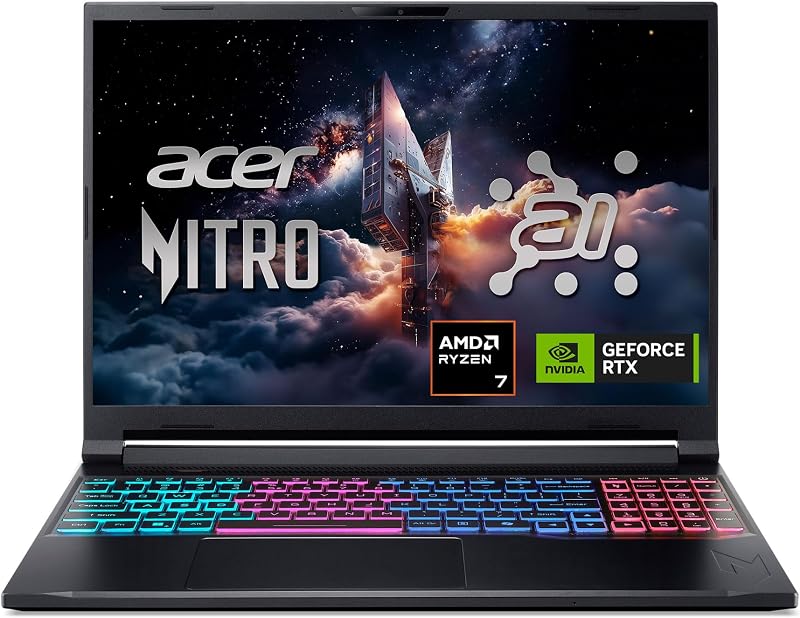
The Acer Nitro V 16S AI features an AMD Ryzen 7 260 processor paired with an NVIDIA GeForce RTX 5060 Laptop GPU, 32GB of DDR5 RAM, and a 1TB Gen 4 SSD. It uses a 16-inch WUXGA IPS display running at 180Hz and supports Wi-Fi 6 networking. Buyers who find an 18-inch chassis overly cumbersome should pick this Acer model to gain a noticeably smaller footprint that slips into standard backpacks while retaining 32GB of operating memory.
msi Cyborg 17 17.3″ FHD

The msi Cyborg 17 17.3″ FHD carries an Intel Core 9-270H processor alongside an NVIDIA GeForce RTX 5060 graphics card and 16GB of DDR5 RAM. It stands out by pairing a 17.3-inch 144Hz FHD display with a generous 2TB storage setup split between an internal 1TB SSD and an included 1TB docking station set. Shoppers who value expansive dual-drive storage management and a translucent black design over extreme 240Hz screen refresh rates will find this an appealing option.
KAIGERR Gaming Laptop

The KAIGERR Gaming Laptop is powered by an AMD Ryzen 7430U processor running up to 4.3GHz, supported by 16GB of DDR4 RAM and a 512GB SSD. It features a 1920P FHD display, a built-in sliding webcam privacy cover, and standard USB 3.2 alongside Type-C connectivity. Everyday computer users who want an affordable solution for general home productivity, basic streaming, and lightweight tasks should consider this model instead of investing in heavy gaming hardware they will not fully utilize.
Final Verdict
The ASUS ROG Strix G18 stands out as a purpose-built desktop replacement that prioritizes visual scale, high frame rates, and deep multi-threaded performance. By combining an 18-inch 240Hz Nebula Display with the raw muscle of the Intel Core Ultra 9 275HX and NVIDIA GeForce RTX 5070, ASUS has crafted a machine that handles modern gaming libraries and multi-application workflows with composure. The 32 GB of DDR5 memory and 1 TB PCIe Gen4 NVMe drive provide plenty of operating headroom right out of the box, ensuring that you do not need to perform immediate hardware upgrades to enjoy modern software.
Nevertheless, prospective buyers must be completely clear about the physical trade-offs involved. This is a substantial laptop engineered to stay on a sturdy desk, tethered to its power supply, rather than accompanying you on casual daily coffee shop visits. If you are seeking a self-contained gaming station that gives you expansive screen real estate, reliable thermal dissipation, and top-tier computing power without the clutter of external monitors, the ASUS ROG Strix G18 delivers on every practical promise.
FAQ
What processor powers the ASUS ROG Strix G18?
The system is powered by the Intel Core Ultra 9 275HX processor, which features 24 cores, a turbo boost frequency reaching up to 5.4 GHz, 36MB of Intel Smart Cache, and an Intel AI Boost NPU capable of up to 13 TOPS.
What are the key specifications of the display panel?
This laptop incorporates an 18-inch 2.5K ROG Nebula Display running at a native resolution of 2560 x 1600 pixels in a 16:10 aspect ratio. It offers a 240Hz refresh rate, a 3ms response time, 500 nits of peak brightness, and an anti-glare screen treatment.
How much memory and storage are included out of the box?
The machine arrives configured with 32 GB of DDR5 RAM operating at 5600MHz alongside a 1 TB PCIe Gen4 NVMe M.2 solid-state drive for operating system and software storage.
What ports are available for connecting external displays?
The listing outlines video connectivity options including HDMI, DisplayPort, and Thunderbolt, enabling straightforward connections to external computer monitors or high-bandwidth docks.
Does the ASUS ROG Strix G18 support modern Wi-Fi standards?
Yes, the notebook is equipped with triple-band Wi-Fi 7 (802.11be) wireless technology, providing rapid data transmission speeds and low network latency when connected to compatible Wi-Fi 7 networking equipment.