As Amazon Associates, we earn from qualifying purchases. This means we may receive a small commission at no extra cost to you if you click through and make a purchase.
Managing everyday bookkeeping, handling client billing, and balancing accounts are fundamental operational tasks, and the QuickBooks Desktop Pro license provides a standalone, one-time purchase path for operators who want local accounting without recurring software charges. Listed as a digital download for Windows with a single-user capacity, this package delivers financial tracking, invoicing tools, and reporting utilities without binding you to monthly subscription agreements. Our verdict is that this listing provides a viable route to an offline bookkeeping hub for solo proprietors, provided you understand the specific communication steps required to receive your key from the third-party merchant.
This package suits solo bookkeepers, independent contractors, and small firm operators who handle their own books and prefer storing accounting data directly on a local workstation. If you need a reliable desktop interface to handle everyday invoicing, track outgoing bills, and organize balance sheets without recurring overhead, this one-user setup fits those day-to-day requirements nicely. However, multi-user teams requiring simultaneous ledger access, operations seeking integrated cloud payroll, or businesses that refuse third-party messaging verification workflows should look elsewhere for their financial tools.

![Express Accounts Accounting Software Free [PC Download]](https://m.media-amazon.com/images/I/41kiz1fP83L._SL500_.jpg "Express Accounts Accounting Software Free [PC Download]")

QuickBooks Desktop Pro at a Glance
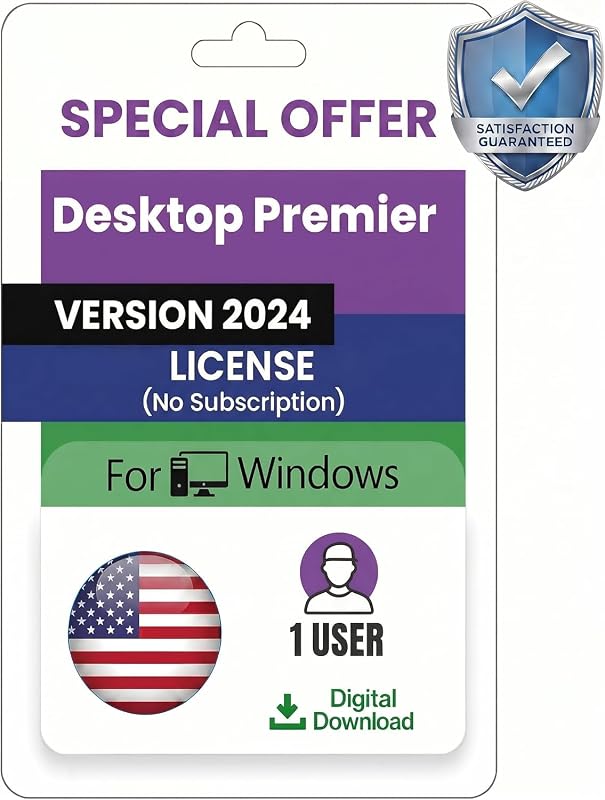
| Attribute | Listing Detail |
|---|---|
| Product Type | Desktop accounting software |
| License Duration | Lifetime license with no recurring fees |
| User Allocation | 1 user |
| Platform Compatibility | Windows PC |
| Delivery Method | Amazon message delivery within 1 to 12 hours |
| Physical Media | No DVD or CD included |
| Brand / Manufacturer | Generic |
| Package Dimensions | 5.75 x 4.45 x 0.79 inches |
| Customer Support | 100% technical support from seller team |
Digital Delivery and Buyer Verification Workflow
When evaluating QuickBooks Desktop digital delivery, prospective buyers need to pay close attention to how the transaction is completed. Unlike traditional boxed software that arrives on your doorstep with physical media, this purchase includes no DVD or physical disc. Instead, the merchant transmits the official product license key directly through the Amazon messaging system. The listing specifies that delivery typically occurs within 1 to 12 hours, but it comes with a strict procedural requirement: the buyer must reply to the seller’s initial message before the license details and download instructions are released.
To locate your message, you must log into your Amazon account, navigate to the account profile area, and open your message center. The seller advises monitoring both your standard inbox and your spam folder to ensure the initial confirmation note is not missed. While some users might find this extra confirmation step unconventional compared to automated instant digital fulfillment, it serves as the seller’s verification checkpoint to confirm receipt and assist with onboarding.
Because the manufacturer is listed as generic rather than the software developer directly, understanding this communication loop is essential. Once you provide the required reply, the seller delivers genuine, original license codes sourced from the official site along with setup guidance. For those managing a busy schedule, accounting for the potential 12-hour fulfillment window is an important consideration when planning financial software installations.
Core Financial Tracking and Invoicing Tools
At the heart of the package is a comprehensive desktop environment designed to centralize everyday bookkeeping tasks. Using QuickBooks Desktop Pro for small business operations allows entrepreneurs to handle basic accounting ledgers without toggling between disconnected spreadsheets. The program provides dedicated modules for tracking income, logging outgoing operational expenses, and monitoring upcoming vendor bills to maintain accurate cash flow records.
Creating professional client invoices is straightforward within the dashboard, enabling users to generate clean statements and bill clients directly from their local records. In addition to basic accounts receivable management, the software generates detailed financial reports that give owners clear visibility into overall business health. The centralized dashboard brings accounts, ledger balances, and pending payments into one organized overview, making month-end reconciliations far less cumbersome for solo operators.
For single-operator businesses that do not require complex enterprise resource planning tools, these core capabilities cover the standard accounting cycle. Whether you are categorizing monthly office supplies, preparing profit and loss statements, or generating summary reports for tax preparation, the built-in utilities handle day-to-day bookkeeping needs reliably on your local hard drive.
System Compatibility and Installation Requirements
Before making a purchase, reviewing the QuickBooks Desktop Pro specs and hardware compatibility is crucial to avoid installation roadblocks. The software is designated strictly for Windows PC environments, meaning it is built to execute natively on Microsoft operating systems. Users running capable Windows machines, such as the lenovo legion 7i 16 (gen 10), will find plenty of local performance overhead to run database-heavy accounting files without stutter or delays.
Navigating the QuickBooks Desktop Windows setup requires downloading the installer files and applying the provided license key. The listing notes that the product includes 100% technical support from the seller team to guide users through installation and ensure a smooth initial start. However, when considering standard QuickBooks Desktop system requirements, the listing does not specify minimum processor clock speeds, required random access memory, or specific hard drive storage footprints. Buyers should ensure their Windows PC has standard modern computing resources and stable network access for the initial download.
Mac users should take note that native macOS installation is not supported by this specific product release. If your office workspace runs primarily on Apple hardware, such as a desktop like the 2025 imac desktop, you cannot run this executable directly without virtualization software or a dedicated Windows secondary computer. Ensuring platform compatibility beforehand prevents unnecessary troubleshooting during the digital setup process.
Lifetime Ownership versus Subscription Licensing
The most prominent selling point of this software package is the QuickBooks Desktop lifetime license model. Modern accounting software has largely transitioned to recurring software-as-a-service frameworks, which demand continuous monthly or annual payments to maintain access to company files and bookkeeping functions. In contrast, this product is sold as a one-time purchase, granting full ownership of the software license for a single workstation without mandatory renewal schedules.
For solo business owners and freelancers seeking predictable operational overhead, eliminating perpetual software bills is a significant advantage. Once the license is validated, the program remains operational on your computer indefinitely, allowing you to track expenses and print invoices without dreading an annual price hike. The financial predictability of a standalone license appeals directly to operators who simply want their software to work locally year after year.
However, standalone perpetual licenses also come with realistic trade-offs that buyers must understand. While the listing confirms lifetime validity and technical support from the seller team, standalone editions typically do not incorporate ongoing cloud-connected services, automatic bank data syncs, or continuous payroll tax table updates that subscription platforms routinely bundle. Deciding whether the license structure fits your operational rhythm requires weighing upfront permanence against the lack of automated recurring cloud features.
User Capacity and Solo Workflow Limitations
Prospective purchasers must recognize that the QuickBooks Desktop Pro 2024 1 user configuration is engineered strictly for individual operation. The single-user limitation means the software is meant to be installed on one PC and accessed by one operator at a time. It does not include concurrent multi-user database hosting, remote multi-seat collaboration, or team-wide permissions management across a local area network.
For independent contractors, freelancers, and small firm principals, a single-seat license aligns neatly with daily workflow demands. A solo operator rarely needs complicated permission controls or concurrent multi-terminal data entry. Everything remains securely stored on one machine, giving the business owner total control over ledger entries, financial statements, and sensitive tax files.
Conversely, growing firms that employ dedicated in-house bookkeepers alongside operational managers who need simultaneous access to billing screens will quickly outgrow a single-seat installation. If your daily business requires multiple team members entering sales receipts, running payroll, and updating inventory counts at the exact same moment, this standalone 1-user desktop package will prove restrictive. Matching the software’s seat allocation to your immediate staffing reality is critical before committing.
QuickBooks Desktop Pro Pros and Cons
Pros
- One-time purchase lifetime license
- No monthly subscription or renewal fees
- Centralized invoicing and expense tracking
- Fast digital delivery via Amazon message
- Full technical support included
Cons
- Single-user license with no multi-user access
- Requires replying to seller message for delivery
- Compatible with Windows PC only
Check QuickBooks Desktop Pro on Amazon
Who Should Buy the QuickBooks Desktop Pro
Evaluating whether to choose this software comes down to your operating system, your desire to avoid ongoing fees, and your comfort with digital messaging fulfillment. Review the following practical criteria to see if this package matches your workflow.
Buy It If
- You want a one-time purchase desktop accounting system with no recurring monthly subscriptions or renewal fees.
- You operate as an independent contractor, freelancer, or solo small business owner who manages finances on a single Windows PC.
- You need straightforward local tools to track bills, create invoices, monitor business expenses, and generate standard financial reports.
- You are comfortable checking your Amazon message center and replying to the seller to receive your license key within 1 to 12 hours.
Skip It If
- You manage a growing enterprise that requires simultaneous, multi-user network access and collaborative team bookkeeping.
- You operate exclusively on macOS hardware and do not run a secondary Windows computing environment.
- You expect automated instant key delivery without having to communicate back and forth with a third-party merchant.
QuickBooks Desktop Pro Alternatives Worth a Look
If you are exploring other bookkeeping solutions before making a final decision, there are compelling options ranging from basic cost-free utilities to full-featured corporate accounting suites.
Express Accounts Accounting Software Free

For solo entrepreneurs who want straightforward desktop bookkeeping without spending money, Express Accounts Accounting Software Free provides a basic PC download designed for managing core financial ledgers. This software suits micro-businesses and hobbyists whose accounting needs are modest and do not justify a commercial desktop package. It delivers essential bookkeeping tools without the messaging-based licensing workflow required by third-party desktop sellers.
SAGE 50 Premium Accounting 2026

Business owners who need an official subscription platform with advanced managerial controls should examine SAGE 50 Premium Accounting 2026. This package includes a 1-user, 1-year subscription featuring comprehensive bookkeeping, invoicing, job costing, and detailed financial management utilities. In a quickbooks desktop vs sage 50 comparison, Sage 50 is built for commercial operations that require structured job costing and ongoing subscription support rather than a static perpetual license.
Final Verdict
The QuickBooks Desktop Pro standalone license offers a clear, practical solution for solo entrepreneurs who want local desktop financial management without recurring monthly subscription fees. By combining comprehensive expense tracking, professional invoicing tools, and deep financial reporting into a unified Windows dashboard, the software handles the everyday bookkeeping requirements of freelancers and small business operators. Its perpetual lifetime validity gives budget-conscious business owners welcome certainty in their administrative software costs.
At the same time, prospective buyers must enter the purchase with realistic expectations regarding delivery and multi-user scaling. The Amazon messaging fulfillment process requires buyers to actively respond to the seller’s initial message before receiving the license key within a 1 to 12-hour window. If you run a Windows-based business, operate as a solo user, and want to keep your bookkeeping files stored locally on your own terms, this standalone 1-user package delivers dependable everyday utility.
FAQ
How is the software license delivered after purchase?
The license key and installation instructions are delivered digitally via Amazon message within 1 to 12 hours. To access the key, you must log into your Amazon account, check your message center, and respond to the seller’s initial confirmation inquiry.
Does this software require an ongoing subscription or annual renewal?
No, the product listing specifies a lifetime license with a one-time purchase structure. There are no monthly subscription fees or mandatory annual renewal charges required to keep using the desktop software.
Can more than one person use this software simultaneously?
No, this particular product is configured strictly as a 1-user license. It is designed for individual operation on a single Windows PC and does not support simultaneous multi-user network access.
What operating systems are supported by this license?
The software is designed specifically for Windows PC computers. The listing does not specify native macOS support, so Mac users would require a Windows environment or virtual machine to run the software.
Is QuickBooks Desktop Pro worth it for a small business?
Deciding whether QuickBooks Desktop Pro is worth it depends on your operational needs. For solo contractors and small businesses seeking local bookkeeping, invoicing, and expense reporting without recurring subscription bills, it offers practical everyday value, provided you follow the seller’s message verification process.
What should I do if I do not receive my license key immediately?
Because delivery takes between 1 and 12 hours and requires buyer confirmation, check your Amazon message center and spam folder. You must reply to the seller’s initial message first, after which the technical team sends the genuine license codes and download details.