
As Amazon Associates, we earn from qualifying purchases. This means we may receive a small commission at no extra cost to you if you click through and make a purchase.
The Apple iMac M4 represents the latest evolution of the modern all-in-one computer, combining a 10-core CPU, a 10-core GPU, and an ultra-slim chassis built around a vibrant 24-inch Retina display. Engineered to leverage personal computing power through Apple Intelligence, this generation is designed to streamline daily productivity, media multitasking, and family use without requiring a clutter of peripheral cables. If you want an elegant, capable desktop that turns on and works instantly with minimal footprint, this system delivers an exceptionally polished computing experience.
This desktop is an ideal match for remote professionals, household command centers, students, and everyday multitaskers who prioritize display fidelity, quiet operation, and tight mobile integration. On the other hand, heavy workstation operators who require massive local drive expansion, modular component access, or larger 27-inch or 32-inch built-in panels will likely want to explore alternative desktop form factors instead of committing to this all-in-one build.




Apple iMac M4 at a Glance
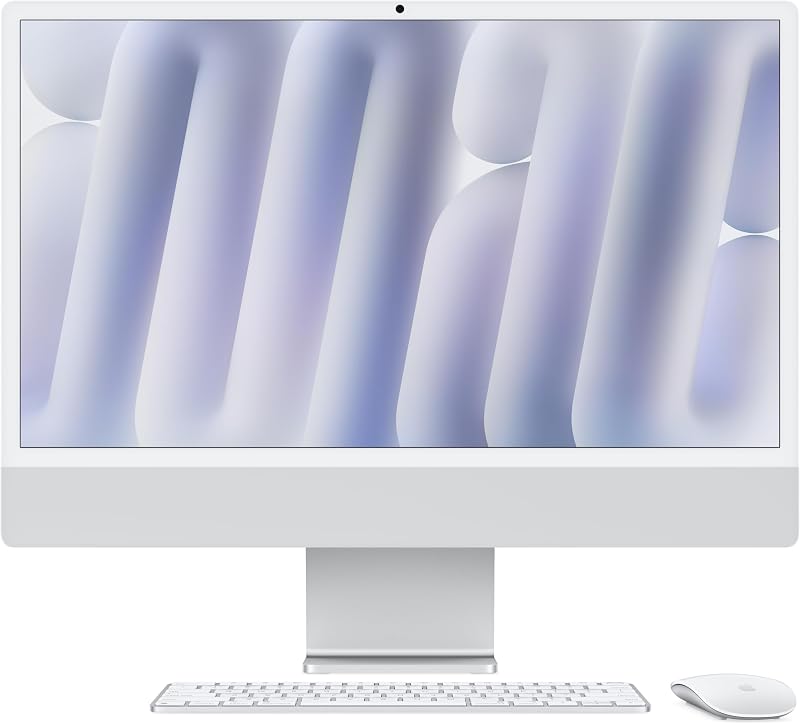
| Feature | Specification |
|---|---|
| Processor | Apple M4 chip (10-core CPU, 10-core GPU) |
| Unified Memory | 24GB unified memory (configurations also offer 16GB) |
| Internal Storage | 512GB SSD (configurations also offer 256GB) |
| Display Panel | 24-inch 4.5K Retina display (500 nits brightness, 1 billion colors) |
| Built-in Camera | 12MP Center Stage camera with Desk View and 1080p HD video recording |
| Audio System | Six-speaker sound system with Spatial Audio, three studio-quality microphones |
| External Ports | Up to four Thunderbolt 4 ports |
| Wireless Technology | Wi-Fi 6E and Bluetooth 5.3 |
| Physical Dimensions | 21.54 x 5.79 x 18.15 inches; 9.77 pounds |
Processing Power and Everyday Performance
The core appeal of the 2025 imac desktop lies in the transition to the updated M4 architecture. With a balanced arrangement of performance and efficiency cores inside its 10-core CPU alongside a 10-core integrated GPU, the machine processes daily applications with instantaneous response times. Whether you are running complex spreadsheet models, organizing hundreds of raw photos, or streaming high-resolution media while keeping dozens of browser tabs active, the hardware prevents stuttering or interface lag.
Looking closely at the apple imac m4 specs, the inclusion of 24GB of unified memory provides a massive buffer for heavy workflows. Unlike traditional setups where system memory and graphics memory are separated, unified memory allows the CPU, GPU, and Neural Engine to access the same data pool instantly. This architecture particularly benefits demanding creative suites like Adobe Creative Cloud and standard productivity suites like Microsoft 365, allowing users to jump between photo retouching, video rendering, and document editing without experiencing application slowdowns.
A central feature of this architecture is how it supports the apple intelligence imac desktop experience. Designed around on-device intelligence and enhanced data privacy, the system assists with language tools, text summarization, image generation, and workflow automation. If you are comparing this setup against older hardware like an apple imac desktop computer 2024, the jump in Neural Engine processing ensures that AI-assisted productivity tools run locally on the machine without transmitting your personal desktop actions to third-party servers.
Display Quality and Visual Workspace
The m4 imac 24 inch display remains one of the most attractive visual panels available in an integrated consumer computer. Boasting a 4.5K resolution, 500 nits of brightness, and support for up to one billion colors, the screen produces clean text rendering, crisp photographic detail, and vibrant saturation. For home office users who spend hours reading text, editing documents, or adjusting digital media, the pixel density significantly reduces eye strain compared to standard high-definition panels.
Despite its visual fidelity, some users who previously worked on larger setups like an imac 27 inch 2020 might find the 24-inch diagonal width somewhat compact for extreme multitasking. However, the high pixel density allows you to run multiple application windows side by side without losing clarity. The panel delivers wide viewing angles and uniform color accuracy across the entire glass surface, making it an excellent canvas for family photo archives, digital design projects, and daily media streaming.
If your daily workflow demands an expanded workspace, the internal graphics system supports driving up to two external 6K displays simultaneously through its rear data connections. This capability allows users to turn the compact desktop into the command hub of a multi-monitor workstation, pairing the built-in 4.5K Retina display with dedicated secondary panels for timeline editing, continuous communication dashboards, or reference materials.
Audio and Video Integration for Remote Communication
Video meetings and remote family calls have become fundamental daily tasks, and the imac m4 for home office environments addresses these needs directly through upgraded multimedia hardware. The centerpiece of this setup is the imac center stage camera, which utilizes a 12MP sensor combined with an advanced image signal processor. The camera captures clean 1080p HD video and employs computational adjustments to keep exposure balanced even when backlighting from an office window shifts throughout the day.
The Center Stage feature actively keeps you centered in the video frame if you shift in your chair or stand up during a presentation. Additionally, the camera supports Desk View, an intelligent visual mode that uses wide-angle lens processing to show an overhead view of your physical desktop surface while simultaneously maintaining a view of your face. This tool is especially helpful for teachers presenting hand-drawn diagrams, artists showing sketches, or team leaders demonstrating physical prototypes during remote meetings.
Audio performance is equally refined thanks to the built-in three-microphone array and six-speaker sound system. The studio-quality microphones use directional beamforming to isolate your voice while suppressing background clatter from keyboards or room reverberation. When listening to conference calls, music, or movies, the integrated six-speaker array delivers surprisingly deep bass and wide stereo separation, complete with Spatial Audio support that fills the room without requiring dedicated external desktop speakers.
Ports, Peripheral Connectivity, and Workspace Integration
The imac m4 ports connectivity configuration focuses heavily on modern high-speed data standards. Equipped with up to four Thunderbolt 4 ports, the computer supports rapid data transfers to external solid-state drives, connection to high-resolution external monitors, and high-speed network docking solutions. While legacy USB-A devices will require external adapter hubs, the Thunderbolt ports provide the bandwidth necessary for modern professional accessories and high-speed storage arrays.
Wireless connectivity is handled by integrated Wi-Fi 6E and Bluetooth 5.3, ensuring low-latency connections to modern wireless routers, wireless audio gear, and desktop input devices. The compact physical dimensions of 21.54 inches wide, 18.15 inches tall, and only 5.79 inches deep at the base make it easy to place on shallow writing desks, kitchen counters, or dedicated home office tables without encroaching on valuable work area. For users who prefer a tiny desktop box paired with their own external screens, comparing this form factor against options like a mac mini m5 pro 2026 highlights how the all-in-one structure eliminates power bricks and video cables.
Ecosystem synergy remains one of the strongest practical benefits of this desktop. Features like iPhone Mirroring allow you to view and interact directly with your mobile device screen right on the Mac desktop without picking up your phone. Universal clipboard functions let you copy text or images on an iPhone and paste them immediately into a desktop document, while Messages and FaceTime synchronize seamlessly across the local network to keep all your family or business communications centralized.
Apple iMac M4 Pros and Cons
Pros
- Vibrant 24-inch 4.5K Retina display with 500 nits
- Fast 10-core CPU and 10-core GPU M4 silicon
- 12MP Center Stage camera with Desk View support
- Six-speaker sound system with Spatial Audio
- Supports up to two external 6K displays
- Generous 24GB unified memory for heavy multitasking
Cons
- Screen size limited strictly to 24 inches
- Internal memory and SSD cannot be upgraded later
- No legacy USB-A ports without external adapters
Who Should Buy the Apple iMac M4
Buy It If
- You want an all-in-one home or office setup with a high-resolution 4.5K Retina screen and no messy cable bundles.
- You conduct frequent video calls and value an intelligent 12MP Center Stage camera with Desk View and studio microphones.
- You are heavily invested in the Apple ecosystem and want practical features like iPhone Mirroring and cross-device clipboard tools.
- You need the imac m4 everyday performance to smoothly run office productivity, creative photo suites, and multitasking tabs without lag.
Skip It If
- You need a massive 27-inch or 32-inch built-in display panel for expansive timeline editing without external monitors.
- You require internal hardware expansion slots to upgrade system RAM or internal SSD storage after purchase.
- Your primary computing focus is dedicated PC gaming requiring discrete graphics cards and native Windows environments.
Apple iMac M4 Alternatives Worth a Look
If you are exploring all-in-one desktop computers but want to consider different operating systems, screen dimensions, or budget tiers, several viable alternatives cater to different workspace requirements.
Lenovo 24″ FHD All-in-One Desktop

The Lenovo 24″ FHD All-in-One Desktop provides a functional 24-inch workspace powered by an Intel processor, 16GB of RAM, and a 256GB PCIe SSD running Windows 11 Pro. It features HDMI connectivity, Wi-Fi 6, Bluetooth 5.2, and an included wireless keyboard and mouse, making it a dependable choice for business operators who rely strictly on Windows-based enterprise software.
HP 21.5″ FHD All-in-One Desktop

For shoppers seeking a smaller footprint, the HP 21.5″ FHD All-in-One Desktop features a 21.5-inch Full HD screen driven by a quad-core Intel N100 processor, 8GB of RAM, and 384GB of storage. This unit comes bundled with an 8-in-1 docking hub, keyboard, and mouse on Windows 11, serving as a sensible option for light web browsing and tight study spaces.
FHD AIO Display

The FHD AIO Display offers a 23.8-inch Full HD setup powered by an Intel 4-core processor, 8GB of RAM, and a 256GB SSD. Configured with Wi-Fi 6 and Windows 11, it suits users who need an uncomplicated home office station dedicated to general word processing, homework, and day-to-day digital organization.
Final Verdict
When considering is the m4 imac worth it, the answer depends on what you value most in a desktop setup. The combination of the M4 silicon, 24GB of unified memory, and a 512GB SSD inside a remarkably thin design makes this all-in-one a standout for everyday productivity and family use. The 4.5K Retina display offers brilliant clarity, while the upgraded camera and microphone system transform remote communication into an effortless experience.
While the non-upgradable hardware and 24-inch limitation mean serious workstation power users may look elsewhere, the Apple iMac M4 excels at its intended mission. It provides a cohesive, aesthetically pleasing, and remarkably fast desktop solution that integrates seamlessly with mobile devices, making it an outstanding investment for any modern household or professional home office.
FAQ
Is the Apple iMac M4 good for remote work and video conferencing?
Yes. The desktop is particularly well equipped for remote work due to its 12MP Center Stage camera with Desk View support, studio-quality three-microphone array with beamforming, and six-speaker sound system with Spatial Audio, all of which provide clear video and crisp sound on conference calls.
How many external displays can the Apple iMac M4 connect to?
The Apple iMac M4 supports connecting up to two external 6K displays simultaneously through its high-speed Thunderbolt 4 ports, allowing you to expand your visual workspace beyond the built-in 24-inch Retina display.
What is Apple Intelligence on the Apple iMac M4?
Apple Intelligence is a personal intelligence system integrated into macOS that assists with writing, task automation, and communication. It utilizes the M4 chip and Neural Engine to process tasks on-device, maintaining privacy protections so personal data remains secure.
Can you upgrade the internal storage or unified memory later?
No. The unified memory and SSD storage are permanently integrated into the Apple M4 chip architecture, meaning you cannot upgrade the internal hardware components after purchasing the machine.
Does the Apple iMac M4 support iPhone Mirroring?
Yes. When paired with a compatible iPhone on macOS, the iMac allows you to view and control your phone directly from the desktop screen, making it easy to interact with mobile apps, copy content across devices, and respond to notifications.


