As Amazon Associates, we earn from qualifying purchases. This means we may receive a small commission at no extra cost to you if you click through and make a purchase.
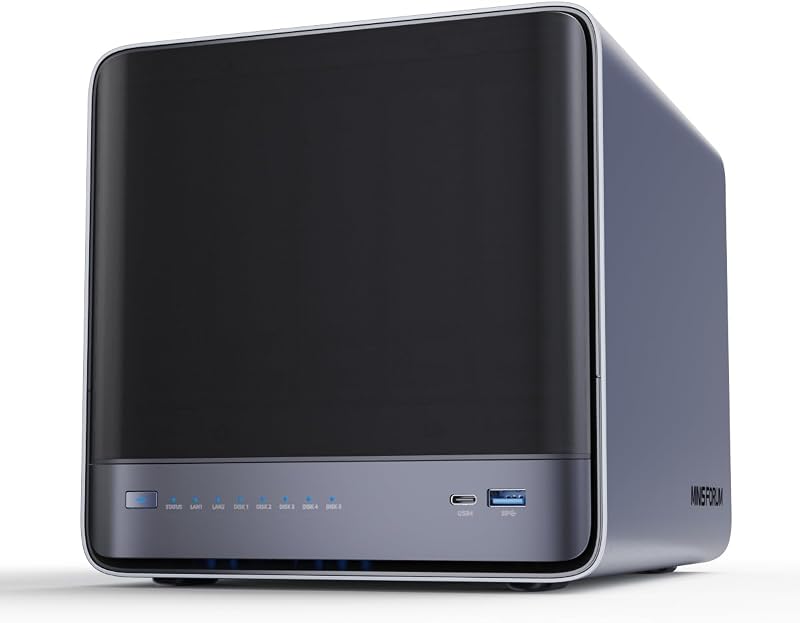
The Minisforum N5 Air is a hybrid network-attached storage solution that merges the processing power of a high-performance mini PC with the serious expandability of a multi-bay storage appliance. Built around an 8-core AMD Ryzen 7 255 processor and offering five SATA drive bays, this compact unit challenges the status quo of sluggish, entry-level network appliances by bringing true desktop-class multitasking to local network storage. Our comprehensive Minisforum N5 Air review finds that this hybrid machine delivers an exceptional balance of brute computing throughput, flexible storage tiers, and high-speed multi-gigabit networking inside an upright desktop footprint.
This compact system is ideally engineered for creative professionals, homelab enthusiasts, and small workgroups who demand fast local file indexing, multi-stream media transcoding, and containerized workflows without running multiple separate machines. If you have been following compact systems like the minisforum um870 slim for daily computing, this unit brings that same high-density philosophy to multi-bay storage. However, everyday shoppers who simply want an automated plug-and-play target for phone photos or standard document sync without managing disk pools or RAID arrays should look elsewhere, as its advanced hardware will prove unnecessarily complex for basic file backups.


Minisforum N5 Air at a Glance
| Component / Feature | Manufacturer Specification |
|---|---|
| Processor | AMD Ryzen 7 255 (8 cores, 16 threads, up to 4.9GHz) |
| Graphics Architecture | AMD Radeon 780M (12 graphics cores, 2600MHz) |
| Memory Capacity | 2x DDR5 SO-DIMM slots (expandable up to 96GB total) |
| SATA Storage Bays | 5x 3.5-inch SATA hard drive slots (up to 174TB capacity) |
| Solid-State Slots | 3x M.2 NVMe SSD slots (64GB OS SSD pre-installed in one slot) |
| Network Connectivity | 1x 10GbE LAN + 1x 5GbE LAN (supports link aggregation up to 15Gbps) |
| Video Output Ports | 1x HDMI (8K@60Hz/4K@144Hz) + 2x USB4 (8K@60Hz/4K@144Hz) |
| High-Speed Expansion | PCIe x16 slot, native OCuLink port (PCIe 4.0 x4, 64Gbps) |
| Operating System | MinisCloud OS pre-installed on dedicated 64GB SSD |
| Cooling and Form Factor | Mini-ITX frame (199x202x252mm) with dual 9025 axial cooling fans |
Processing Power and Hardware Architecture
Under the hood, the Minisforum N5 Air Ryzen 7 255 configuration instantly separates this unit from traditional network appliances that rely on low-wattage, dual-core or quad-core mobile processors. Featuring 8 physical cores and 16 threads capable of boosting up to 4.9GHz, this chip delivers authentic desktop-grade horsepower. Paired with integrated AMD Radeon 780M graphics containing 12 compute cores running at 2600MHz, the system tackles demanding tasks such as real-time audio and video decoding, high-throughput file indexing, and concurrent multi-user database queries without stuttering. Enthusiasts tracking high-performance multi-drive platforms, such as the minisforum n5 pro ai nas, will recognize the substantial utility of bringing modern x86 silicon directly into local storage enclosures.
System memory flexibility is another standout element highlighted in the Minisforum N5 Air specs. Minisforum equipped the slide-out motherboard with two DDR5 SO-DIMM slots supporting up to 96GB of total memory, or up to 48GB per module. Because the system utilizes standard memory modules rather than soldered onboard chips, users can upgrade their memory as workload requirements grow. Having access to high-bandwidth DDR5 RAM is crucial for virtualization tasks, running multiple Docker containers simultaneously, and feeding memory-hungry file systems that rely heavily on RAM-based read caching.
Beyond traditional processing components, the architecture provides dedicated high-speed expansion that rare competitors offer in this form factor. The chassis incorporates a PCIe x16 slot for installing discrete graphics cards or auxiliary high-speed network interface cards. Furthermore, the motherboard features an external OCuLink interface operating at PCIe 4.0 x4 bandwidth (up to 64Gbps). This port allows direct connectivity to external GPU docks or dedicated AI hardware accelerators, turning the unit into a localized machine learning or workstation platform, though the listing explicitly notes that this OCuLink interface does not support hot plugging.
Storage Capacity and RAID Configuration Options
The defining highlight of the Minisforum N5 Air NAS is its expansive drive accommodation, packing five 3.5-inch SATA hard drive bays into an upright mini-ITX enclosure. When populated with high-capacity hard drives, the Minisforum N5 Air storage capacity reaches up to an impressive 174TB. This massive volume makes it well suited for extensive media archives, raw 4K and 8K video libraries, virtual disk images, and scheduled cross-network workstation backups. The five drive trays slide securely into a central backplane that is actively cooled by internal axial fans to maintain drive health over continuous operational cycles.
In addition to mechanical disk bays, the system incorporates three M.2 NVMe solid-state drive slots. These high-speed lanes can be configured for primary high-performance data pools or allocated as read and write cache drives to accelerate the responsiveness of the mechanical SATA array. To protect against hardware failure and optimize performance, the system supports multiple RAID configurations. Users can implement RAID 0 for raw performance across striped disks, RAID 1 for mirrored redundancy, or RAID 5 and RaidZ1 to achieve balanced data security with parity protection across multiple drives.
Prospective builders should note an important layout detail regarding the solid-state storage configuration during initial setup. Minisforum ships the unit with a 64GB SSD pre-installed in one of the three M.2 slots to house the primary operating system. If your deployment plan requires utilizing all three M.2 slots for high-capacity NVMe drives, the manufacturer indicates that you must remove the 64GB system disk and deploy your operating system of choice using an internal USB flash drive connected to the chassis’s internal USB port.
High-Speed Networking and Connectivity
A massive storage pool requires significant network bandwidth to prevent transfer bottlenecks, and the Minisforum N5 Air 10GbE implementation ensures high-speed data flow across your local environment. The unit comes equipped with dual multi-gigabit LAN ports: one 10-gigabit Ethernet port (10GbE) and one 5-gigabit Ethernet port (5GbE). Minisforum supports network link aggregation across these two physical interfaces, achieving theoretical combined transmission bandwidth of up to 15Gbps. This capability allows multiple workstations to ingest large video files or pull project assets simultaneously without saturating the local pipe.
External peripheral connectivity mirrors that of a fully equipped modern desktop workstation rather than a stripped-down network bridge. The chassis includes two USB4 ports operating at transfer speeds of up to 20Gbps. Combined with a dedicated HDMI port, the N5 Air supports triple display outputs capable of driving visual resolutions up to 8K at 60Hz or 4K at 144Hz. This monitor support means the unit can comfortably serve as a primary desktop workstation or video editing station rather than spending its entire lifecycle tucked away inside a server cabinet.
Rounding out the interface selection are standard USB connectivity options, Wi-Fi, Bluetooth, and built-in password protection features for administrative safety. Whether you connect the device directly to high-speed switches or manage it as an edge-computing workstation on a creative professional’s desk, the array of physical ports ensures high-bandwidth connectivity without requiring aftermarket expansion dongles.
MinisCloud OS and Everyday Software Usability
Operating out of the box, the system runs on MinisCloud OS, a proprietary software environment designed to combine advanced storage features with straightforward management across Windows, macOS, iOS, and Android platforms. MinisCloud OS provides built-in support for ZFS snapshots and LZ4 compression, enabling fast point-in-time recovery against accidental deletions or ransomware while optimizing drive capacity on compressible data sets. Multi-user isolation features allow teams to maintain secure private folders, while one-click remote access simplifies accessing internal assets outside the local area network.
For smart media management and homelab services, the software environment includes AI photo albums that automatically catalog family or studio photo archives. More importantly, native Docker application support allows users to deploy hundreds of self-hosted container applications directly on the server, ranging from media distribution servers and home automation hubs to local development stacks. When evaluating the Minisforum N5 Air for home server deployments, having integrated container management backed by an 8-core CPU offers massive practical utility.
Those with custom operating system preferences are not trapped inside a closed ecosystem. When planning the Minisforum N5 Air setup, users can easily boot alternative x86 operating systems such as TrueNAS, Unraid, Proxmox, or standard Linux distributions. Enthusiasts exploring high-performance small-form-factor servers like the ai max+ 395 will appreciate that the open x86 architecture here allows complete freedom in tailoring your software stack to your exact infrastructure requirements.
Thermal Management and Modular Maintenance
Managing the heat generated by five spinning hard drives, high-speed NVMe drives, and an 8-core, 16-thread processor inside a compact 199 by 202 by 252 millimeter mini-ITX frame requires intentional thermal planning. Minisforum addresses this challenge through an innovative modular layout centered around a slide-out motherboard tray. By releasing the inner chassis assembly, users can instantly access the DDR5 SO-DIMM slots and M.2 connectors without disassembling the primary drive bays, making memory upgrades and component inspection remarkably straightforward.
Continuous operational cooling is handled by dual 9025 large axial fans positioned to draw continuous air across the five drive bays. Mechanical hard drives generate noticeable heat under sustained multi-user read and write cycles, and maintaining cool ambient temperatures inside the drive cages is critical for long-term component reliability. The dual-fan array maintains a steady cross-breeze across both the storage backplane and the internal PCIe motherboard components, preventing thermal throttling during prolonged file indexing or heavy parity builds.
Minisforum N5 Air Pros and Cons
Pros
- AMD Ryzen 7 255 with 16 threads
- Five SATA bays supporting up to 174TB
- High-speed 10GbE and 5GbE networking
- DDR5 memory expandable up to 96GB
- Native OCuLink and PCIe x16 expansion
- Triple 8K display output support
Cons
- Pre-installed OS occupies one M.2 slot
- OCuLink interface lacks hot-plug support
- Overkill for basic, single-user file storage
Check Minisforum N5 Air on Amazon
Who Should Buy the Minisforum N5 Air
The N5 Air bridges the gap between specialized network storage enclosures and multi-core desktop workstations. Consider these specific criteria to determine whether this machine fits your computing workflow.
Buy It If
- You need an all-in-one system combining five 3.5-inch drive bays (up to 174TB) with an 8-core Ryzen processor for heavy virtualization, local containers, and media transcoding.
- Your local network features 10GbE or 5GbE switches and you want link aggregation speeds reaching up to 15Gbps for multi-user file workflows.
- You require modular memory expansion up to 96GB of DDR5 RAM alongside native OCuLink or PCIe x16 expansion for auxiliary hardware or AI accelerators.
- You want triple 8K display outputs so your storage appliance can double directly as an editing workstation or administrative command center.
Skip It If
- You only need a simple, low-power two-bay backup target for routine family photos and office documents without advanced virtualization.
- You prefer an entry-level, locked-down appliance with zero configuration requirements and no need for high-speed multi-gigabit networking.
- You do not have a use case for M.2 SSD caching, multi-user isolation, or heavy background container applications.
Minisforum N5 Air Alternatives Worth a Look
If the 5-bay form factor or specialized server architecture of the N5 Air does not align with your specific workspace or storage needs, consider these compact desktop alternatives from the same category search.
KAMRUI Pinova P2 Mini PC

The KAMRUI Pinova P2 Mini PC is a compact general-purpose desktop computer powered by an AMD Ryzen 7330U processor featuring 4 cores and 8 threads with clock speeds up to 4.3GHz. It comes equipped with 16GB of RAM, a 256GB SSD, Zen 3 architecture, an 8MB L3 smart cache, and support for triple 4K displays.
Buyers should choose the Pinova P2 over the N5 Air if they are looking for an everyday compact computer for office productivity, web tasks, and standard home media consumption rather than a multi-terabyte storage server with 3.5-inch drive bays.
GMKtec Mini PC

The GMKtec Mini PC is an office-oriented small-form-factor desktop featuring an Intel Core i3-10110U processor, 16GB of dual-channel DDR4 RAM, and a 512GB storage drive. It includes dual HDMI ports for 4K displays, USB 3.2 connectivity, Wi-Fi 6, Bluetooth 5.2, and a 2.5GbE network interface.
This model is the preferable choice for users who need a dual-screen micro desktop for business tasks with reliable 2.5GbE networking without the physical bulk, drive bays, or thermal complexity of a 5-bay network storage enclosure.
16GB RAM 512GB SSD

The 16GB RAM 512GB SSD mini desktop computer from BOSGAME features an AMD Ryzen 5300U processor, 16GB of system memory, a 512GB SSD, and Windows 11 Pro. It supports triple displays and includes dual LAN ports alongside Wi-Fi 5 and Bluetooth 5.0 wireless capabilities.
Users should pick this unit over the N5 Air if they are searching for a compact, dual-LAN mini computer to serve as a lightweight network router, firewall, or basic home server that does not require internal 3.5-inch mechanical drive bays.
Final Verdict
The Minisforum N5 Air establishes a compelling new standard for hybrid desktop servers, effectively eliminating the historic compromise between slow network storage enclosures and separate desktop workstations. By pairing an 8-core AMD Ryzen 7 255 processor and up to 96GB of DDR5 memory with five 3.5-inch SATA bays supporting 174TB of capacity, Minisforum has built a powerhouse capable of handling heavy local processing and massive data storage simultaneously. Add in dual 10GbE and 5GbE networking, triple 8K display capability, and an OCuLink expansion port, and the hardware versatility is undeniable.
While mastering the storage layout requires attention during initial setup—particularly if you choose to repurpose the operating system M.2 slot for additional high-speed solid-state storage—the slide-out modular motherboard and robust dual-fan cooling make ongoing maintenance practical. For power users, content creators, and homelab administrators asking whether the Minisforum N5 Air is worth it, this compact powerhouse delivers exceptional versatility and capability that easily justifies a central spot on your desk or server shelf.
FAQ
How much total storage capacity does the Minisforum N5 Air support?
The Minisforum N5 Air supports up to 174TB of total digital storage across its five 3.5-inch SATA hard drive bays. In addition to mechanical drives, the system features three M.2 NVMe SSD slots for high-speed storage pools or caching, with one slot pre-populated from the factory by a 64GB operating system disk.
What operating system comes pre-installed on the device?
The device comes pre-installed with MinisCloud OS on an internal 64GB SSD. MinisCloud OS is designed for easy multi-platform management across Windows, macOS, iOS, and Android, and features built-in ZFS snapshots, LZ4 compression, multi-user isolation, AI photo album management, and native Docker container support.
Can I replace MinisCloud OS with a third-party operating system?
Yes, third-party operating systems are supported on the x86 hardware. According to the manufacturer listing, if you wish to free up all three M.2 NVMe slots for storage, you can remove the default 64GB system disk and install an operating system of your choice via a USB flash drive connected to the chassis’s internal USB port.
What network transfer speeds are possible with the dual LAN ports?
The N5 Air features one 10GbE LAN port and one 5GbE LAN port. The system supports network link aggregation across both ports, allowing combined network transfer speeds of up to 15Gbps when connected to compatible high-speed network switches and multi-client environments.
What is the purpose of the OCuLink interface on the Minisforum N5 Air?
The native OCuLink port provides a PCIe 4.0 x4 connection offering up to 64Gbps of transfer bandwidth. It allows users to connect external PCI Express devices, such as external graphics cards (eGPUs) or specialized AI computing accelerators, directly to the system. Note that the OCuLink connection does not support hot plugging and devices must be connected while powered down.