
As Amazon Associates, we earn from qualifying purchases. This means we may receive a small commission at no extra cost to you if you click through and make a purchase.
The Lenovo 300e Chromebook 2nd Gen is a compact laptop designed for fundamental schoolwork, everyday web browsing, and simple digital tasks. Built in a sturdy clamshell chassis running Google Chrome OS, this device brings together an Intel Celeron N4020 processor, 4GB of RAM, an 11.6-inch high-definition screen, and an interactive touch panel. The one-line verdict is clear: it serves dependably as a basic educational laptop for younger learners, but its modest processor and 32GB solid-state storage require realistic expectations.
This small portable suits elementary and middle school students who spend most of their time in web browsers, Google Classroom, and online cloud documents. Because it relies on lightweight cloud tools, it gives households an uncomplicated, low-maintenance terminal without the hassle of traditional desktop systems. However, users needing to store large local media libraries, run heavy software, or manage dozens of open tabs will quickly hit performance walls, making a more expansive machine like the lenovo ideapad slim 3 chromebook a more capable alternative.


Lenovo 300e Chromebook 2nd Gen at a Glance

| Feature | Specification |
|---|---|
| Display Size | 11.6 inches |
| Touchscreen Support | Yes |
| Processor | Intel Celeron N4020 (1.1 GHz) |
| Graphics Coprocessor | Intel UHD Graphics 600 (Integrated) |
| System Memory | 4GB RAM |
| Internal Storage | 32GB SSD (Serial ATA) |
| Operating System | Chrome OS |
| Form Factor | Clamshell |
| Condition | Refurbished (Amazon Renewed) |
| Peripheral Compatibility | External displays, keyboards, mice, USB storage, printers, Wi-Fi |
Processing Power and Everyday Performance
Understanding the hardware helps set practical expectations for overall Lenovo 300e Chromebook performance during daily study sessions. At the heart of the laptop sits the Lenovo 300e Celeron N4020 dual-core processor running at 1.1GHz, backed by integrated Intel UHD Graphics 600 and 4GB of RAM. Within the lightweight Chrome OS environment, this setup handles single-window web browsing, Google Classroom assignments, web portals, and streaming video lectures with predictable smoothness, avoiding the heavy background overhead of traditional operating systems.
However, running multiple demanding browser tabs exposes the limits of this entry-level chip. The 4GB memory allocation allows a student to keep an active Google Docs tab, a research page, and an educational reference portal open together without trouble. Opening extensive background tabs or heavy web media causes tabs to reload and produces noticeable stutter. Learners with heavier workloads or older students managing intensive research will find a substantially higher multitasking ceiling on advanced hardware like the lenovo chromebook plus 2-in-1 gen 10.
Graphics rendering relies on the integrated Intel UHD Graphics 600 coprocessor, which capably decodes web video, runs interactive educational software, and outputs to external displays. This graphics hardware is built strictly for standard user interfaces, media playback, and basic educational animations rather than advanced 3D gaming. For daily school exercises, instructional video playback, and standard web navigation, the graphical output remains clear, stable, and well matched to basic academic needs.
Display Quality and Touchscreen Usability
The primary visual interface is an 11.6-inch high-definition screen equipped with integrated touch responsiveness. The Lenovo 300e 2nd Gen touchscreen adds an intuitive, hands-on dimension to everyday computing, allowing students to tap prompts, navigate educational games, explore interactive diagrams, and scroll through reading materials directly with their fingers. For younger pupils whose keyboard skills and trackpad coordination are still developing, touch navigation bridges the gap between handheld tablets and standard portable computers.
The 11.6-inch screen size keeps the laptop compact, allowing it to fit neatly on crowded classroom desks, kitchen tables, or small lap desks. The high-definition panel provides crisp text for reading digital textbooks, library articles, and school worksheets. However, the smaller panel naturally limits side-by-side multitasking. Users who need to compare two lengthy documents side by side will find themselves scrolling more frequently or connecting an external monitor to expand their view.
Built in a standard clamshell form factor, the laptop keeps its keyboard base anchored while supporting the upright touch panel. Unlike convertible laptops that fold completely flat, this traditional design provides physical stability on flat desk surfaces while students tap on the screen. This structure prevents the screen from tipping backward during active classroom interactions, providing a sturdy, reliable workstation for daily scholastic assignments.
Storage Capacity and File Management
Internal storage is a crucial detail within the Lenovo 300e Chromebook 2nd Gen specs. Featuring a 32GB solid-state drive operating over a Serial ATA interface, this laptop is engineered around cloud computing rather than local file storage. Chrome OS reserves a portion of this 32GB drive for system software, local cache files, and built-in automatic backup software. As a result, the user-accessible local space is tight, requiring an organized, cloud-first workflow for daily academic files.
Given this Lenovo 300e Chromebook storage capacity, saving large video files, full-resolution photos, or large offline application data locally will quickly fill the drive. Users must rely on cloud storage services like Google Drive to store assignments, school presentations, and personal records safely. For students working primarily inside Google Docs, Sheets, and web-based school tools, 32GB provides adequate local buffering, but anyone needing large offline downloads must adapt their habits.
Fortunately, the laptop includes broad peripheral compatibility to overcome internal storage limits. The system connects easily to external USB storage devices, letting students plug in flash drives or external drives to archive projects and access offline materials. Furthermore, Chrome OS features automatic backup software that continuously synchronizes system settings, bookmarks, and files to your online account, ensuring schoolwork stays secure even if local storage is cleared.
Portability, Build, and Refurbished Value
Durability is a core consideration when evaluating the Lenovo 300e Chromebook 2nd Gen for students and family environments. Housed in a black clamshell chassis, this laptop is built to handle the bumps, jostling, and backpack transit common in school hallways and busy homes. While the product listing notes an item weight of 8 pounds, its 11.6-inch frame allows it to slide easily into student backpacks and lockers without taking over entire desk surfaces during study periods.
The laptop offers versatile connectivity, letting users turn the compact device into a full desktop workstation at home. It maintains compatibility with external displays, external keyboards, mice, USB storage drives, printers, and wireless accessories via USB and Wi-Fi. Users wanting an ergonomic setup for long research sessions can connect a full-sized monitor and separate input devices. If you prefer 360-degree hinge flexibility and premium convertible hardware, stepping up to a model like the lenovo ideapad flex 5i chromebook plus gen 7 offers that physical versatility.
This particular listing is a certified renewed device. As a Lenovo 300e 2nd Gen refurbished unit under the Amazon Renewed program, it has undergone functionality testing, basic cleaning, inspection, and repackaging to look and work like new. It ships with an AC adapter power device and relevant accessories, though it may arrive in a generic box. While shoppers frequently ask about Lenovo 300e Chromebook 2nd Gen battery life, the listing does not specify exact runtime hours, meaning endurance depends on screen brightness and active tasks.
Lenovo 300e Chromebook 2nd Gen Pros and Cons
Pros
- Responsive 11.6-inch HD touchscreen
- Lightweight Chrome OS integration
- Sturdy black clamshell build
- Wide peripheral and Wi-Fi compatibility
- Certified refurbished with AC adapter included
Cons
- Limited 32GB internal SSD storage
- Basic Celeron dual-core multitasking speed
- Listing does not specify battery hours
Check Lenovo 300e Chromebook 2nd Gen on Amazon
Who Should Buy the Lenovo 300e Chromebook 2nd Gen
Deciding whether this compact laptop fits your needs comes down to your primary computing tasks and software expectations. Consider these scenarios to determine whether it matches your daily routine.
Buy It If
- You need an inexpensive, durable learning laptop for an elementary or middle school student using Google Classroom and cloud tools.
- You want an intuitive 11.6-inch touchscreen for easy navigation, interactive educational apps, and digital reading.
- Your daily workflow focuses on web browsing, streaming video lessons, checking emails, and working in online Google Docs.
- You want a tested, certified refurbished laptop backed by a limited warranty with an AC adapter included in the box.
Skip It If
- You need substantial local storage for large offline video collections, extensive photo libraries, or heavy local files.
- You rely on demanding desktop programs, creative design software, or PC gaming that requires Windows or macOS.
- You prefer a large 14-inch or 15.6-inch display to view multiple full-sized windows side by side comfortably.
Lenovo 300e Chromebook 2nd Gen Alternatives Worth a Look
Shoppers exploring entry-level Chrome OS options have several compelling alternatives with larger displays, upgraded processors, or expanded storage capacities.
HP 14″ HD Chromebook Laptop

The HP 14″ HD Chromebook Laptop provides a noticeable step up in screen space with its 14-inch high-definition panel, making it a better fit for users who find an 11.6-inch screen restrictive. Powered by an Intel Quad-Core N4120 processor, 4GB of RAM, and 64GB of eMMC storage, this model doubles the internal capacity of the Lenovo while listing up to 14 hours of battery life, a webcam, HDMI output, and USB-A and USB-C connectivity for school Zoom calls.
14″ FHD IPS 300 nits

Buyers looking for sharper visuals and substantial storage should consider the 14″ FHD IPS 300 nits display notebook. This ASUS CX14 Chromebook features a 14-inch Full HD IPS screen at 300 nits brightness, an Intel Celeron N50 CPU, 4GB of LPDDR5 memory, Wi-Fi 6, and a 576GB total storage configuration combining a 64GB SSD with a 512GB PLUSERA docking set in a dusk gray finish.
64GB eMMC
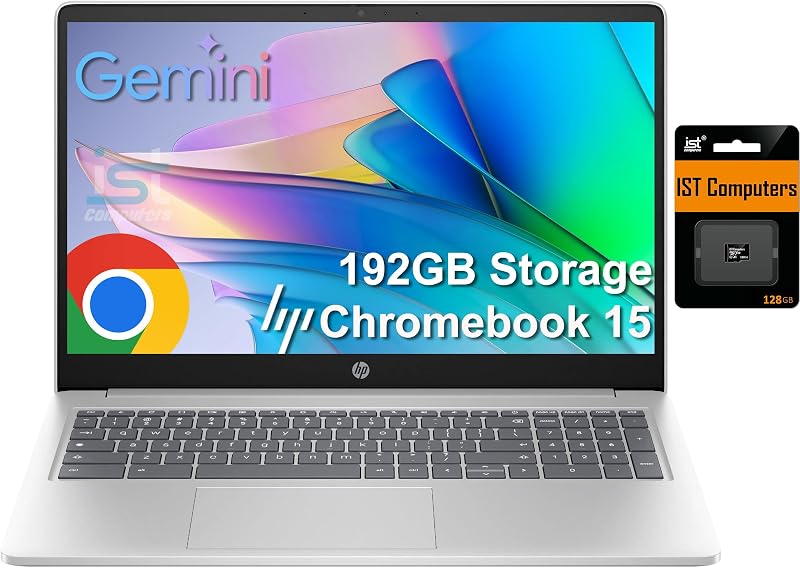
For users who prioritize expansive screen space and higher memory, the 64GB eMMC plus 128GB SD Card laptop provides a 15.6-inch anti-glare display. This HP Chromebook 15 pairs an Intel N200 processor with 8GB of DDR5 RAM, a numeric keyboard, a webcam with privacy shutter, and 192GB of combined storage, making it well suited for home office tasks and older students handling spreadsheets.
Final Verdict
When asking is Lenovo 300e Chromebook 2nd Gen worth it, the answer depends on keeping expectations aligned with its intended educational role. This refurbished clamshell laptop provides an accessible, reliable entry point into digital schoolwork and simple web tasks. With its Intel Celeron N4020 processor, 4GB of RAM, and 11.6-inch touchscreen, it handles cloud document creation, online research, and homework submissions smoothly within Chrome OS.
However, the trade-offs are clear and require planning. The 32GB SSD storage capacity offers very little room for offline media, requiring users to rely on cloud drives or external USB storage. Additionally, its dual-core Celeron chip and compact screen size are not built for intensive multitasking or demanding software. For young students and casual users seeking an uncomplicated, touch-enabled web machine for the basics, the Lenovo 300e 2nd Gen remains a practical, dependable pick.
FAQ
Is the Lenovo 300e Chromebook 2nd Gen good for students?
Yes, the laptop is well suited for elementary and middle school students working in Google Classroom, web portals, and online documents. Its compact size and intuitive touchscreen help younger learners complete assignments easily.
Can you expand the 32GB storage on this Chromebook?
While the internal 32GB SSD cannot be replaced internally, you can expand your available storage by plugging external USB flash drives or external drives into the USB ports, or by using cloud storage services like Google Drive.
Does the Lenovo 300e Chromebook 2nd Gen have a touchscreen?
Yes, this model features an 11.6-inch high-definition touchscreen display, allowing users to tap, swipe, and interact directly on the screen in addition to using the physical keyboard and trackpad.
What accessories are included with this refurbished Chromebook?
As an Amazon Renewed certified product, the laptop includes an AC adapter power device and all relevant operating accessories. It has been tested, cleaned, and inspected to work like new, though it may arrive in a generic box.
What operating system runs on this laptop?
This laptop runs Google Chrome OS, which includes automatic backup software, cloud file integration, and automatic security updates designed for web browsing and digital schoolwork.


