
As Amazon Associates, we earn from qualifying purchases. This means we may receive a small commission at no extra cost to you if you click through and make a purchase.
The Lenovo Chromebook Plus 2-in-1 Gen 10 is a flexible convertible laptop engineered to bring high-efficiency mobile processing and responsive cloud computing to everyday workspaces. Powered by an Intel Core 5 120U deca-core chip and featuring a tall 16:10 touchscreen, our verdict is that this machine sets a remarkably capable standard for responsive web multitasking, research, and collaborative digital work without unnecessary system complexity.
This laptop ideally suits college students, remote administrative staff, and everyday households that rely heavily on web applications, video calling, and digital note-taking. However, users who require specialized Windows-only desktop executables, heavy local file rendering, or terabytes of onboard solid-state storage should look elsewhere for their computing needs.


Lenovo Chromebook Plus 2-in-1 Gen 10 at a Glance

| Attribute | Detail |
|---|---|
| Model Series | Chromebook Plus 14IRU10 (Part Number 83LL001VUS) |
| Processor | Intel Core 5 120U (1st Gen, 10 Cores, 12 Threads, up to 5.0 GHz Turbo) |
| Processor Cache | 12 MB L3 Cache |
| System Memory | 8 GB RAM |
| Internal Storage | 128 GB eMMC Flash Memory |
| Display | 14-inch WUXGA (1920 x 1200) Touchscreen, 60 Hz |
| Graphics | Integrated Intel Graphics |
| Video Output | HDMI |
| Stylus Compatibility | Supports Stylus Input |
| Color | Luna Gray |
Intel Core 5 Processing and Everyday Multitasking
The processing architecture inside the Lenovo Chromebook Plus Gen 10 represents a notable evolutionary step for the ChromeOS platform. Utilizing an Intel Core 5 120U deca-core processor, the device features an intricate configuration of ten computing cores and twelve concurrent processing threads. With a base clock speed of 1.40 GHz and the capacity to reach a maximum turbo frequency of 5.0 GHz alongside 12 MB of L3 cache, this lenovo chromebook plus intel core 5 setup delivers rapid responsiveness across demanding web applications. Unlike traditional budget Chromebooks that frequently stall when handling heavy background tasks, this architecture handles complex spreadsheets, extensive tab collections, and parallel cloud processes with minimal hesitation.
Backing the processor is 8 GB of system memory, which satisfies the established performance criteria for modern Google-certified Plus machines. In daily use, having this tier of memory enables clean switching between multiple open browser workspaces, video conferencing calls, and active document editing. Shoppers who previously evaluated earlier hardware revisions like the lenovo ideapad flex 5i chromebook plus gen 7 will appreciate how smoothly the newer generation manages dense web tools and media feeds without forcing background tabs to reload constantly.
Everyday multitasking benefits substantially from the underlying CPU thread allocation. Background updates, security sweeps, and cloud synchronizations take place quietly on auxiliary cores, leaving primary high-frequency execution power available for your active work window. For people juggling remote team chats, media streaming, and multi-window web research simultaneously, the processing foundation delivers stable, uninterrupted throughput.
Display Quality and Convertible 2-in-1 Flexibility
Visual interaction is centered around a lenovo chromebook plus 14 inch touchscreen featuring a native WUXGA resolution of 1920 x 1200 pixels. The choice of a 16:10 aspect ratio rather than standard 16:9 widescreen delivers noticeable vertical workspace, enabling you to view more lines of text, expanded web pages, and larger document sections before scrolling. Operating at a standard 60 Hz refresh rate, the panel offers crisp text definition and clear colors that make prolonged reading, academic research, and document editing comfortable on the eyes.
The physical versatility of the chassis plays a central role in this lenovo chromebook plus convertible review. With its 360-degree rotating hinge, the machine transitions seamlessly among traditional laptop typing, tent mode for presentations or shared viewings, stand mode for passive video playback, and flat tablet orientation. The responsive touch interface recognizes swift finger gestures, allowing users to scroll through lengthy web articles, zoom into detailed PDF diagrams, and navigate system menus directly on the glass.
The convertible form factor particularly shines in mixed-use environments. In tight spots like an airplane tray table, a crowded library desk, or a kitchen counter, flipping the keyboard back into tent or stand mode drastically reduces the device footprint while keeping controls accessible. The build is styled in a subtle Luna Gray finish that maintains a professional, uncluttered look whether you are working in an office boardroom or a university lecture hall.
Stylus Support and Academic Productivity
Classroom functionality is a primary design pillar, making the lenovo chromebook plus 2-in-1 for students an especially compelling tool. The convertible hardware allows students to fold the screen flat against the base to emulate a physical digital notebook. Because the display includes verified lenovo chromebook plus stylus support, users can take advantage of digital pens to write handwritten formulas, annotate lecture slides, and sketch instructional diagrams directly on the screen.
While the hardware is engineered to support active pen input, the listing does not specify whether a stylus is bundled directly inside the retail packaging or sold separately as an accessory. Students and note-takers planning to use pen inputs should prepare to verify whether their preferred stylus hardware is included or requires an external purchase. Even with touch alone, the convertible form factor provides substantial advantages over rigid clamshell notebooks such as the lenovo ideapad slim 3 chromebook, giving learners the freedom to highlight materials, manipulate visual educational apps, and sign forms without a mouse.
The integration of the ChromeOS ecosystem complements academic work through cloud backups and fast boot speeds. Students can move between classrooms without worrying about manual file transfers, as Google Drive and linked web storage maintain document parity across devices. In the event of network interruptions, offline document editing modes keep essays and study notes accessible, synchronizing edits the moment the device reconnects to local campus networks.
Storage, Connectivity, and Battery Expectations
Looking closely at the lenovo chromebook plus 2-in-1 gen 10 specs, internal storage is configured with 128 GB of eMMC flash memory. While eMMC flash storage operates on slower sequential transfer architectures compared to full NVMe solid-state drives, ChromeOS is designed to operate primarily within cloud storage environments and local application caches. For the majority of users storing class documents, light offline media, and Android applications, 128 GB provides adequate local breathing room, though users planning to hoard large offline 4K video files will need to rely on external drives or cloud repositories.
External physical connectivity includes a dedicated HDMI video output port, which allows immediate connection to classroom projectors, desktop monitors, and external office displays without demanding proprietary dongles. The official specifications also confirm compatibility with external mice, keyboards, storage peripherals, printers, and Bluetooth-enabled mobile accessories. When evaluated alongside similar hardware standards like the acer chromebook plus 514, having built-in legacy display outputs provides convenient flexibility when presenting in diverse conference settings.
Regarding power consumption, shoppers frequently search for details on lenovo chromebook plus 2-in-1 battery life. The listing does not specify the exact battery watt-hour rating, milliamp-hour capacity, or estimated runtime in hours for the lenovo chromebook plus 14iru10 model. However, the energy-efficient 120U low-voltage processor paired with the lean operating footprint of ChromeOS is architected to optimize runtime during routine browsing sessions. Users who routinely work away from wall outlets should consider packing the charger when running sustained video streaming or driving external high-resolution monitors through the HDMI port.
Lenovo Chromebook Plus 2-in-1 Gen 10 Pros and Cons
Pros
- Deca-core Intel Core 5 120U processor
- Sharp 14-inch WUXGA 16:10 touchscreen
- Versatile 360-degree convertible hinge
- Integrated HDMI video output port
- Built-in stylus input support
Cons
- Modest 128 GB eMMC flash storage
- Listing omits specific battery runtime specs
- Standard 60 Hz display refresh rate
Check Lenovo Chromebook Plus 2-in-1 Gen 10 on Amazon
Who Should Buy the Lenovo Chromebook Plus 2-in-1 Gen 10
Buy It If
- You need a flexible 2-in-1 touchscreen convertible that supports stylus input for digital note-taking, sketching, and reading.
- Your daily computing workflow lives inside web browsers, Google Workspace, web apps, and video conferencing tools.
- You want a deca-core Intel processor capable of smoothly handling heavy tab counts without thermal or performance choking.
- You value a taller 16:10 WUXGA display that delivers extra vertical workspace for reading documents and writing papers.
Skip It If
- You depend strictly on native Windows software suites or proprietary legacy desktop tools unavailable on ChromeOS.
- You need hundreds of gigabytes of fast onboard NVMe solid-state storage rather than 128 GB of eMMC flash memory.
- You require a high-refresh-rate gaming panel or dedicated discrete graphics hardware for intensive 3D rendering.
Lenovo Chromebook Plus 2-in-1 Gen 10 Alternatives Worth a Look
If you are exploring other portable convertible and standard productivity options, several laptops across different operating systems provide alternative strengths.
360° Convertible

The 360° Convertible is a larger 15.6-inch touchscreen laptop running native Windows 11. It features an Intel Core i3-10100Y processor, 16 GB of memory, a 256 GB SSD with SATA3 expansion support up to 2 TB, and a stated 57.75Wh battery alongside WiFi 6 connectivity. Shoppers who require a traditional Windows desktop environment, double the internal memory, and massive local storage expansion potential should pick this larger model over the Lenovo Chromebook Plus.
HP OmniBook X Flip 2-in-1
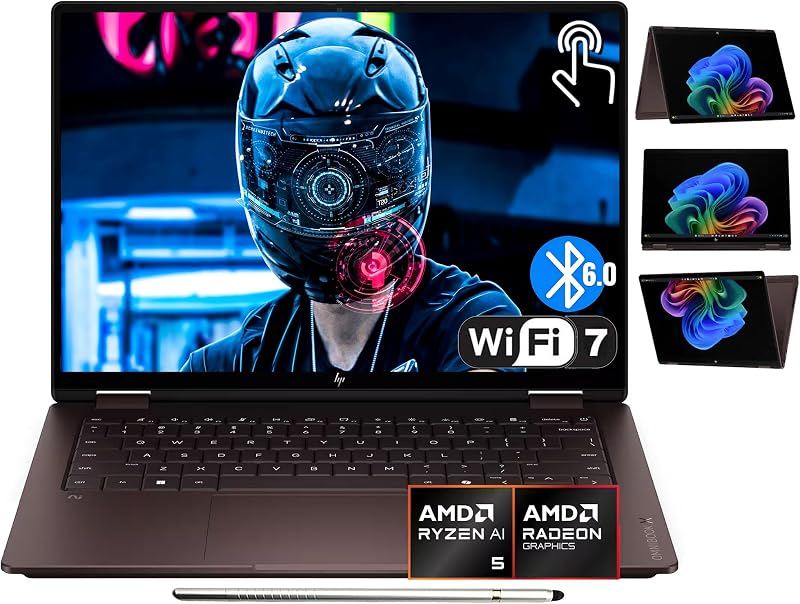
The HP OmniBook X Flip 2-in-1 is an advanced 14-inch convertible laptop powered by Windows 11 Home and an AMD Ryzen AI 5 430 processor rated up to 50 TOPS. It boasts a higher-resolution 2K OLED touchscreen, 16 GB of LPDDR5X memory, a 512 GB SSD, cutting-edge Wi-Fi 7, and includes an active stylus in the package. Users who prioritize an ultra-vivid OLED display, modern AI processing hardware, and larger onboard storage under Windows will find this a notable upgrade.
Copilot PC AMD Ryzen AI

The Copilot PC AMD Ryzen AI (Lenovo Yoga 7 2-in-1) delivers a premium Windows 11 Home experience driven by an AMD Ryzen AI 5 340 processor and 16 GB of RAM. This machine incorporates a 14-inch OLED touch display, a massive 1 TB solid-state drive, a fingerprint reader, Wi-Fi 7, and an included Yoga Pen. Buyers seeking extensive local storage capacity, biometrics, and an included digital writing tool should favor this alternative over the cloud-centric Chromebook.
Final Verdict
When determining whether the Lenovo Chromebook Plus 2-in-1 Gen 10 is worth it, the answer depends directly on how you approach your computing tasks. By bringing an Intel Core 5 120U deca-core processor with 12 threads and turbo capabilities up to 5.0 GHz into the ChromeOS ecosystem, Lenovo eliminates the lag and stutter historically associated with entry-level web notebooks. The 14-inch 16:10 WUXGA touchscreen provides plenty of visual room for reading and document production, while the 360-degree convertible hinge offers practical flexibility across tight physical spaces.
Although the 128 GB eMMC flash storage is modest for users who keep large media libraries offline, it aligns neatly with the cloud-forward architecture of modern Google workspaces. For students, educators, and mobile professionals seeking an agile, secure, and responsive 2-in-1 device with broad peripheral compatibility and native stylus support, this Chromebook delivers a balanced and dependable everyday computing experience.
FAQ
Does the Lenovo Chromebook Plus 2-in-1 Gen 10 include a stylus in the box?
The product listing confirms that the device features stylus support for drawing and handwriting, but it does not specify whether a pen is included in the package. Buyers should assume the stylus may need to be purchased separately unless otherwise stated by the specific retailer.
What is the battery life on the Lenovo Chromebook Plus 2-in-1 Gen 10?
The manufacturer listing does not specify the exact battery capacity in watt-hours or provide an estimated runtime figure. Battery endurance will vary depending on your screen brightness settings, active web applications, and whether you are outputting video via the HDMI port.
Can I connect the Lenovo Chromebook Plus 14IRU10 to an external monitor?
Yes. The laptop features a built-in HDMI video output port, enabling you to plug directly into external monitors, televisions, or conference room projectors without needing specialized adapters.
How much local storage does this Chromebook have?
The model features 128 GB of eMMC flash storage. This capacity is designed primarily to store your operating system files, local downloads, Android applications, and cached cloud documents.
What processor is used in this 2-in-1 Chromebook?
The device is powered by a 1st Gen Intel Core 5 120U processor featuring 10 computing cores, 12 threads, a base clock of 1.40 GHz, a maximum turbo frequency of 5.0 GHz, and 12 MB of L3 cache.


