
As Amazon Associates, we earn from qualifying purchases. This means we may receive a small commission at no extra cost to you if you click through and make a purchase.
The ASUS Prime Z270-A is a full-sized ATX motherboard built around the Intel Z270 chipset and LGA 1151 socket, engineered specifically to host 7th Generation Intel Core processors. It delivers a balanced desktop foundation combining dynamic cooling automation, durable expansion slots, and high-speed data connectivity for users maintaining or assembling a classic Intel system.
This board is ideal for builders who want a dependable platform for Core i7 7th Generation chips, dedicated DDR4 memory kits, and modern solid-state drives without unnecessary cosmetic bulk. Those planning a machine around newer multi-core processors, PCIe 5.0 graphics, or DDR5 memory should bypass this generation and explore modern socket alternatives.


ASUS Prime Z270-A at a Glance
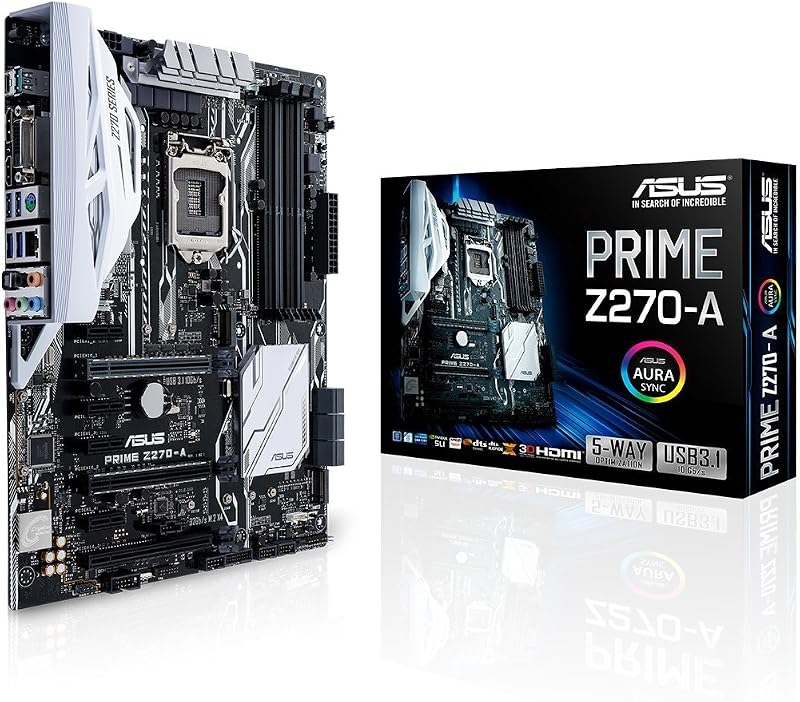
| Attribute | Detail |
|---|---|
| CPU Socket | LGA 1151 |
| Chipset | Intel Z270 |
| Compatible Processors | 7th Generation Intel Core (Core i7) |
| Form Factor | ATX |
| Memory Technology | DDR4 (2133 MHz listed) |
| Storage Expansion | Dual M.2 slots, Intel Optane Memory compatibility |
| High-Speed Connectivity | USB 3.1 Type-A and Type-C, Intel Thunderbolt 3 support |
| Display Outputs | DisplayPort (DP), HDMI, DVI |
| Expansion Reinforcement | Dual Safe Slots with metal framing |
| Platform | Windows 10 |
Hardware Reinforcement and Safe Slot Engineering
Modern graphics cards place substantial mechanical strain on traditional motherboard expansion slots due to heavy heatsinks and multi-fan cooling assemblies. ASUS addresses this structural challenge on this board by implementing dual patent-pending Safe Slots. Each asus z270 safe slot utilizes an advanced injection molding process that integrates a rigid metal frame directly into the plastic housing. The reinforced bracket is firmly anchored to the printed circuit board, creating superior retention force and shearing resistance that keeps heavyweight graphics cards secure during transit and daily operation.
Beyond physical slot strength, the ATX board layout integrates dedicated on-board 3D-printing mounts. These dedicated mounting points allow system builders to design, print, and install customized mechanical accessories such as personalized cable covers, dedicated fan brackets, or cosmetic nameplates directly onto the board surface. The hardware design also integrates AURA Sync RGB lighting headers, providing synchronized illumination effects across an ecosystem of compatible accessories while maintaining a clean, structured aesthetic within an ATX chassis.
Performance Tuning and Overclocking Management
Precision system configuration is handled through an intelligent firmware and software suite designed to streamline complex performance adjustments. The board features 5-Way Optimization alongside an Auto-Tuning module that evaluates system stability under load to create tailored overclocking profiles. This dynamic system intelligence makes asus prime z270-a overclocking approachable for enthusiasts who want maximum clock speed from their unlocked 7th Generation Intel Core processors without spending hours manually adjusting core voltages and multiplier ratios.
Thermal regulation operates hand in hand with performance tuning through integrated FanXpert 4 software. FanXpert 4 monitors multiple on-board temperature sensors and adjusts attached PWM or DC case fans dynamically based on real-time hardware loads. This granular cooling control maintains lower operating temperatures during demanding computing tasks while reducing acoustic output during everyday desktop use. The asus prime z270-a specs list support for DDR4 memory at a baseline speed of 2133 MHz, ensuring dependable communication between memory channels and the processor under diverse operating conditions.
Storage Configurations and High-Speed Connectivity
Data throughput remains a crucial aspect of system responsiveness, and the board provides versatile storage expansion to eliminate common boot drive bottlenecks. Users can take full advantage of dual asus z270 m.2 slots, allowing the installation of high-speed solid-state drives without cluttering the interior of the case with standard SATA data and power cables. Furthermore, the architecture includes Intel Optane Memory compatibility, which acts as a high-speed cache accelerator to boost secondary storage response times and minimize system boot delays.
External connectivity covers a broad range of legacy and modern peripheral standards directly on the rear I/O panel. The board features integrated USB 3.1 Type-A and reversible Type-C ports, delivering rapid data transfer rates for external solid-state storage drives and mobile peripherals. Display flexibility is supported through on-board DisplayPort, HDMI, and DVI video outputs, while specialized Intel Thunderbolt 3 support allows the motherboard to interface with high-bandwidth external expansion docks and professional audio gear. Those who also use high-end portable hardware such as the asus zephyrus g16 2026 will appreciate having matching high-speed Type-C ports on their dedicated desktop rig.
Diagnostics and System Boot Troubleshooting
When assembling a computer or updating existing hardware components, identifying the exact cause of a failed power-on self-test is vital for quick resolution. Builders frequently research the asus z270 code terminology when diagnosing boot anomalies, memory initialization hangs, or display signal drops. Because an improperly seated DDR4 memory module, loose 24-pin power connector, or unseated graphics card can stall the boot sequence before video initialization, clear diagnostic feedback is necessary to isolate hardware conflicts without unnecessary component swapping.
While enthusiast builders often look for a two-digit hexadecimal readout on the printed circuit board, the listing does not specify whether this model includes an onboard numeric display or relies on standard beep codes and diagnostic status indicators. Resolving common asus z270 error codes typically involves methodical troubleshooting: reseating memory sticks in alternating dual-channel channels, checking CPU socket pin alignment, verifying that auxiliary PCIe power cables are firmly clicked into place, and resetting the CMOS to clear unstable memory timings or overclock profiles.
Processor Support and Platform Longevity
Understanding socket compatibility is essential when planning a build or replacing an older mainboard. The asus prime z270-a lga 1151 socket is engineered specifically around the Intel Z270 chipset, with the listing identifying explicit compatibility for 7th Generation Intel Core processors, including Core i7 variants. While both 6th and 7th Generation chips utilized the physical LGA 1151 footprint, the official listing confirms 7th Generation Intel Core support. Builders must note that this architecture does not support 8th Generation or 9th Generation processors despite their similar socket name, making verified asus z270 motherboard cpu support a vital specification to check before purchasing companion hardware.
When considering whether the asus prime z270-a for gaming remains viable, much depends on the target frame rates and games being played. Paired with a capable 7th Gen Core i7 chip and a modern discrete graphics card secured in the reinforced Safe Slot, the system delivers solid 1080p and 1440p gaming performance across mainstream esports and legacy titles. Competitive gamers pairing their setup with high-refresh gaming displays like the asus rog strix xg27ucg can achieve responsive input tracking, while enthusiasts running premium visual panels such as the rog swift oled pg27aqwp-w will find adequate throughput through the reinforced primary PCIe slot.
Ultimately, determining if the platform makes practical and technical sense comes down to user goals. If someone asks is asus prime z270-a worth it, the answer is yes for users who already own compatible DDR4 memory and a functioning 7th Gen Core i7 chip and need a dependable replacement board. However, builders starting a brand-new desktop configuration from scratch should weigh the costs of legacy components against current processor generations that offer significantly higher core counts, PCIe 5.0 speeds, and extended multi-generational socket life.
ASUS Prime Z270-A Pros and Cons
Pros
- 5-Way Optimization automated tuning
- Dual M.2 slots for storage expansion
- Reinforced dual Safe Slots for GPUs
- Integrated USB 3.1 Type-A and Type-C
- AURA Sync RGB lighting headers
Cons
- Limited to 7th Generation Intel CPUs
- Lacks modern DDR5 and PCIe 5.0 support
- Listing does not specify onboard code display
Check ASUS Prime Z270-A on Amazon
Who Should Buy the ASUS Prime Z270-A
Buy It If
- You own a 7th Generation Intel Core processor and need a reliable, feature-rich replacement motherboard with robust cooling automation.
- You want dual M.2 storage expansion paired with USB 3.1 Type-A and Type-C connectivity on a stable Windows 10 platform.
- You operate a heavy discrete graphics card that benefits from reinforced Safe Slot structural anchoring.
- You appreciate automated overclocking tools like 5-Way Optimization and FanXpert 4 to tune your hardware without manual guesswork.
Skip It If
- You are building a brand-new desktop from scratch and want current-generation multi-core CPUs with DDR5 memory support.
- You need native PCIe 5.0 expansion lanes or integrated Wi-Fi 7 wireless connectivity directly on the board.
- You require a guaranteed on-board two-digit diagnostic LED display, as the listing does not specify this exact hardware feature.
ASUS Prime Z270-A Alternatives Worth a Look
If you are looking beyond the LGA 1151 ecosystem or want modern processor architectures with updated connectivity standards, several newer motherboards provide powerful alternative upgrade paths.
GIGABYTE B850 AORUS Elite WIFI7

The GIGABYTE B850 AORUS Elite WIFI7 is an AMD AM5 ATX motherboard designed to support AMD Ryzen 9000, 8000, and 7000 series processors. It features modern DDR5 memory support, a 14+2+2 power phase design, three M.2 slots, PCIe 5.0 lanes, high-speed USB-C, 2.5GbE LAN, integrated Wi-Fi 7, EZ-Latch hardware installation, and a 5-year warranty. Shoppers seeking a modern AMD desktop build with cutting-edge wireless standards and current multi-core processing power should choose this board over the legacy Intel platform.
paired with Asrock Z890 PRO

The paired with Asrock Z890 PRO RS WiFi motherboard bundle includes an Intel Core Ultra 5 250K Plus processor with 18 cores reaching up to 5.3 GHz and 30MB cache. It features high-speed PCIe 5.0 bandwidth, 20Gbps Type-C connectivity, and built-in WiFi 6E support. Users who want a comprehensive modern Intel hardware upgrade combining a next-generation hybrid CPU and an updated motherboard platform in a single package will find this bundle far more capable than an older Z270 setup.
MSI MAG B850 Tomahawk MAX

The MSI MAG B850 Tomahawk MAX is an ATX motherboard built for AMD Ryzen 9000, 8000, and 7000 series processors on the AM5 platform. It includes an 80A SPS VRM power layout, DDR5 memory boost capable of 8400+ MT/s overclocking, a PCIe 5.0 x16 slot, M.2 Gen5 storage support, integrated Wi-Fi 7, and a high-speed 5G LAN port. Builders demanding bleeding-edge networking speeds, extreme memory clock frequencies, and Gen5 storage support for gaming should select this model instead.
Final Verdict
The ASUS Prime Z270-A remains a capable, well-engineered motherboard for desktop users committed to the 7th Generation Intel Core ecosystem. By combining dual M.2 solid-state storage bays, robust USB 3.1 Type-A and Type-C ports, and intelligent automated cooling through FanXpert 4 and 5-Way Optimization, it extracts dependable daily performance from legacy LGA 1151 processors. The structural inclusion of reinforced Safe Slots also ensures that heavier modern graphics cards remain safely seated without risking damage to the circuit board.
Nonetheless, the inherent boundaries of the Intel Z270 platform mean that its value primarily lies in maintenance, replacement, and dedicated legacy workstations. Because it lacks native compatibility with modern high-core-count processors, DDR5 memory kits, and PCIe 5.0 bandwidth, it is not recommended for builders starting an entirely new system from scratch. For those who already possess compatible components and desire a stable, feature-packed foundation, this motherboard delivers solid, practical performance.
FAQ
What processors work with the ASUS Prime Z270-A?
The motherboard features an LGA 1151 socket based on the Intel Z270 chipset. According to the listing specifications, it is compatible with 7th Generation Intel Core processors, including Core i7 models. It does not support newer processor families such as 8th or 9th Generation Intel Core chips.
How do you troubleshoot an ASUS Z270 code or boot failure?
Troubleshooting boot stalls involves systematically checking hardware connections. Common remedies include reseating DDR4 memory modules in their appropriate channels, checking power supply connections to the 24-pin and CPU power headers, ensuring the graphics card is firmly seated in the Safe Slot, and performing a CMOS reset to revert unstable BIOS settings.
What storage options are available on the ASUS Prime Z270-A?
The board is equipped with dual M.2 slots for high-speed solid-state drives, helping reduce system boot times and cable clutter. Additionally, it offers Intel Optane Memory compatibility to accelerate secondary drive responsiveness, alongside conventional SATA connectivity for standard hard drives and SSDs.
Does the ASUS Prime Z270-A support modern operating systems?
The official listing explicitly specifies Windows 10 as the compatible operating system platform. Users running Windows 10 can take full advantage of the board’s software tools, including FanXpert 4 cooling profiles and 5-Way Optimization automated tuning.
What is the purpose of the dual Safe Slots?
The dual Safe Slots utilize an injection molding manufacturing technique that embeds a metal reinforcement frame into the PCIe slot housing. This design firmly anchors the slot to the motherboard, providing enhanced retention and shear resistance to protect the circuit board from heavy modern graphics cards.


